וויכטיק סאַפעטי אינסטרוקציעס
Read all instructions before using this appliance. To reduce the risk of fire, electrical shock, or injury when using your air conditioner, follow these basic precautions:
- דעם אַפּפּליאַנסע מוזן זיין רעכט גראָונדעד.
- Never unplug the air conditioner by pulling on the power cord. Always grasp the plug firmly and pull straight out from the receptacle.
- דו זאלסט נישט קניפּ, בייגן אָדער קנופּ די מאַכט שנור.
- לאָזט נישט אָפּ דעם לופטקילונג מיט אַ צעבראָכענעם עלעקטרישן שנור אָדער פּלאָג.
- Do not use an extension cord or an adapter plug with this unit.
- Always turn off the air conditioner and unplug it before cleaning or servicing.
- בלאָקירט נישט די לופט־אַרייַנגאַנג אָדער אויסגאַנג־עפענונגען.
- Use only for its intended purpose as described in this manual.
- האַלטן פּאַקקאַגינג מאַטעריאַלס אויס פון דערגרייכן פון קינדער.
פּראָדוקט איבערview
The RCA 12000 BTU Wi-Fi Air Conditioner is designed to cool rooms up to 550 sq. ft. It features Wi-Fi connectivity, allowing remote control via a smart device. The unit includes multiple operating modes, a digital display, and a 24-hour timer for personalized comfort.
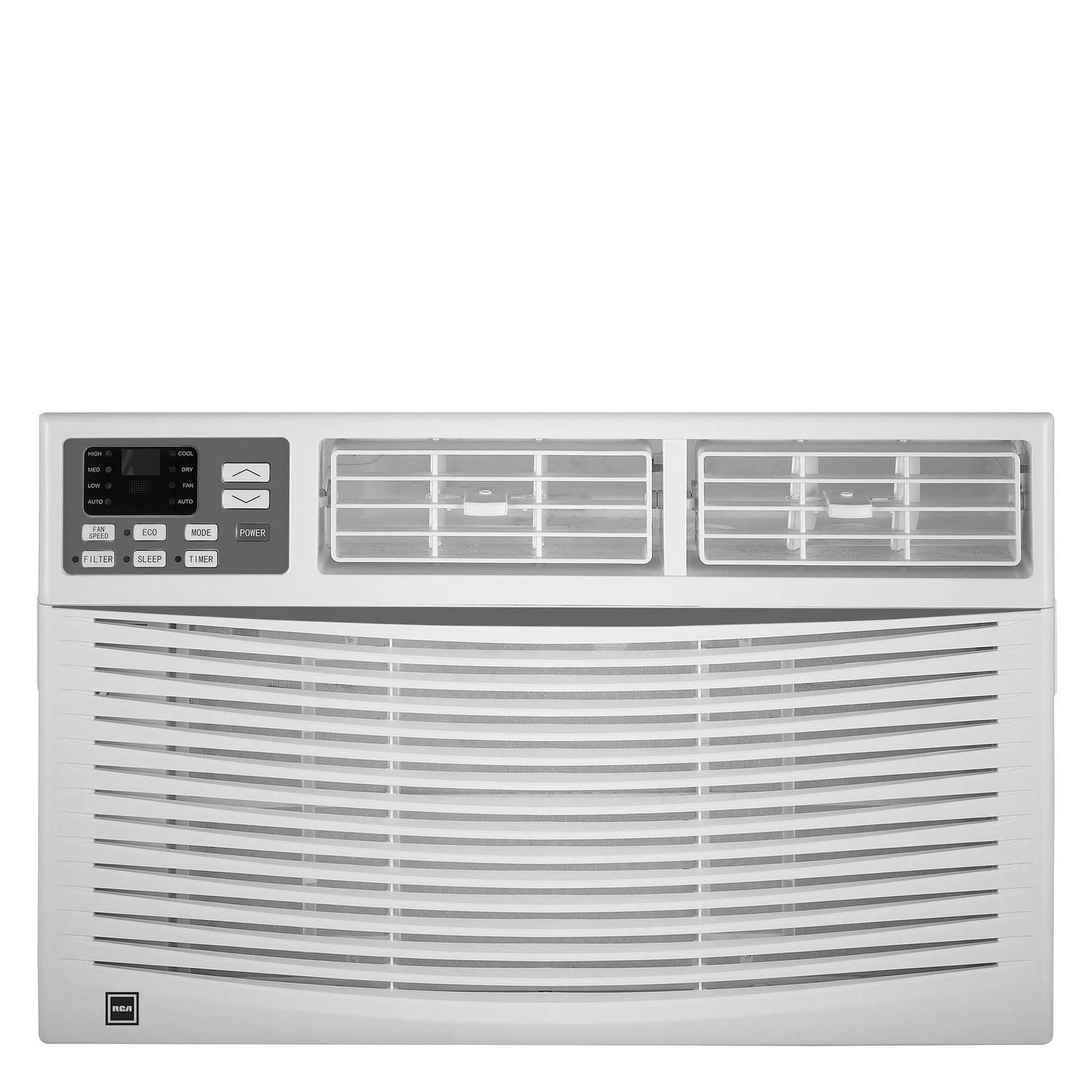
בילד: פראָנט view of the RCA 12000 BTU Wi-Fi Air Conditioner, showing the control panel and air vents.
שליסל פֿעיִקייטן:
- 12,000 BTU cooling capacity, suitable for areas up to 550 sq. ft.
- Integrated Wi-Fi for remote control via smart devices.
- Three fan modes for customized airflow.
- Digital display for easy temperature and setting adjustments.
- 24-hour programmable timer.
- Eco mode for energy-efficient operation.
- Filter check reminder for timely maintenance.
- Auto restart function after power outages.
- Includes window installation kit and remote control.
פּעקל אינהאַלט
Verify that all parts are included in the package before installation:
- RCA 12000 BTU Wi-Fi Air Conditioner Unit
- ווייַט קאָנטראָל מיט באַטעריז
- Window Installation Kit (side panels, top rail, sash lock, foam seals)
- באַזיצער ס מאַנואַל
An image showing all included components laid out would typically be found here.
ייַנמאָנטירונג און סעטאַפּ
פֿענצטער ינסטאַלירונג:
This air conditioner is designed for installation in standard double-hung windows with a minimum height of 16 inches and a width between 26 and 36 inches.
- צוגרייטן דעם פֿענצטער: Ensure the window opening is clean and clear of obstructions.
- צוטשעפּען די שפּיץ רעלס: Secure the top rail to the air conditioner unit using the provided screws.
- אינסטאַלירן זייט פּאַנאַלז: Slide the accordion side panels into the side panel frames on the unit.
- שטעלט איין איינהייט אין פענצטער: Carefully lift the unit and place it in the window opening, ensuring the bottom rail rests against the window sill.
- זיכערע איינהייט: Extend the side panels to fill the window opening and secure them with screws. Install the sash lock to prevent the window from being opened from the outside. Apply foam seals to ensure an airtight fit.
- דריינאַדזש: זיכער מאַכן אַז די אַפּאַראַט איז אַ ביסל גענייגט אויסווערטס צו דערמעגלעכן געהעריקע קאָנדענסאַט דריינאַדזש.
An image illustrating the step-by-step window installation process would be beneficial here.
Wi-Fi סעטאַפּ:
To enable remote control functionality, connect your air conditioner to your home Wi-Fi network.
- אראפקאפיע אַפּ: Download the RCA Home app from your smartphone's app store (iOS or Android).
- שאַפֿן אַ חשבון: עפֿנט די אַפּ און שאַפֿט אַ נײַעם באַניצער אַקאַונט אָדער לאָגט זיך אײַן אויב איר האָט שוין אײנס.
- לייג דיווייס: Follow the in-app instructions to add a new device. This typically involves putting the air conditioner into pairing mode (refer to the unit's control panel or remote for specific instructions, often a Wi-Fi button press).
- פאַרבינדן צו Wi-Fi: Select your home Wi-Fi network and enter the password when prompted by the app.
- באַשטעטיקונג: Once connected, the Wi-Fi indicator on the air conditioner's display will illuminate steadily, and the app will confirm successful pairing.
An image showing the Wi-Fi indicator on the unit's display and a screenshot of the app's pairing screen would be helpful.
אַפּערייטינג ינסטראַקשאַנז
קאָנטראָל פּאַנעל און ווייַט קאָנטראָל:
The air conditioner can be operated using the control panel on the unit or the included remote control. The remote control offers full functionality from a distance.
An image of the remote control with button labels would be useful here.
יקערדיק אָפּעראַציע:
- מאַכט אויף / אַוועק: דרוק די מאַכט קנעפּל צו קער די אַפּאַראַט אויף אָדער אַוועק.
- מאָדע סעלעקציע: דרוק די מאָדע button to cycle through available modes: Cool, Fan, and Eco.
- טעמפּעראַטור אַדזשאַסטמאַנט: ניצן די UP (▲) און אַראָפּ (▼) arrows to set the desired temperature. The temperature range is typically 62°F to 86°F (17°C to 30°C).
- פאַן גיכקייַט: דרוק די FAN SPEED button to select Low, Medium, or High fan speed.
אַוואַנסירטע פאַנגקשאַנז:
- טיימער: דרוק די TIMER button to set a delay for the unit to turn on or off. Use the UP/אַראָפּ arrows to adjust the time in 1-hour increments, up to 24 hours.
- עקאָ מאָדע: When activated, the unit will cycle the compressor on and off to maintain the set temperature, saving energy. The fan may continue to run during compressor off cycles.
- שלאָפן מאָדע: (If available) This mode gradually increases the temperature over several hours to provide comfortable sleeping conditions while saving energy.
- ווי-פי קאָנטראָל: Use the RCA Home app on your smart device to remotely turn the unit on/off, change temperatures, control modes, create custom schedules, and adapt fan speeds.
וישאַלט
רעגולערע אויפהאלטונג גאראנטירט אפטימאלע פאָרשטעלונג און פארלענגערט די לעבן פון אייער לופטקילונג.
לופט פילטער רייניקונג:
The air filter should be cleaned every two weeks or when the 'Filter Check' indicator illuminates.
- אויסלעשן די איינהייט: Always turn off and unplug the air conditioner before cleaning.
- אַראָפּנעמען פֿילטער: עפֿנט דעם פֿראָנט פּאַנעל און שלעפּט פֿאָרזיכטיק אַרויס דעם לופֿט פֿילטער.
- ריין פילטער: וואַשט דעם פילטער מיט וואַרעם, זייפֿיקן וואַסער. שווענקט גוט אויס. פֿאַר שטאַרק פֿאַרשומוצטע פילטערס, קען מען ניצן אַ וואַקוום קלינער צו אַראָפּנעמען לויזע שמוץ פֿאַר וואַשן.
- טרוקן פילטער: לאָזט דעם פילטער גאָר טרוקן ווערן אין דער לופט איידער איר לייגט עס צוריק אַרײַן. שטעלט עס נישט אויס צו דירעקטער זון אָדער הויכער היץ.
- ווידער-אינסטאלירן פילטער: שטופּט צוריק דעם טרוקענעם פילטער אין זײַן שפּאַלט און פֿאַרמאַכט דעם פֿראָנט פּאַנעל.
An image demonstrating how to remove and clean the air filter would be helpful.
אַלגעמיינע רייניקונג:
- עקסטעריע: ווישט דעם קאַבינעט מיט אַ ווייכן, דamp cloth. Do not use harsh chemicals, abrasive cleaners, or waxes.
- קוילן: Periodically check the condenser coils (located at the back of the unit) for dirt and debris. If necessary, gently brush them clean.
טראָובלעשאָאָטינג
איידער איר קאָנטאַקטירט קונה סערוויס, זעט די פאלגענדע טאַבעלע פֿאַר געוויינטלעכע פּראָבלעמען און לייזונגען:
| פּראָבלעם | מעגלעך סיבה | לייזונג |
|---|---|---|
| לופט קאַנדישאַנער טוט נישט אָנהייבן. | No power; tripped circuit breaker; unit unplugged. | Check power cord connection; reset circuit breaker; ensure unit is plugged into a working outlet. |
| די איינהייט קילט נישט עפעקטיוו. | Dirty air filter; blocked air intake/exhaust; room too large; windows/doors open. | Clean air filter; clear obstructions; ensure room size is within capacity; close all windows and doors. |
| וואַסער טריפט אינעווייניק. | Unit not tilted properly; clogged drain pan. | Ensure unit is slightly tilted outwards for drainage; clear any blockages in the drain pan. |
| Wi-Fi פֿאַרבינדונג פּראָבלעמען. | אומרעכט Wi-Fi פּאַראָל; ראַוטער צו ווייט; אַפּ נישט דערהייַנטיקט. | Verify Wi-Fi password; move unit closer to router or use a Wi-Fi extender; update RCA Home app. |
ספּעסאַפאַקיישאַנז
| שטריך | דעטאַל |
|---|---|
| סאָרט | RCA |
| מאָדעל נומער | RACE1206WF |
| קאָאָלינג קאַפּאַציטעט | 12,000 BTU |
| קאַווערידזש שטח | אַרויף צו 550 סק. |
| דעהומידיפיקאַטיאָן קורס | 2 פּינץ פּער שעה |
| מינימום פֿענצטער הייך | 16 אינטשעס |
| Window Width Range | 26 - 36 אינטשעס |
| דימענשאַנז (LxDxH) | 22" x 24" x 17" (אומגעפער) |
| פּונקט וואָג | 78 פונט |
| קאַנעקטיוויטי | ווי-פי |
וואָראַנטי אינפֿאָרמאַציע
This RCA air conditioner comes with a 1-יאָר לימיטעד פאַבריקאַנט וואָראַנטי. Please refer to the warranty card included with your product for full terms and conditions, or visit the official RCA webפּלאַץ פֿאַר מער דעטאַילס.
קונה שטיצן
For technical assistance, troubleshooting beyond this manual, or warranty claims, please contact RCA Customer Support. Contact information can typically be found on the manufacturer's webוועבזייטל אדער אויף דער גאַראַנטיע קאַרטל וואָס איז צוגעשטעלט געוואָרן מיט אייער פּראָדוקט.


