1. געטינג סטאַרטעד
1.1 פּעקל אינהאַלט
איידער איר הייבט אן, ביטע זיכער מאכן אז אלע זאכן זענען פאראן אין אייער פעקל:
- 2 x QCY T13X Earbuds
- 1 רענטגענ טשאַרדזשינג קאַסע
- 3 x Pairs of Eartips (Small, Medium - pre-installed, Large)
- 1 רענטגענ וסב- C טשאַרדזשינג קאַבלע
- 1 x באַניצער מאַנואַל
1.2 ערשט טשאַרדזשינג
The earbuds must be fully charged before first use. Place both earbuds into the charging case. Connect the USB-C cable to the charging case and a power source. A full charge takes approximately 120 minutes. If the earbuds are not used for more than two weeks, charge them regularly to maintain battery health.
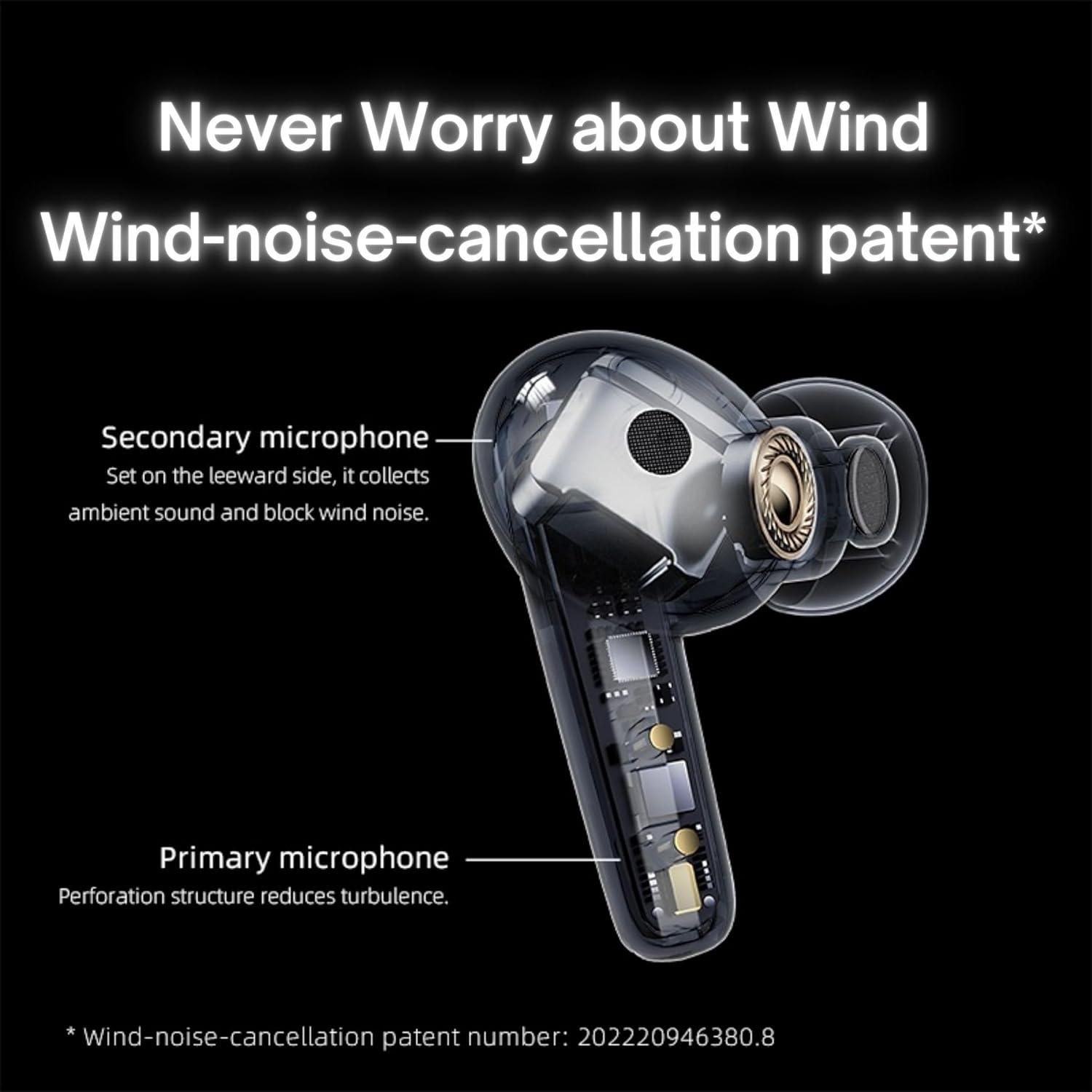
Image: QCY T13X Earbuds in their charging case, connected with a USB-C cable for charging. The image illustrates the charging process and the compact design of the case and earbuds.
1.3 Eartip Selection
For optimal sound quality and comfort, choose the eartips that best fit your ears. The package includes small, medium, and large sizes. The medium size is pre-installed. A proper seal is crucial for bass response and noise isolation.
1.4 פּאָרן מיט דיין מיטל
- זיכער מאַכן אַז די אויערקנעפּלעך זענען אויפגעלאָדן און געלייגט אין די טשאַרדזשינג קעסטל.
- עפֿנט דעם דעקל פֿונעם אָפּלאָד־קעסטל. די אויערקנעפּלעך וועלן אויטאָמאַטיש אַרײַן אין פּערינג־מאָדוס.
- אויף אייער סמאַרטפאָון אָדער בלוטוט-ענייבאַלד מיטל, גייט צו בלוטוט סעטטינגס.
- זוכן פֿאַר available devices and select "QCY T13X" from the list.
- אַמאָל פארבונדן, וועט איר הערן אַ באַשטעטיקונג טאָן.

Image: QCY T13X Earbuds and their charging case, highlighting the Bluetooth 5.3 connectivity. This image demonstrates the wireless technology used for pairing.
2. אפערירן אייערע אויערקנעפלעך
2.1 מאַכט אויף / אַוועק
- מאַכט אויף: Open the charging case, and the earbuds will automatically power on. Alternatively, press and hold the touch panel on both earbuds for 1-2 seconds.
- מאַכט אַוועק: Place the earbuds back into the charging case and close the lid. They will automatically power off and begin charging. Alternatively, disconnect them from your device, and they will power off after a few minutes of inactivity.
2.2 מוזיק ווידערשפּיל קאָנטראָלס
The QCY T13X earbuds feature touch controls for easy management of your audio:
- שפּיל / פּויזע: Double-tap the touch panel on either earbud.
- ווייַטער שפּור: דריי מאָל צאַפּן אויף די רעכט עאַרבוד.
- פֿריִערדיקע שפּור: דריי מאָל צאַפּן אויף די לינקס עאַרבוד.

Image: A person wearing a QCY T13X earbud, demonstrating the discreet design and the area for touch controls. This image helps visualize how the earbuds are worn and interacted with.
2.3 רוף פאַרוואַלטונג
- ענטפֿערן / סוף רופן: Double-tap the touch panel on either earbud.
- אָפּוואַרפן רופן: Press and hold the touch panel on either earbud for 1.5 seconds.
2.4 באַנד קאָנטראָל
Volume control is managed through the QCY application on your smartphone. Download the QCY app to customize settings and adjust volume levels directly.
2.5 QCY Application
For enhanced features and customization, download the official QCY app from your device's app store. The app allows you to:
- סטרויערן די באַנד.
- קאַסטאַמייז ריר קאָנטראָלס.
- Select from various EQ presets (e.g., Pure Vocals, Boosted Original, Soft and Immersive).
- דערהייַנטיקן פירמוואַרע.

Image: QCY T13X Earbuds with a graphic indicating three default EQ settings: Pure Vocals, Boosted Original, and Soft and Immersive. This highlights the sound customization options available through the app.
2.6 Multi-Device Connectivity
The QCY T13X supports seamless switching between multiple paired devices. Once paired with several devices, the earbuds can intelligently connect to the active audio source.

Image: QCY T13X Earbuds shown connected to both a smartphone and a tablet, illustrating the multi-device connectivity feature. This image demonstrates the flexibility of using the earbuds with different devices.
3. וישאַלט און קער
3.1 אויפלאָדן די אויערקנעפּלעך און קעסטל
The charging case has a capacity of 350 mAh, with each earbud having a 45 mAh battery. A single charge provides up to 8 hours of playback, and the charging case extends total playback time to up to 30 hours. The earbuds support fast charging. Ensure regular charging if not used for extended periods.
3.2 רייניקונג
Regularly clean your earbuds and charging case to ensure optimal performance and hygiene. Use a soft, dry, lint-free cloth. For eartips, remove them and gently wipe with a damp שטאָף, און דערנאָך גוט טרוקן איידער איר עס צוריק צוטשעפּען.
3.3 סטאָרידזש
Store your QCY T13X earbuds in their charging case when not in use. Avoid exposing them to extreme temperatures, such as below 10 degrees Celsius (50°F) or above 60 degrees Celsius (140°F), to prevent battery damage and ensure longevity.
4. טראָובלעשאָאָטינג
4.1 פאַבריק באַשטעטיק
If you experience persistent connection or functionality issues, a factory reset may resolve them:
- Delete the previous connection record for "QCY T13X" from your phone's Bluetooth settings.
- לייגט ביידע אויערקנעפּלעך אין די טשאַרדזשינג קעסטל און מאַכט זיכער אַז זיי לאָודן זיך.
- דריקן און האַלטן די קנעפּל אויף די טשאַרדזשינג פאַל פֿאַר 10 סעקונדעס.
- The red and blue LED indicators will flash alternately 3 times, indicating a successful reset.
4.2 פֿאַרבינדונג פּראָבלעמען
- מאַכן זיכער אַז בלועטאָאָטה איז ענייבאַלד אויף דיין מיטל.
- Make sure the earbuds are charged and within the 10-meter Bluetooth range.
- פּרוּווט ריסטאַרטן דיין דעווייס און די אויערקנעפּלעך.
- דורכפירן א פאַבריק ריסעט ווי באשריבן אויבן.
4.3 קלאַנג פּראָבלעמען
- Check the volume levels on both your device and through the QCY app.
- Ensure the eartips provide a proper seal in your ear.
- רייניקט יעדן שמוץ פון די אויערקנעפל רעדנערס.
- If only one earbud is working, try placing both back in the case, closing the lid, and then reopening to re-establish the connection between them.
5. ספּעסאַפאַקיישאַנז
| שטריך | באַשרייַבונג |
|---|---|
| מאָדעל נאָמען | T13X (BH23QT26A) |
| דרייווער גרייס | 7.2 מם דינאַמיק דרייווער |
| מיקראָפאָנעס | 4 (ENC Noise Reduction, Mic Amplification, Echo Cancellation) |
| בלועטאָאָטה ווערסיע | 5.3 |
| בלועטאָאָטה קייט | אַרויף צו 10 מעטער |
| שטיצט פּראָטאָקאָלס | HFP/A2DP/AVRCP |
| אַודיאָ קאָדעקס | AAC, SBC |
| עאַרבוד באַטערי קאַפּאַציטעט | 45 מאַה (יעדער) |
| טשאַרדזשינג קאַסע באַטאַרייע קאַפּאַציטעט | 350 מאַה |
| גאַנץ שפּיל צייט | אַרויף צו 30 שעה (מיט טשאַרדזשינג פאַל) |
| איין-מאל נוצן פּלייבאַק צייט | אַרויף צו 8 שעה |
| טשאַרדזשינג צייט (קאַסע) | בעערעך. 120 מינוט |
| וואַסער קעגנשטעל | IPX5 |
| וואָג (עאַרבוד) | 6.34ג |
| Total Weight (Case + Earbuds) | 48.15ג |
| קאָנטראָל מעטאָד | ריר |
| ראַש קאָנטראָל | אַקטיוו ראַש קאַנסאַליישאַן (ANC) |
| אָפטקייַט ענטפער | 20000 KHz |
| סענסיטיוויטי | 105 דב |
| ימפּידאַנס | 100 אָהמס |

Image: An exploded diagram of a QCY T13X earbud, illustrating the internal 7.2mm dynamic driver. This image provides insight into the audio technology within the earbud.

Image: A detailed diagram of a QCY T13X earbud, highlighting the placement of its multiple microphones for Environmental Noise Cancellation (ENC) and wind noise reduction. This image explains the technology behind clear calls.
6. וואָראַנטי און שטיצן
6.1 פאַבריקאַנט'ס גאַראַנטיע
The QCY T13X Bluetooth Earbuds come with a 1-יאָר פאַבריקאַנט ס וואָראַנטי. Please retain your proof of purchase for any warranty claims. The warranty covers defects in materials and workmanship under normal use.
6.2 קונה שטיצן
For further assistance, technical support, or warranty inquiries, please visit the official QCY website or contact their customer service. You can also refer to the QCY app for additional resources and FAQs.


