1. פּראָדוקט איבערview
The Vorago BSP-500-V2 is a portable Bluetooth speaker designed for robust performance and durability. It features IPX5 water resistance, making it suitable for various environments, including outdoor adventures and parties. This manual provides detailed instructions for setting up, operating, and maintaining your speaker.
שליסל פֿעיִקייטן:
- אמתע ווירעלעס סטערעאָ (TWS) קאָנעקטיוויטי: Connect two BSP-500-V2 speakers for an immersive stereo sound experience.
- עקסטענדעד באַטאַרייע לעבן: Enjoy up to 7 hours of music playback at 70% volume, thanks to its 2000 mAh battery.
- USB Type-C טשאַרדזשינג: Convenient and modern USB-C port for charging.
- ווערסאַטאַל קאַנעקטיוויטי: Supports Bluetooth for wireless streaming and a 3.5mm auxiliary input for wired connections.
- IPX5 וואַסער קעגנשטעל: Protected against low-pressure water jets from any direction.
פּעקל אינהאַלט:
- וואָראַגאָ בספּ-500-וו2 בלועטאָאָטה רעדנער
- וסב טיפּע- C טשאַרדזשינג קאַבלע
- 3.5 מם אַודיאָ קאַבלע
- באַניצער מאַנואַל (דעם דאָקומענט)
פּראָדוקט דיאַגראַמע:

פיגורע 1.1: פראָנט view of the Vorago BSP-500-V2 Bluetooth speaker, showcasing its mesh grille and central Vorago logo.

פיגור 1.2: ווינקלדיק view of the speaker, highlighting its robust, rectangular design and integrated carrying strap.

פיגורע 1.3: שפּיץ view showing the control panel with power, volume down, play/pause, and volume up buttons.
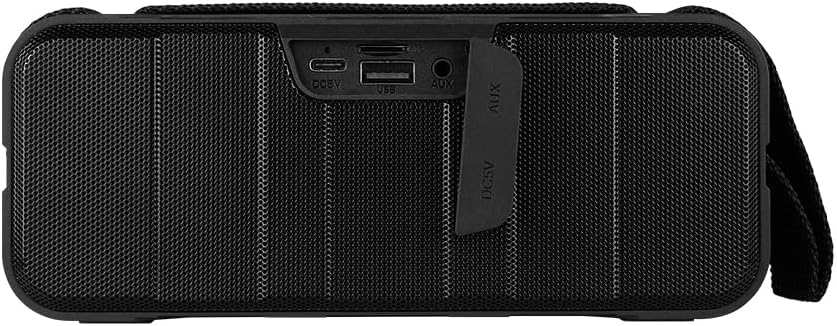
פיגורע 1.4: דערציען view of the speaker, showing the protective flap covering the input ports.

Figure 1.5: Close-up of the input ports, including DC 5V (USB-C), USB-A, and AUX (3.5mm) inputs, protected by a rubber cover.
2. זיכערקייַט אינפֿאָרמאַציע
- שטעלט נישט אויס דעם רעדנער צו עקסטרעמע טעמפּעראַטורן (הייס אָדער קאַלט).
- ויסמיידן דראַפּינג אָדער ונטערטעניק די רעדנער צו שטאַרק ימפּאַקץ.
- Keep the speaker away from direct sunlight and heat sources.
- נעמט נישט אוועק, פאררעכט, אדער מאדיפיצירט נישט דעם רעדנער אליין. דאס וועט בטל מאכן די גאראנטיע.
- Ensure the port cover is securely closed when using the speaker near water to maintain IPX5 water resistance.
- Do not immerse the speaker in water. IPX5 rating protects against splashes and light rain, not submersion.
- ניצט נאָר דעם צוגעשטעלטן טשאַרדזשינג קאַבל אָדער אַ סערטיפיצירטן USB טיפּ-C קאַבל צום טשאַרדזשינג.
- רייניקט דעם רעדנער מיט אַ ווייכן, טרוקענעם שטאָף. ניצט נישט קיין שרײַבנדיקע רייניגערס אדער סאָלווענטן.
3. סעטאַפּ
3.1 אויפלאָדן דעם רעדנער
- Open the protective rubber cover on the rear of the speaker to access the charging port.
- Connect the USB Type-C end of the charging cable to the speaker's DC 5V port.
- פֿאַרבינדט דעם אַנדערן עק פֿונעם USB קאַבל צו אַ USB מאַכט אַדאַפּטער (נישט אַרייַנגערעכנט) אָדער אַ קאָמפּיוטער'ס USB פּאָרט.
- די טשאַרדזשינג אינדיקאַטאָר ליכט וועט זיך אָנצינדן בעת טשאַרדזשינג און זיך אויסלעשן ווען עס איז גאָר אויפגעלאָדן.
- Once charging is complete, securely close the protective rubber cover to maintain water resistance.
3.2 פּאַוערינג אויף / אַוועק
- צו מאַכט אויף: דריקן און האַלטן די מאַכט קנעפּל on the top panel for approximately 3 seconds until you hear an audible prompt.
- צו מאַכט אַוועק: דריקן און האַלטן די מאַכט קנעפּל for approximately 3 seconds until you hear an audible prompt.
3.3 בלועטאָאָטה פּערינג
- Ensure the speaker is powered on. It will automatically enter Bluetooth pairing mode, indicated by a flashing LED light.
- אויף אייער דעווייס (סמאַרטפאָן, טאַבלעט, לאַפּטאָפּ), אַקטיווירט בלועטוט און זוכט פֿאַר פֿאַראַן דעווייסעס.
- Select "BSP-500-V2" from the list of found devices.
- Once successfully paired, the speaker will emit an audible confirmation, and the LED light will stop flashing and remain solid.
- דער רעדנער וועט זיך אויטאָמאַטיש צוריקבינדן צום לעצטן פארבונדענעם אפאראט ווען עס ווערט אנגעצינדן, אויב דער אפאראט איז אין דער געגנט און בלועטוט איז איינגעשטעלט.
3.4 אמתע ווירעלעס סטערעאָ (TWS) פּאָרינג
TWS allows you to connect two BSP-500-V2 speakers together for a true stereo sound experience.
- Ensure both BSP-500-V2 speakers are powered on and not connected to any other Bluetooth device.
- אויף איינעם פון די רעדנערס (דאָס וועט זיין דער הויפּט רעדנער), דריקט צוויי מאָל דעם קנעפּל שפּיל / פּויזע קנעפּל. The speaker will enter TWS pairing mode.
- The two speakers will automatically search for and connect to each other. You will hear an audible confirmation once they are successfully paired.
- Once TWS is established, connect your device to the primary speaker via Bluetooth as described in Section 3.3.
- To disconnect TWS, double-press the שפּיל / פּויזע קנעפּל אויף יעדער רעדנער.
3.5 Auxiliary (AUX) Connection
For devices without Bluetooth, you can use the 3.5mm audio cable.
- Open the protective rubber cover on the rear of the speaker.
- Connect one end of the 3.5mm audio cable to the speaker's AUX port.
- פֿאַרבינדט דעם אַנדערן עק פֿונעם קאַבל צום אַודיאָ־אַרויסגאַנג־דזשעק פֿון אייער דעווייס.
- דער רעדנער וועט זיך אויטאָמאַטיש איבערקערן צו AUX מאָדע.
- Once disconnected, securely close the protective rubber cover.
4. אַפּערייטינג ינסטרוקטיאָנס
4.1 קנעפּל פונקציעס:
| קנעפּל | פונקציע (קורץ דריקן) | פֿונקציע (לאנג דרוק) |
|---|---|---|
| מאַכט קנעפּל | N/A | מאַכט אויף / אַוועק |
| באַנד אַראָפּ קנעפּל | פאַרמינערן די באַנד | פֿריִערדיקע שפּירט |
| שפּיל / פּויזע קנעפּל | שפּילן/פּויזירן מוזיק, ענטפֿערן/ענדיגן רוף | Reject Call, Double-press for TWS Pairing |
| באַנד אַרויף קנעפּל | פאַרגרעסערן באַנד | ווייַטער שפּור |
5. וישאַלט
- רייניקונג: Use a soft, dry, lint-free cloth to clean the speaker's surface. For stubborn dirt, slightly dampווייקט דעם שטאָף מיט וואַסער. ניצט נישט קיין שאַרפע כעמיקאַלן, רייניקונגס-סאָלווענטן, אדער שטאַרקע וואַשפּולווערן.
- וואַסער קעגנשטעל קער: Always ensure the rubber port cover on the back of the speaker is fully and securely sealed when using the speaker outdoors or near water. This maintains its IPX5 water resistance. After exposure to water, wipe the speaker dry before opening the port cover for charging or auxiliary connections.
- סטאָרידזש: When not in use for extended periods, store the speaker in a cool, dry place, away from direct sunlight and extreme temperatures. It is recommended to charge the speaker fully before storing and to recharge it every few months to maintain battery health.
- באַטערי זאָרגן: To prolong battery life, avoid fully discharging the battery frequently. Charge the speaker when the low battery indicator is active.
6. טראָובלעשאָאָטינג
| פּראָבלעם | מעגלעך סיבה | לייזונג |
|---|---|---|
| דער רעדנער גייט נישט אן. | נידעריק באַטאַרייע. | Charge the speaker fully using the provided USB Type-C cable. |
| קען נישט פארבינדן דורך בלוטוט. | Speaker is not in pairing mode; Device's Bluetooth is off; Speaker is already connected to another device; Device is too far from speaker. | Ensure speaker is powered on and flashing (pairing mode). Turn on Bluetooth on your device. Disconnect from other devices. Move device closer to speaker (within 10 meters). |
| קיין קלאַנג אָדער נידעריקע וואָלומען. | קול צו נידעריג אויף רעדנער אדער אפאראט; אומרעכטע איינגאבע מאָדע; רעדנער נישט פארבונדן. | Increase volume on both speaker and connected device. Ensure correct mode (Bluetooth or AUX) is active. Verify successful Bluetooth pairing or AUX cable connection. |
| געזונט דיסטאָרשאַן. | Volume too high; Device too far from speaker; Interference. | Reduce volume on speaker and/or device. Move device closer to speaker. Avoid obstacles between speaker and device. |
| TWS פּאָרינג פיילז. | Speakers are already paired to a device; Speakers are too far apart. | Ensure both speakers are disconnected from any Bluetooth devices. Place speakers close to each other during TWS pairing. |
7. ספּעסאַפאַקיישאַנז
| שטריך | דעטאַל |
|---|---|
| מאָדעל נאָמען | BSP-500-V2 |
| רעדנער טיפּ | מולטימעדיאַ |
| ספּעציעלע שטריך | בלועטאָאָטה |
| רעקאַמענדיד נוצן | פֿאַר מוזיק שפּילער |
| קאַמפּאַטאַבאַל דעוויסעס | לאַפּטאָפּ, MP3 שפּילער, סמאַרטפאָון, טאַבלעט |
| קאָנטראָללער טיפּ | קנעפּל |
| אַרומרינגלען סאָונד קאַנאַל קאַנפיגיעריישאַן | 5.0 |
| באַטערי לעבן | 7 שעה |
| קאַמפּאָונאַנץ אַרייַנגערעכנט | רעדנער |
| פּראָדוקט דימענשאַנז | 5 ד רענטגענ 15 וו רענטגענ 18 ה סענטימעטער |
| פּראָדוקט וואָג | 1 קילאָ |
| וואָטערפּרוף | יאָ (IPX5) |
| באַטאַרייע קאַפּאַציטעט | 2000 מאַה |
| Ampליבער טיפּ | אַקטיוו |
| מאַכט מקור | באַטערי |
| אָפטקייַט ענטפער | 180 הז |
| קאַנעקטיוויטי טעכנאָלאָגיע | בלועטאָאָטה |
| אַודיאָ רעזולטאַט מאָדע | סטערעאָ |
| מאַונטינג טיפּ | טאַבלעטאָפּ בארג |
8. וואָראַנטי און שטיצן
The Vorago BSP-500-V2 Bluetooth Speaker comes with a limited warranty. Please refer to the warranty card included with your product for specific terms and conditions, or visit the official Vorago webפּלאַץ פֿאַר מער דעטאַילס.
For technical support, troubleshooting assistance, or warranty claims, please contact Vorago customer service through their official channels. You can find more information and contact details on the Vorago Brand Store on Amazon אָדער זייער באַאַמטער webפּלאַץ.
ביטע באַהאַלטן אייער קויפן-באַווייַז פֿאַר גאַראַנטיע צוועקן.


