1. הקדמה
This manual provides comprehensive instructions for the installation, operation, and maintenance of your TAFFIO LMGQ9899-BO Android Head Unit. This 9-inch multimedia system is specifically designed for Porsche Cayenne models manufactured between 2003 and 2010, including compatibility with the Bose amplifier system. It features an Android 12 operating system, GPS navigation, integrated CarPlay, and Android Auto functionalities.
2. זיכערקייַט אינפֿאָרמאַציע
Please read all safety instructions carefully before installation and operation. Failure to follow these instructions may result in injury or damage to the device or vehicle.
- פאַכמאַן ינסטאַלירונג רעקאַמענדיד: צוליב דער קאָמפּלעקסיטעט פון פאָרמיטל עלעקטראָניק, איז פאַכמאַן ינסטאַלירונג העכסט רעקאָמענדירט.
- מאַכט דיסקאַנעקשאַן: שטענדיק אָפּשטעקן די באַטאַרייע פֿון דער מאַשין איידער איר הייבט אָן קיין אינסטאַלאַציע אַרבעט צו פֿאַרמייַדן עלעקטרישע קורצצייטן און שאָדן.
- וויירינג: Ensure all wiring connections are secure and properly insulated to prevent short circuits. Do not modify the wiring harness.
- דרייווינג זיכערקייַט: ניצט נישט דעם אפאראט אויף א וועג וואס וועט אייך אפlenken פונעם דרייווינג. שטעלט שטענדיג אין פריאריטעט פאר וועג זיכערהייט.
- ווענטילאַטיאָן: Ensure the unit has adequate ventilation and is not obstructed by other components.
3. פּעקל אינהאַלט
באַשטעטיקט אַז אַלע זאכן וואָס זענען אויסגערעכנט אונטן זענען אַרייַנגערעכנט אין אייער פּעקל. אויב עפּעס פעלנדיק אָדער צעבראָכן, ביטע קאָנטאַקט אייער הענדלער.

פיגורע 3.1: איבערview of included components. This image displays the main head unit, frame, MOST adapter, USB cables, GPS antenna, 4G antenna, RCA plugs, SIM card slot, backup camera cable, power cable with CAN BUS, antenna adapter, and mounting screws.
- 1x TAFFIO 9-inch Multimedia + Navigation System
- 1x Frame for Porsche Cayenne (2003-2010)
- 1x Power Cable with CAN BUS Decoder
- 1x MOST Adapter for BOSE AMP (for vehicles with Bose sound system)
- 1x גפּס אַנטענע
- 1x 4G אַנטענע
- 2 קס וסב קייבאַלז
- 1x RCA Audio/Video Cables Set (including video input, audio input, subwoofer output)
- 1x Backup Camera Input Cable
- 1x Antenna Adapter
- מאַונטינג סקרוז
- 1x User Manual (English, PDF available for download)
4. סעטאַפּ און ייַנמאָנטירונג
The TAFFIO LMGQ9899-BO is designed for Plug & Play installation, minimizing the need for additional adapters or mounting frames. However, careful attention to wiring is crucial.
4.1 וויירינג דיאַגראַמע
Refer to the following diagram for proper connection of the head unit components.

פיגורע 4.1: Connection points for the TAFFIO LMGQ9899-BO. This diagram illustrates the rear panel connections and the main wiring harness, detailing inputs for GPS, 4G, video, audio, camera, USB, power, CAN-BUS, and connections to the original car cables.
- גפּס אַנטענע: פֿאַרבינדט די דזשי-פּי-עס אַנטענע פֿאַר נאַוויגאַציע פֿונקציאָנאַליטעט.
- 4G אַנטענע: Connect the 4G antenna for mobile data connectivity.
- Video Plugs: Connect external video sources or outputs.
- Audio Plugs: Connect external audio sources or outputs (e.g., subwoofer).
- Camera IN: Connect a backup camera here. The unit supports automatic switching when reversing.
- יו-עס-בי (1 און 2): פֿאַרבינדט USB דעוויסעס פֿאַר מעדיע ווידערשפּיל אָדער טשאַרדזשינג.
- מאַכט קאַבלע: Connect the main power cable to the vehicle's harness.
- CAN-BUS Connector: Connect the CAN-BUS decoder for vehicle communication.
- Connect to Original Car Cable (1 & 2): These are primary connections to the vehicle's existing wiring.
- Connect to TAFFIO Radio Cable: Specific connection for the radio antenna.
4.2 באָסע AMP ינטעגראַטיאָן
For Porsche Cayenne models equipped with the Bose sound system, utilize the included MOST Adapter. This adapter ensures proper audio signal transmission and compatibility with the factory ampליפער.
4.3 ערשט מאַכט-אַרויף
After installation, reconnect the vehicle's battery. The unit should power on automatically with the ignition. Follow any on-screen prompts for initial setup, such as language selection and time zone.
5. אַפּערייטינג ינסטרוקטיאָנס
The TAFFIO head unit features an intuitive Android interface with a capacitive multi-touch screen.
5.1 הויפּט צובינד איבערview
The main screen provides quick access to core functions like Clock, Music, Navigation, and Radio.

פיגורע 5.1: Main user interface with shortcuts to essential applications.
5.2 אַפּ פאַרוואַלטונג
Access the full list of installed applications by swiping up or tapping the app drawer icon. You can download additional apps from the Play Store.

פיגורע 5.2: App drawer showing available applications.
5.3 גפּס נאַוויגאַציע
The unit supports various navigation applications. Use the pre-installed navigation software or download your preferred app from the Play Store. The 2-Zone function allows navigation in the front while other media plays in the back.
5.4 קאַרפּליי און אַנדרויד אויטאָ
The head unit features integrated Wireless CarPlay and Android Auto functionality, eliminating the need for external adapters.

פיגורע 5.3: Wireless CarPlay interface.

פיגורע 5.4: Android Auto interface.
To activate: Connect your smartphone via Bluetooth or USB. Follow the on-screen prompts to enable CarPlay or Android Auto.
5.5 בלועטאָאָטה פאַנגקשאַנז
Pair your mobile phone via Bluetooth for hands-free calling and A2DP music streaming.
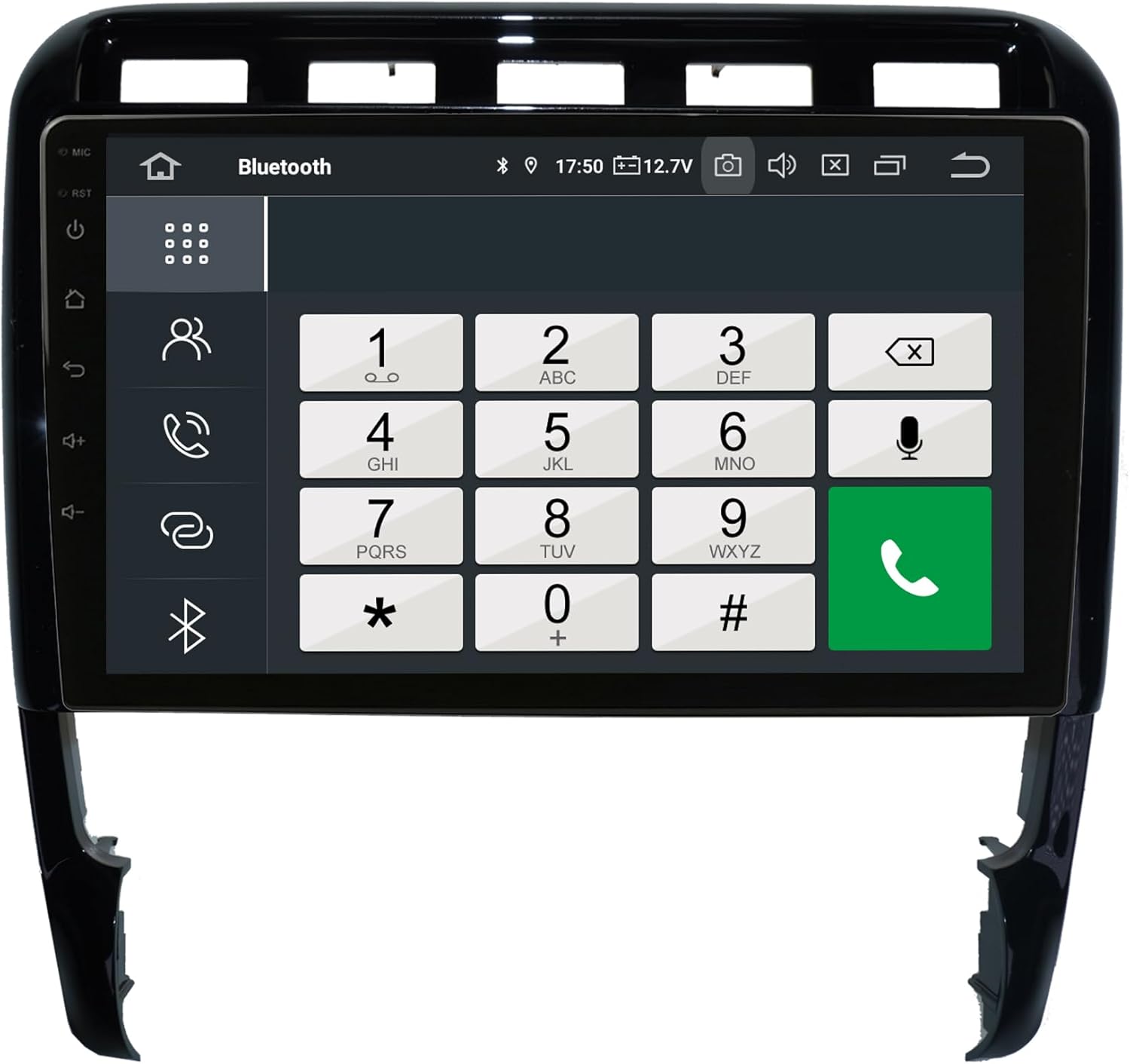
פיגורע 5.5: Bluetooth phone dialer interface.
פּאָרינג: Go to Bluetooth settings on the head unit and your phone. זוכן פֿאַר available devices and select the head unit. Confirm the pairing code.
5.6 ראַדיאָ (FM/AM)
The unit includes an FM/AM tuner with RDS (Radio Data System) for displaying station information.

פיגורע 5.6: Radio tuner interface.
סקאַנינג: Use the scan function to find available stations. Save your favorite stations to presets.
5.7 Audio Settings (Equalizer)
Adjust audio output using the integrated equalizer. Preset options (Pop, Classic, Rock, Jazz) and custom user settings for Bass/Treble/Balance are available.

פיגורע 5.7: Amplifier and audio balance settings.
5.8 אנדערע פֿעיִקייטן
- מעדיע פּלייבאַק: Play music, pictures, and videos directly from USB/SD/SDHC slots.
- WIFI: Connect to WLAN hotspots or your smartphone's hotspot for internet access.
- דערציען אַפּאַראַט: Automatic switching to the rear camera view ווען ריווערסינג.
- אַוטאָ-זיקאָרן: All saved settings and positions are automatically retained.
- Day and Night Display: Automatic or manual adjustment of display brightness.
6. וישאַלט
Proper care ensures the longevity and optimal performance of your head unit.
- רייניקונג די פאַרשטעלן: ניצט אַ ווייכן, לינט-פֿרייע שטאָף צו פֿאָרזיכטיק ווישן דעם עקראַן. פֿאַר שווערע פֿלעקן, אַ ביסל ווישןampווישט דעם שטאָף מיט וואַסער אָדער אַ ספּעציעלן עקראַן-רייניקער. פֿאַרמייַדט שטרענגע כעמיקאַלן אָדער אַברייסיוו מאַטעריאַלן.
- אַלגעמיינע רייניקונג: Keep the unit and surrounding area free of dust and debris. Use a soft brush or compressed air for vents and crevices.
- טעמפּעראַטור: ויסמיידן יקספּאָוזינג די אַפּאַראַט צו עקסטרעם טעמפּעראַטורעס.
- ווייכווארג דערהייַנטיקונגען: Periodically check for software updates to ensure optimal performance and access to new features. Refer to the manufacturer's webזייטל אדער די איינהייט'ס סעטטינגס פאר דערהייַנטיקונג פּראָצעדורן.
7. טראָובלעשאָאָטינג
If you encounter issues, refer to the following common problems and solutions before contacting support.
| פּראָבלעם | מעגלעך סיבה | לייזונג |
|---|---|---|
| דער אַפּאַראַט טוט נישט מאַכט אויף. | קיין שטראָם צושטעל; צעבראכענע פיוז; אומרעכטע וויירינג. | Check power connections and vehicle fuses. Ensure wiring is correct as per diagram. |
| קיין קלאַנג אדער שלעכטע קלאַנג קוואַליטעט. | Incorrect audio settings; Loose speaker wires; MOST adapter issue (for Bose systems). | Check volume and equalizer settings. Verify speaker connections. Ensure MOST adapter is correctly installed and functioning. |
| די דזשי-פי-עס סיגנאַל איז שוואַך אָדער נישט פּינקטלעך. | GPS antenna obstructed or improperly installed. | זיכער מאַכן אַז די GPS אַנטענע האָט אַ קלאָרע view פון הימל און איז זיכער פארבונדן. |
| בלועטאָאָטה קשר ישוז. | Phone not in pairing mode; Interference; Incorrect pairing process. | זיכער מאַכן אַז בלועטוט איז אַקטיווירט אויף ביידע דעוויסעס. ויסמעקן פריערדיקע פּאָרינגז און פּרוּווט ווידער. גיי נענטער צום אַפּאַראַט. |
| קאַרפּליי/אַנדרויד אויטאָ פֿאַרבינדט זיך נישט. | Incorrect phone settings; USB cable issue; Software glitch. | Ensure your phone is compatible and has the latest OS. Try a different USB cable. Restart both the head unit and your phone. |
| טאָוטשסקרעען ניט ריספּאַנדאַבאַל. | צייטווייליגע ווייכווארג פראבלעם; עקראן שאדן. | Perform a soft reset (refer to device settings for reset option). If issue persists, contact support. |
For issues not covered here, please consult the PDF manual available for download or contact customer support.
8. ספּעסאַפאַקיישאַנז
| שטריך | באַשרייַבונג |
|---|---|
| מאָדעל נומער | LMGQ9899-BO |
| אָפּערייטינג סיסטעם | אַנדרויד 12 |
| קפּו | Octa-Core 1.6Ghz |
| באַראַן | 4 גיגאבייט |
| אינערלעכער סטאָרידזש | 64 גב פלאַש |
| ווייַז גרייס | 9 אינטשעס |
| ווייַז טיפּ | קאַפּאַסיטיווע מולטי-פאַרבינדן סקרין |
| האַכלאָטע | FULL HD |
| קאַנעקטיוויטי | Bluetooth, WIFI, USB, 4G (via antenna) |
| נאַוויגאַציע | GPS (Worldwide map support) |
| ספּעציעלע פֿעיִקייטן | Integrated CarPlay & Android Auto, RDS Radio, 2-Zone Function, Back-Zone Function, Rear Camera Input, Play Store access |
| אַודיאָ רעזולטאַט מאָדע | AUX, 4x Audio Outputs, 1x Subwoofer Output |
| פאַבריקאַנט | Real Media GmbH & Co. KG - Germany |
9. וואָראַנטי און שטיצן
Your TAFFIO LMGQ9899-BO head unit comes with a 2 יאָר וואָראַנטי פֿון דעם קויפֿדאַטום. די וואָראַנטי דעקט פֿאַבריקאַציע חסרונות און מאַלפאַנגקשאַנז אונטער נאָרמאַל נוצן.
For warranty claims, technical support, or further assistance, please contact your retailer or the manufacturer directly. Ensure you have your proof of purchase and product model number readily available.
פאַבריקאַנט: Real Media GmbH & Co. KG - Germany


