הקדמה
This manual provides essential instructions for the safe and efficient operation of your Sanyo PLC-WXU700A 3LCD Projector. The PLC-WXU700A is a WXGA conference room projector featuring 3LCD technology, delivering 3,800 lumens brightness and a native resolution of 1280x800. Please read this manual thoroughly before using the projector and retain it for future reference.
פּעקל אינהאַלט
באַשטעטיקן אַז אַלע זאכן זענען פאַראַן אין דיין פּעקל:
- Sanyo PLC-WXU700A 3LCD Projector
- ווייַט קאָנטראָל
- מאַכט קאַבלע
- HDMI קאַבלע
- באַניצער מאַנואַל (דעם דאָקומענט)
סעטאַפּ
1. פּראָיעקטאָר פּלאַצירונג
Position the projector on a stable, flat surface or mount it securely. Ensure adequate ventilation around the projector to prevent overheating. The projector is designed to be portable, allowing for flexible placement in various environments.
2. קאַנעקטינג מאַכט
- Connect the supplied power cable to the AC inlet on the rear of the projector.
- שטעקט אריין דעם אנדערן עק פונעם עלעקטרישן קאבל אין א געערדטן עלעקטרישן אויסגאנג.
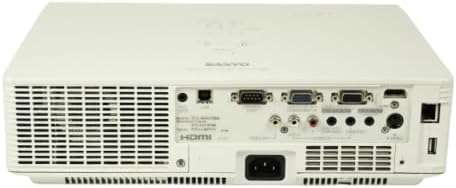
Image: Rear panel of the Sanyo PLC-WXU700A projector, highlighting the power input and connectivity ports.
3. פֿאַרבינדן אַרייַנשרייַב קוואלן
The Sanyo PLC-WXU700A offers multiple connectivity options:
- הדמי: Connect the supplied HDMI cable from your source device (e.g., laptop, Blu-ray player) to the HDMI input port on the projector.
- VGA (D-Sub 15-pin): For analog computer connections, use a VGA cable to connect to the D-Sub 15-pin input ports.
- קאָמפּאָסיטע ווידעא: Use RCA cables for composite video input.
- אַודיאָ ינפּוץ: Separate audio input jacks are available for various sources.

Image: Side-rear perspective of the projector, illustrating the array of input ports and side ventilation grilles.
אַפּערייטינג ינסטראַקשאַנז
1. פּאָווערינג אויף / אויסגעלאשן
- צו מאַכט אויף: דרוק די מאַכט קנעפּל אויף דעם פּראָיעקטאָר'ס קאָנטראָל פּאַנעל אָדער די ווײַטקאָנטראָל. די מאַכט אינדיקאַטאָר ליכט וועט זיך אָנצינדן.
- צו מאַכט אַוועק: דרוק די מאַכט button twice. The projector will enter a cooling down cycle before completely shutting off. Do not unplug the projector during the cooling cycle.
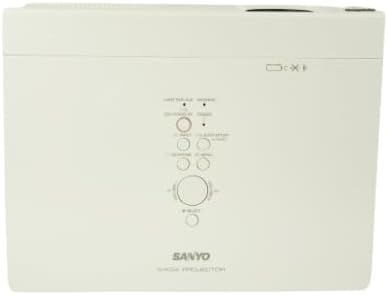
בילד: פון אויבן אַראָפּ view of the projector, displaying the integrated control panel with various buttons for power, menu navigation, and input selection.
2. אויסקלייבן די איינגאבע מקור
דרוק די אַרייַנשרייַב or מקור button on the projector or remote control to cycle through available input sources (HDMI, VGA, Video). Select the input corresponding to your connected device.
3. אַדזשאַסטירן בילד
- פאָקוס רינג: Rotate the focus ring on the projector lens to achieve a sharp image.
- זום לעווער: Adjust the zoom lever on the projector lens to change the image size without moving the projector.
- Keystone Correction: If the image appears trapezoidal, use the keystone correction function (usually found in the projector's menu or via dedicated buttons on the remote) to square the image.
וישאַלט
1. רייניקן דעם פּראָיעקטאָר
- עקסטעריע: ווישט אויס דעם פּראָיעקטאָר casinגיסט מיט אַ ווייכן, טרוקענעם שטאָף. פֿאַר שווערן שמוץ, ניצט אַ לייכט טרוקן שטאָף.amp טוך מיט אַ מילד וואַשפּולווער, און דערנאָך ווישן טרוקן.
- לענס: Gently clean the projector lens with a lens cleaning cloth or lens paper. Avoid using abrasive materials.
- לופט פילטערס: Regularly check and clean the air filters to ensure proper ventilation and prevent overheating. Refer to the full service manual for filter replacement instructions.
2. לamp פאַרבייַט
The Sanyo PLC-WXU700A uses a lamp-based illumination system. The lamp has a finite lifespan and will eventually need replacement. When the lamp indicator light illuminates or the image brightness significantly decreases, it is time to replace the lamp.
- Ensure the projector is powered off and completely cooled down before attempting lamp פאַרבייַט.
- געפינען די לamp cover (often on the top or bottom of the projector).
- שרויף די לamp cover and carefully remove the old lamp מאָדולע.
- Install a new, genuine Sanyo replacement lamp module, ensuring it is securely seated.
- פאַרבייַטן די לamp דעקן און פאַרשטייַפן די סקרוז.
- באַשטעטיק די לamp timer in the projector's OSD (On-Screen Display) menu.
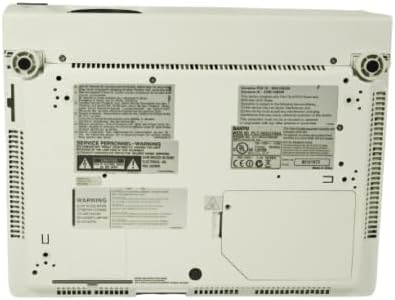
Image: Underside of the projector, displaying product labels, warning information, and potential access panels for maintenance like lamp פאַרבייַט.
טראָובלעשאָאָטינג
אויב איר טרעפט פּראָבלעמען מיט אייער פּראָיעקטאָר, זעט די פאלגענדע געוויינטלעכע פּראָבלעמען און לייזונגען:
- קיין בילד געוויזן:
- זיכער מאַכן אַז דער פּראָיעקטאָר איז אנגעצינדן און אַז דער מאַכט קאַבל איז זיכער פארבונדן.
- Verify that the input source is correctly selected on the projector.
- Check the connection cable (HDMI, VGA) between the source device and the projector. Try a different cable if possible.
- Ensure the source device is outputting a signal.
- בילד איז פארשוואומען:
- סטרויערן די פאָקוס רינג אויף די פּראַדזשעקטער אָביעקטיוו.
- זיכער מאַכן אַז דער פּראָיעקטאָר איז אין אַ פּאַסיק דיסטאַנץ פֿון דעם עקראַן.
- בילד איז טראַפּעזאָידאַל:
- Adjust the keystone correction setting in the projector's menu.
- Ensure the projector is placed perpendicular to the screen as much as possible.
- Projector Overheats or Shuts Down:
- Ensure all ventilation vents are clear and not obstructed.
- ריין די לופט פילטערס.
- אַפּערירט דעם פּראָיעקטאָר אין אַ גוט-ווענטילירטן אָרט.
- רימאָוט קאָנטראָל נישט ארבעטן:
- קאָנטראָלירט און פאַרבייט די באַטעריעס אין דער ווײַטקאָנטראָל.
- זיכער מאַכן אַז עס זענען נישטאָ קיין שטערונגען צווישן דעם ווײַטקאָנטראָל און דעם פּראָיעקטאָר'ס IR ופנעמער.
ספּעסאַפאַקיישאַנז
| שטריך | דעטאַל |
|---|---|
| סאָרט | Sanyo (Tekswamp) |
| מאָדעל | PLC-WXU700A |
| ווייַז טעכנאָלאָגיע | 3LCD |
| ווייַס ברייטנאַס | 3,800 אַנסי לומענס |
| געבוירן האַכלאָטע | 1280x800 (WXGA) |
| קאַנטראַסט פאַרהעלטעניש | 500:1 |
| קאַנעקטיוויטי טעכנאָלאָגיע | הדמי, ווגאַ |
| פּראָדוקט דימענשאַנז | 10 X 13.1 X 3.1 אינטשעס |
| ספּעציעלע שטריך | פּאָרטאַטיוו |
| רעקאָממענדעד ניצט | ביזנעס |
וואָראַנטי און שטיצן
For warranty information and technical support, please refer to the documentation provided at the time of purchase or contact your vendor. Keep your purchase receipt as proof of purchase for warranty claims.


