הקדמה
This manual provides comprehensive instructions for the setup, operation, maintenance, and troubleshooting of your Akko 5075B Plus Dracula Castle Mechanical Keyboard. Designed for versatility and performance, this keyboard features multi-mode connectivity, hot-swappable switches, and customizable RGB lighting to enhance your computing experience.

Figure 1: Akko 5075B Plus Dracula Castle Mechanical Keyboard with Creamy Yellow Switches.
פּעקל אינהאַלט
ביטע באַשטעטיקן אַז אַלע זאכן זענען פאַראַן אין דעם פּעקל:
- אַקקאָו 5075 ב פּלוס מעטשאַניקאַל קלאַוויאַטור
- וסב טיפּע- C קאַבלע
- 2.4 גהז ווירעלעסס ופנעמער
- Extra Novelty Keycaps (Dracula Castle themed)
- קייקאַפּ פּולער
- באַשטימען פּולער
Video 1: Unboxing the Akko 5075B Plus Dracula Keyboard, showcasinג זײַן אינהאַלט און ערשטן אויסזען.
סעטאַפּ
1. קאָנעקטיוויטי מאָדעס
The Akko 5075B Plus supports three connectivity modes: Bluetooth 5.0, 2.4GHz wireless (via USB receiver), and wired Type-C. You can easily switch between devices and modes.

פיגורע 2: איבערview of Bluetooth, 2.4GHz, and Type-C wired connectivity options.

Figure 3: Visual representation of seamless switching between multiple connected devices.
- ווייערד מאָדע: Connect the keyboard directly to your device using the provided USB Type-C cable. The port is located on the top edge of the keyboard.
- 2.4GHz ווירעלעסס מאָדע: Locate the USB receiver stored in the slot on the underside of the keyboard. Plug the receiver into an available USB port on your device.
- בלועטאָאָטה מאָדע: Ensure the keyboard is in Bluetooth mode using the switch on the underside. Follow your device's Bluetooth pairing instructions to connect.

Figure 4: USB Type-C port for wired connection and charging.
2. אָפּערירן סיסטעם קאָמפּאַטאַביליטי סוויטש
A switch on the underside of the keyboard allows you to select between Mac, USB, and Windows modes for optimal compatibility and functionality.

Figure 5: OS compatibility switch located on the keyboard's underside.
3. פיזישע אויפשטעל
The keyboard features adjustable feet on its underside, allowing you to set your preferred typing angle for ergonomic comfort.

Figure 6: Flip-out feet for adjusting keyboard height and angle.
אַפּערייטינג ינסטראַקשאַנז
1. Keycaps
The keyboard comes with PBT Double Shot ASA Profile keycaps, known for their durability and resistance to shine. The Dracula Castle theme features vintage gray base colors with novelty keys like bats, horror pumpkins, and ghosts.

Figure 7: Diagram illustrating the ASA Profile keycap dimensions.

Figure 8: PBT Double-Shot keycaps ensuring legends do not fade easily.

Figure 9: Collection of Dracula Castle themed novelty keycaps included with the keyboard.
2. סוויטשיז
The keyboard features Akko V3 Creamy Yellow Pro switches, which are linear and pre-lubed for a smooth typing experience. The 5-pin hot-swappable sockets allow for easy replacement of switches without desoldering.

Figure 10: Hot-swappable PCB allowing users to easily replace switches.

Figure 11: Demonstration of removing and installing hot-swappable switches.

פיגורע 12: דעטאַילעד view of the Akko V3 Creamy Yellow Pro switch.
3. RGB לייטינג
The keyboard features built-in and side-LED RGB backlighting with customizable light animation effects. Per-key RGB is supported and can be configured through the Akko Cloud Driver software.
4. קנעפּל פונקציאָנאַליטעט
The multi-function knob allows for quick adjustments. By default, it controls audio volume. It can also be re-mapped via the Akko Cloud Driver for other functions, such as adjusting RGB brightness.
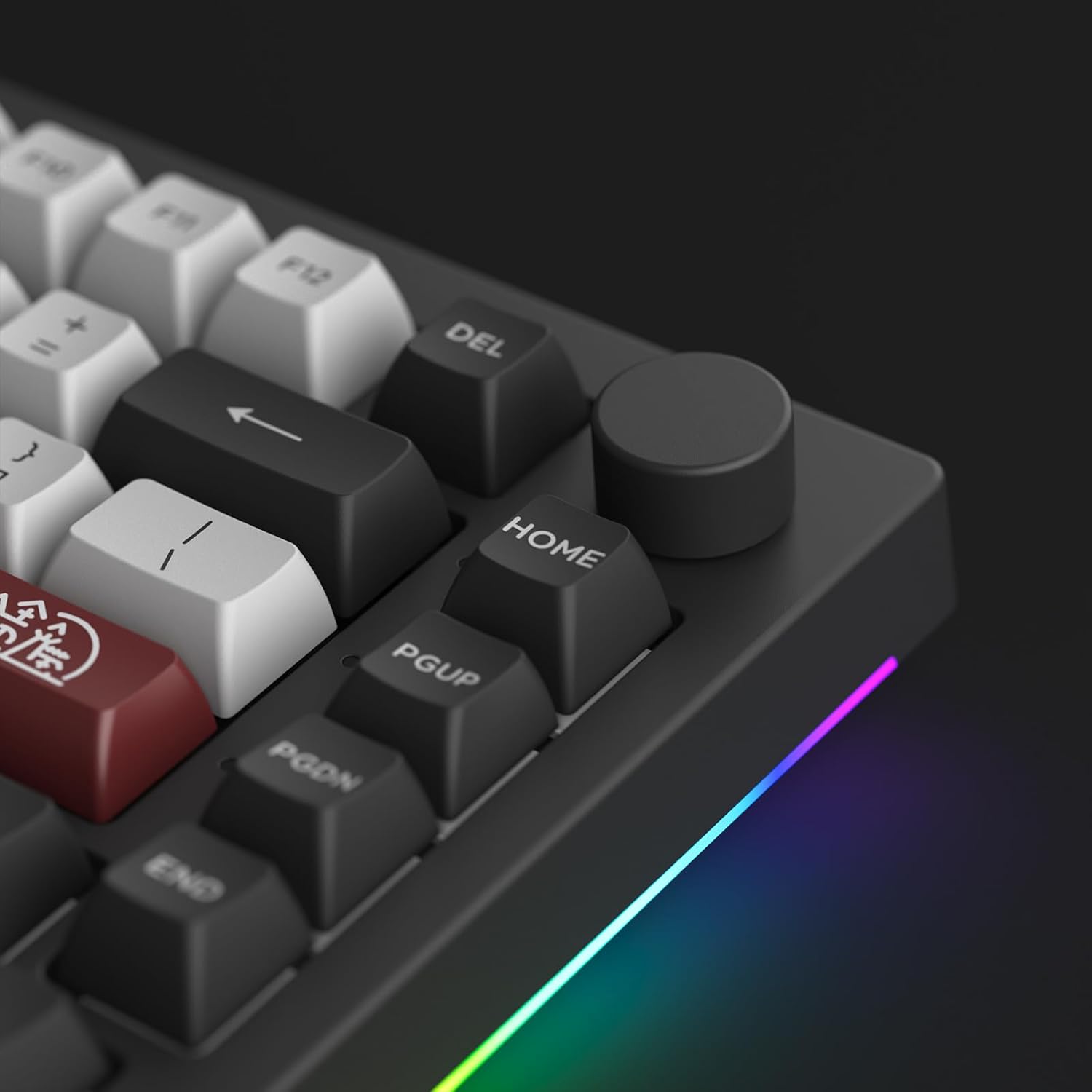
פיגורע 13: דעטאַילעד view of the programmable knob.

Figure 14: Visual demonstration of the knob's rotation and press functions.
5. Programmable Features (Akko Cloud Driver)
All keys and the knob can be re-mapped, and macros can be set using the Akko Cloud Driver software. This software provides extensive customization options for lighting effects, key assignments, and more.
Download the Akko Cloud Driver from the official Akko webפּלאַץ (www.akkogear.com) to unlock full customization capabilities.
וישאַלט
1. רייניקונג
Regular cleaning helps maintain the keyboard's performance and appearance. Use a soft brush or compressed air to remove dust and debris from between the keycaps. For deeper cleaning, carefully remove the keycaps using the provided keycap puller and wipe them with a damp שטאָף.
2. סוויטש און קלאַוויאַטור פאַרבייַט
Thanks to the hot-swappable design, individual switches can be replaced if they become faulty or if you wish to try different switch types. Use the switch puller to gently remove switches. Ensure new switches are aligned correctly before pressing them into place. Keycaps can be removed and replaced using the keycap puller.
טראָובלעשאָאָטינג
אויב איר טרעפט פּראָבלעמען מיט אייער קלאַוויאַטור, ביטע באַציעט זיך צו די פאלגענדע געוויינטלעכע לייזונגען:
- קאַנעקטיוויטי ישוז: Ensure the keyboard is in the correct mode (Wired, 2.4GHz, or Bluetooth) for your device. For wireless connections, check battery level and ensure the receiver is properly plugged in or Bluetooth is paired.
- RGB Lighting Problems: Verify that the keyboard is connected via USB for full RGB customization through the Akko Cloud Driver. Adjust brightness using the knob or software.
- שליסל ענטפערט נישט: If a specific key is not responding, it may be a faulty switch. Utilize the hot-swappable feature to replace the switch.
- ווייכווארג דערקענונג: Ensure the keyboard is connected via USB when attempting to use the Akko Cloud Driver for firmware updates or extensive customization.
For more detailed troubleshooting or technical support, please visit the Akko official webפּלאַץ אָדער קאָנטאַקט זייער קונה דינסט.
ספּעסאַפאַקיישאַנז
| שטריך | דעטאַל |
|---|---|
| פּראָדוקט דימענשאַנז | 16.93 X 6.69 X 2.36 אינטשעס |
| פּונקט וואָג | 3.05 פונט |
| פאַבריקאַנט | Akko |
| נומער מאָדעל נומער | 5075 ב פּלוס |
| קאַנעקטיוויטי טעכנאָלאָגיע | USB-C, Bluetooth 5.0, 2.4GHz Wireless |
| קלאַוויאַטור באַשרייַבונג | Ergonomic, 75% Layout |
| ספּעציעלע שטריך | Hot-Swappable, Programmable RGB, Knob |
| Keycap Profile | ASA Profile, פּבט טאָפּל שאָט |
| באַשטימען טיפּ | Akko V3 Creamy Yellow Pro (Linear, Pre-lubed) |
| באַטאַרייע קאַפּאַציטעט | 3000 מאַה |

Figure 15: Internal structure of the Akko 5075B Plus keyboard, showing various layers for optimized noise reduction and typing feel.
וואָראַנטי און שטיצן
For warranty information, product registration, or technical assistance, please visit the official Akko webזייטל אדער קאנטאקט זייער קאסטומער שטיצע מאנשאפט. האלט אייער קויף קוויטל פאר גאראנטיע קליימס.
Official Akko Webפּלאַץ: www.akkogear.com


