1. הקדמה
This manual provides detailed instructions for the installation, operation, and maintenance of your COMMAX CDV-77M 7-inch Fine View Monitor. Please read this manual thoroughly before using the product to ensure proper function and safety. Keep this manual for future reference.
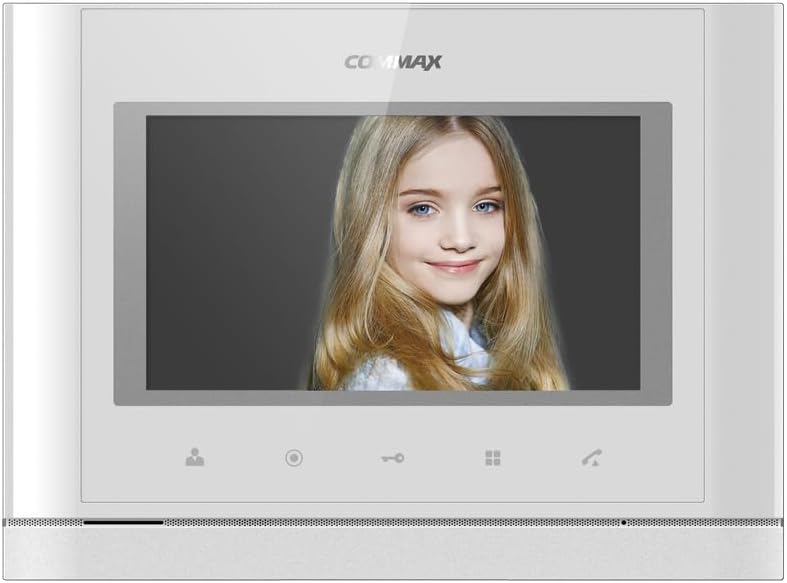
פראָנט view of the COMMAX CDV-77M monitor, showcasing its 7-inch TFT LCD screen and sleek design. The screen is active, displaying an image.
2. פּראָדוקט פֿעיִקייטן
- 7-inch TFT LCD screen for clear video display.
- Supports video communication and door lock release functions.
- Expandable system: Connects with up to 2 door cameras, 2 additional monitors, and 2 interphones.
- PAL/NTSC video format conversion capability.
- Hand-free operation for convenience.
- Wall-mounted design for easy installation.
3. זיכערקייַט אינפֿאָרמאַציע
Please observe the following safety precautions to prevent damage to the product and ensure user safety:
- שטעלט נישט אויס דעם אַפּאַראַט צו וואַסער אָדער צו פיל פייכטקייט.
- פֿאַרמײַדט צו שטעלן דעם אַפּאַראַט אין דירעקטער זון אָדער לעבן היץ־קוואַלן.
- פרובירט נישט צו עפענען אדער פאררעכטן דעם איינהייט אליין. לאָזט איבער אלע סערוויסעס צו קוואַליפֿיצירטע פּערסאָנעל.
- זיכער מאַכן אַז די מאַכט מקור שטימט מיט די ספּעציפֿישע וואָלומעןtage (AC 100-240V, 50/60Hz).
- האַלטן די אַפּאַראַט אַוועק פון שטאַרק מאַגנעטיק פעלדער.
- Operate within the specified temperature range of 0℃ to 40℃.
4. ינסטאַלירונג
4.1 פּעקל אינהאַלט
באַשטעטיקן אַז אַלע קאָמפּאָנענטן זענען פאַראַן:
- COMMAX CDV-77M Monitor Unit
- וואנט מאָונטינג קלאַמער
- מאַונטינג סקרוז און אַנגקערז
- באַניצער מאַנואַל (דעם דאָקומענט)
- מאַכט קאַבלע
4.2 מאָנטירן דעם מאָניטאָר
The CDV-77M monitor is designed for wall-mounted installation. Choose a suitable location indoors, away from direct sunlight and moisture.
- Secure the wall mounting bracket to the desired location using the provided screws and anchors.
- Ensure the bracket is level and securely fastened.
- Refer to the dimensions diagram for proper spacing and fit:

Technical drawing showing the dimensions of the COMMAX CDV-77M monitor: 244 mm width and 180 mm height.
4.3 וויירינג קאַנעקשאַנז
Before making any connections, ensure the power supply is disconnected.
- Door Camera Connection: Connect the door camera using a 4-wire cable. The maximum recommended distance is 28 meters (using 0.5Ø wire).
- Interphone Connection: Connect the interphone unit using a 4-wire cable.
- Additional Monitor Connection: If connecting additional monitors, refer to the specific wiring diagram provided with your system.
- מאַכט קשר: Connect the AC 100-240V, 50/60Hz power cable to the monitor and a suitable power outlet.
After all connections are made, carefully attach the monitor unit to the wall mounting bracket.
5. אַפּערייטינג ינסטרוקטיאָנס
Familiarize yourself with the monitor's controls:

Detailed diagram illustrating the front panel of the COMMAX CDV-77M monitor, with labels for the TFT LCD, Speaker, Microphone, Power Switch, and control buttons: Monitoring, Interphone, Door Release, Menu, and Talk.
- מאַכט אויף / אַוועק: Use the Power Switch located on the side/bottom of the unit.
- באַקומען אַ רוף: When a visitor calls from the door camera, the monitor will display their image and ring. Press the רעדן קנעפּל to communicate.
- מאָניטאָרינג: דרוק די מאָניטאָרינג קנעפּל צו view the feed from the connected door camera at any time.
- טיר ארויסלאָזן: During a call or while monitoring, press the טיר ריליס קנעפּל to unlock the connected door.
- Interphone Communication: דרוק די Interphone Button to initiate communication with another connected interphone or monitor.
- מעניו נאַוויגאַציע: ניצן די מעניו קנעפּל to access settings and adjustments for the monitor.
6. וישאַלט
- רייניקונג: ניצט אַ ווייכע, טרוקענע שטאָף צו רייניקן דעם מאָניטאָר עקראַן אוןasinז. ניצט נישט קיין שרײַבנדיקע רייניגער אדער סאָלווענטן.
- באַזייַטיקונג פון שטויב: Regularly dust the unit to prevent accumulation, especially around ventilation areas.
- ויסמיידן ליקווידס: Do not spray liquids directly onto the monitor.
7. טראָובלעשאָאָטינג
| פּראָבלעם | מעגלעך סיבה | לייזונג |
|---|---|---|
| No power to the monitor. | Power cable disconnected; power outlet faulty; power switch off. | Check power cable connection; test outlet with another device; ensure power switch is on. |
| No video from door camera. | Camera cable loose or damaged; camera faulty. | Check camera wiring connections; ensure camera is powered and functioning. |
| קיין אודיאָ בעת קאָמוניקאַציע. | מיקראָפאָן/רעדנער דעפעקטיוו; וויירינג פּראָבלעם. | Check audio wiring; ensure volume settings are appropriate. |
| Door lock not releasing. | Door lock wiring issue; lock mechanism faulty. | Verify door lock wiring; test door lock mechanism independently. |
אויב די פראבלעם בלייבט נאך פרובירן די לייזונגען, ביטע קאנטאקטירט קאסטומער סופארט.
8. ספּעסאַפאַקיישאַנז
| שטריך | דעטאַל |
|---|---|
| מאָדעל | CDV-77M |
| פאַרשטעלן גרייס | 7 אינטש טפט לקד |
| מאַכט מקור | אַק 100-240 וו, 50/60 הז |
| בארג טיפּ | וואַנט-מאָונטעד טיפּ |
| אַפּערייטינג טעמפּעראַטור | 0℃ ~ 40℃ |
| Wiring (Door Camera) | 4 wires (Distance: 28m with 0.5Ø wire) |
| Wiring (Interphone) | 4 ווירעס |
| מאַקס. קאַנעקשאַנז | 2 Cameras, 2 Monitors, 2 Interphones |
| קאַנסאַמשאַן | Max. 15W / Standby 3W |
| דימענשאַנז (W×H×D) | 244 מם × 180 מם × 18 מם |
| ווידעא פֿאָרמאַט | PAL/NTSC convertible |
9. וואָראַנטי און שטיצן
For warranty information, please refer to the warranty card included with your product or contact your local COMMAX distributor. For technical support or service inquiries, please visit the official COMMAX webפּלאַץ אָדער קאָנטאַקט זייער קונה סערוויס אָפּטיילונג.
פאַבריקאַנט: COMMAX
ערשטער דאַטע בנימצא: 7 אויגוסט 2023


