1. הקדמה
This manual provides detailed instructions for the safe and effective use of the UNI-T UT121A Mini Smart Digital Multimeter. The UT121A is a compact, True RMS digital multimeter designed for various electrical measurements, featuring automatic range selection, non-contact voltage (NCV) detection, and a clear LCD display. Please read this manual thoroughly before operation to ensure proper usage and to prevent potential hazards.
2. זיכערקייַט אינפֿאָרמאַציע
Always adhere to the following safety precautions when using the multimeter:
- לייענען און פֿאַרשטיין אַלע ינסטראַקשאַנז איידער נוצן.
- דו זאלסט נישט צולייגן וואָלtage or current that exceeds the specified maximum limits.
- Always ensure the test leads are in good condition and properly connected.
- Do not use the meter if it appears damaged or if the battery cover is not properly closed.
- Exercise extreme caution when working with live circuits. Wear appropriate personal protective equipment (PPE).
- האַלט די פינגער הינטער די פינגער שיצער אויף די טעסט פּראָובז בעת מעסטונגען.
- טוישט באַלד די באַטעריעס ווען דער אינדיקאַטאָר פֿאַר נידעריקע באַטעריע דערשיינט.
3. פּראָדוקט איבערview
The UNI-T UT121A is a portable and user-friendly digital multimeter. Below is an illustration of its main components and controls.

Figure 3.1: UT121A Interface Introduction. This diagram highlights the LCD display, function switch key, On/Off button, NCV sensing terminal, flashlight, battery cover, and the black and red probe jacks.
The device features a large LCD screen for clear readings, intuitive buttons for function selection, and a compact design for easy portability.
4. סעטאַפּ
4.1 באַטאַרייע ייַנמאָנטירונג
The UT121A model requires two 1.5V AAA batteries. To install or replace batteries:
- Ensure the multimeter is powered off and disconnect any test leads.
- געפֿינען די באַטאַרייע אָפּטייל אויף די צוריק פון די מיטל.
- ניצן אַ שרויפנ - ציער צו עפענען די באַטאַרייע דעקן.
- Insert two 1.5V AAA batteries, observing the correct polarity.
- סיקיורלי נאָענט די באַטאַרייע דעקן.

Figure 4.1: Battery Compartment. The UT121A uses two 1.5V AAA batteries, easily accessible via an independent battery compartment for convenient replacement.
4.2 אַפּפּליקאַטיאָן געביטן
The UT121A is suitable for various applications, including electrical school training, electrical maintenance, circuit maintenance, automobile maintenance, and general equipment maintenance.

Figure 4.2: Multimeter Application Areas. This image shows the versatility of the UT121A across different fields, along with a visual of its battery configuration.
5. אַפּערייטינג ינסטרוקטיאָנס
5.1 מאַכט אויף / אַוועק
Press the power button (usually marked with a power symbol) to turn the multimeter on or off. The device will typically enter Auto mode upon startup.
5.2 Auto Mode and Function Selection
In Auto mode, the multimeter intelligently identifies the measurement type (voltage, resistance, continuity) and automatically selects the appropriate range. To manually select or cycle through functions (e.g., DC VoltagE, AC Voltage, Resistance, Capacitance, Frequency, Diode, Continuity, NCV, LIVE), press the 'SEL' button or the dedicated function buttons as indicated on the device.
5.3 הינטערליכט און פלאַשליכט
The UT121A features a backlit display for improved visibility in low-light conditions and a built-in flashlight for illuminating the work area.

Figure 5.1: Backlit Display. The clear backlit display ensures readability even in dark environments.
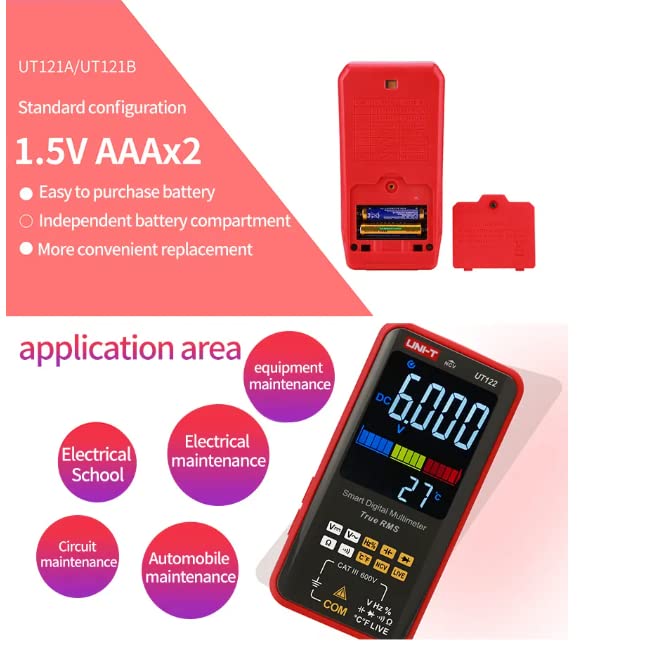
Figure 5.2: Flashlight Lighting. The integrated flashlight assists in working in poorly lit areas.
5.4 גענומען מעזשערמאַנץ
Connect the test leads to the appropriate input jacks (COM and VΩHz for most measurements). Select the desired function and range (if not in Auto mode) before making contact with the circuit.

פיגורע 5.3: Voltage and Frequency Display. The multimeter can simultaneously display voltage and frequency, as shown here with AC 388.9V and 50Hz.
5.5 NCV (נישט-קאָנטאַקט וואָלומען)tage) and LIVE Wire Detection
די NCV פונקציע ערמעגליכט נישט-קאנטאקט דעטעקציע פון AC וואָלומען.tage, providing an audible and visual indication of live wires without direct contact. The LIVE function helps identify live and neutral wires in a circuit.
Video 5.1: NCV Function Demonstration. This video demonstrates the non-contact voltage detection feature of the UNI-T UT122 multimeter, showing how it alerts the user to the presence of AC voltage near a power strip.
6. ספּעסאַפאַקיישאַנז
The UT121A offers a range of measurement capabilities. Key specifications include True RMS measurement, AC/DC 600V voltage measurement, and a 6000-count display. For a comprehensive list of specifications, refer to the table below.

Figure 6.1: Detailed Specifications Table. This table provides a comprehensive overview of the technical specifications for the UT121A, UT121B, and UT122 models, including measurement ranges, accuracy, and special features like True RMS, Auto Range, Dual Display, and NCV/LIVE.
7. וישאַלט
7.1 רייניקונג
צו רייניקן דעם מולטימעטער, ווישט אויס דעם קעסטל מיט אדamp אַ שטאָף און אַ מילדן וואַשפּולווער. ניצט נישט קיין אַברייסיווס אָדער סאָלווענטן. מאַכט זיכער אַז דער אַפּאַראַט איז גאָר טרוקן איידער נוצן.
7.2 באַטערי פאַרבייַט
Refer to Section 4.1 for instructions on battery replacement. Always use new batteries of the specified type (1.5V AAA) and dispose of old batteries responsibly.
8. טראָובלעשאָאָטינג
If the multimeter does not function correctly, consider the following common issues:
- קיין ווייַז: קאָנטראָלירט צי די באַטעריעס זענען ריכטיק אינסטאַלירט און האָבן גענוג אָפּצאָל. טוישט זיי אויב נייטיק.
- "OL" אַרויסווייַז: This indicates an overload or out-of-range measurement. Ensure the correct function and range are selected, or that the measured value is within the device's limits.
- ומפּינקטלעך רידינגז: Verify that the test leads are properly connected and not damaged. Ensure the correct measurement function is selected.
פֿאַר שטענדיקע פּראָבלעמען, קאָנטאַקטירט קונה שטיצע.
9. וואָראַנטי און שטיצן
For warranty information and technical support, please refer to the documentation included with your purchase or visit the official UNI-T webזייטל. האַלט אייער קויף קוויטל ווי אַ באַווייַז פון קויפן פֿאַר קיין וואָראַנטי קליימז.


