1. פּראָדוקט איבערview
The CANYON Smartband Senior ST-02 is a lightweight activity tracker designed with features tailored for seniors. It offers essential functionalities such as activity monitoring, Bluetooth connectivity for smartphone integration, and an SOS button for emergency situations. This manual provides detailed instructions for setting up, operating, and maintaining your device.
The device is designed for comfort and ease of use, ensuring freedom of movement while providing important safety and tracking capabilities.
2. סעטאַפּ גייד
2.1. טשאַרדזשינג די מיטל
Before first use, fully charge your Smartband. Connect the charging cable to the designated charging pins on the back of the device and to a standard USB power adapter. A full charge typically takes approximately 2 hours.
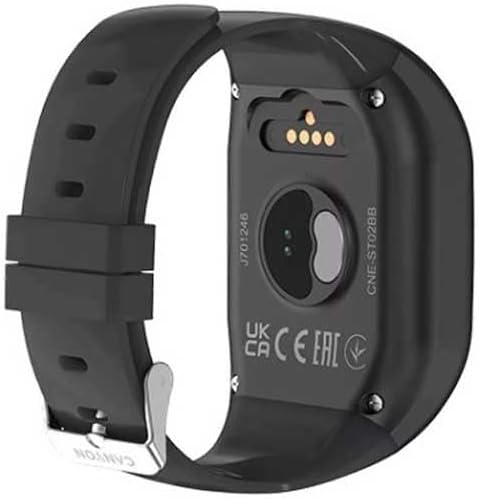
בילד: הינטערשטע view of the Smartband, highlighting the metallic charging pins and optical sensors for health monitoring.
2.2. פּאָווערינג אויף / אויסגעלאשן
To power on the device, press and hold the main button (often the SOS button or a dedicated power button, if present) for a few seconds until the screen illuminates or a vibration is felt. To power off, navigate to the power-off option in the device menu or press and hold the main button again, following on-screen prompts.
2.3. אַפּ אינסטאַלאַציע און פּערינג
- Download the official CANYON companion application from your smartphone's app store (Google Play Store for Android or Apple App Store for iOS).
- מאַכן זיכער אַז בלועטאָאָטה איז ענייבאַלד אויף דיין סמאַרטפאָנע.
- Open the CANYON app and follow the on-screen instructions to create an account or log in.
- Select "Add Device" or "Pair New Device" within the app. The app will search for available Smartbands.
- Select "CANYON ST-02" from the list of found devices to initiate pairing. Confirm any pairing requests on both your smartphone and the Smartband.
Successful pairing will be indicated by a notification on both devices.
3. אַפּערייטינג ינסטרוקטיאָנס
3.1. קנעפּל פאַנגקשאַנז

בילד: פראָנט view of the Smartband, displaying the '1', '2', and prominent 'SOS' buttons, along with a microphone icon.
- קנעפּל 1: Typically used for quick dialing a pre-set contact (e.g., family member 1).
- קנעפּל 2: Typically used for quick dialing a pre-set contact (e.g., family member 2).
- SOS קנעפּל: Press and hold this button in an emergency. It will initiate a call to pre-programmed emergency contacts and may send location data.
- Microphone Icon: Indicates the built-in microphone for two-way communication during calls initiated via buttons 1, 2, or SOS.
3.2. טעטיקייט טראַקינג
The Smartband continuously tracks your daily activity, including steps taken, distance covered, and calories burned. This data is synchronized with the companion app on your smartphone, where you can view your progress and historical data.
3.3. דזשי-פי-עס פונקציאָנאַליטעט
The Smartband utilizes GPS via your connected smartphone to provide location tracking. This feature is particularly useful for emergency situations or for family members to monitor the wearer's location (with consent). Ensure your smartphone's GPS and Bluetooth are active for this feature to function correctly.
3.4. באַקומען נאָוטאַפאַקיישאַנז
Once paired with your smartphone, the Smartband can display notifications for incoming calls, messages, and other app alerts. Manage notification settings within the CANYON companion app.
4. וישאַלט און קער
- רייניקונג: Wipe the device regularly with a soft, dry cloth. For stubborn dirt, use a slightly damp cloth and immediately dry the device. Avoid harsh chemicals or abrasive materials.
- וואַסער קעגנשטעל: Refer to the product specifications for water resistance ratings. Avoid submerging the device beyond its specified limits.
- באַטערי זאָרגן: To prolong battery life, avoid extreme temperatures. Do not leave the device fully discharged for extended periods.
- סטאָרידזש: When not in use for a long time, store the Smartband in a cool, dry place.
5. טראָובלעשאָאָטינג
| פּראָבלעם | מעגלעך לייזונג |
|---|---|
| די מיטל טוט נישט מאַכט אויף. | זיכער מאַכן אַז די דעווייס איז גאָר אויפגעלאָדן. פֿאַרבינדט עס צום טשאַרדזשער פֿאַר לפּחות 30 מינוט. |
| קען נישט פאַרבינדן מיטן סמאַרטפאָן. |
|
| SOS function not working. |
|
| Inaccurate activity data. | Ensure the Smartband is worn correctly on the wrist. Calibrate the device through the companion app if available. |
6. פּראָדוקט ספּעסאַפאַקיישאַנז
- סאָרט: CANYON
- מאָדעל נאָמען: Senior ST-02
- קאָליר: שוואַרץ
- קאַנעקטיוויטי טעכנאָלאָגיע: בלועטאָאָטה
- ספּעציעלע פֿעיִקייטן: Lightweight, Bluetooth, Senior-oriented features
- קאַמפּאַטאַבאַל דעוויסעס: סמאַרטפאָנע
- קריקאָנלאָדלעך באַטערי: Yes (1 Lithium-polymer included)
- גפּס: דזשי-פי-עס דורך סמאַרטפאָון
- פאָרם פאַקטאָר: קוואַדראַט
- ציל וילעם: וניסעקס
7. וואָראַנטי און שטיצן
קאַניאָן פּראָדוקטן זענען באדעקט מיט אַ פאַבריקאַנט'ס וואָראַנטי. ביטע זען די וואָראַנטי קאַרטל וואָס איז אַרייַנגערעכנט מיט דיין פּראָדוקט אָדער באַזוכן די באַאַמטער קאַניאָן וועבזייטל. webזייטל פֿאַר דעטאַלירטע וואָראַנטי טערמינען און באדינגונגען.
For technical assistance, troubleshooting, or further inquiries, please contact CANYON customer support through their official webזייטל אדער די קאָנטאַקט אינפֿאָרמאַציע וואָס איז צוגעשטעלט אין אייער פּראָדוקט פּאַקאַדזשינג.


