וויכטיק סאַפעטי אינסטרוקציעס
Please read these instructions carefully before operating the unit and retain them for future reference.
- דו זאלסט נישט ויסשטעלן דעם אַפּפּליאַנסע צו דריפּינג אָדער ספּלאַשינג וואַסער.
- שטעלט נישט קיין זאכן אָנגעפילט מיט פליסיקייטן, ווי למשל וואַזעס, אויף דעם אַפּאַראַט.
- זיכער מאַכן אַז עס איז דאָ געהעריקע ווענטילאַציע. נישט פֿאַרשטאָפּן קיין ווענטילאַציע עפענונגען.
- דו זאלסט נישט ינסטאַלירן לעבן קיין היץ קוואלן אַזאַ ווי ראַדיאַטאָרס, היץ רעדזשיסטערז, סטאָוווז אָדער אנדערע אַפּאַראַט (אַרייַנגערעכנט ampליפיערס) וואָס פּראָדוצירן היץ.
- נאָר נוצן אַטאַטשמאַנץ / אַקסעסעריז ספּעסיפיעד דורך דער פאַבריקאַנט.
- אָפּשטעקן דעם אַפּפּליאַנסע בעשאַס בליץ סטאָרמז אָדער ווען אַניוזד פֿאַר לאַנג פּיריאַדז.
- קאָנטאַקט אַלע קוואַלאַפייד סערוויס פּערסאַנעל. סערוויסינג איז פארלאנגט אויב די אַפּאַראַט איז דאַמידזשד אין קיין וועג.
פּראָדוקט איבערview
The Muse M17CB is a compact dual PLL FM/MW digital alarm clock radio designed for reliable timekeeping and audio playback. It features a clear 0.9-inch white LED display with a dimmer function and a 24-hour time format. Users can set two independent alarms, choosing to wake up to either the radio or a buzzer. The digital tuner allows for 6 preset stations (3 FM and 3 MW) for quick access to your favorite broadcasts. Additional functions include SNAP, SLEEP, and SNOOZE for enhanced user convenience.
פראָנט View

בילד באַשרייַבונג: This image displays the front of the Muse M17CB alarm clock radio. It features a prominent 0.9-inch white LED display showing "12:00". Above the display are various control buttons and two rotary knobs. The buttons include P.1, P.2, P.3, DIM., O/SOURCE, and a large SNOOZE button. The left rotary knob is for VOLUME, and the right is for TUNING/SET. A small "muse" logo tag is visible on the left side.
Top פּאַנעל קאָנטראָלס

בילד באַשרייַבונג: דאָס בילד גיט אַ בילד פֿון אויבן אַראָפּ view of the Muse M17CB alarm clock radio, highlighting the control panel. It shows two large rotary knobs for Volume and Tuning/Set, along with several push buttons: P.1, P.2, P.3 (for radio presets), DIM. (dimmer), O/SOURCE (power/source selection), and a large circular SNOOZE button. The layout is clear and intuitive.
דערציען פּאַנעל קאַנעקשאַנז

בילד באַשרייַבונג: This image shows the rear panel of the Muse M17CB alarm clock radio. It clearly displays the "AC~" power input socket, the "FM ANT." wire antenna, and an "AUX IN" 3.5mm jack for connecting external audio devices. A speaker grille is also visible on the right side.
סעטאַפּ
מאַכט קאַנעקשאַן
- Unpack the Muse M17CB unit and all accessories.
- Connect the AC power cord to the "AC~" input on the rear of the unit.
- שטעקט אריין דעם אנדערן עק פונעם עלעקטרישן שנור אין א געווענליכע וואנט-אויסגאבע.
- The LED display will light up, indicating the unit is receiving power.
אַנטענאַ סעטאַפּ
- For optimal FM reception, fully extend the FM wire antenna located at the back of the unit.
- Adjust the position of the antenna for the best possible signal reception.
אַפּערייטינג ינסטראַקשאַנז
באַשטעטיקן די צייט
- מאַכן זיכער אַז די אַפּאַראַט איז פּאַוערד אויף.
- דריקן און האַלטן די TUNING/SET knob for approximately 2 seconds until the hour digits flash on the display.
- דרייען די TUNING/SET קנופּ צו סטרויערן די שעה.
- דרוק די TUNING/SET knob once to confirm the hour; the minute digits will flash.
- דרייען די TUNING/SET knob to adjust the minutes.
- דרוק די TUNING/SET knob again to confirm the minutes and exit time setting mode.
- די צייט איז געוויזן אין 24-שעה פֿאָרמאַט.
Setting the Alarm (Alarm 1 and Alarm 2)
די איינהייט פֿאַרמאָגט צוויי אומאָפּהענגיקע אַלאַרמען (אַלאַרם 1 און אַלאַרם 2).
- דרוק די פּ.קסנומקס קנעפּל (פֿאַר אַלאַרם 1) אָדער פּ.קסנומקס button (for Alarm 2) once. The alarm icon and hour digits will flash.
- דרייען די TUNING/SET knob to adjust the alarm hour.
- דרוק די TUNING/SET knob to confirm the hour; the minute digits will flash.
- דרייען די TUNING/SET knob to adjust the alarm minutes.
- דרוק די TUNING/SET knob to confirm the minutes. The alarm source (radio or buzzer) will flash.
- דרייען די TUNING/SET knob to select either ראַדיאָ or בוזזער as the alarm sound.
- דרוק די TUNING/SET knob to confirm the alarm source. The alarm volume will flash (if radio is selected).
- דרייען די באַנד knob to set the desired alarm volume (for radio alarm).
- דרוק די TUNING/SET knob to save the alarm settings. The corresponding alarm icon will appear on the display, indicating the alarm is active.
כדי צו דעאַקטיווירן אַן אַלאַרם, דריק די קאָרעספּאָנדירנדיקע פּ.קסנומקס or פּ.קסנומקס קנעפּל ביז די אַלאַרם ייקאַן פֿאַרשווינדט פֿון דיספּליי.
Radio Operation (FM/MW)
- דרוק די O/SOURCE button to turn on the radio. Press it repeatedly to cycle between FM, MW, and AUX modes.
- דרייען די TUNING/SET knob to manually tune to a desired frequency.
- צו אויטאמאטיש סקענען פאר סטאנציעס, דריק און האלט די TUNING/SET knob for 2 seconds. The radio will scan and stop at the next available station.
Setting and Recalling Presets (P.1, P.2, P.3)
- צו שפּאָרן אַ פאָרסעט: Tune to the desired station. Press and hold one of the preset buttons (פּ.קסנומקס, פּ.קסנומקס, אָדער פּ.קסנומקס) for 2 seconds until the display confirms the preset is saved.
- צו צוריקרופן אַ פּריסעט: Briefly press the desired preset button (פּ.קסנומקס, פּ.קסנומקס, אָדער פּ.קסנומקס) to tune to the stored station.
דיממער פֿונקציע
דרוק די DIM. button repeatedly to adjust the brightness of the LED display to your preference (e.g., High, Medium, Low, Off).
סנאָאָזע פֿונקציע
ווען אַן אַלאַרם קלינגט, דריק די גרויסע קנעפּל SNOOZE קנעפל צו צייטווייליג שטיל מאכן דעם אלארם. דער אלארם וועט ווידער קלינגען נאך בערך 9 מינוט.
שלאָף פֿונקציע
The sleep function allows you to fall asleep to the radio, which will automatically turn off after a set period.
- בשעת די ראַדיאָ שפּילט, דריק די פּ.קסנומקס button (often doubles as SLEEP function) repeatedly to cycle through available sleep timer durations (e.g., 90, 60, 30, 15 minutes, or OFF).
- דער ראַדיאָ וועט זיך אויטאָמאַטיש אויסלעשן נאָך דער אויסגעקליבענער געדויער.
SNAP Function
The specific operation of the SNAP function is not detailed in the provided product description. Please refer to the full printed manual included with your device for instructions on using the SNAP feature.
הילפס-איינגאנג (AUX IN)
פֿאַרבינדט אַן עקסטערנעם אַודיאָ מיטל (למשל, MP3 שפּילער, סמאַרטפאָון) צום AUX IN jack on the rear of the unit using a 3.5mm audio cable. Press the O/SOURCE button repeatedly until "AUX" appears on the display to switch to auxiliary input mode. Audio from the connected device will play through the alarm clock's speaker.
וישאַלט
- רייניקונג: ניצט אַ ווייכע, טרוקענע שטאָף צו רייניקן די אויסערלעכע זייט פון דעם אַפּאַראַט. ניצט נישט קיין שרײַבנדיקע רייניגער, וואַקסן אָדער סאָלווענטן.
- סטאָרידזש: If the unit is not used for an extended period, unplug it from the power outlet and store it in a cool, dry place.
- ויסמיידן נעץ: Keep the unit away from water and high humidity.
טראָובלעשאָאָטינג
| פּראָבלעם | מעגלעך סיבה | לייזונג |
|---|---|---|
| קיין מאַכט / דיספּליי אויסגעלאָשן | עלעקטרישע שנור נישט ריכטיג פארבונדן. | זיכער מאַכן אַז די AC מאַכט שנור איז זיכער אַרייַנגעשטעקט אין דעם אַפּאַראַט און אַ אַרבעטנדיק וואַנט ווענטיל. |
| נעבעך ראַדיאָ אָפּטראָג | די FM אַנטענע נישט אויסגעצויגן אָדער ריכטיק פּאַזיציאָנירט. | Fully extend and adjust the position of the FM wire antenna for better reception. Try moving the unit to a different location. |
| שרעק טוט נישט געזונט | אַלאַרם נישט אַקטיוויזירט אָדער פאַלש געשטעלט. | Verify that the alarm icon is displayed. Recheck alarm time and source settings. Ensure alarm volume is not set to minimum if radio alarm is selected. |
| דיספּליי צו העל/טונקעל | די דימער סעטטינג דארף אדזשאַסטמענט. | דרוק די DIM. button repeatedly to cycle through brightness levels. |
ספּעסאַפאַקיישאַנז
- מאָדעל: M17CB
- ווייַז: 0.9-inch White LED with Dimmer
- צייט פֿאָרמאַט: 24-שעה
- טונער: Digital FM/MW PLL
- פּרעסעץ: 6 (3 FM + 3 MW)
- אַלאַרמס: Dual Alarm (Radio or Buzzer)
- פאַנגקשאַנז: SNAP, SLEEP, SNOOZE
- מאַכט מקור: אַק מאַכט
- דימענסיעס: 13 סענטימעטער (לענג) רענטגענ 11 סענטימעטער (ברייט) רענטגענ 6.5 סענטימעטער (הייך)
- קאָליר: טערקווויז
- מאַטעריאַל: Resin or Plastic
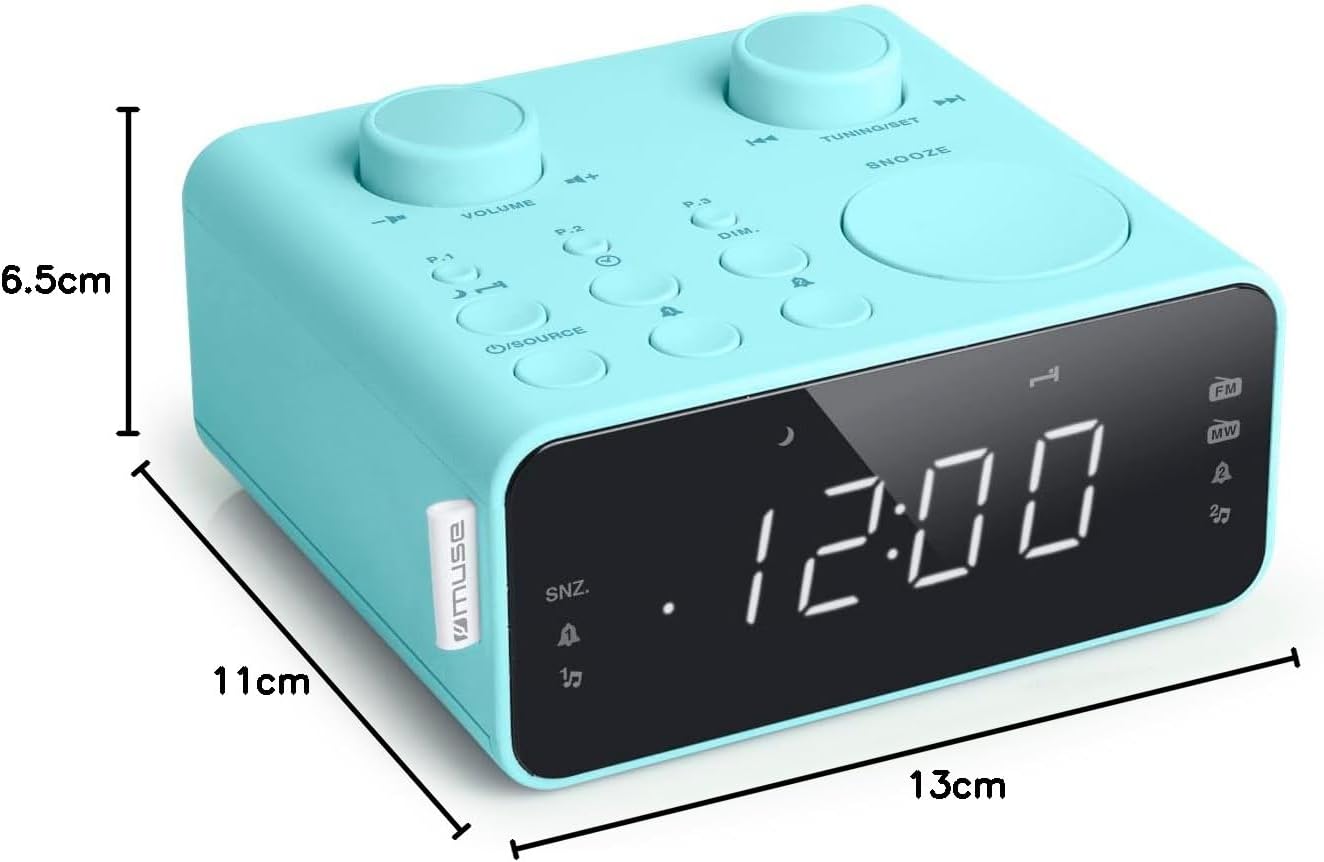
בילד באַשרייַבונג: This image illustrates the dimensions of the Muse M17CB alarm clock radio. It shows the unit with measurements indicating a length of 13cm, a width of 11cm, and a height of 6.5cm.
וואָראַנטי און שטיצן
פֿאַר וואָראַנטי אינפֿאָרמאַציע און טעכנישע שטיצע, ביטע זען די וואָראַנטי קאַרטל וואָס איז אַרייַנגערעכנט מיט דיין פּראָדוקט אָדער באַזוכן די באַאַמטער מוזע וועבזייטל webזייטל. האַלט אייער קויף קוויטל ווי אַ באַווייַז פון קויפן.
The product includes a user manual (as indicated by "Pièces incluses: Manuel du propriétaire").


