הקדמה
This manual provides detailed instructions for the WOLFANG GA300 Action Camera. It covers setup, operation, maintenance, and specifications to ensure optimal performance and user experience. The GA300 is designed to capture high-quality video and photos in various environments, including underwater, with advanced stabilization and versatile features.
וואָס איז אין די קעסטל
The WOLFANG GA300 Action Camera package includes the following items:
- 1x WOLFANG GA300 Action Camera
- 1x רימאָוט קאָנטראָל
- 2x 1350mAh באַטערי
- קסנומקסקס וואַטערפּראָאָף קאַסע
- קסנומקסקס וועלאָסיפּעד שטייט
- 5x Mount
- 2x 2-sided tape
- 2x Helmet Mount
- 4x Bandages
- 5x Tethers
- 1x וסב קאַבלע
- קסנומקסקס לענס קלאָטה
- 1x שנעל רעפערענץ גייד
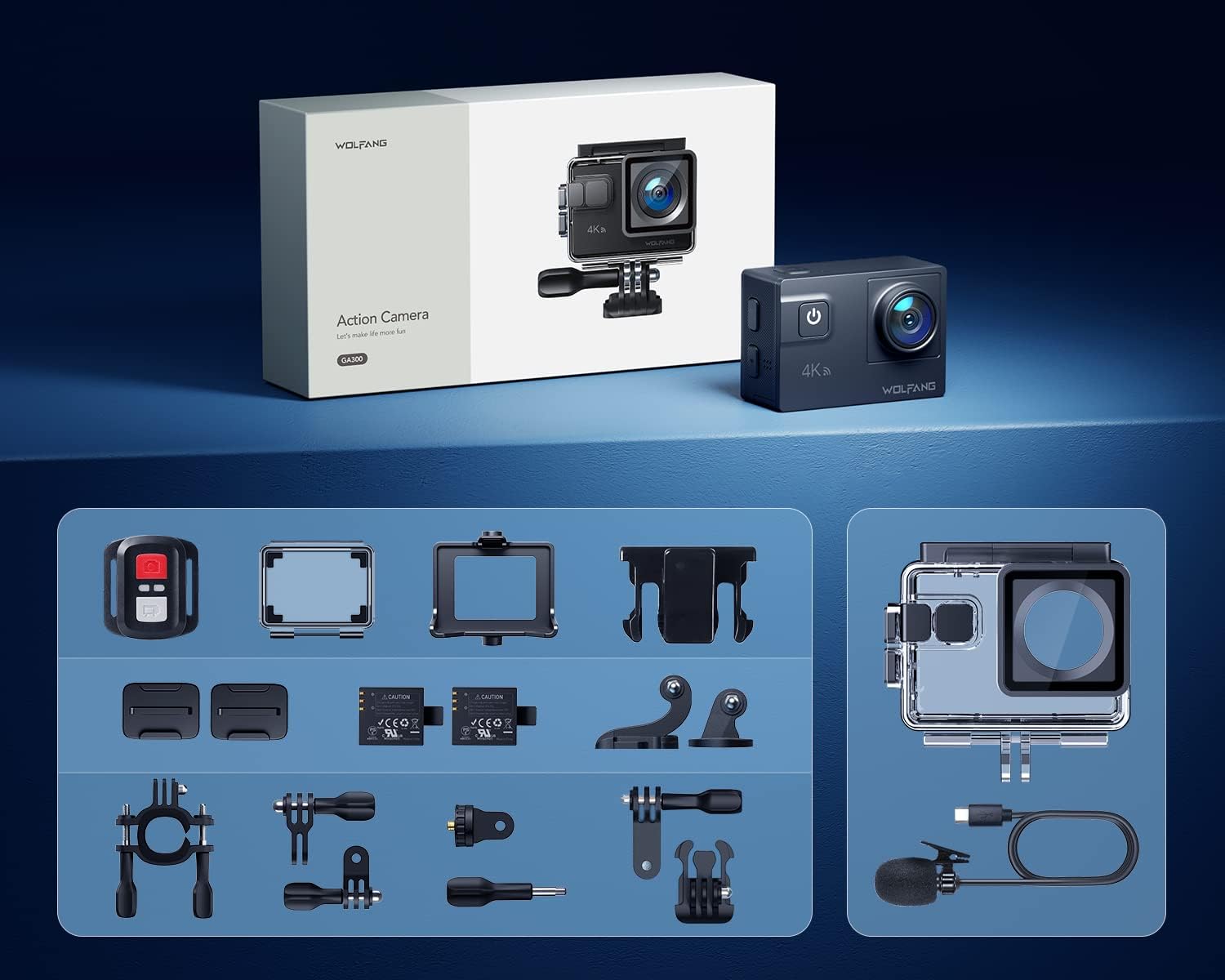
Image: All components included in the WOLFANG GA300 Action Camera kit, neatly laid out.
פּראָדוקט איבערview
The WOLFANG GA300 Action Camera features a compact design with intuitive controls and multiple connectivity options.
קאַמעראַ קאַמפּאָונאַנץ
- פראָנט פאַרשטעלן: פֿאַר לעבן פאַר-view און סטאַטוס ינדיקאַטאָרס.
- Rear Touchscreen (2-inch): פֿאַר מעניו נאַוויגאַציע, סעטטינגס אַדזשאַסטמענט, און ווידערשפּיל.
- מאַכט / מאָדע קנעפּל: To power on/off and switch between modes.
- שאַטער/OK קנעפּל: To start/stop recording or take photos.
- וסב- C פּאָרט: פֿאַר טשאַרדזשינג און דאַטן אַריבערפירן.
- מיני HDMI פּאָרט: For video output to external displays.
- מיקראָפאָן אַרייַנשרייַב: פֿאַר פֿאַרבינדן דעם עקסטערנעם מיקראָפֿאָן.
- מיקראָ סד קאָרט שפּעלטל: Supports up to 128GB cards (32GB included).
- באַטערי אָפּטייל: Houses the removable 1350mAh battery.

Image: The WOLFANG GA300 camera, showcasing its compact size and key accessories.
סעטאַפּ
1. ינסערטינג באַטערי
Open the battery compartment cover located at the bottom of the camera. Insert a fully charged 1350mAh battery, ensuring the contacts align correctly. Close the cover securely.
2. אריינשטעלן מיקראָ סד קאַרטל
Locate the Micro SD card slot on the side of the camera. Insert a compatible Micro SD card (Class 10 or higher, up to 128GB) with the contacts facing the correct direction until it clicks into place.
3. טשאַרדזשינג די קאַמעראַ
Connect the camera to a USB power source using the provided USB-C cable. The charging indicator will illuminate. A full charge typically takes a few hours. Two batteries are included, each providing approximately 90 minutes of recording time.
4. אנשטעלן דעם וואַסערפּרוף קעסטל
For underwater use or protection against dust and impact, place the camera inside the waterproof case. Ensure the case is properly sealed before use. The case allows the camera to be waterproof up to 40 meters.

Image: The WOLFANG GA300 in its waterproof housing, demonstrating its 40M waterproof capability.
5. Attaching Mounts
Utilize the various included mounts (bicycle stand, helmet mounts, general mounts) to secure your camera for different activities. Ensure all mounts are firmly attached to prevent accidental detachment.

Image: A person on a mountain bike with the camera mounted, illustrating helmet mount usage.
אַפּערייטינג די אַפּאַראַט
1. מאַכט אויף / אויסגעלאשן
דריקן און האַלטן די מאַכט / מאָדע קנעפּל צו קער די אַפּאַראַט אויף אָדער אַוועק.
2. ניצן די טאָוטשסקרעען
Navigate through menus and settings by swiping and tapping on the 2-inch rear touchscreen. The responsive touchscreen allows for easy operation.
3. ווידעא רעקאָרדינג
Select video mode from the menu. Press the Shutter/OK button to start recording. Press again to stop. The camera supports 4K at 60FPS, 1080P at 120FPS, and 720P at 240FPS for various recording needs.
4. פאָטאָ כאַפּן
Switch to photo mode. Press the Shutter/OK button to take a 24MP photo.
5. ניצן די רימאָוט קאָנטראָל
The included remote control allows you to start/stop video recording and take photos from a distance of up to 10 meters.
6. Wi-Fi Connectivity and App
Enable Wi-Fi on the camera and connect it to your smartphone via the IBK Cam app. This allows for live preview, remote control, and easy transfer of media to your device.

Image: The camera's live view displayed on a smartphone, demonstrating Wi-Fi connectivity.
7. ספּעציעלע פאַנגקשאַנז
- פּאַמעלעך באַוועגונג: Capture fast-paced action in slow motion.
- צייט שטרעקע: Condense long events into short, dynamic videos.
- פּלאַצן מאָדע: נעמט קייפל בילדער אין שנעלער נאכפאלג.
- ונטערטוקנ זיך מאָדע: Enhances underwater footage by correcting color balance.

בילד: וויזועל עקסamples of Time Lapse, Loop Recording, Slow Motion, and Long Exposure modes.
8. Adjustable View ווינקל לענס
The camera features an adjustable view angle lens, allowing you to switch between Wide, Medium, and Narrow fields of view to suit your shooting needs.

Image: The adjustable view angle feature, demonstrating different perspectives from Wide to Narrow.
9. 6-Axis EIS Stabilization & 8x Zoom
The advanced 6-axis Electronic Image Stabilization (EIS) ensures your videos remain smooth and stable, even during dynamic activities. The 8x zoom function allows for precise control over shooting distance and capturing distant details.
וישאַלט
- וואָטערפּרוף קאַסע: Regularly inspect the waterproof case for any damage or debris on the seal. Clean with fresh water after saltwater use and allow to air dry.
- Lens Care: Use the provided lens cloth to gently clean the camera lens and waterproof case lens. Avoid abrasive materials.
- באַטאַרייע סטאָרידזש: Store batteries in a cool, dry place. For long-term storage, charge batteries to approximately 50% capacity.
- אַלגעמיינע רייניקונג: ווישט אָפּ דעם קאַמעראַ קערפּער מיט אַ ווייכן, טרוקענעם שטאָף. פֿאַרמייַדט ניצן שאַרפע כעמיקאַלן.
טראָובלעשאָאָטינג
- די אַפּאַראַט טוט נישט קער אויף: זיכער מאַכן אַז די באַטאַרייע איז גאָר אויפגעלאָדן און ריכטיק אַרײַנגעשטעלט. פּרוּווט ניצן די צווייטע אַרייַנגערעכנטע באַטאַרייע.
- רעקאָרדינג ישוז: Check if the Micro SD card is properly inserted and has sufficient free space. Ensure the card is Class 10 or higher.
- נעבעך אַודיאָ קוואַליטעט: If using the external microphone, ensure it is securely plugged into the correct port. Check camera settings to confirm external mic is selected.
- Wi-Fi קאַנעקשאַן פּראָבלעמס: Restart both the camera and your smartphone. Ensure the IBK Cam app is up to date.
- וואַסער ליקאַדזש: Immediately remove the camera from the waterproof case. Inspect the case for cracks or damage to the rubber seal. Do not use the case if damaged.
ספּעסאַפאַקיישאַנז
| שטריך | באַשרייַבונג |
|---|---|
| סאָרט | WOLFANG |
| מאָדעל נומער | GA300 |
| ווידעא קאַפּטורע רעסאָלוטיאָן | 4K 60FPS, 4K 30FPS, 2.7K 30FPS, 1080P 120FPS, 1080P 60FPS, 1080P 30FPS, 720P 240FPS, 720P 120FPS, 720P 60FPS |
| פאָטאָ האַכלאָטע | 24MP |
| וואָטערפּרוף דעפּט | 40M (with included case) |
| בילד סטאַביליזאַטיאָן | 6-Axis EIS |
| פארגרעסער | 8x |
| פאַרשטעלן גרייס | 2 Inches (Touchscreen) |
| קאַנעקטיוויטי | Wi-Fi, USB-C, Mini HDMI |
| סטאָרידזש | מיקראָ סד (ביז 128 גיגאבייט, 32 גיגאבייט אריינגערעכנט) |
| באַטעריז | 2x 1350mAh Lithium Ion (included) |
| פּונקט וואָג | 1.19 פונט |
| פּראָדוקט דימענשאַנז | 2.36 X 1.65 X 0.98 אינטשעס |
אפיציעלע פּראָדוקט ווידיאס
WOLFANG GA300 Audio Test
Video: An audio test demonstrating the sound recording capabilities of the WOLFANG GA300 Action Camera, including both internal and external microphone performance.
WOLFANG Action Camera 4K 60FPS 24MP Review
ווידעא: א דעטאלירטע רעקארדירונגview of the WOLFANG GA300 Action Camera, highlighting its 4K 60FPS video and 24MP photo capabilities, along with other features.


