1. הקדמה
The ORIVISION EHV1401 is a versatile HDMI and VGA video encoder designed for professional video streaming and broadcasting applications. It supports H.265 and H.264 video encoding at resolutions up to 1080P@60Hz, offering multi-channel output and various streaming protocols. This manual provides detailed instructions for setting up, operating, and maintaining your encoder.
2. שליסל פֿעיִקייטן
- Supports H.265/H.264 video encoding.
- Adaptive selection for HDMI or VGA input.
- Simultaneous HDMI and VGA loop-out display.
- Supports 1x HDMI and 1x VGA input with corresponding loop-out.
- Digital and analog audio loop-out support.
- Wide protocol support: HTTP, HTTPS, RTSP, RTMP, RTMPS, SRT, UDP, RTP, HLS, FLV, Onvif.
- Up to 1080P@60Hz resolution input and output.
- Supports 4 channels of simultaneous stream output.
- Audio encoding without video input capability.
- Two-way audio transmission support.
- AAC/G.711 advanced audio coding format.
- 1000M full-duplex network interface for LAN and WAN transmission.
- Supports POE power supply (optional).
- SDK support for secondary development.
- Network remote management and upgrade capabilities.
- דיזיינד פֿאַר 24/7 אָפּעראַציע.
3. פּראָדוקט איבערview and Interfaces
The ORIVISION EHV1401 encoder features multiple input and output ports for flexible connectivity. Understanding these interfaces is crucial for proper setup.

פיגורע 3.1: Front panel of the ORIVISION EHV1401 encoder. From left to right, it shows VGA input, HDMI input, Audio input, Audio output, VGA output, HDMI output, LAN port, and 12V DC power input.
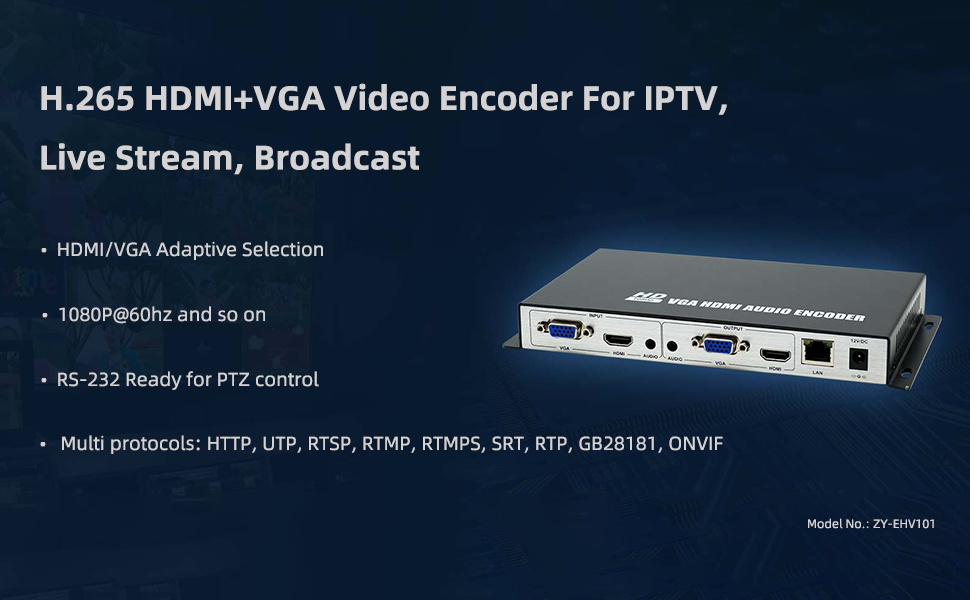
פיגורע 3.2: איבערview of the ORIVISION EHV1401 encoder highlighting its primary applications for IPTV, Live Stream, and Broadcast, along with key features like adaptive input, 1080P@60Hz support, RS-232 for PTZ, and multiple protocols.
4. סעטאַפּ און קאַנעקשאַן
Follow these steps to connect your ORIVISION EHV1401 encoder to your video sources, displays, and network.
- קאָננעקט ווידעא מקור: Connect your HDMI or VGA video source (e.g., PC, camera, monitor, DVD player) to the corresponding HDMI or VGA input port on the encoder.
- פֿאַרבינדן אַודיאָ מקור (אָפּציאָנעל): If using external audio, connect your audio source to the Audio input port.
- Connect Local Displays (Loop-out): For local monitoring, connect HDMI or VGA displays to the HDMI Loopout and VGA Loopout ports.
- נעץ קאַנעקשאַן: Connect an Ethernet cable from the encoder's LAN port to your network router or switch.
- מאַכט קשר: Connect the 12V DC power adapter to the encoder's 12VDC port and plug it into a power outlet. If using POE (Power over Ethernet), ensure your network switch supports POE and connect the Ethernet cable.

פיגורע 4.1: Basic connection diagram illustrating how to connect video sources (PC, camera, monitor, DVD), local loop-out displays, and network for streaming to various platforms.
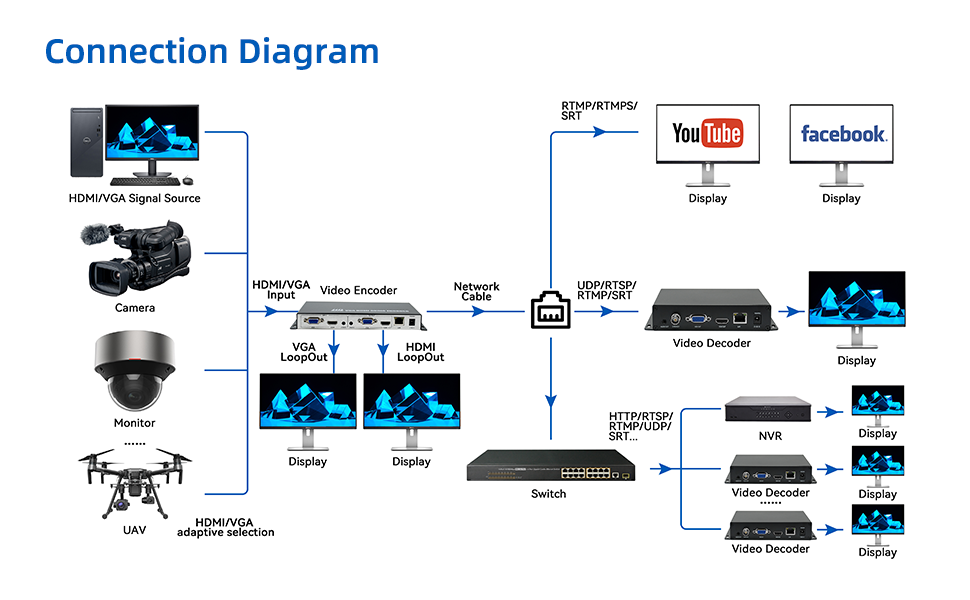
פיגורע 4.2: Advanced connection diagram showing integration with multiple signal sources, local displays, network switches, and various streaming/recording destinations including YouTube, Facebook, video decoders, and NVRs.
5. אַפּערייטינג ינסטרוקטיאָנס
Once the encoder is connected, you can configure and manage it via its web צובינד.
5.1 אַקסעס די Web צובינד
- Ensure your computer is on the same network as the encoder.
- עפענען א web browser and enter the encoder's IP address (refer to your network settings or default IP if provided in documentation).
- Log in using the provided credentials (default username/password are usually 'admin'/'admin' or similar, check product documentation).

פיגורע 5.1: Example screenshot of the encoder's web interface, providing access to system information and configuration settings.
5.2 Configuring Video and Audio Settings
- Navigate to the "Encoder" or "Video Settings" section in the web צובינד.
- Select your desired input source (HDMI or VGA).
- Configure video resolution (up to 1080P@60Hz), frame rate, and bitrate.
- Adjust audio encoding settings (AAC/G.711) and bitrate.
פיגורע 5.2: The encoder supports AAC and G.711 audio encoding for high-quality audio transmission.
5.3 Streaming Configuration
The encoder supports various streaming protocols. Configure your desired protocol and destination.

פיגורע 5.3: The encoder supports a wide range of streaming protocols including RTMP, RTMPS, RTSP, SRT, HLS, UDP/RTP, Multicast, HTTP, and Onvif.
- Select the streaming protocol (e.g., RTMP for YouTube/Facebook Live).
- Enter the streaming server URL and stream key/name provided by your streaming platform.
- Save your settings and start the stream.
6. ספּעסאַפאַקיישאַנז
Detailed technical specifications for the ORIVISION EHV1401 encoder (Model ZY-EHV101).

פיגורע 6.1: Comprehensive specifications table for the ZY-EHV101 model, detailing video input/output, supported resolutions, encoding, audio interfaces, network features, and general device parameters.
| קאַטעגאָריע | פּאַראַמעטער | ווערט |
|---|---|---|
| ווידעא | אַרייַנשרייַב ינטערפייסיז | 1x HDMI 1.4 and VGA (HDCP1.4) |
| שטיצן האַכלאָטע | 1920*1080, 1280*720, 1280*800, 1280*768, 1024*768, 1024*576, 960*540, 850*480, 800*600, 720*576, 720*540, 720*480, 720*404, 704*576, 640*480, 640*360, 480*270, Auto | |
| ראַם קורס | 5-60 הז | |
| רעזולטאַט ינטערפייסיז | 1x Ethernet port (RJ45), 1x HDMI and VGA Loop-out | |
| ווידעא קאָדירונג | H.265 & H.264 | |
| קאָוד קורס | 16kbps - 12Mbps | |
| אַודיאָ | אַרייַנשרייַב ינטערפייסיז | 1x External audio, HDMI and VGA built-in Audio |
| רעזולטאַט ינטערפייסיז | 1x External audio | |
| אַודיאָ קאָדירונג | AAC, G.711 | |
| נעץ | RJ45 | 1000 ם עטהערנעט פּאָרט |
| Program Streaming | HTTP, RTSP, RTMP/RTMPS, SRT, GB28181, HLS, FLV, ONVIF, Multicast: UDP/RTP | |
| אַלגעמיינע | Dimension (W*L*H) | 8.5*4.4*0.98in (217*112*25mm) |
| גראָב וואָג | 0.35 קג | |
| טעמפּעראַטור | 0 ~ 45°C (for working), -20~60°C (for storing) | |
| הומידיטי | <90%, ניט-קאַנדענסינג | |
| אַרייַנשרייַב וואָלtage | DC 12V/1A | |
| מאַכט קאַנסאַמשאַן | 5W |

פיגורע 6.2: Physical dimensions of the ORIVISION EHV1401 encoder.
7. טראָובלעשאָאָטינג
This section addresses common issues you might encounter with your ORIVISION EHV1401 encoder.
- קיין ווידעא רעזולטאַט:
- Check all HDMI/VGA cable connections. Ensure they are securely plugged in.
- Verify the input source is active and outputting a signal.
- Confirm the resolution and refresh rate of the input source are supported by the encoder (refer to specifications).
- Ensure the correct input source is selected in the encoder's web צובינד.
- קיין נעץ קאָנעקטיוויטי:
- Check the Ethernet cable connection to the encoder and your network device.
- Verify network settings (IP address, subnet mask, gateway) in the encoder's web צובינד.
- Ensure your network router/switch is functioning correctly.
- Streaming Issues (Buffering, Disconnections):
- קאָנטראָלירט אייער אינטערנעט פֿאַרבינדונג גיכקייט און פעסטקייט.
- Reduce the video bitrate in the encoder settings if your internet upload speed is insufficient.
- Verify the streaming server URL and stream key/name are correct.
- Ensure no firewall or network security settings are blocking the streaming protocols.
- קיין אַודיאָ:
- Check audio cable connections (if using external audio).
- Ensure audio is enabled and correctly configured in the encoder's web צובינד.
- Verify the audio source is active and producing sound.
8. וישאַלט
Proper maintenance ensures the longevity and optimal performance of your ORIVISION EHV1401 encoder.
- רייניקונג: ניצט אַ ווייכע, טרוקענע שטאָף צו רייניקן די אויסערלעכע זייט פון דעם אַפּאַראַט. פֿאַרמייַדט פליסיקע רייניקונגס־מיטלען אָדער אַברייסיוו מאַטעריאַלן.
- ווענטילאַטיאָן: Ensure the encoder is placed in a well-ventilated area to prevent overheating. Do not block ventilation openings.
- Firmware דערהייַנטיקונגען: Periodically check the ORIVISION website for firmware updates. Keeping the firmware updated can improve performance and add new features.
- סטאָרידזש: If storing the device for an extended period, ensure it is kept in a cool, dry place within the specified storage temperature range (-20~60°C).
9. וואָראַנטי און שטיצן
For warranty information and technical support, please refer to the documentation included with your purchase or visit the official ORIVISION website. You can also contact ORIVISION customer service for assistance with product setup, operation, or troubleshooting.
פאַבריקאַנט: Nantong ZYDZ Electronic Co.,Ltd.
סאָרט: ORIVISION


