הקדמה
The HOCO W25 Bluetooth Headphones are designed to provide a high-quality audio experience with deep bass and crisp sound. Featuring touch controls, a water-resistant and sweat-proof design, and extended battery life, these headphones are suitable for various activities, from daily commutes to workouts. They offer broad compatibility with Bluetooth-enabled devices, ensuring seamless connectivity and reliable performance.
וואָס איז אין די קעסטל
- HOCO W25 Bluetooth Headphones
- טשאַרדזשינג קאַבלע
פּראָדוקט איבערview

פיגור 1: ווינקלדיק view of the HOCO W25 Bluetooth Headphones in Black.
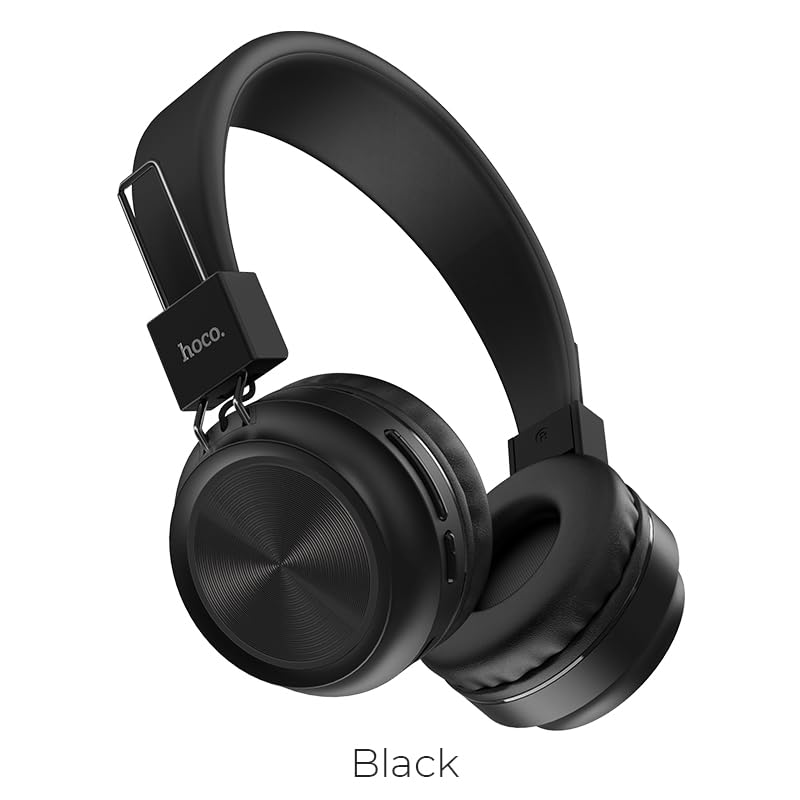
פיגורע 2: פראָנט view of the HOCO W25 Bluetooth Headphones, highlighting the black color option.
שליסל פֿעיִקייטן:
- העכער געזונט קוואַליטעט: Rich, deep bass and crystal-clear highs for an immersive audio experience.
- Water-Resistant and Sweat-Proof: Designed to withstand water and sweat, making them ideal for workouts and outdoor use.
- ריר קאָנטראָלס: Convenient and intuitive control over music playback and calls.
- בלועטאָאָטה 5.3 טעכנאָלאָגיע: Ensures seamless pairing, stable connectivity, and reliable wireless performance.
- גיימינג מאָדע: Low latency performance for an enhanced gaming experience.
- גליטשיק און מאָדערן פּלאַן: Lightweight and comfortable over-ear design.
סעטאַפּ
1. טשאַרדזשינג די כעדפאָונז
Before first use, fully charge your HOCO W25 headphones. Connect the provided charging cable to the charging port on the headphones and the other end to a USB power source (e.g., computer USB port, wall adapter). The charging indicator light will show the charging status and turn off when fully charged. A full charge takes approximately 1 hour.
2. פּערינג מיט אַ בלועטאָאָטה דיווייס
- מאַכן זיכער אַז די כעדפאָונז זענען אויסגעדרייט אַוועק.
- Press and hold the power button on the headphones until the indicator light flashes blue and red alternately, indicating pairing mode.
- אויף אייער דעווייס (סמאַרטפאָן, טאַבלעט, לאַפּטאָפּ), אַקטיווירט בלועטוט און זוכט פֿאַר פֿאַראַן דעווייסעס.
- Select "HOCO W25" from the list of found devices.
- Once connected, the indicator light on the headphones will turn solid blue or flash slowly.
באַמערקונג: די כעדפאָונז וועלן אויטאָמאַטיש פּרובירן זיך ווידער צו פאַרבינדן מיטן לעצטן געפּאָרטן מיטל ווען זיי ווערן אָנגעצונדן.
אַפּערייטינג ינסטראַקשאַנז
מאַכט אויף / אַוועק:
- מאַכט אויף: דריקן און האַלטן די מאַכט קנעפּל פֿאַר 3 סעקונדעס.
- מאַכט אַוועק: דריקן און האַלטן די מאַכט קנעפּל פֿאַר 5 סעקונדעס.
מוזיק פּלייבאַק:
- שפּיל / פּויזע: Single tap the multi-function button.
- ווייַטער שפּור: Double tap the multi-function button.
- פֿריִערדיקע שפּור: Triple tap the multi-function button.
- באַנד אַרויף: דרוק דעם באנד + קנעפּל.
- באַנד אַראָפּ: דריק דעם "Volume -" קנעפל.
רופן פאַרוואַלטונג:
- ענטפֿערן / סוף רופן: Single tap the multi-function button.
- אָפּוואַרפן רופן: דריקן און האַלטן די מולטי-פונקציע קנעפּל פֿאַר 2 סעקונדעס.
- ריאַל די לעצטע נומער: Double tap the multi-function button when not on a call.
שטימע אַססיסטאַנט:
- אַקטאַווייט קול אַססיסטאַנט: Press and hold the multi-function button for 1 second.
מיטל קאָמפּאַטיביליטי
The HOCO W25 Bluetooth Headphones are designed for wide compatibility and can connect with virtually all Bluetooth-enabled devices, including:
- סמאַרטפאָונז (iOS און אַנדרויד)
- טאַבלעץ
- לאַפּטאָפּס
- סמאַרט טעלעוויזיע
- Other Bluetooth audio devices
באַטאַרייע לעבן & טשאַרדזשינג
- שפּיל צייט: Up to 12 hours of continuous music playback or talk time on a single charge.
- סטאַנדביי צייט: אַרויף צו 200 שעה.
- טשאַרדזשינג צייט: בעערעך 1 שעה פֿאַר אַ פול אָפּצאָל.
- טשאַרדזשינג ינדיקאַטאָר: די LED אינדיקאַטאָר וועט ווייַזן די טשאַרדזשינג סטאַטוס און וועט זיך אויסלעשן ווען עס איז גאָר אויפגעלאָדן.
Actual battery life may vary based on volume level, audio content, and usage conditions.
וישאַלט
- רייניקונג: ווישט די כעדפאָונז מיט אַ ווייכן, טרוקענעם שטאָף. ניצט נישט קיין שרײַבנדיקע רייניגער אָדער סאָלווענטן.
- סטאָרידזש: האַלט די כעדפאָונז אין אַ קיל, טרוקן אָרט אַוועק פון דירעקט זונשייַן און עקסטרעמע טעמפּעראַטורן.
- וואַסער ויסשטעלן: While water-resistant and sweat-proof, avoid submerging the headphones in water. Dry thoroughly if exposed to moisture.
- באַטערי זאָרגן: To prolong battery life, avoid fully discharging the headphones frequently. Charge regularly, even if not in use for extended periods.
טראָובלעשאָאָטינג
קיין מאַכט:
- זיכער מאַכן אַז די כעדפאָונז זענען גאָר אויפגעלאָדן.
- קאָנטראָלירט דעם טשאַרדזשינג קאַבל און מאַכט מקור.
קען נישט פארבינדן:
- Make sure the headphones are in pairing mode (flashing blue and red light).
- מאַכן זיכער אַז בלועטאָאָטה איז ענייבאַלד אויף דיין מיטל.
- ריקט די כעדפאָונז נענטער צו אייער דעווייס.
- Forget "HOCO W25" from your device's Bluetooth settings and try pairing again.
- ריסטאַרט ביידע די כעדפאָונז און דיין מיטל.
קיין געזונט אָדער נידעריק באַנד:
- פֿאַרגרעסערט דעם קול אויף ביידע די כעדפאָונז און אייער פֿאַרבונדענעם מיטל.
- זיכער מאַכן אַז די כעדפאָונז זענען ריכטיק פארבונדן צו דיין מיטל.
- קוק צי אן אנדער דעווייס איז פארבונדן צו די כעדפאָונז.
נעבעך געזונט קוואַליטעט:
- ריקט זיך נענטער צו אייער אפאראט כדי צו פארמיידן אריינמישונג.
- זיכער מאַכן אַז עס זענען נישטאָ קיין שטערונגען צווישן די כעדפאָונז און דיין מיטל.
- פרובירט צו שפּילן פֿאַרשידענע אַודיאָ קוועלער.
ספּעסאַפאַקיישאַנז
| שטריך | דעטאַל |
|---|---|
| מאָדעל נאָמען | W25 |
| קאַנעקטיוויטי טעכנאָלאָגיע | ווירעלעסס (בלועטאָאָטה) |
| בלועטאָאָטה ווערסיע | 5.3 |
| ראַש קאָנטראָל | געזונט אפגעזונדערטקייט |
| וואַסער קעגנשטעל מדרגה | וואַסער קעגנשטעליק |
| קאָנטראָל טיפּ | ריר, באַנד קאָנטראָל |
| באַטערי לעבן | 12 שעה (אויפשפּיל) |
| טשאַרדזשינג צייט | 1 שעה |
| סטאַנדביי צייט | 200 שעה |
| פאָרם פאַקטאָר | Over Ear, On Ear |
| מיקראָפאָן פֿאָרמאַט | געבויט-אין |
| מאַטעריאַל | פּלאַסטיק |
| פּונקט וואָג | 161 ג |
| פאַבריקאַנט | HOCO |
אפיציעלע פּראָדוקט ווידעאָ
דער ווידעא גיט אַן איבערבליקview of the HOCO W25 Bluetooth Headphones, highlighting key features such as deep bass, touch controls, water resistance, and battery life. It also showcases the product's compatibility and design.
וואָראַנטי & שטיצן
The HOCO W25 Bluetooth Headphones come with a standard brand warranty. For specific warranty terms and conditions, please refer to the warranty card included with your product or visit the official HOCO webפּלאַץ.
For further assistance, technical support, or troubleshooting beyond this manual, please contact HOCO customer service or visit the product detail page on the retailer's webדעם וועבזייטל וואו איר האָט געקויפט דעם פּראָדוקט.
- וואָראַנטי: 1 יאָר וואָראַנטי
You can find more information and support resources by visiting the product page on Amazon.in.


