1. הקדמה
The HOCO Bluetooth Neck Band In-Ear Earphones (Model ES64_Green) are designed to provide a high-quality audio experience with extended playback time and convenient features. This manual provides essential information for setting up, operating, and maintaining your earphones.
שליסל פֿעיִקייטן אַרייַננעמען:
- Bluetooth 5.3 connectivity for stable and efficient pairing.
- אַרויף צו 30 שעה פון קעסיידערדיק נוצן אויף אַ איין אָפּצאָל.
- Ergonomic neckband design for comfortable wear.
- Toggle switch button for convenient operation.
- Lightweight design at 26.5g.
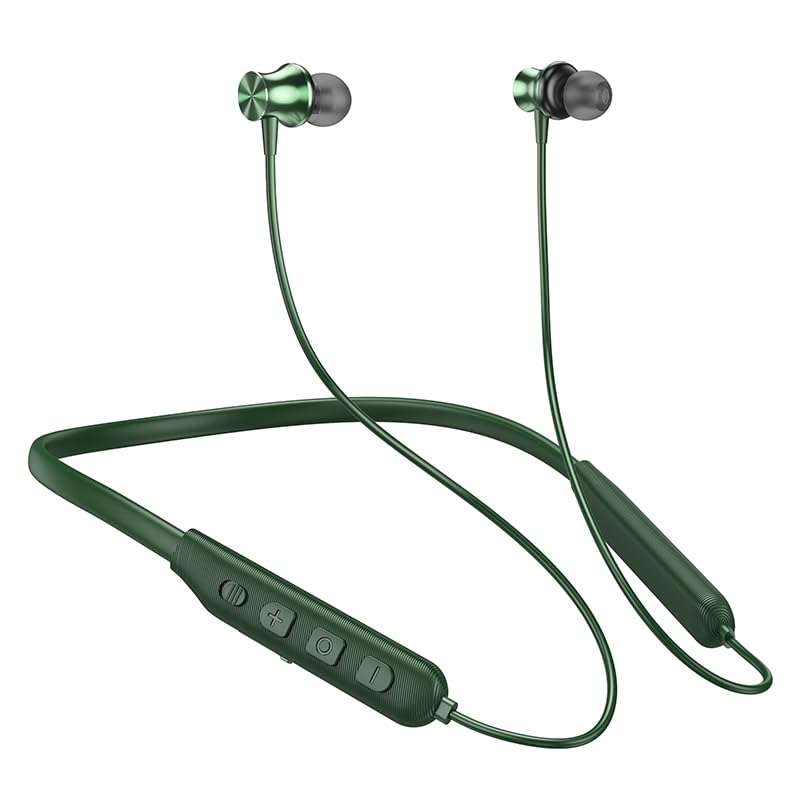
Image: The HOCO Bluetooth Neck Band in green, showcasing its in-ear design and flexible neckband.
2. פּעקל אינהאַלט
ביטע טשעק די פּאַקעט פֿאַר די פאלגענדע זאכן:
- HOCO Bluetooth Neck Band In-Ear Earphones (ES64_Green)
- Ear Cushions (additional sizes may be included)
- באַניצער מאַנואַל (דעם דאָקומענט)
- Charging Cable (not explicitly listed in "whats_in_the_box" but implied for charging)
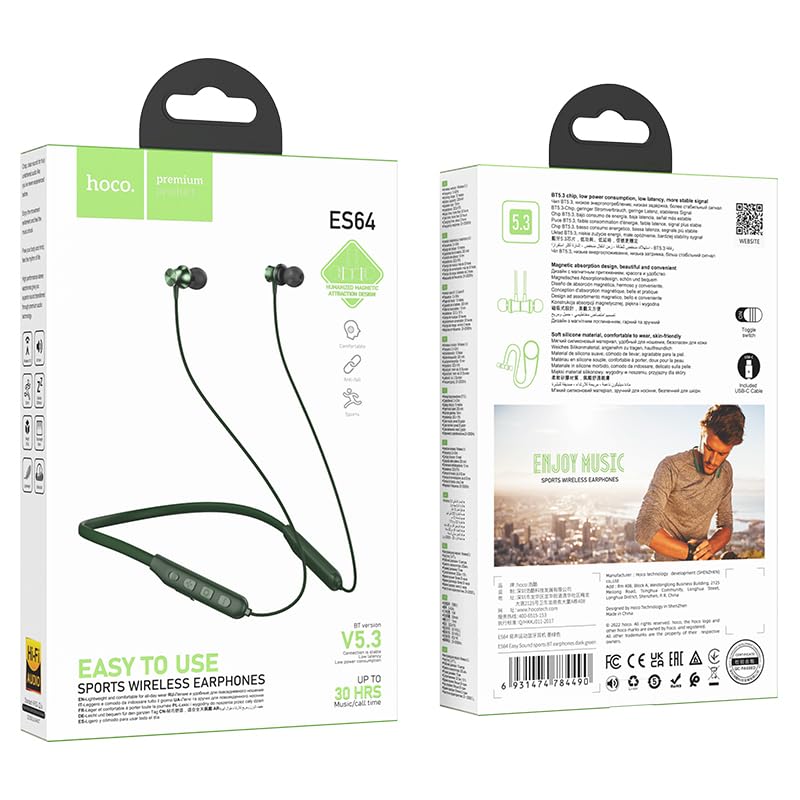
בילד: פאָרנט און הינטן view of the HOCO Bluetooth Neck Band product packaging, showing the earphones and key features.
3. פּראָדוקט איבערview
Familiarize yourself with the components and controls of your HOCO Bluetooth Neck Band.
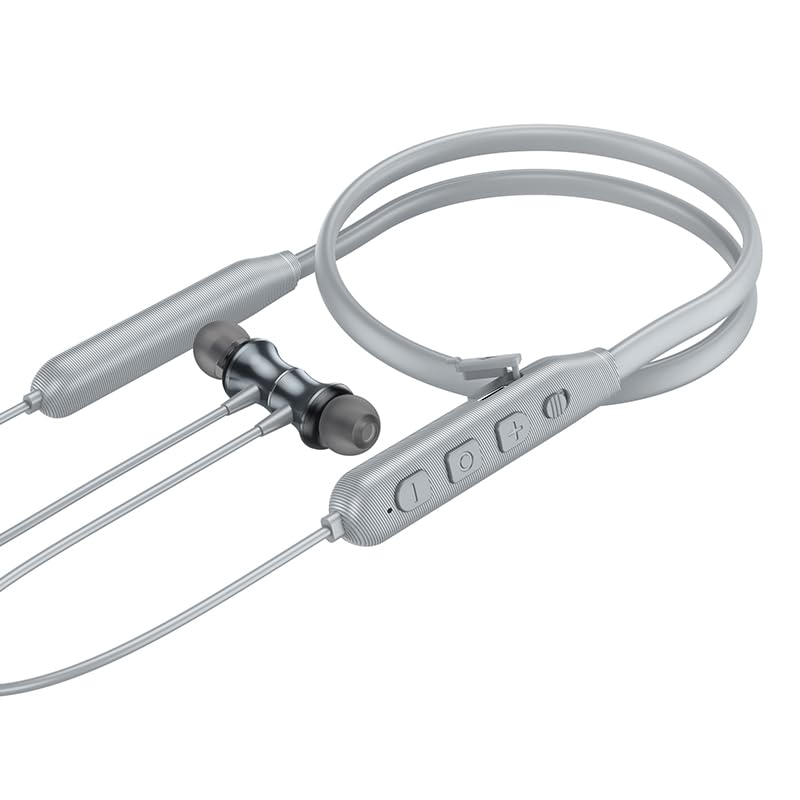
בילד: נאָענט-אַרויף view of the control panel on the HOCO Bluetooth Neck Band, showing the toggle switch, volume buttons, and multi-function button.
קאָנטראָלס:
- מולטי-פונקציע קנעפּל (MFB): Power On/Off, Play/Pause, Answer/End Calls.
- באַנד אַרויף (+): פֿאַרגרעסערן די קול, נעקסטע ליד (לאַנג דריקן).
- באַנד אַראָפּ (-): פֿאַרקלענערן די באַנד, פֿריִערדיקע ליד (לאַנג דריקן).
- באַשטימען באַשטימען: For convenient power control.
- טשאַרדזשינג פּאָרט: USB Type-C (implied by modern devices, though not specified as Type-C).
- LED ינדיקאַטאָר: ווײַזט מאַכט, פּערינג, און טשאַרדזשינג סטאַטוס.
4. סעטאַפּ
4.1 אויפלאָדן די אויערפאָונז
Before first use, fully charge your earphones. A full charge takes approximately 2 hours.
- Connect the charging cable to the charging port on the neckband.
- פֿאַרבינדט דעם אַנדערן עק פֿונעם קאַבל צו אַ USB מאַכט אַדאַפּטער (נישט אַרייַנגערעכנט) אָדער אַ קאָמפּיוטער'ס USB פּאָרט.
- The LED indicator will show the charging status (e.g., red while charging, blue when fully charged).
The ASAP Charge feature allows for quick charging to provide additional playtime with a short charge.
4.2 פּאָרן מיט אַ בלועטוט מיטל
Follow these steps to pair your HOCO Bluetooth Neck Band with your smartphone or other Bluetooth-enabled device:
- Ensure the earphones are fully charged and powered off.
- Slide the toggle switch to the "On" position or long-press the MFB until the LED indicator flashes rapidly (usually blue and red alternately), indicating pairing mode.
- אויף דיין מיטל, געבן בלועטאָאָטה און זוכן פֿאַר בנימצא דעוויסעס.
- Select "HOCO ES64" (or similar name) from the list of found devices.
- Once connected, the LED indicator will typically show a slow blue flash or turn off, and you will hear an audible confirmation.
The earphones support Bluetooth v5.3 for stable connection and can connect to two devices simultaneously (specific instructions for dual pairing may vary by device, refer to your device's manual).
5. אַפּערייטינג ינסטרוקטיאָנס
5.1 מאַכט אויף / אַוועק
- מאַכט אויף: Slide the toggle switch to "On" or long-press the MFB until the LED indicator lights up.
- מאַכט אַוועק: Slide the toggle switch to "Off" or long-press the MFB until the LED indicator turns off.
5.2 מוזיק פּלייבאַק
- שפּיל / פּויזע: קורץ דריקן די MFB.
- באַנד אַרויף: דריק קורץ דעם "+" קנעפל.
- באַנד אַראָפּ: דריק קורץ דעם "-" קנעפל.
- ווייַטער שפּור: לאַנג דריקן די "+" קנעפּל.
- פֿריִערדיקע שפּור: לאַנג דריקן די "-" קנעפּל.
5.3 רוף פאַרוואַלטונג
- ענטפער רופן: Short press the MFB when an incoming call rings.
- סוף רופן: Short press the MFB during a call.
- אָפּוואַרפן רופן: Long press the MFB when an incoming call rings.
- ריאַל די לעצטע נומער: טאָפּל דריקן די MFB.

Image: A person wearing the HOCO Bluetooth Neck Band during a run, demonstrating its comfortable and secure fit for active use.
5.4 ווידעא דעמאַנסטראַציע
For a visual guide on the product's features and usage, please watch the official product video below:
Video: Official HOCO product video demonstrating the features and usage of the Bluetooth Neck Band, including its long playback time, ASAP Charge, and Bluetooth pairing capabilities.
6. וישאַלט
Proper care will extend the lifespan of your earphones:
- רייניקונג: Use a soft, dry cloth to clean the earphones. Do not use harsh chemicals or abrasive materials.
- סטאָרידזש: האַלט די אויערפאָונז אין אַ קיל, טרוקן אָרט אַוועק פון דירעקט זונשייַן און עקסטרעמע טעמפּעראַטורן.
- וואַסער קעגנשטעל: The earphones are water resistant. Avoid submerging them in water or exposing them to heavy rain for prolonged periods. Dry them thoroughly if they get wet.
- טשאַרדזשינג: Do not overcharge the battery. Disconnect the charger once the earphones are fully charged.
7. טראָובלעשאָאָטינג
If you encounter issues with your HOCO Bluetooth Neck Band, try the following solutions:
| פּראָבלעם | מעגלעך לייזונג |
|---|---|
| קענען ניט מאַכט אויף | זיכער מאַכן אַז די באַטאַרייע איז אויפגעלאָדן. פֿאַרבינדט עס צו אַ מאַכט מקור און פּרוּווט ווידער. |
| קען נישט צוזאמענשטעלן מיטן אפאראט |
|
| ניט געזונט אָדער נידעריק באַנד |
|
| ינטערמיטאַנט קשר |
|
8. ספּעסאַפאַקיישאַנז
| שטריך | דעטאַל |
|---|---|
| מאָדעל נאָמען | ES64_Green |
| קאַנעקטיוויטי טעכנאָלאָגיע | ווירעלעסס (בלועטאָאָטה) |
| בלועטאָאָטה ווערסיע | 5.3 (chip: JL AC7003) |
| באַטאַרייע קאַפּאַציטעט | 200 מאַה |
| טשאַרדזשינג צייט | וועגן 2 שעה |
| ניצן צייט | 30 שעה |
| סטאַנדביי צייט | 350 שעה |
| Earphones Total Length | 85 סענטימעטער |
| וואָג | 26.5ג |
| מאַטעריאַל | פּלאַסטיק |
| קאָנטראָל טיפּ | Physical Button, Toggle Switch |
| וואַסער קעגנשטעל מדרגה | וואַסער קעגנשטעליק |
| כולל קריקאָנלאָדלעך באַטערי | יא |
| פאַבריקאַנט | HOCO |
| לאַנד פון אָריגין | כינע |
9. וואָראַנטי און שטיצן
Your HOCO Bluetooth Neck Band In-Ear Earphones come with a 1-יאָר וואָראַנטי פֿון דעם קויפֿדאַטום. די וואָראַנטי באַדעקט פֿאַבריקאַציע־דעפֿעקטן און גאַראַנטירט אַז דער פּראָדוקט פֿונקציאָנירט ווי באַשטימט אונטער נאָרמאַלן באַנוץ.
For warranty claims, technical support, or any inquiries, please contact your retailer or the official HOCO customer service. Keep your purchase receipt as proof of purchase.
For more information, you may visit the official HOCO website (if available, a placeholder link would be here, but since none is provided, I will omit a specific URL).


