1. הקדמה
This manual provides detailed instructions for the safe and effective operation of your Wouxun KG-UVD1P FM Transceiver. Please read this manual thoroughly before using the device to ensure proper functionality and to prevent damage.
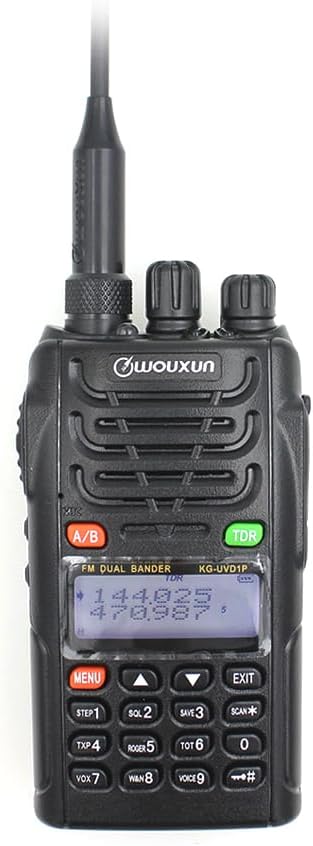
בילד באַשרייַבונג: א פראנט view of the Wouxun KG-UVD1P FM Transceiver, showcasinג עס איז שוואַרץ גasing, antenna, LCD display, keypad, and control knobs. The display shows frequency information.
2. פּעקל אינהאַלט
באַשטעטיקט אַז אַלע זאכן וואָס זענען אויסגערעכנט אונטן זענען אַרייַנגערעכנט אין אייער פּעקל:
- ראַדיאָ גוף
- באַטערי
- אַנטענע
- גאַרטל קליפּ
- Charger (Desktop Charger and Power Adaptor)
- באַניצער מאַנואַל
- האַנט רימען
- מאַשין טשאַרדזשער קאַבלע

בילד באַשרייַבונג: אַן איבערהויפּט view displaying all components included in the standard Wouxun KG-UVD1P package. Items are numbered and include the radio, battery, antenna, belt clip, desktop charger, power adaptor, hand strap, and car charger cable.
3. פּראָדוקט איבערview
3.1. ראַדיאָ קאָמפּאָנענטן
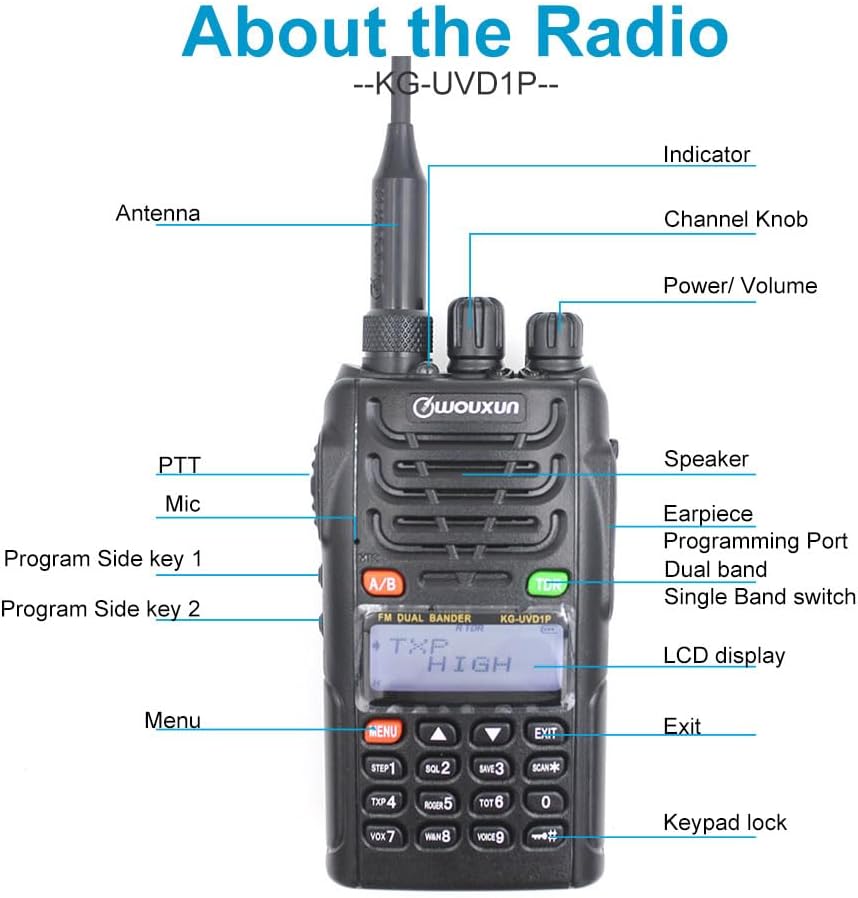
בילד באַשרייַבונג: A detailed diagram of the Wouxun KG-UVD1P radio with various parts labeled, including the antenna, indicator light, channel knob, power/volume knob, speaker, earpiece, programming port, dual band switch, LCD display, PTT button, microphone, program side keys, Menu button, Exit button, and keypad lock.
- אַנטענע: פֿאַר טראַנסמיטינג און ריסיווינג ראַדיאָ סיגנאַלן.
- ינדיקאַטאָר: LED light indicating transmission (red) or reception (green).
- קאַנאַל קנופּ: Used to select channels or adjust settings.
- מאַכט / באַנד: דרייט זיך צו אנצינדן/אויסלעשן דעם ראדיא און צו סטרויערן די וואליאם.
- רעדנער: אָוטפּוץ אַודיאָ.
- Earpiece/Programming Port: Connects accessories or programming cable.
- Dual Band Switch (A/B): Toggles between VHF and UHF bands or display modes.
- LCD ווייַז: Shows frequency, channel, and status information.
- PTT (Push-To-Talk): דריק און האלט צו שיקן.
- מיק: מיקראָפאָן פֿאַר שטימע אַרייַנשרייַב.
- Program Side Keys: Customizable function buttons.
- קיפּאַד: For entering frequencies, channels, and accessing menu functions.
3.2. גשמיות דימענשאַנז

בילד באַשרייַבונג: קייפל views of the Wouxun KG-UVD1P radio, including front, left side, right side, and back, illustrating its compact design and the placement of the belt clip and battery pack.
4. סעטאַפּ
4.1. באַטאַרייע ייַנמאָנטירונג
- גלייכט אויס די באַטעריע פּאַק מיט די גרוווז אויף דער צוריק פון די ראַדיאָ.
- רוקט די באַטעריע פּאַק אַרויף ביז עס קליקט אין פּלאַץ.
- צו אַראָפּנעמען, דריק די באַטעריע אויסלאָז לאַטש (אויב פֿאַראַן) און שלעפּ די באַטעריע אַראָפּ.
4.2. אַנטענע אַטאַטשמענט
- Screw the antenna clockwise into the connector on top of the radio until it is finger-tight.
- דו זאלסט נישט אָוווערטייטאַן.
4.3. טשאַרדזשינג די באַטערי

בילד באַשרייַבונג: The Wouxun smart charger in use, showing the radio docked for charging and a separate battery pack being charged simultaneously. The image highlights the 7.4V 1700mAh Lithium-ion battery.
- Connect the power adaptor to the desktop charger and plug it into a power outlet.
- Place the radio with the battery installed, or the battery alone, into the charging slot.
- די טשאַרדזשער אינדיקאַטאָר ליכט וועט טיפּיש ווייַזן רויט בעשאַס טשאַרדזשינג און ווערן גרין ווען גאָר טשאַרדזשד.
- א פולע טשאַרדזש נעמט טיפּיש עטלעכע שעה.
5. אַפּערייטינג ינסטרוקטיאָנס
5.1. מאַכט אויף/אויס און באַנד קאָנטראָל
- מאַכט אויף: Rotate the Power/Volume knob clockwise until a click is heard and the display illuminates.
- מאַכט אַוועק: Rotate the Power/Volume knob counter-clockwise until a click is heard and the display turns off.
- באַנד אַדזשאַסטמאַנט: Rotate the Power/Volume knob to increase (clockwise) or decrease (counter-clockwise) the audio output.
5.2. קאַנאַל און פרעקווענץ אויסוואַל
- אָפטקייַט מאָדע: Directly enter frequencies using the keypad.
- קאַנאַל מאָדע: Use the Channel knob or keypad to select pre-programmed channels.
- Multi-step Frequency: Supports 5K/6.25K/10K/12.5K/25K/50K/100K steps for precise frequency tuning.
5.3. Transmit and Receive (PTT)
- To transmit, press and hold the PTT button on the side of the radio. Speak clearly into the microphone.
- מעלדונג די PTT קנעפּל צו באַקומען.
- The indicator light will be red during transmission and green during reception.
5.4. Dual Band, Dual Frequency, Dual Display, and Dual Standby
- The radio supports simultaneous monitoring of two different frequencies (VHF&UHF, UHF&UHF, or VHF&VHF).
- Use the A/B button to switch between the primary and secondary display frequencies.
- The radio will automatically switch to the active frequency when a signal is detected.
5.5. VOX Transmission
- VOX (Voice Operated Transmit) allows hands-free transmission.
- Activate VOX through the menu. The radio will transmit automatically when it detects your voice.
- Adjust VOX sensitivity in the menu to prevent accidental transmissions or missed voice activation.
5.6. Digital FM Radio
- The radio includes a digital FM radio function.
- Access the FM radio through the menu. It supports automatic tuning and storing of radio frequencies.
5.7. אנדערע פאַנגקשאַנז
- High/Low Power Selection: Adjust transmit power via the menu for battery conservation or extended range.
- Wide/Narrow Bandwidth: Select 25KHz (wide) or 12.5KHz (narrow) bandwidth based on channel requirements.
- קאַנאַל נאָמען רעדאַגירן: Customize channel names for easier identification.
- D.C.S/CTCSS: Utilize 105 groups of D.C.S (Digital Coded Squelch) and 50 groups of CTCSS (Continuous Tone-Coded Squelch) for selective calling.
- סטאַפּוואַטש פונקציאָנירן: Integrated stopwatch utility.
- נידעריק-וואָלtage Voice Prompt: Alerts the user when the battery level is low.
- פארנומענע קאנאל לאקאוט (BCL): פאַרהיט טראַנסמיסיע אויף אַ שוין פאַרנומען קאַנאַל.
- Transmit Over Timer (TOT): Limits continuous transmission time to prevent channel hogging and overheating.
- קלאַוויאַטור שלאָס: Prevents accidental key presses (Auto/Manual options).
- Multiple Scan Modes: Scan channels or frequencies for activity.
- Wire Clone Function: Allows copying settings from one radio to another using a cloning cable.
- Bright Flashlight Illumination: Built-in LED flashlight for convenience.
- סאָס פונקציע: אַקטיוויזירט אַן נויטפאַל סיגנאַל.
- 1750 הערץ טאָן: Used for repeater access.
- DTMF Encoding Function: For sending Dual-Tone Multi-Frequency signals.
- English Voice Guide: Provides audible prompts for menu navigation and settings.
6. וישאַלט
6.1. רייניקונג
- רייניקט די ראַדיאָ'ס ייבערפלאַך מיט אַ ווייכן, דamp שטאָף.
- דו זאלסט נישט נוצן האַרב קעמיקאַלז אָדער אַברייסיוו קלינערז.
- זיכער מאַכן אַז די ראַדיאָ איז אויסגעלאָשן און די באַטאַרייע איז אַרויסגענומען איידער איר רייניקן.
6.2. באַטערי קער
- פֿאַרמײַדט איבערלאָדן אָדער גאָר אויסלאָדן די באַטאַרייע.
- סטאָר באַטעריז אין אַ קיל, טרוקן אָרט ווען ניט אין נוצן.
- אויב איר לאָזט עס אָפּ פֿאַר לענגערע צייטן, זאָלט איר אָפּלאָדן די באַטאַרייע ביז אַרום 50% קאַפּאַציטעט.
6.3. סטאָרידזש
- האַלט דעם ראַדיאָ אין אַ טרוקענער, שטויב-פֿרײַער סביבה.
- האַלטן אַוועק פון דירעקט זונשייַן און עקסטרעמע טעמפּעראַטורן.
- אַרויסנעמען די באַטאַרייע אויב דער ראַדיאָ וועט נישט ווערן גענוצט פֿאַר אַ לענגערער צייט.
7. טראָובלעשאָאָטינג
| פּראָבלעם | מעגלעך סיבה | לייזונג |
|---|---|---|
| ראַדיאָ גייט נישט אָן | Battery discharged or improperly installed | Charge the battery; ensure battery is correctly seated. |
| קען נישט שיקן אדער באקומען | Incorrect frequency/channel; antenna not attached; low battery; Busy Channel Lockout active | Verify frequency/channel; attach antenna securely; charge battery; disable BCL. |
| נעבעך אַודיאָ קוואַליטעט | Weak signal; incorrect squelch level; antenna issue | Move to an area with better signal; adjust squelch; check antenna connection. |
| די קיפּאַד איז נישט ריספּאַנדינג | קלאַוויאַטור שלאָס איז אַקטיוו | Unlock the keypad (refer to operating instructions). |
8. ספּעסאַפאַקיישאַנז
| שטריך | דעטאַל |
|---|---|
| מאָדעל נומער | KG UVD1P |
| אָפטקייַט ראַנגע | 30-300 מהז |
| נומער פון טשאַנאַלז | 40 |
| באַטערי טיפּ | 1700mAh Lithium-ion (1 A battery required, included) |
| Voltage | 1.2 וואלטס (דק) |
| וואַסער קעגנשטעל מדרגה | וואָטערפּרוף |
| פּונקט וואָג | 1.65 פונט |
| פּעקל דימענשאַנז | 10.12 X 9.53 X 4.53 אינטשעס |
| פאַבריקאַנט | WOUXUN |
| UPC | 781912417284 |
| קאַמפּאַטאַבאַל דעוויסעס | Two-way radios with compatible frequencies and bandwidths, external antennas |
9. וואָראַנטי און שטיצן
9.1. וואָראַנטי אינפֿאָרמאַציע
The Wouxun KG-UVD1P FM Transceiver comes with a 1 יאָר וואָראַנטי פֿון דעם קויפֿדאַטום. די וואָראַנטי דעקט פֿאַבריקאַציע־דעפֿעקטן אונטער נאָרמאַלן באַנוץ. ביטע באַהאַלטן אייער קויפֿבאַווײַז פֿאַר וואָראַנטי־קליימז.
9.2. קונה שטיצן
For technical assistance, troubleshooting beyond this manual, or warranty inquiries, please contact your authorized Wouxun dealer or visit the official Wouxun webפּלאַץ פֿאַר שטיצן רעסורסן.


