1. הקדמה
This manual provides comprehensive instructions for the FK Irons Flux Max Wireless Pen Tattoo Machine. It covers essential information regarding setup, operation, maintenance, and troubleshooting to ensure optimal performance and longevity of your device. The Flux Max is designed for professional tattoo artists, offering advanced features and ergonomic design for precision and comfort.
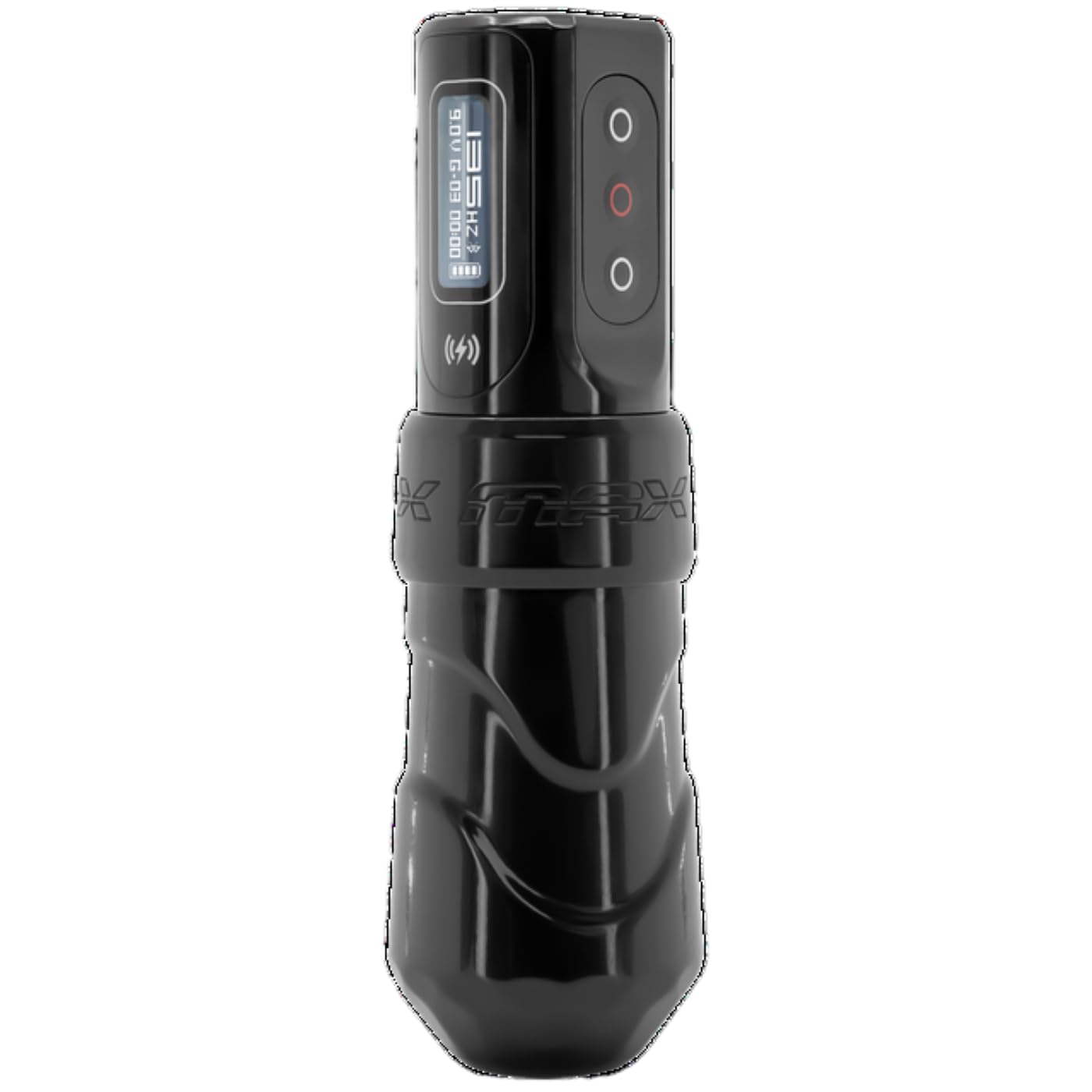
The FK Irons Flux Max wireless tattoo machine pen offers extended stroke length options, including 3.2mm, 4.0mm, and 4.5mm. It features the PowerBolt II battery pack with an OLED digital display, Bluetooth connectivity, and over 10 hours of tattooing power. The PowerBolt II allows for adjustable give directly on the device, eliminating the need for a mobile app connection. Constructed from 6061 T6 aluminum, the machine incorporates a redesigned ergonomic grip for enhanced control and comfort, with voltage adjustments available in 0.1 increment steps.
2. שליסל פֿעיִקייטן
- Extended Stroke Length Options: Available in 3.2mm, 4.0mm, and 4.5mm for versatile tattooing applications.
- PowerBolt II Battery Pack: Provides over 10 hours of battery life with an OLED digital display.
- בלועטאָאָטה קאַנעקטיוויטי: Enables advanced features and connectivity.
- Adjustable Give: Control needle give directly from the PowerBolt II without requiring a mobile application.
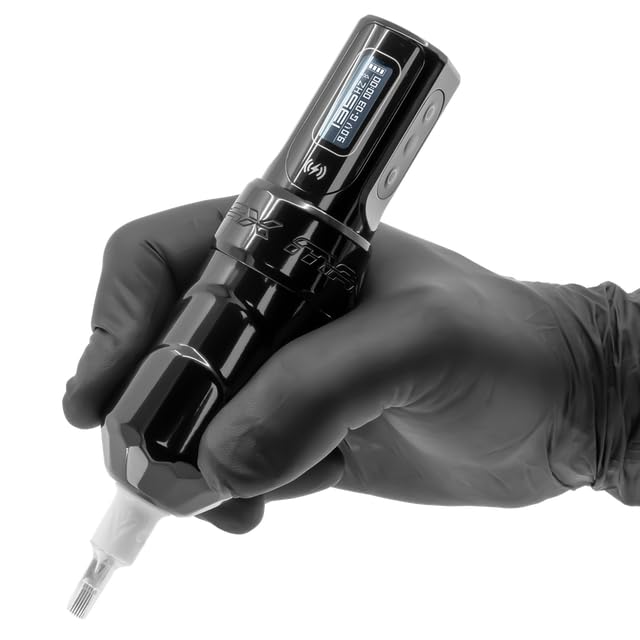
- ערגאָנאָמיק פּלאַן: Features a redesigned grip and forward-weighted balance for maximum control and comfort during extended use.
- פּרעסיסיאָן וואָלtage אַדזשאַסטמאַנט: Allows for fine-tuning of voltagE אין 0.1 וו ינקראַמאַנץ.
- דוראַבאַל קאַנסטראַקשאַן: Made from high-quality 6061 T6 aluminum.
3. זיכערקייַט אינפֿאָרמאַציע
This device is intended for professional use only by trained and certified tattoo artists. Adherence to local health and safety regulations is mandatory.
- בלויז פונדרויסנדיק נוצן: The tattoo machine is for external application of tattoo ink to the skin.
- סטעריליזאַטיאָן: Ensure all components that come into contact with the skin or ink are thoroughly sterilized before each use. Use appropriate sterilization methods as per industry standards.
- פאַכמאַן נוצן: This equipment is designed for experienced or professional tattoo artists only.
- מאַכט מקור: Use only the provided PowerBolt II battery pack or compatible FK Irons power sources.
- ויסמיידן נעץ: Keep the device dry. Do not immerse in liquids.
- באַזייַטיקונג: Dispose of needles and other consumables according to biohazard waste regulations.
4. סעטאַפּ
4.1 אַנפּאַקינג און דורכקוק
Carefully unpack all components. Inspect the machine and PowerBolt II for any signs of damage. If any damage is observed, do not use the device and contact your supplier immediately.
4.2 Charging the PowerBolt II
- Connect the provided USB-C charging cable to the PowerBolt II charging port.
- פֿאַרבינדט דעם אַנדערן עק פֿונעם קאַבל צו אַ קאָמפּאַטיבלע USB מאַכט אַדאַפּטער (נישט אַרייַנגערעכנט).
- The OLED display on the PowerBolt II will indicate charging status. A full charge typically takes approximately 1.5 hours.
- Ensure the PowerBolt II is fully charged before initial use for optimal battery performance.

4.3 Attaching the PowerBolt II to the Machine
- Align the PowerBolt II with the machine body, ensuring the connection points are clean and free of debris.
- Gently push and twist the PowerBolt II onto the machine body until it is securely seated. Do not force the connection.

4.4 Needle Cartridge Installation
- מאַכן זיכער אַז די מאַשין איז אויסגעדרייט אַוועק.
- Select a sterile, compatible needle cartridge.
- Insert the needle cartridge into the machine's cartridge receiver, twisting gently until it locks into place.
- Adjust the needle depth by rotating the grip of the machine.
5. אָפּעראַציע
5.1 פּאַוערינג אויף / אַוועק
- To power on, press and hold the power button on the PowerBolt II until the OLED display illuminates.
- צו מאַכט אַוועק, דריקן און האַלטן די מאַכט קנעפּל ביז די אַרויסווייַזן טורנס אַוועק.
5.2 אַדזשאַסטירן באַנדtage
- Once powered on, the OLED display will show the current voltage.
- ניצן די אַרויף (+) און אַראָפּ (-) buttons on the PowerBolt II to adjust the voltagE אין 0.1 וו ינקראַמאַנץ.
- די רעקאַמענדיד אַפּערייטינג וואָלtage range is typically between 5V and 12V, but may vary based on needle configuration and artist preference.
5.3 Adjusting Give
The PowerBolt II allows for direct adjustment of needle give. Refer to the PowerBolt II specific instructions for detailed steps on accessing and modifying give settings via the OLED display menu.
5.4 בלועטוט קאָנעקטיוויטי
The Flux Max features Bluetooth connectivity for advanced control and firmware updates via the Darklab app. Consult the Darklab app documentation for pairing instructions and available features.
5.5 Using the Killswitch (Optional)
The FK Irons Killswitch (sold separately) can be paired with the Flux Max for wireless foot pedal control. Follow the Killswitch's pairing instructions to connect it to your machine.

5.6 פּראָדוקט ווידעא
ווידעא 1: אפיציעלער פראדוקט איז פארבייview of the FK Irons Flux Max, demonstrating its features and design.
6. וישאַלט
6.1 רייניקונג
- After each use, wipe down the exterior of the machine and PowerBolt II with a sterile wipe or a cloth dampened with an approved disinfectant solution.
- Do not spray cleaning solutions directly into the machine or PowerBolt II.
- זיכער מאַכן אַז קיין פליסיקייטן זאָלן נישט אַרײַן אין די אינעווייניקסטע קאָמפּאָנענטן אָדער טשאַרדזשינג פּאָרט.
6.2 סטאָרידזש
- Store the machine in a clean, dry environment, away from direct sunlight and extreme temperatures.
- When storing for extended periods, ensure the PowerBolt II is partially charged (around 50%) to preserve battery health.
6.3 באַטערי קער
- פֿאַרמײַדט אָפֿט פֿולשטענדיק אויסצולאָדן די באַטעריע.
- דו זאלסט נישט ויסשטעלן די באַטאַרייע צו הויך טעמפּעראַטורעס.
- If the battery shows signs of damage or swelling, discontinue use immediately and dispose of it properly.
7. טראָובלעשאָאָטינג
| פּראָבלעם | מעגלעך סיבה | לייזונג |
|---|---|---|
| מאַשין טוט נישט קער אויף. | Battery discharged. PowerBolt II not securely attached. | Charge the PowerBolt II. Reattach the PowerBolt II firmly to the machine body. |
| נישט קאָנסיסטענט נאָדל באַוועגונג. | Loose needle cartridge. Incorrect voltage באַשטעטיקן. | Ensure needle cartridge is securely locked. Adjust voltage to recommended range. |
| PowerBolt II not charging. | Faulty cable or adapter. Charging port obstructed. | Try a different USB-C cable and power adapter. Inspect charging port for debris. |
| בלועטאָאָטה קשר ישוז. | Out of range. App not updated. | Ensure machine is within range of the connected device. Update Darklab app to the latest version. |
If troubleshooting steps do not resolve the issue, please contact FK Irons customer support.
8. ספּעסאַפאַקיישאַנז
| שטריך | דעטאַל |
|---|---|
| מאָדעל | מאַקס פלאַקס |
| סאָרט | פק ייערנז |
| סטראָוק לענגקטס | 3.2mm, 4.0mm, 4.5mm (this model is 4.0mm) |
| באַטערי טיפּ | ליטיום יאָן (1 אַרייַנגערעכנט) |
| באַטערי לעבן | אַרויף צו 10+ שעה |
| קאַנעקטיוויטי | בלועטאָאָטה |
| VoltagE אַדזשאַסטמאַנט | 0.1V increments |
| מאַטעריאַל | 6061 ט6 אַלומינום |
| פּראָדוקט דימענשאַנז | 4.87 X 1.26 X 6 אינטשעס |
| וואָג | 6.4 אונסעס |
| UPC | 810034257093 |
| פאַבריקאַנט | פק ייערנז |

9. וואָראַנטי און שטיצן
For warranty information, please refer to the official FK Irons webזייטל אדער קאנטאקט זייער קאסטומער סערוויס גלייך. גאראנטיע טערמינען און באדינגונגען קענען זיין אנדערש לויט ראיאן און פראדוקט.
For technical support, troubleshooting assistance beyond this manual, or inquiries regarding parts and service, please contact FK Irons customer support through their official channels:
- Webפּלאַץ: www.fkirons.com
- קאָנטאַקט אינפֿאָרמאַציע: זעט די "קאָנטאַקט אונדז" סעקציע אויף דער באַאַמטער webזייטל פֿאַר טעלעפאָן נומערן אָדער בליצפּאָסט שטיצע.


