1. הקדמה
א דאנק פארן קויפןasing the DBPOWER W32 Projector. This manual provides essential information for the safe and efficient operation of your device. Please read it thoroughly before use and keep it for future reference.
פּעקל אינהאַלט
באַשטעטיקן אַז אַלע זאכן זענען אַרייַנגערעכנט אין דיין פּעקל:
- DBPOWER W32 Projector
- ווייַט קאָנטראָל
- מאַכט שנור
- HDMI קאַבלע
- אב קאַבלע
- באַניצער מאַנואַל (דעם דאָקומענט)
- הייך אַדדזשוסטמענט שרויף

2. סעטאַפּ
2.1 פּלייסמאַנט
שטעלט דעם פּראָיעקטאָר אויף אַ שטאַרקער, גלאַטער ייבערפלאַך. זאָרגט פֿאַר גענוג ווענטילאַציע אַרום דעם אַפּאַראַט. פֿאַר אָפּטימאַלן viewing, project onto a smooth, light-colored wall or a projector screen.

2.2 מאַכט קאַנעקשאַן
- פֿאַרבינדט דעם מאַכט שנור צום פּראָיעקטאָר'ס מאַכט אַרייַנגאַנג.
- צאַפּן די אנדערע סוף פון די מאַכט שנור אין אַ מאַכט ווענטיל.
- דריק דעם מאַכט קנעפּל אויף דעם פּראָיעקטאָר אָדער ווײַטקאָנטראָל צו עס אנצינדן.
2.3 פאָקוס און קיסטאָון קאָרעקציע
Adjust the focus ring on the projector lens until the image is clear. Use the keystone correction dial to correct any trapezoidal distortion, ensuring a rectangular image.

3. אַפּערייטינג ינסטרוקטיאָנס
3.1 קאַנעקטינג דעוויסעס
The DBPOWER W32 Projector supports various input sources:
- הדמי: Connect to laptops, game consoles (PS3/PS4, X-Box, Switch), TV sticks (Fire TV, Roku Stick), and other HDMI-enabled devices.
- וסב: פֿאַרבינדט USB דרייווז פֿאַר מעדיע ווידערשפּיל.
- פון: Connect to DVD players or older devices using the included AV cable.
- TF קאָרט: Insert a TF card for direct media playback.

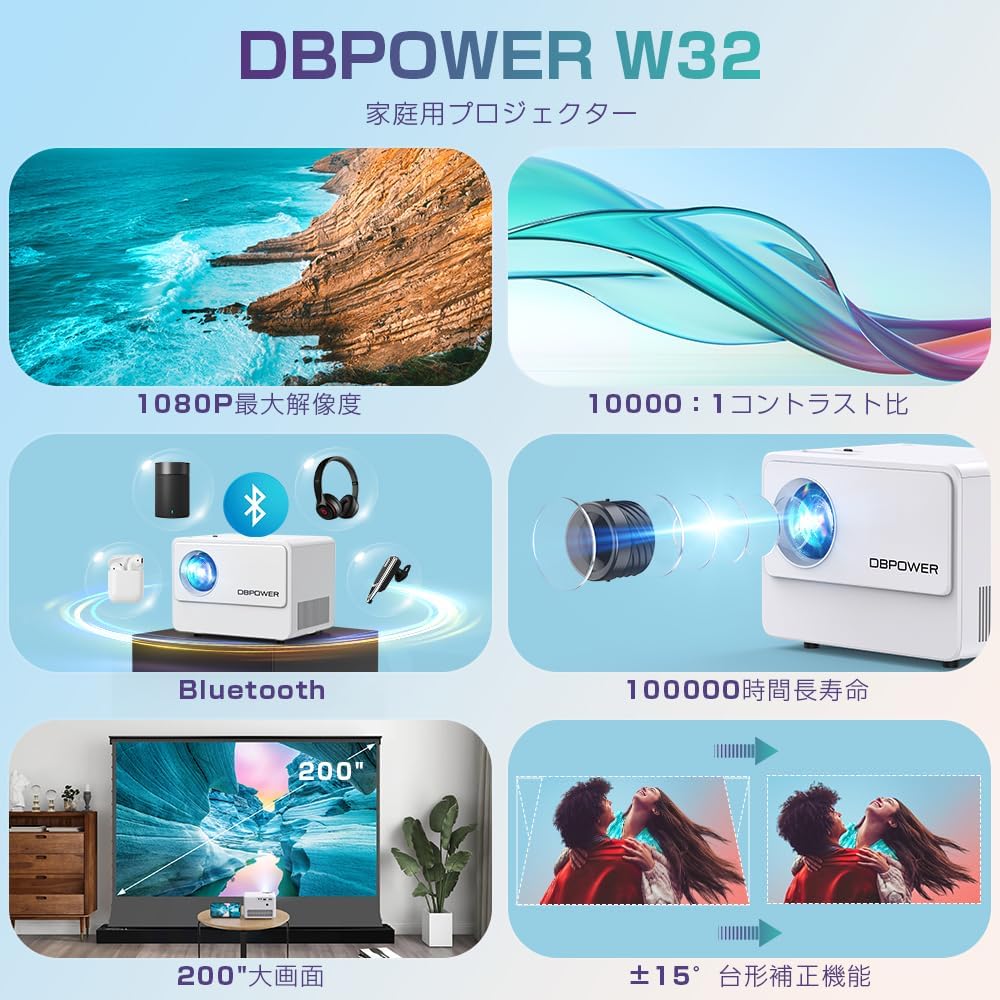
3.2 וויירלעסע קאָנעקטיוויטי (WiFi און בלועטוט)
The projector features built-in WiFi and Bluetooth for seamless wireless connections.
WiFi Screen Mirroring (iOS/Android)
- Select "Screen" from the input source menu to enter the mirroring interface.
- Ensure your iOS/Android device and the projector are connected to the same WiFi network.
- On your iOS device, enable Screen Mirroring and select "DBPOWER-XXXXXX" from the detected devices.
- On your Android device, enable Cast/Wireless Display and select "DBPOWER-XXXX" from the detected devices.

בלועטאָאָטה אַודיאָ קאַנעקשאַן
פֿאַרבינדט עקסטערנע בלועטוט רעדנערס אדער כעדפאָונז פֿאַר אַ פֿאַרבעסערטע אַודיאָ דערפֿאַרונג.
- Go to the projector's Bluetooth settings.
- געבן בלועטאָאָטה אויף די פּראַדזשעקטער.
- שטעלן דיין בלועטאָאָטה אַודיאָ מיטל אין פּערינג מאָדע.
- אויסקלייבן אייער דעווייס פון דער ליסטע אויפן פּראָיעקטאָר צו פֿאַרבינדן.
3.3 אַודיאָ רעזולטאַט
The projector has two built-in speakers for basic audio. For a more immersive experience, connect external audio devices via Bluetooth or the 3.5mm audio jack.

4. וישאַלט
4.1 רייניקן די לינז
Use a soft, lint-free cloth specifically designed for optical lenses to clean the projector lens. Do not use abrasive cleaners or solvents.
4.2 לופט פילטער רייניקונג
Regularly check and clean the air filter to ensure proper ventilation and prevent overheating. Refer to the diagram below for the location of the air vents.

4.3 סטאָרידזש
When not in use for extended periods, store the projector in a cool, dry place, away from direct sunlight and excessive dust. Use the original packaging or a protective case.
5. טראָובלעשאָאָטינג
| פּראָבלעם | מעגלעך סיבה | לייזונג |
|---|---|---|
| קיין בילד געוויזן | Power cable not connected; Incorrect input source selected; Device not connected properly. | Check power connection; Select correct input source (HDMI, USB, AV); Ensure cables are securely connected. |
| בלערד בילד | פאָקוס נישט אַדזשאַסטיד; קיסטאָון נישט אַדזשאַסטיד. | Adjust the focus ring; Adjust the keystone correction dial. |
| קיין געזונט | Volume too low; External audio device not connected or selected; Muted. | Increase volume; Check external audio connections/Bluetooth pairing; Unmute the projector. |
| ווייַט קאָנטראָל נישט ארבעטן | Batteries dead; Obstruction between remote and projector; Remote sensor blocked. | פאַרבייטן באַטעריעס; אַראָפּנעמען שטערונגען; זיכער מאַכן אַז די ווייַט קאָנטראָל איז געצילט אויף די פּראָיעקטאָר ס IR סענסאָר. |
| אָוווערכיטינג | Blocked ventilation; Prolonged use in hot environment. | זיכער מאַכן אַז די ווענטילאַציעס זענען ריין; אַרבעטן אין אַ גוט ווענטילירטן אָרט; לאָזן דעם פּראָיעקטאָר אָפּקילן. |
6. ספּעסאַפאַקיישאַנז
| שטריך | דעטאַל |
|---|---|
| סאָרט | דבפּאָווער |
| מאָדעל נומער | W32 |
| פּראָדוקט דימענשאַנז | 14.9 X 11 X 10.4 סענטימעטער |
| פּונקט וואָג | 970 ג |
| ברייטנאַס | 10000 Lumens (equivalent to 300 ANSI Lumens) |
| געבוירן האַכלאָטע | 1920 x 1080 pixels (1080P) |
| שטיצט רעסאָלוטיאָן | אַרויף צו 4K |
| קאַנטראַסט פאַרהעלטעניש | 10,000:1 |
| Lamp לעבן | ≥ 100,000 שעה |
| קאַנעקטיוויטי טעכנאָלאָגיע | Bluetooth, WiFi, HDMI, USB, AV, TF Card |
| רעקאַמענדיד נוצן | היים טעאַטער |
| ספּעציעלע פֿעיִקייטן | 4K compatible, Bluetooth, Built-in Speaker, Keystone Correction, WiFi |


7. וואָראַנטי און שטיצן
DBPOWER provides a 12-month warranty from the date of purchase. This warranty covers initial defects and natural failures under normal use. For any issues, including exchanges or returns, please contact our customer support.
קונה שטיצן
- 24-hour quick response service
- 12-חודש קוואַליטעט גאַראַנטירן
- 30-day return validity period
- Dedicated customer support always available
For direct support, you can scan the QR code below to add us on LINE or visit our official store page.

Please note: Customer support is closed on Saturdays, Sundays, and public holidays, as well as during year-end/New Year, Golden Week, and Obon holidays.


