הקדמה
This manual provides essential information for the safe and efficient operation of your TECNO Pova 5 Pro 5G smartphone. Please read it thoroughly before using your device to ensure optimal performance and longevity.

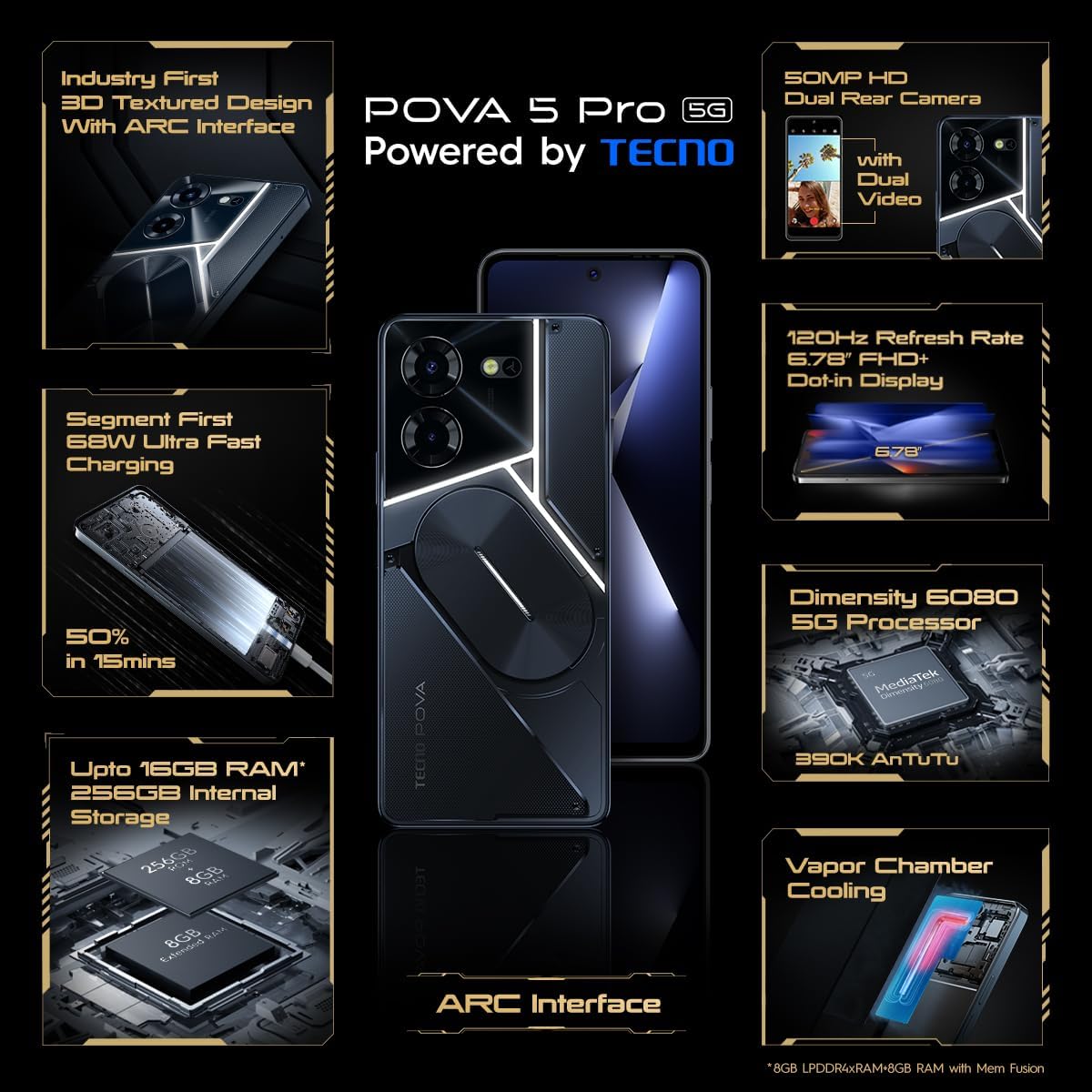
Image: The TECNO Pova 5 Pro 5G smartphone, showcasing its design and key feature of 68W Ultra Fast Charging.
וואָס איז אין די קעסטל
באַשטעטיקן אַז אַלע זאכן זענען פאַראַן אין דער פּאַקאַדזשינג:
- סמאַרטפאָנע
- 68 וו מאַכט אַדאַפּטער
- טיפּ-C קאַבלע
- TPU דעקל
- סים עדזשעקטאָר טול

Image: A flat lay of the TECNO Pova 5 Pro 5G packaging contents, showing the smartphone, 68W power adapter, USB-C cable, TPU protective cover, and the SIM ejector tool.
סעטאַפּ
ערשט סעטאַפּ
- אַרײַנשטעלן סים/סד קאַרטל: Locate the SIM tray on the side of the device. Use the provided SIM ejector tool to open the tray. Insert your Nano-SIM card(s) and/or microSD card into the designated slots. Ensure the tray is fully reinserted.
- מאַכט אויף: Press and hold the Power button (located on the right side) until the TECNO logo appears.
- פֿאָלגן די אינסטרוקציעס אויף דעם עקראַן: The device will guide you through initial setup, including language selection, Wi-Fi connection, Google account setup, and security settings.
טשאַרדזשינג די מיטל
The TECNO Pova 5 Pro 5G supports 68W Ultra Fast Charging.
- פֿאַרבינדט דעם טיפּ-C קאַבל צום טשאַרדזשינג פּאָרט אין דער אונטערשטער טייל פֿון טעלעפֿאָן.
- פֿאַרבינדט דעם אַנדערן עק פֿונעם קאַבל צום 68 וואט מאַכט אַדאַפּטער.
- צאַפּן די מאַכט אַדאַפּטער אין אַ וואַנט ווענטיל.
- A full charge typically takes approximately 45 minutes, with 50% charge achievable in about 15 minutes.
בילד: א קלאָרע פראָנט view of the TECNO Pova 5 Pro 5G smartphone, highlighting its display and front camera.
אַפּערייטינג די מיטל
יקערדיק נאַוויגאַציע
- טאָוטשסקרעען: צאַפּן צו סעלעקטירן, סווייפּן צו סקראָלן, צוקניפּן צו פארגרעסערן.
- מאַכט קנעפּל: דריקן צו וועקן/שלאָפן דעם עקראַן. דריקן און האַלטן צו אויסלעשן אָדער ריסטאַרטן.
- באַנד קנעפּלעך: אַדזשאַסטירן מעדיע וואָלומען, רוף וואָלומען, אָדער רינגטאָן וואָלומען.
קאַמעראַ באַניץ
The device features a 50MP AI Dual Rear Camera and a 16MP Selfie Camera.
- עפֿנט די קאַמעראַ אַפּ פֿון דער היים־עקראַן אָדער אַפּ־שוך.
- אויסקלייבן די געוואונטשע מאָדע (פאָטאָ, ווידעאָ, פּאָרטרעט, אאז"וו).
- צאַפּן דעם שאַטער קנעפּל צו כאַפּן פאָטאָס אָדער אָנהייבן/אָפּשטעלן ווידעאָ רעקאָרדינג.
- Utilize AI enhancements for optimized scene recognition and image quality.
ARC Interface and Notifications
The TECNO Pova 5 Pro 5G features a unique multi-color ARC interface with backlighting.
- The ARC interface provides customizable light effects for notifications, incoming calls, gaming, and music playback.
- Access settings to personalize the light patterns and colors for different alerts.

בילד: די הינטערשטע view of the TECNO Pova 5 Pro 5G, showcasing its distinctive 3D textured design and the illuminated ARC interface.

בילד: א דעטאַלירטע view of the TECNO Pova 5 Pro 5G's ARC interface, illustrating the multi-color backlighting feature.
וישאַלט
- באַטערי זאָרגן: To prolong battery life, avoid exposing the device to extreme temperatures. Do not fully discharge the battery regularly.
- רייניקונג: ניצט אַ ווייכע, לינט-פֿרייע שטאָף צו רייניקן דעם עקראַן און קערפּער. פֿאַרמייַדט ניצן שטרענגע כעמיקאַלן אָדער אַברייסיוו מאַטעריאַלן.
- ווייכווארג דערהייַנטיקונגען: Regularly check for and install system updates to ensure optimal performance, security, and access to new features. Navigate to Settings > System > System update.
- סטאָרידזש פאַרוואַלטונג: פּעריִאָדיש אויסמעקן נישט-נייטיקע fileס און אַפּפּס צו האַלטן גענוג סטאָרידזש פּלאַץ און מיטל גיכקייַט.
טראָובלעשאָאָטינג
- מיטל נישט פּאַוערינג אויף: Ensure the battery is charged. Connect the device to the charger for at least 15 minutes before attempting to power on again. If the issue persists, perform a forced restart by holding the Power button for 10-15 seconds.
- טשאַרדזשינג ישוז: Verify that the charging cable and adapter are securely connected and undamaged. Try using a different outlet.
- אַפּ קראַשט/פֿרירט: Close the problematic app and reopen it. If the issue continues, clear the app's cache and data in Settings > Apps. As a last resort, uninstall and reinstall the app.
- שלעכטע נעץ קאָנעקטיוויטי: Check if Airplane Mode is off. Restart the device. If using mobile data, ensure your SIM card is properly inserted and your data plan is active.
- איבערהייצונג: Avoid using the device in direct sunlight or during intensive tasks for extended periods. Close background applications.
ספּעסאַפאַקיישאַנז
| שטריך | באַשרייַבונג |
|---|---|
| מאָדעל נאָמען | פּאָוואַ 5 פּראָ 5G |
| אָפּערייטינג סיסטעם | אַנדרויד 13.0 |
| פּראַסעסער | Dimensity 6080 (2.4 GHz Octa-Core) |
| באַראַן | 8 GB (expandable up to 16 GB with Memory Fusion) |
| אינערלעכער סטאָרידזש | 256 GB (UMCP) |
| ווייַז | 6.78-inch FHD+ Dot-in Display |
| דערפרישן קורס | 120 הז |
| דערציען אַפּאַראַט | 50 MP AI Dual Camera |
| פראָנט אַפּאַראַט | 16 MP Selfie Camera |
| באַטערי | 5000 מאַה ליטהיום-פּאַלימער |
| טשאַרדזשינג | 68W Ultra Fast Charging |
| דימענשאַנז | 16.9 X 7.7 X 16.9 סענטימעטער |
| וואָג | 214 גראַמז |
| קאַנעקטיוויטי | 5G (10 bands supported), NFC, Bluetooth 5.1 |

Image: An internal diagram or view of the TECNO Pova 5 Pro 5G, illustrating its vapor chamber cooling system for efficient heat dissipation.
וואָראַנטי און שטיצן
Your TECNO Pova 5 Pro 5G comes with a manufacturer's warranty. Please refer to the warranty card included in your product packaging for specific terms and conditions.
For technical support, service, or warranty claims, please contact TECNO customer service. TECNO maintains a large service network with over 1200 service centers in India.
You can find more information and support resources by visiting the official Tecno store on Amazon: טעקנאָ קראָם


