1. הקדמה
This manual provides essential information for the safe and efficient use of your CUBOT P80 smartphone. Please read it carefully before using the device and keep it for future reference.
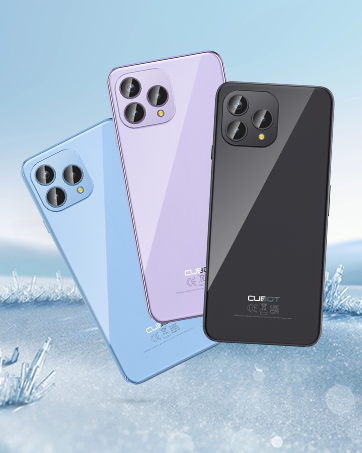
The CUBOT P80 is available in multiple color options.
2. וואָס איז אין דער קעסטל
באַשטעטיקט אַז אַלע זאכן זענען פאַראַן אין אייער פּראָדוקט פּאַקעט:
- CUBOT P80 סמאַרטפאָנע
- Phone protective case
- Phone protection film (pre-applied or separate)
- Charger (9V2A)
- וסב קאַבלע (טיפּ-C)
- טיפ-C כעדפאָון
- SIM pin ejector tool
- שנעל אָנהייב גייד
- Compliance regulation document

Included accessories with the CUBOT P80 smartphone.
3. Device Layout and Physical Features
The CUBOT P80 features a sleek design with a 6.58-inch FHD+ display and a triple camera system on the rear.
דימענשאַנז און וואָג
- גרעב: 9.75 מם
- וואָג: 217 ג

The CUBOT P80's slim profile און לייטווייט פּלאַן.
פינגערפּרינט סקאַננער
The device includes a side-mounted fingerprint scanner for secure and quick unlocking.

Fingerprint sensor location for convenient unlocking.
4. סעטאַפּ
אריינשטעלן סים קארטלעך און TF קארטל
The CUBOT P80 supports dual SIM functionality or one SIM card with a TF (microSD) card for expanded storage.
- געפינט די סים טאַץ אויף דער זייט פון דעם טעלעפאָן.
- שטעקט אריין דעם סים אויסווארף געצייג אין דעם קליינעם לאך לעבן דעם טרעי און דריקט פעסט ביז דער טרעי קומט ארויס.
- Place your Nano SIM card(s) and/or TF card into the designated slots on the tray. Ensure the gold contacts are facing down.
- שטופּ פֿאָרזיכטיק צוריק דעם טאַץ אין דעם טעלעפֿאָן ביז עס איז גלײַך מיטן אַפּאַראַט'ס קערפּער.

SIM and TF card installation options.
ערשט מאַכט אויף
Press and hold the power button located on the side of the device until the CUBOT logo appears. Follow the on-screen instructions to complete the initial setup, including language selection, Wi-Fi connection, and Google account login.
5. אַפּערייטינג ינסטרוקטיאָנס
אַנדרויד 13 אָפּערייטינג סיסטעם
The CUBOT P80 runs on Android 13, offering a user-friendly interface, enhanced privacy controls, and access to the Google Play Store for applications.

איבערview of the Android 13 operating system.
ווייַז פֿעיִקייטן
The device features a 6.58-inch FHD+ Capacitive Touch Screen with a resolution of 2408x1080 pixels, 400 nits peak brightness, and a 20:9 aspect ratio.

Key features of the CUBOT P80 display.
6. קאַמעראַ פֿעיִקייטן
The CUBOT P80 is equipped with an AI Quad Camera System on the rear and a high-resolution front camera.
אַפּאַראַט ספּעסאַפאַקיישאַנז
- הויפּט אַפּאַראַט: 48MP
- פראָנט אַפּאַראַט: 24MP
- מאַקראָו אַפּאַראַט: 2MP

The CUBOT P80's AI Quad Camera System.
הויפּט אַפּאַראַט
The 48MP main camera captures images with high detail and clarity.

High-resolution capture with the 48MP main camera.
פראָנט אַפּאַראַט
The 24MP front camera is designed for clear selfies and video calls, featuring beauty modes.

Selfie capabilities of the 24MP front camera.
מאַקראָו קאַמעראַ
The 2MP macro lens allows for detailed close-up photography of small objects.

Detailed close-up shots with the 2MP macro camera.
Multiple Camera Modes
The camera application includes various modes such as Night View, Portrait, and Panorama to enhance your photography experience.

Explore various photography modes.
7. קאַנעקטיוויטי
נעץ און ווי-פי
The CUBOT P80 supports Dual 4G Dual VoLTE for cellular connectivity and 2.4/5GHz Dual Wi-Fi for stable and faster internet access.
- GSM: 850/900/1800/1900 מהז
- WCDMA: B1/2/4/5/6/8/19
- פדד: B1/2/3/4/5/7/8/12/13/17/18/19/20/26/28A/28B/66
- TDD: 38/39/40/41
Cellular and Wi-Fi network support.
NFC and GPS
The device includes Multifunctional NFC for cash-free mobile payments and supports GPS, GLONASS, and Galileo for accurate global satellite positioning.
NFC for payments and advanced GPS for navigation.
8. באַטאַרייע און טשאַרדזשינג
The CUBOT P80 is equipped with a 5200mAh battery, providing extended usage times. It supports 18W fast charging and OTG (On-The-Go) functionality.
- סטאַנדביי: אַרויף צו 26 טעג
- רופט: אַרויף צו 29 שעה
- מוזיק פּלייבאַק: אַרויף צו 26 שעה
- ווידעא פּלייבאַק: אַרויף צו 7 שעה

Battery life and charging features.
9. סטאָרידזש און פאָרשטעלונג
The CUBOT P80 is powered by an MT8788 Octa-core processor and features ample memory and storage.
- פּראַסעסער: MediaTek MT8788 Octa-core (12nm process, 2.0 GHz clock speed)
- באַראַן: 8GB + 8GB Expansion RAM (total 16GB)
- אינערלעכע סטאָרידזש (ROM): 256 גיגאבייט
- יקספּאַנדאַבאַל סטאָרידזש: ביז 1TB דורך TF קאַרטל

Processor and memory details.

RAM expansion technology for enhanced performance.

Internal and expandable storage options.
10. וויכטיק נאָטעס
טרעגער קאָמפּאַטאַביליטי
The CUBOT P80 smartphone does not support AT&T, Cricket, or Verizon networks in the United States. Please confirm your carrier's compatibility before purchasinג אדער ניצן דעם מיטל.

Important information regarding network compatibility.
11. ספּעסאַפאַקיישאַנז
| שטריך | באַשרייַבונג |
|---|---|
| מאָדעל נומער | P80-schwarz-US |
| אָפּערייטינג סיסטעם | אַנדרויד 13.0 |
| פּראַסעסער | MediaTek MT8788 Octa-core |
| באַראַן | 16 גיגאבייט (8 גיגאבייט + 8 גיגאבייט עקספּאַנשאַן) |
| אינערלעכער סטאָרידזש | 256 גיגאבייט |
| יקספּאַנדאַבאַל סטאָרידזש | ביז 1TB (TF קאַרטל) |
| פאַרשטעלן גרייס | 6.58 אינטשעס |
| האַכלאָטע | 1920 x 1080 (FHD+) |
| הויפּט אַפּאַראַט | 48MP |
| פראָנט אַפּאַראַט | 24MP |
| מאַקראָו קאַמעראַ | 2MP |
| באַטאַרייע קאַפּאַציטעט | 5200 מאַה |
| טשאַרדזשינג | 18 וו שנעל טשאַרדזשינג |
| קאַנעקטיוויטי | 4G LTE, Dual SIM, Wi-Fi (2.4/5GHz), NFC, Bluetooth |
| נאַוויגאַציע | גפּס, גלאָנאַס, גאַלילעאָ |
| אַודיאָ דזשאַק | 3.5 מם |
| דימענשאַנז | 9.29 x 7.17 x 1.81 אינטשעס (פּאַקעט) |
| פּונקט וואָג | 7.7 אונסעס |
12. טראָובלעשאָאָטינג
פּראָסט ישוז און סאַלושאַנז
- די מיטל איז נישט פּאַוערינג: זיכער מאַכן אַז די באַטאַרייע איז אויפגעלאָדן. פֿאַרבינדט דעם טעלעפאָן צום טשאַרדזשער און וואַרט אַ פּאָר מינוט איידער איר פּרוּווט עס ווידער אָנצוצינדן.
- שלעכט נעץ סיגנאַל: Check SIM card insertion. Ensure you are within your carrier's coverage area. Note that the CUBOT P80 is not compatible with AT&T, Cricket, or Verizon.
- אַפּליקאַציעס קראַשן: Clear the cache of the problematic app (Settings > Apps > [App Name] > Storage > Clear Cache). If the issue persists, try reinstalling the app or performing a factory reset (backup data first).
- די באַטאַרייע פליסן געשווינד: Reduce screen brightness, close unused apps running in the background, disable unnecessary notifications, and limit location services.
- Fingerprint scanner not working: Ensure your finger is clean and dry. Re-register your fingerprints in the security settings.
13. וואָראַנטי און שטיצן
פֿאַר וואָראַנטי אינפֿאָרמאַציע און טעכנישע שטיצע, ביטע זען די באַאַמטער CUBOT webזייטל אדער קאָנטאַקט אייער הענדלער. האַלט אייער קויפן באַווייַז פֿאַר וואָראַנטי קליימז.
אָנליין רעסורסן:
- באַזוכן די CUBOT קראָם אויף עמעזאָן פֿאַר פּראָדוקט אינפֿאָרמאַציע און דערהייַנטיקונגען.
14. פּראָדוקט ווידעאָ איבערview
אפיציעלע פּראָדוקט ווידעאָ שאָוasing the CUBOT P80's features and design.


