הקדמה
This user manual provides detailed instructions for the operation and maintenance of your MOBI Connect Smart 4 in 1 Wi-Fi Air Purifier & Humidifier. This device is designed to improve indoor air quality by purifying and humidifying the air, offering a healthier and more comfortable living environment. Please read this manual thoroughly before use to ensure proper function and safety.

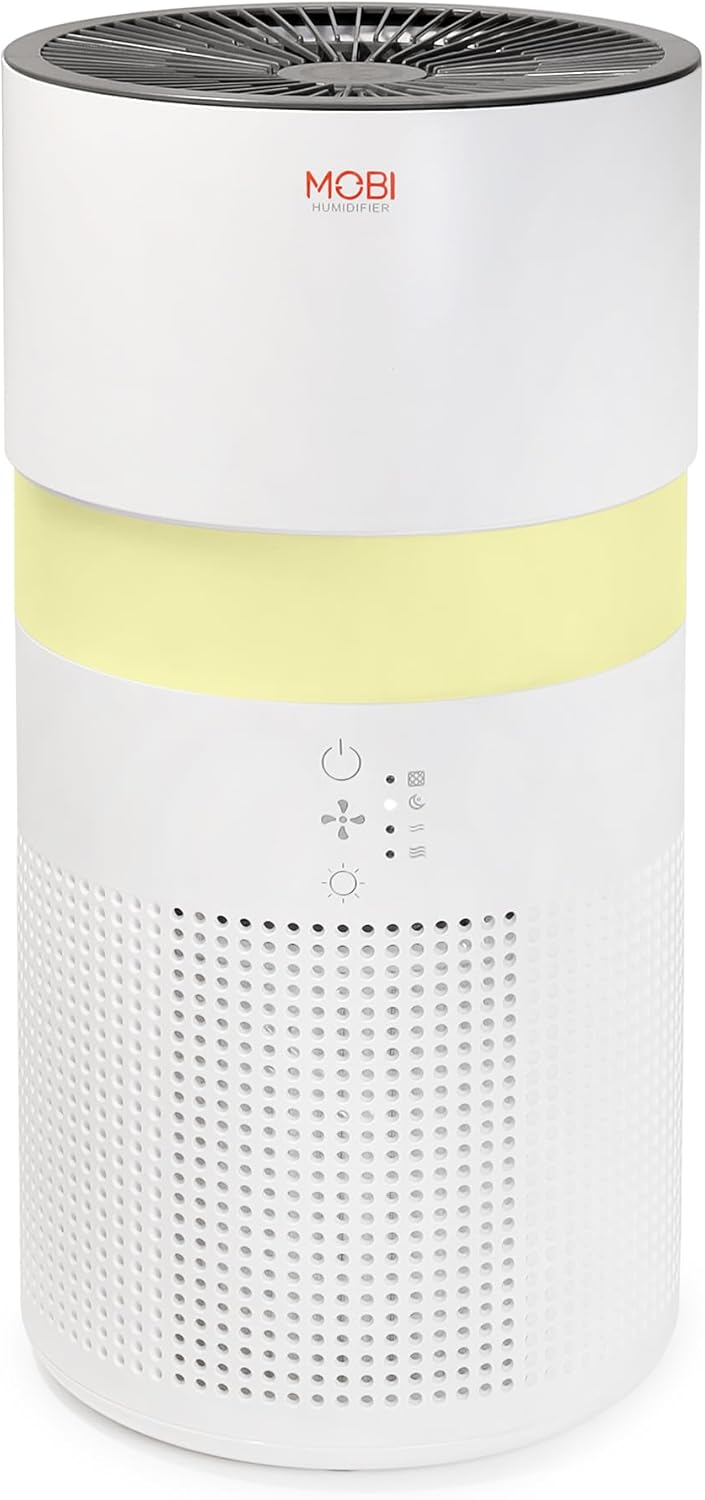
Image: The MOBI Connect Smart 4 in 1 Wi-Fi Air Purifier & Humidifier, a compact white cylindrical device with a light band and control panel.
וויכטיק סאַפעטי אינפֿאָרמאַציע
כדי צו רעדוצירן דעם ריזיקע פון פייער, עלעקטרישן שאק, אדער שאָדן, זאָלט איר שטענדיק נאָכפאָלגן די גרונטלעכע זיכערהייט מיטלען ווען איר ניצט דעם אַפּאַראַט.
- Always place the device on a firm, level surface.
- דו זאלסט נישט פאַרשפּאַרן לופט ינלעץ אָדער אַוטלעץ.
- האַלטן די מיטל אַוועק פון וואַסער און נעץ.
- אָפּשטעקן די מיטל איידער רייניקונג אָדער וישאַלט.
- דו זאלסט נישט נוצן די מיטל אויב די מאַכט שנור אָדער צאַפּן איז דאַמידזשד.
- האַלטן אויס פון דערגרייכן פון קינדער און פּעץ.
- Only use original MOBI replacement filters.
פּראָדוקט איבערview
Familiarize yourself with the components and controls of your air purifier and humidifier.
בילד: א נאָענטע בילד view of the control panel on the MOBI Air Purifier, showing power, fan speed, light, and humidifier icons.
קאָנטראָל פּאַנעל פֿעיִקייטן:
- מאַכט קנעפּל: Turns the unit on/off and activates pairing mode.
- פאָכער ספּיד ינדיקאַטאָר: Displays current fan speed (Sleep, Medium, High).
- Humidifier Indicator: Shows humidifier status.
- ליכט מאָדע קנעפּל: Cycles through light modes (Off, Gradient, Fixation).
- פילטער פאַרבייַט ינדיקאַטאָר: לייכט זיך ווען מען דארף אויסטוישן דעם פילטער.
סעטאַפּ גייד
Follow these steps to set up your MOBI Connect Smart 4 in 1 Wi-Fi Air Purifier & Humidifier and connect it to the MOBI Smart App.
ערשט סעטאַפּ:
- אַנפּאַק די מיטל און אַראָפּנעמען אַלע פּאַקקאַגינג מאַטעריאַלס.
- Ensure the filter is correctly installed inside the unit. Refer to the 'Maintenance' section for filter installation.
- שטעלן די מיטל אויף אַ סטאַביל, פלאַך ייבערפלאַך.
- Plug the power adapter into the device and then into a wall outlet. The device will enter pairing mode, indicated by a red blinking LED.
אַפּ קשר:
- אָפּלאָדירן די מאָבי סמאַרט אַפּ פֿון דיין דעווייס'ס אַפּ סטאָר.
- Open the app and sign up for an account if you don't have one.
- Accept all requested permissions (Bluetooth, Location, Notifications) for full functionality.
- On the app's home screen, tap 'Add Device' or the '+' icon in the top right corner.
- The app will search for nearby devices. If your device is blinking red, it should appear in the 'Discovering devices' area. Tap 'Add'.
- If not automatically discovered, select 'Mobi Air Purifier' from the 'Add Manually' list.
- Enter your 2.4GHz Wi-Fi network username and password. (Note: 5GHz networks are not supported).
- Follow the on-screen instructions to activate the device for pairing. If the red LED is not blinking, press and hold the power button until it starts blinking.
- Once the device is blinking red, tap 'Finish network configuration' and then 'Next' in the app.
- The app will connect to the device. Once connected, tap the blue button with the white plus sign next to 'MOBI Smart Air Care 4 IN 1' and then 'Done' in the top right corner.
Video: A detailed guide on how to connect and set up the MOBI Smart 4-in-1 Air Purifier & Humidifier using the MOBI Smart App, including app permissions, device discovery, Wi-Fi setup, and pairing instructions.
אַפּערייטינג ינסטראַקשאַנז
Control your MOBI Connect Smart 4 in 1 Wi-Fi Air Purifier & Humidifier using the physical buttons on the device or through the MOBI Smart App.
Using the Device Buttons:
- מאַכט אויף / אַוועק: Press the power button once to turn the unit on or off.
- סטרויערן פאַן ספּיד: Press the fan speed button to cycle through Sleep, Medium, and High settings.
- קאָנטראָל נאַכט ליכט: Press the light button to cycle through Off, Gradient (color flow), and Fixation (single color) modes.
- לופט-פייכטער פונקציע: Press the humidifier button to activate or deactivate the humidification feature.
Using the MOBI Smart App:
The app provides comprehensive control and additional features.
- באַשטימען: Power the device on or off remotely.
- ווינט גיכקייַט: Select Sleep, Medium, or High wind speed options.
- קאָונטדאָוון טימער: Set a timer for 2, 4, or 6 hours for automatic shut-off.
- סעטטינגס: Access advanced options:
- UV דיסינפעקשאַן: Enable or disable the UV disinfection feature.
- באַשטעטיק פילטער: Reset the filter life indicator after replacing the filter.
- ליכט מאָדע: Choose between Off, Gradient (cycling colors), or Fixation (select a single color).
- פּלאַן: Create custom schedules for when the device should turn on or off.
- סמאַרט היים ינטעגראַטיאָן: Monitor your home's air quality and integrate with other MOBI Smart devices.
- Aromatherapy Pad: Add essential oils to the designated pad to diffuse scents into the air.

Image: The MOBI Air Purifier showcasing its 7 color-changing LED night light feature, adding ambiance to any room.

Image: The MOBI Air Purifier next to a smartphone displaying the MOBI Smart App interface, highlighting smart home control features.
וישאַלט
Regular maintenance ensures optimal performance and extends the lifespan of your device.
פילטער פאַרבייַט:
The MOBI Connect Smart 4 in 1 Wi-Fi Air Purifier & Humidifier uses a 3-stage filtration system (Pre-Filter, Carbon, and HEPA filter). The filter replacement alert will notify you when it's time to change the filter.

Image: A visual representation of the 3-stage HEPA filtration system, showing the layers of the filter.
- אָפּשטעקן די מיטל פון די מאַכט ווענטיל.
- Remove the bottom cover of the unit.
- פֿאָרזיכטיק אַראָפּנעמען דעם אַלטן פֿילטער.
- Insert the new MOBI replacement filter, ensuring it is seated correctly.
- פאַרבייַטן די דנאָ דעקן.
- צאַפּן די מיטל צוריק אין.
- In the MOBI Smart App, go to 'Settings' and select 'Reset Filter' to reset the filter life indicator.

Image: The MOBI Air Purifier with a new filter, illustrating the filter replacement alert system.
רייניקונג די מיטל:
- ווישן די יקסטיריער פון די מיטל מיט אַ ווייך, דamp שטאָף. דו זאלסט נישט נוצן אַברייסיוו קלינערז.
- Clean the water tank regularly to prevent mineral buildup and mold growth. Use a mild detergent and rinse thoroughly.
- Ensure all parts are completely dry before reassembling and using the device.
טראָובלעשאָאָטינג
If you encounter issues with your device, refer to the following common problems and solutions.
| פּראָבלעם | מעגלעך סיבה | לייזונג |
|---|---|---|
| די מיטל איז נישט קער אויף. | נישט איינגעשטאכן; פראבלעם מיטן עלעקטרישן אויסגאבע; צעבראכענע שנור. | Ensure power cord is securely plugged in. Test outlet with another device. Check for cord damage. |
| די דעווייס קאנעקט זיך נישט צו Wi-Fi. | Incorrect Wi-Fi password; 5GHz network; device not in pairing mode. | Verify Wi-Fi password. Ensure you are connecting to a 2.4GHz network. Press and hold power button to enter pairing mode (red blinking LED). |
| Air quality not improving. | Dirty filter; incorrect fan speed; room size too large. | Check filter indicator and replace if necessary. Increase fan speed. Ensure device is suitable for your room size. |
| דער לופט-פייכטער פראדוצירט נישט קיין נעפל. | Water tank empty; humidifier function off; mineral buildup. | Refill water tank. Activate humidifier function via app or button. Clean water tank and humidifier components. |
ספּעסאַפאַקיישאַנז
| שטריך | דעטאַל |
|---|---|
| פּראָדוקט דימענשאַנז | 6.5"ד x 6.5"ברייט x 13"ה (6.5 x 6.5 x 13 אינטשעס) |
| נומער מאָדעל נומער | 70692 |
| וואָג | 3 פונט |
| קאָליר | ווייַס |
| שטאָק שטח קאַווערידזש | אַרויף צו 350 קוואַדראַט פֿיס |
| פילטריישאַן סיסטעם | 3-Stage (Pre-Filter, Activated Carbon, HEPA) |
| הומידיפיער טיפּ | Forced-air water tank method |
| נאַכט ליכט | 7 Unique LED Colors, Adjustable Modes (Off, Gradient, Fixation) |
| ראַש מדרגה | 24dB (Sleep Mode) |
| לופט סערקיאַליישאַן קורס | 5x per hour |
| קאַנעקטיוויטי | Wi-Fi (2.4GHz required) |
| סערטיפיקאַטיאָנס | UL Certified, RoHS Certified |
| וואָסtage | 680 וואטס |
וואָראַנטי און שטיצן
MOBI products are designed with quality and reliability in mind. For warranty information and customer support, please refer to the official MOBI webזייטל אדער קאנטאקט זייער קאסטומער סערוויס גלייך.
For frequently asked questions (FAQ) and feedback, you can also access these sections within the MOBI Smart App under the device settings.


