1. הקדמה
Welcome to the user manual for your Hoppstar Expert Digital Camera. This manual provides essential information on how to set up, operate, and maintain your camera, ensuring a fun and creative experience for young photographers. Please read this manual carefully before using the camera and keep it for future reference.
The Hoppstar Expert is designed specifically for children, offering a user-friendly interface, durable construction with interchangeable silicone covers, and a range of exciting features including a selfie camera, video recording, picture frames, photo filters, and face detection.
2. זיכערקייַט אינפֿאָרמאַציע
- This product is intended for children aged 3 years and older. Adult supervision is recommended during use.
- שטעלט נישט אויס די קאַמעראַ צו וואַסער אָדער צו פיל פייכטקייט.
- Avoid dropping the camera or subjecting it to strong impacts, even with the protective silicone cover.
- Keep small parts, such as memory cards, out of reach of very young children to prevent choking hazards.
- Use only the charging cable provided or a compatible USB charger.
- Do not attempt to disassemble or repair the camera yourself. Contact customer support if issues arise.
3. פּעקל אינהאַלט
ביטע אָפּהאַקן דאָס קעסטל פֿאַר די פֿאָלגנדיקע זאַכן:
- Hoppstar Expert Digital Camera
- ינסטראַקשאַנז מאַנואַל
- וסב טשאַרדזשינג קאַבלע
- Lanyard/Strap
- וסב-C צו וסב-א אַדאַפּטער
- USB-C to Micro-USB Adapter
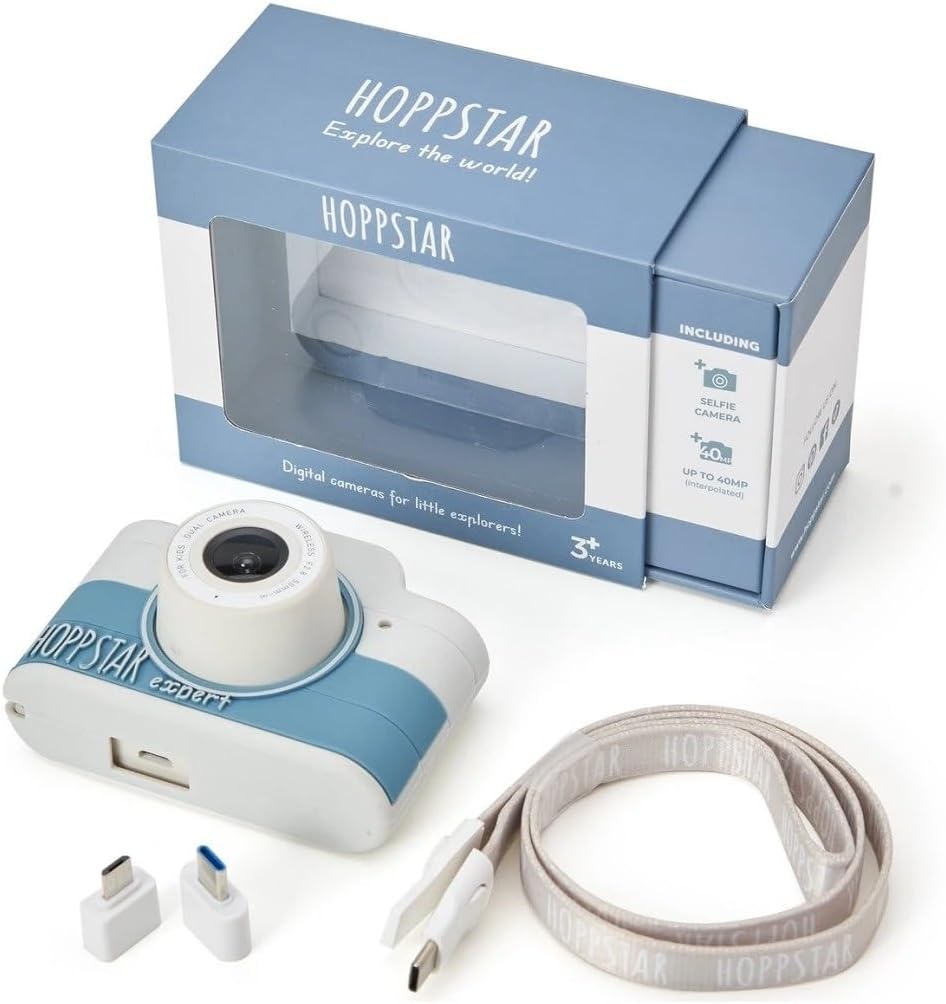
Image: Hoppstar Expert camera shown with its retail packaging, USB charging cable, lanyard, and two USB adapters.
4. פּראָדוקט איבערview
פראָנט View

Image: The front of the Hoppstar Expert camera, featuring the main lens, flash, and the 'Hoppstar Expert' branding on the blue and white body.
- הויפּט לינז: For taking standard photos and videos.
- Flash/Light: גיט באַלויכטונג אין נידעריק-ליכט באדינגונגען.
- מיקראָפאָן: קאַפּטשערז אַודיאָ בעשאַס ווידעא רעקאָרדינג.
דערציען View

Image: The back of the Hoppstar Expert camera, displaying the LCD screen and the control buttons on either side.
- LCD פאַרשטעלן: Displays menus, live view, און ווידערשפּיל.
- Selfie אַפּאַראַט: Located above the screen for self-portraits.
- קאָנטראָל קנעפּלעך: Navigation, OK, Menu, and other function buttons.
5. סעטאַפּ
5.1 אויפלאָדן די קאַמעראַ
Before first use, fully charge the camera's internal battery. Connect the provided USB charging cable to the camera's USB port and to a USB power source (e.g., computer, wall adapter). The charging indicator light will show the charging status and turn off when fully charged.
5.2 אַרייַנלייגן אַ זכּרון קאָרט
The Hoppstar Expert comes with 16 GB of internal storage. If you wish to expand storage, locate the memory card slot (usually on the side or bottom) and insert a compatible microSD card (not included) until it clicks into place. Ensure the camera is powered off before inserting or removing the card.
5.3 פּאַוערינג אויף / אַוועק
Press and hold the Power button (usually located on the top or side) for a few seconds to turn the camera on or off.
6. אַפּערייטינג ינסטרוקטיאָנס
6.1 יקערדיק קאָנטראָלס
- OK קנעפּל: באַשטעטיקט אויסוואַלן אין מעניוז, נעמט פאָטאָס, אָדער הייבט אָן/שטעלט אָפּ ווידעאָ רעקאָרדינג.
- נאַוויגאַציע קנעפּלעך: Used to move through menu options (Up, Down, Left, Right).
- מעניו קנעפּל: Accesses the camera's settings and feature options.
- מאָדע קנעפּל: טוישט צווישן פאָטאָ, ווידעא און ווידערשפּיל מאָדעס.
6.2 נעמען בילדער
In photo mode, frame your shot using the LCD screen. Press the OK button to capture a photo. The camera supports both front and selfie cameras. To switch between cameras, navigate to the camera settings in the menu or use a dedicated button if available.
6.3 רעקאָרדינג ווידיאס
Switch to video mode. Press the OK button once to start recording and press it again to stop. Videos are saved to the internal memory or inserted memory card.
6.4 Using Creative Features
The Hoppstar Expert includes several creative features:
- Picture Frames: Apply fun borders to your photos. Access this feature through the camera's menu.
- Photo Filters: Change the look and feel of your photos with various color and effect filters.
- פּנים דעטעקשאַן: The camera can automatically detect faces in the frame, assisting with focus.
Explore these options within the camera's menu settings to enhance your photos and videos.
7. וישאַלט
- רייניקונג: ניצט אַ ווייכע, טרוקענע שטאָף צו רייניקן די קאַמעראַ און דעם עקראַן. פֿאַר דער לענס, ניצט אַ ספּעציעלע לענס רייניקונג שטאָף. ניצט נישט קיין פליסיקע רייניגער.
- סיליקאָנע קאָווער: The interchangeable silicone cover can be removed and cleaned with mild soap and water if necessary. Ensure it is completely dry before reattaching.
- באַטערי זאָרגן: כדי צו פארלענגערן די לעבן פון די באַטעריע, זאָלט איר נישט אָפט אויסלאָדן די באַטעריע. לאָדט די קאַמעראַ רעגולער אויף, אפילו אויב זי ווערט נישט גענוצט פאר לענגערע צייטן.
- סטאָרידזש: האַלט די קאַמעראַ אין אַ קיל, טרוקן אָרט אַוועק פון דירעקט זונשייַן און עקסטרעמע טעמפּעראַטורן.
8. טראָובלעשאָאָטינג
די אַפּאַראַט טוט נישט קער אויף
- זיכער מאַכן אַז די באַטאַרייע איז אויפגעלאָדן. פֿאַרבינדט די קאַמעראַ צו אַ שטראָם מקור און פּרוּווט ווידער.
- דריק און האלט דעם פּאַוער קנעפּל פֿאַר אַ לענגערע צייט (5-10 סעקונדעס).
Poor Image/Video Quality
- זיכער מאַכן אַז די לענס איז ריין און פריי פון שמוץ אָדער שטויב.
- Check lighting conditions. Optimal results are achieved in well-lit environments.
- Ensure the camera is held steady during capture.
Camera Freezes/Unresponsive
- Try resetting the camera by pressing the reset button (if available, often a small pinhole) or by holding the Power button until it turns off and then restarting.
Cannot Save Photos/Videos
- Check if the internal memory or inserted memory card is full. Delete unnecessary files or insert a new card.
- Ensure the memory card is properly inserted and not corrupted.
If you encounter issues not listed here or if troubleshooting steps do not resolve the problem, please contact Hoppstar customer support.
9. ספּעסאַפאַקיישאַנז
| שטריך | באַשרייַבונג |
|---|---|
| סאָרט נאָמען | Hoppstar |
| מאָדעל נאָמען | Hoppstar Expert Yale |
| מאָדעל נומער | 76893 |
| קאָליר | ייל |
| פּעקל דימענשאַנז | 14.3 X 8.7 X 5.1 סענטימעטער |
| קעסיידערדיק שאָאָטינג ספּיד | 30 fps |
| געבויט-אין קאַמפּאָונאַנץ | Camera + Instruction Manual |
| מאָדעל יאָר | 2023 |
| פילם קאָליר | קאָליר |
| טיפּ פון ויסשטעלן קאָנטראָל | אָטאַמאַטיק |
| לאָדן טיפּ | עלעקטראָניש |
10. וואָראַנטי און שטיצן
The Hoppstar Expert Digital Camera comes with a standard manufacturer's warranty. Please refer to the warranty information provided with your purchase or visit the official Hoppstar webזייטל פֿאַר פרטים וועגן וואָראַנטי טערמינען און באדינגונגען.
For technical support, product inquiries, or warranty claims, please contact Hoppstar customer service through their official webזייטל אדער די קאָנטאַקט אינפֿאָרמאַציע וואָס איז צוגעשטעלט אין אייער קויפן דאָקומענטאַציע.


