1. הקדמה
This manual provides essential information for the safe and effective operation of your VOLTCRAFT DSO-2202H + AFG Handheld Oscilloscope. This versatile device combines the functions of an oscilloscope, a multimeter, and an arbitrary function generator (AFG) into a single portable unit. Please read this manual thoroughly before using the device to ensure proper handling and to prevent damage or injury.
2. זיכערקייַט אינפֿאָרמאַציע
Always observe the following safety precautions to avoid personal injury and prevent damage to the instrument or other equipment.
- לייענען אַלע ינסטראַקשאַנז: איידער איר ניצט דעם אפאראט, לייענט און פארשטייט אלע זיכערהייט און אפעראציע אינסטרוקציעס.
- Use proper probes: Use only probes and accessories rated for the voltage and current of the measurement.
- ויסמיידן נאַס טנאָים: דו זאלסט נישט אַרבעטן די מיטל אין נאַס אָדער דamp ינווייראַנמאַנץ.
- גראָונדינג: Ensure proper grounding when connecting to mains power or high-voltagE סערקאַץ.
- נישט עפענען דעם סיasing: Refer all servicing to qualified service personnel. Opening the casinג קען אייך אויסשטעלן צו געפערלעכע וואליוםtages.
- Observe all ratings: נישט איבערשרייטן די מאקסימום אינפוט רייטינגס פון דעם אפאראט.
3. פּראָדוקט איבערview
The VOLTCRAFT DSO-2202H + AFG is a compact, multi-functional test instrument designed for various electrical measurement tasks. It features a clear color LCD display and intuitive controls.
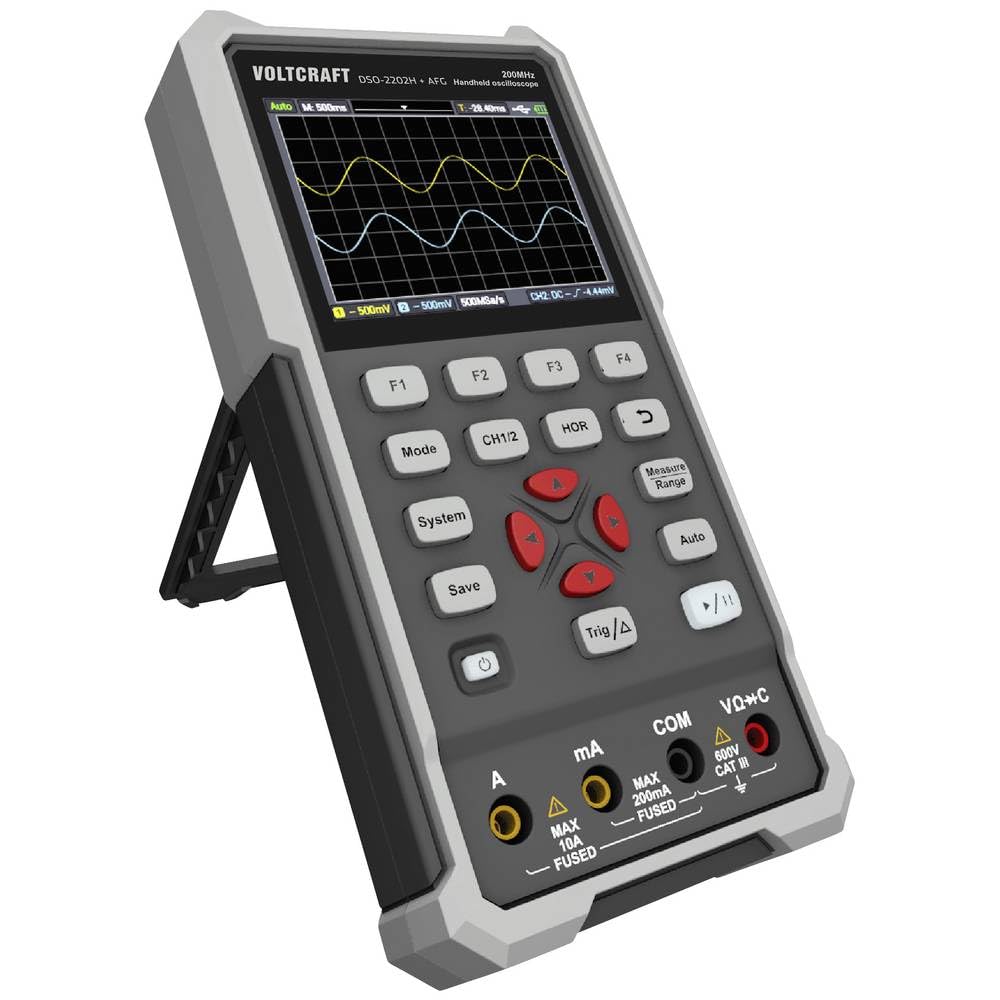
פיגורע 1: פראָנט view of the VOLTCRAFT DSO-2202H + AFG Handheld Oscilloscope with connected test probes. The display shows a voltage reading, and the control panel with function buttons and navigation keys is visible below.
שליסל פֿעיִקייטן:
- 3-in-1 Oscilloscope, Multimeter, and Waveform Generator
- 3.5-inch (8.89 cm) Color LCD Screen (320 x 240 pixels)
- USB Type-C Interface for connectivity and data storage
- Durable and robust design
4. סעטאַפּ
Follow these steps for initial setup of your device.
4.1 פּאַוערינג אויף / אַוועק
- צו אנצינדן דעם אפאראט, דריק און האלט די קנעפל מאַכט button located on the side/top panel.
- The color LCD screen will illuminate, displaying the startup sequence.
- צו האַלטן אַוועק, דריקן און האַלטן די מאַכט קנעפּל ווידער ביז די דעווייס שליסט זיך אויס.
4.2 פֿאַרבינדן פּראָבעס
For oscilloscope functions, connect the oscilloscope probes to the BNC connectors. For multimeter functions, connect the test leads to the appropriate input jacks (VΩ+C, mA, A, COM) at the bottom of the device.
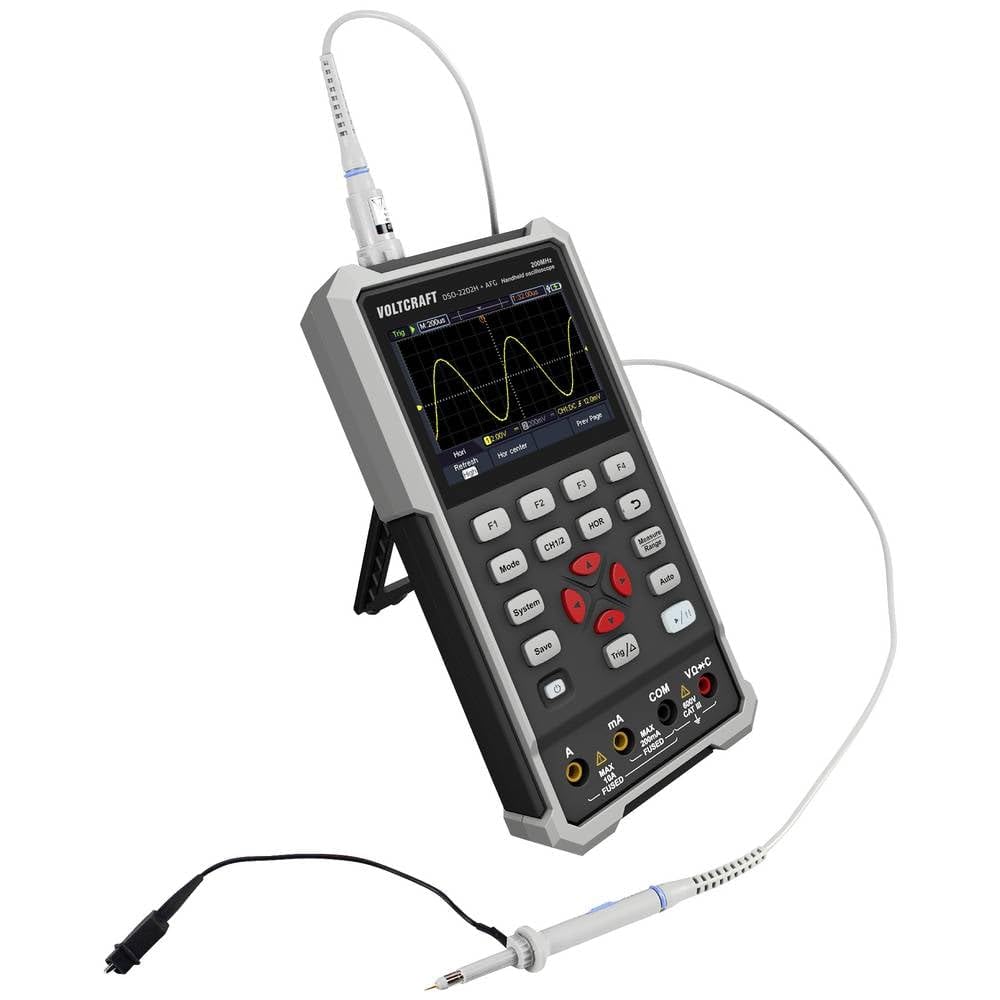
פיגורע 2: זייַט view of the device showing the kickstand extended for desktop use and an oscilloscope probe connected to the BNC input. The multimeter input jacks are visible at the bottom.
5. אַפּערייטינג ינסטרוקטיאָנס
The DSO-2202H + AFG offers three primary modes of operation: Oscilloscope, Multimeter, and Arbitrary Function Generator.
5.1 אָסילאָסקאָפּ מאָדע
This mode allows you to visualize and analyze electrical signals. The device features 2 channels and a 200MHz bandwidth.
- דרוק די מאָדע button to select Oscilloscope mode.
- Connect the oscilloscope probe(s) to the circuit under test.
- ניצן די CH1/2 button to switch between channels or view ביידע.
- Adjust the vertical sensitivity (V/div) and horizontal time base (s/div) using the navigation buttons.
- ניצן די Trig/Δ button to set trigger conditions for stable waveform display.
- די אַוטאָ button can automatically adjust settings for a stable waveform.

Figure 3: The device displaying a waveform in oscilloscope mode. The screen shows voltage and time divisions, indicating a signal measurement.
5.2 מולטימעטער מאָדע
The multimeter function allows for precise measurements of voltage, current, resistance, capacitance, and continuity.
- דרוק די מאָדע button to select Multimeter mode.
- Connect the test leads to the appropriate input jacks (e.g., VΩ+C for voltage/resistance/capacitance, A or mA for current, COM for common).
- Select the desired measurement function (e.g., DC VoltagE, AC Voltage, Resistance) using the function buttons (F1-F4) or navigation keys.
- לייענען די מעזשערמאַנט ווערט אויף די אַרויסווייַזן.
5.3 Arbitrary Function Generator (AFG) Mode
The AFG allows you to generate various waveforms for testing circuits.
- דרוק די מאָדע button to select AFG mode.
- Connect the output of the AFG to the circuit requiring a signal input.
- Use the function buttons (F1-F4) and navigation keys to select waveform type (sine, square, triangle, etc.), frequency, amplitude, and offset.
- Adjust parameters as needed for your application.
5.4 דאַטאַ סטאָרידזש
The USB Type-C port can be used for data storage. Connect the device to a computer using a USB Type-C cable to transfer saved waveforms or measurement data.
6. וישאַלט
Proper maintenance ensures the longevity and accuracy of your device.
- רייניקונג: רייניקט דעם אַפּאַראַט רעגולער מיט אַ ווייכן, טרוקענעם שטאָף. ניצט נישט קיין שרײַבנדיקע רייניגערס אדער סאָלווענטן.
- סטאָרידזש: האַלט דעם אַפּאַראַט אין אַ קיל, טרוקן אָרט אַוועק פון דירעקט זונשייַן און עקסטרעמע טעמפּעראַטורן.
- באַטערי זאָרגן: If the device has an internal rechargeable battery, ensure it is charged periodically if stored for long periods to maintain battery health.
- פּראָבע באַהאַנדלונג: Inspect probes and test leads for damage before each use. Replace any damaged accessories immediately.
7. טראָובלעשאָאָטינג
If you encounter issues with your device, refer to the following common troubleshooting steps.
- אַפּאַראַט אַרבעט נישט אָן: Ensure the device is charged or connected to a power source. Check the power button for proper engagement.
- קיין ווייַז: If the device powers on but the screen is blank, try adjusting the display brightness (if available) or restarting the device.
- אומרעכטע לייענונגען: Verify that probes and test leads are correctly connected and not damaged. Ensure the correct measurement mode and range are selected. Calibrate the device if necessary (refer to advanced settings or contact support).
- נישט-סטאַבילע כוואַליעפאָרם: In oscilloscope mode, adjust the trigger level, trigger source, and time base settings. Use the Auto button for initial setup.
For persistent issues, contact VOLTCRAFT customer support or your retailer.
8. ספּעסאַפאַקיישאַנז
| באַשרייַבונג | ווערט |
|---|---|
| פאַבריקאַנט | VOLTCRAFT |
| מאָדעל נומער | VC-13438620 (DSO-2202H + AFG) |
| פּראָדוקט דימענשאַנז (L x W x H) | 17 X 12 X 40 סענטימעטער |
| וואָג | 600 גראַמז |
| מאַטעריאַל | פּלאַסטיק |
| אָסילאָסקאָפּ באַנדווידט | 200 מהז |
| טשאַנאַלז | 2-קאַנאַל |
| Sample קורס | 1 GSa/s |
| זכּרון דעפּט | 8 kpts |
| האַכלאָטע | 8 ביסל |
| ווייַז | 3.5-inch (8.89 cm) Color LCD (320 x 240 pixels) |
| צובינד | וסב טיפּ-C |
| מעאַסורעמענט סיסטעם | מעטריק |
| באַטעריז אַרייַנגערעכנט | ניין |
| באַטעריז פארלאנגט | ניין |
9. וואָראַנטי און שטיצן
For warranty information, please refer to the documentation provided with your purchase or contact your retailer. For technical support, visit the official VOLTCRAFT webפּלאַץ אָדער קאָנטאַקט זייער קונה סערוויס אָפּטיילונג.


