1. הקדמה
א דאנק פארן קויפןasing the CANYON BSP-8 Bluetooth Speaker. This manual provides essential information for the safe and efficient use of your device. Please read it thoroughly before operation and retain it for future reference.
שליסל פֿעיִקייטן:
- 10W Audio Output: Delivers clear and powerful sound.
- בלועטאָאָטה 5.2: For stable and energy-efficient wireless connection up to 10 meters.
- RGB באַקלייט: Integrated lighting for enhanced ambiance.
- אמת ווירעלעסס סטערעאָ (TWS): Connect two BSP-8 speakers for a full stereo sound experience.
- קייפל פּלייַבאַקק אָפּציעס: Supports Bluetooth, AUX, USB, and MicroSD card inputs.
- פּאָרטאַטיוו פּלאַן: Compact size with a convenient hanger for easy transport.
- לאנג באַטאַרייע לעבן: אַרויף צו 3 שעה פון שפּיל צייט אויף אַ איין אָפּצאָל.
2. זיכערקייַט אינפֿאָרמאַציע
- שטעלט נישט אויס דעם רעדנער צו עקסטרעמע טעמפּעראַטורן, דירעקטע זונשייַן, אדער הויכע פֿײַכטקייט.
- ויסמיידן דראַפּינג אָדער ונטערטעניק די רעדנער צו שטאַרק ימפּאַקץ.
- Do not disassemble or attempt to repair the speaker yourself. Contact qualified service personnel.
- האַלט דעם רעדנער אַוועק פון וואַסער און אַנדערע פליסיקייטן. עס איז נישט וואַסערפּרוף.
- ניצט נאָר דעם צוגעשטעלטן טשאַרדזשינג קאַבל אָדער אַ סערטיפיצירטן טיפּ-C קאַבל צום טשאַרדזשינג.
- Dispose of the battery and speaker according to local regulations.
3. פּעקל אינהאַלט
- CANYON BSP-8 Bluetooth Speaker
- וסב טיפּע- C טשאַרדזשינג קאַבלע
- באַניצער מאַנואַל
4. פּראָדוקט איבערview
מאַכט זיך באַקאַנט מיט די רעדנער'ס קאָמפּאָנענטן און קאָנטראָלס.
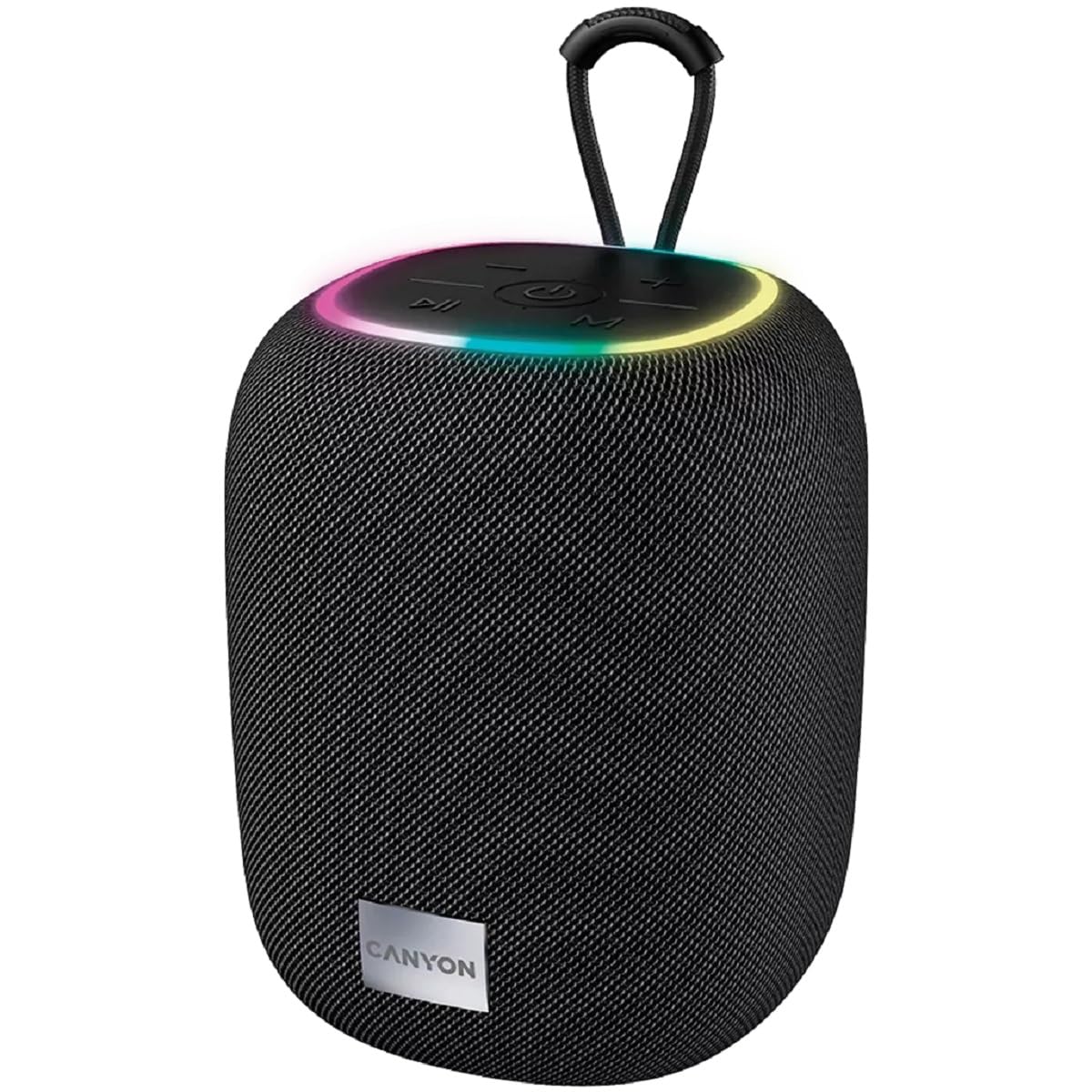
בילד 1: אויבן view of the CANYON BSP-8 speaker, showing the control buttons, RGB backlight, and integrated hanger.
Control Buttons (Top Panel):
- מאַכט קנעפּל: Press and hold to turn on/off. Short press to play/pause.
- באַנד אַראָפּ / פריערדיקע ליד קנעפּל: קורץ דריקן צו פארמינערן די קול. לאנג דריקן צו פארן פריערדיגן ליד.
- באַנד אַרויף / ווייַטער ליד קנעפּל: קורץ דריקן צו פארגרעסערן די קול. לאנג דריקן פארן נעקסטן ליד.
- מאָדע קנעפּל (M): Short press to switch between Bluetooth, AUX, USB, and MicroSD modes.

בילד 2: דערציען view of the CANYON BSP-8 speaker, illustrating the various input ports including AUX, USB, TF (MicroSD) card slot, and DC5V Type-C charging port.
Input Ports (Rear Panel):
- AUX פּאָרט: פֿאַר פֿאַרבינדן עקסטערנע אַודיאָ דעוויסעס דורך אַ 3.5 מם אַודיאָ קאַבל.
- וסב פּאָרט: פֿאַר שפּילן אַודיאָ פֿון אַ USB פֿלאַש דרייוו.
- TF קאַרטל שפּעלטל (מיקראָסד): For playing audio from a MicroSD card.
- DC5V (Type-C) Port: פֿאַר טשאַרדזשינג די רעדנער.
5. סעטאַפּ
5.1 אויפלאָדן דעם רעדנער
- Connect the provided USB Type-C cable to the DC5V port on the speaker.
- פֿאַרבינדט דעם אַנדערן עק פֿונעם קאַבל צו אַ USB מאַכט אַדאַפּטער (5V/1A רעקאָמענדירט) אָדער אַ קאָמפּיוטער'ס USB פּאָרט.
- די טשאַרדזשינג אינדיקאַטאָר ליכט וועט זיך אָנצינדן. עס וועט זיך אויסלעשן אָדער טוישן קאָליר אַמאָל עס איז גאָר אָנגעלאָדן.
Note: For optimal battery life, fully charge the speaker before first use.

Image 3: Illustration showing the 1800 mAh battery capacity and up to 3 hours of playtime for the CANYON BSP-8 speaker.
5.2 פּאַוערינג אויף / אַוועק
- צו מאַכט אויף: דריק און האלט דעם פּאַוער קנעפּל פֿאַר אַרום 3 סעקונדעס. איר וועט הערן אַן אָדבאַרע פּראָמפּט.
- צו מאַכט אַוועק: דריק און האלט דעם פּאַוער קנעפּל פֿאַר אַרום 3 סעקונדעס. איר וועט הערן אַן אָדבאַרע פּראָמפּט.
5.3 בלועטאָאָטה פּערינג
- צינדט אן דעם רעדנער. עס וועט אויטאמאטיש אריינגיין אין בלוטוט פארבינדונג מאָדוס, אנגעצייכנט דורך א בלינקנדיקע LED ליכט.
- אַקטיווירן בלועטוט אויף אייער מאָביל מיטל (סמאַרטפאָון, טאַבלעט, קאָמפּיוטער).
- זוכן פֿאַר available Bluetooth devices and select "CANYON BSP-8" from the list.
- אַמאָל פּערד, וועט די LED ליכט אויפהערן צו בלינקען, און איר וועט הערן אַ באַשטעטיקונג גערויש.
Note: The speaker will automatically reconnect to the last paired device if it is within range and Bluetooth is enabled.

Image 4: Illustration highlighting the stable and energy-efficient Bluetooth 5.2 connection with an operating range of up to 10 meters.
5.4 אמתע ווירעלעס סטערעאָ (TWS) פּאָרינג
To connect two CANYON BSP-8 speakers for a stereo sound experience:
- Ensure both BSP-8 speakers are powered on and not connected to any Bluetooth device.
- On one speaker (this will be the primary speaker), double-press the Power button. It will enter TWS pairing mode.
- די צוויי רעדנערס וועלן זיך אויטאמאטיש זוכן און זיך פארבינדן איינער מיטן צווייטן. איר וועט הערן א באשטעטיגונגס-קלאנג אזוי שנעל ווי זיי זענען פארבונדן.
- Once TWS is established, connect your mobile device to the primary speaker via Bluetooth as described in section 5.3.
Note: TWS mode only works with two identical CANYON BSP-8 speakers.
6. אַפּערייטינג ינסטרוקטיאָנס
6.1 פּלייַינג אַודיאָ
- בלועטאָאָטה מאָדע: After successful pairing, audio from your connected device will play through the speaker.
- AUX מאָדע: Connect a 3.5mm audio cable from your external audio device to the AUX port on the speaker. Press the 'M' button to switch to AUX mode.
- וסב מאָדע: Insert a USB flash drive into the USB port. The speaker will automatically switch to USB mode and begin playing audio files. If not, press the 'M' button.
- מיקראָסד קאָרט מאָדע: Insert a MicroSD card into the TF card slot. The speaker will automatically switch to MicroSD mode and begin playing audio files. If not, press the 'M' button.
6.2 פּלייבאַק קאָנטראָל
- שפּיל / פּויזע: קורץ דריקן די מאַכט קנעפּל.
- באַנד אַרויף: דריק קורץ דעם באַנד אַרויף (+) קנעפּל.
- באַנד אַראָפּ: דריק קורץ דעם באַנד אַראָפּ (-) קנעפּל.
- ווייַטער שפּור: לאַנג דריקן די באַנד אַרויף (+) קנעפּל.
- פֿריִערדיקע שפּור: לאַנג דריקן די באַנד אַראָפּ (-) קנעפּל.
6.3 RGB באַקלייט
The speaker features an integrated RGB backlight on the top panel. The backlight activates automatically when the speaker is powered on. There are no specific controls for changing the RGB pattern or turning it off/on independently of the speaker's power state.


