הקדמה
Thank you for choosing the Epson EB-L210SF projector. This manual provides essential information for the safe and efficient use of your projector. Please read it thoroughly before operating the device and keep it for future reference.
The Epson EB-L210SF is a 3LCD Full-HD projector designed for clear and vibrant image projection. It features a laser light source for long-lasting performance.
וויכטיק סאַפעטי אינפֿאָרמאַציע
- לייזער זיכערקייַט: Do not look directly into the projector lens when the laser light source is active. Avoid direct eye exposure to the laser beam.
- ווענטילאַטיאָן: Ensure adequate ventilation around the projector. Do not block ventilation openings. Overheating can cause damage.
- מאַכט מקור: Use only the power supply specified for this projector.
- האַנדלינג: באַהאַנדלט דעם פּראָיעקטאָר מיט פֿאָרזיכט. פֿאַרמײַדט אים צו לאָזן פֿאַלן אָדער אים אויסשטעלן צו שטאַרקע קלאַפּן.
- רייניקונג: טרענט אפ דעם עלעקטרישן שנור איידער איר רייניגט. ניצט א ווייכן, טרוקענעם טוך. ניצט נישט קיין פליסיקע אדער אייראזאל רייניגער.
סעטאַפּ
1. אַנפּאַקינג און פּלייסמאַנט
Carefully remove the projector and all accessories from the packaging. Place the projector on a stable, level surface. Ensure there is sufficient space around the projector for proper ventilation.

פיגורע 1: פראָנט און זייַט view of the Epson EB-L210SF projector, showing the lens and ventilation grilles.
2. קאַנעקטינג מאַכט
- פֿאַרבינדט דעם צוגעשטעלטן מאַכט שנור צום פּראָיעקטאָר'ס AC אַרייַנגאַנג.
- צאַפּן די אנדערע סוף פון די מאַכט שנור אין אַ גראָונדעד עלעקטריקאַל ווענטיל.
3. פֿאַרבינדן אַרייַנשרייַב קוואלן
The projector supports various input sources. Connect your device (computer, Blu-ray player, etc.) to the appropriate port on the projector's rear panel.

Figure 2: Rear panel of the projector, displaying various input and output ports including HDMI, Computer (VGA), Video, USB, and Audio connections.
- הדמי: Connect an HDMI cable from your device to one of the HDMI ports (HDMI 1 or HDMI 2).
- קאָמפּיוטער (VGA): Connect a VGA cable from your computer to the Computer 1 or Computer 2 port. For audio, connect a separate audio cable to Audio 1 or Audio 2.
- ווידעא: Connect composite video and audio cables to the Video and Audio (R/L) ports.
- וסב: Use the USB-A port for connecting USB storage devices or the USB-B port for display over USB.
- לאן: פֿאַרבינדט אַן עטערנעט קאַבל פֿאַר נעץ קאָנטראָל און מאָניטאָרינג.
4. ערשטע איינשטראָם און בילד אַדזשאַסטמענט
- Press the power button on the projector or remote control to turn on the device. The power indicator will illuminate.
- סטרויערן די פאָקוס רינג around the lens until the image is sharp and clear.
- ניצן די זום לעווער (if available) to adjust the image size.
- אויב די בילד קוקט אויס טראַפּעזאָידאַל, ניצט די קייסטאָנע קערעקשאַן feature (manual or automatic) to square the image. Refer to the Operating section for details on menu navigation.
אַפּערייטינג די פּראַדזשעקטער
1. קאָנטראָל פּאַנעל איבערview
The control panel on top of the projector allows access to various functions and settings.
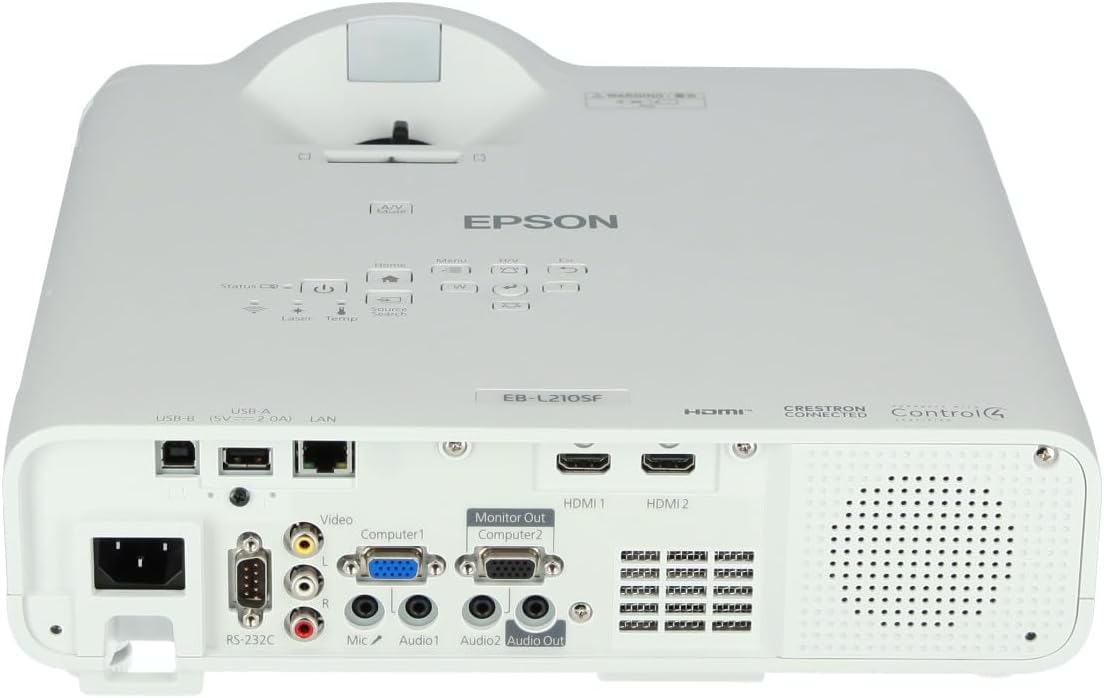
פיגורע 3: שפּיץ view of the projector, highlighting the control panel with buttons for power, menu, source selection, and navigation.
- מאַכט קנעפּל: טורנס די פּראַדזשעקטער אויף אָדער אַוועק.
- מקור זוכן: גייט דורך די פארהאן איינגאבע קוועלער.
- מעניו קנעפּל: עפֿנט דאָס אויף-עקראַן אַרויסווייַז (OSD) מעניו.
- Navigation Buttons (Arrow keys): געניצט צו נאַוויגירן דורך מעניו אָפּציעס.
- אַרייַן קנעפּל: באַשטעטיקט אויסוואַלן אין מעניו.
- עסק קנעפּל: Exits the current menu or returns to the previous screen.
- היים קנעפּל: Accesses the home screen or quick settings.
- א/וו שטום: Temporarily mutes audio and blanks the screen.
2. Selecting an Input Source
דרוק די מקור זוך button on the control panel or remote control to cycle through the connected input sources (e.g., HDMI 1, HDMI 2, Computer 1, Video). The projector will automatically detect and display the active source.
3. Adjusting Image and Audio Settings
דרוק די מעניו button to access the projector's on-screen display (OSD) menu. Use the navigation buttons to browse categories such as:
- בילד: Adjust brightness, contrast, color, tint, sharpness, and color temperature.
- סיגנאַל: Configure input signal settings, aspect ratio, and overscan.
- סעטטינגס: General projector settings like language, display options, and power management.
- אַודיאָ: Adjust volume, mute, and audio input selection.
אויסקלייַבן אַן אָפּציע און דריקן אַרייַן to modify its value. Press Esc צו אַרויסגאַנג די מעניו.
וישאַלט
1. רייניקן דעם פּראָיעקטאָר
- עקסטעריע: Wipe the projector's exterior with a soft, dry, lint-free cloth. For stubborn dirt, dampen the cloth slightly with water, then wipe dry.
- לענס: Gently wipe the lens with a lens cleaning cloth or lens paper. Avoid using abrasive materials or excessive force.
- לופט פילטער: Regularly check and clean the air filter to prevent dust buildup, which can affect performance and cause overheating. Refer to the projector's on-screen menu for filter maintenance reminders.
2. לאַזער ליכט מקור
The Epson EB-L210SF uses a laser light source, which offers a long operational life and does not require lamp replacement. No user maintenance is typically required for the laser light source itself.
טראָובלעשאָאָטינג
אויב איר טרעפט פּראָבלעמען מיט אייער פּראָיעקטאָר, זעט די פאלגענדע געוויינטלעכע פּראָבלעמען און לייזונגען:
| פּראָבלעם | מעגלעך סיבה / לייזונג |
|---|---|
| קיין בילד נישט פּראָיעקטירט |
|
| בילד איז פארשוואומען אדער נישט אין פאָקוס |
|
| Image is distorted (trapezoidal) |
|
| קיין געזונט |
|
| Projector is not wireless | The Epson EB-L210SF is not inherently a wireless projector. Wireless functionality typically requires an optional external wireless adapter, which is sold separately. Please consult Epson's official website or your retailer for compatible wireless adapters. |
| Overheating warning (Temp indicator) |
|
ספּעסאַפאַקיישאַנז
| שטריך | דעטאַל |
|---|---|
| מאָדעל נומער | V11HA75080 |
| ווייַז האַכלאָטע | 1920 רענטגענ 1080 (פול הד) |
| קאַנעקטיוויטי טעכנאָלאָגיע | HDMI, VGA, USB, LAN |
| פּראָדוקט דימענשאַנז | 11.81 X 11.81 X 11.81 אינטשעס |
| פּונקט וואָג | 10.14 פונט |
| ליכט מקור | לייזער |
| פאַבריקאַנט | Epson |
| רעקאָממענדעד ניצט | מאָניטאָרינג |
| ספּעציעלע שטריך | לייטווייט |
| באַטעריז פארלאנגט | 1 AAAA (for remote control, not included with projector unit) |
| ערשטער דאַטע בנימצא | 14 נאוועמבער 2023 |
וואָראַנטי און שטיצן
פֿאַר דעטאַלירטע וואָראַנטי אינפֿאָרמאַציע, ביטע זען די וואָראַנטי קאַרטל וואָס איז אַרייַנגערעכנט מיט דיין פּראָדוקט אָדער באַזוכן די באַאַמטער עפּסאָן וועבזייטל webזייטל. גאַראַנטיע טערמינען און באדינגונגען קענען זיין אַנדערש לויט געגנט.
For technical support, product registration, or to download the latest drivers and software, please visit the official Epson support website or contact Epson customer service in your region. Contact information can typically be found on the Epson webפּלאַץ.


