1. פּראָדוקט איבערview
The Poly Voyager 4320 UC is a wireless stereo headset designed for professionals requiring seamless connectivity and productivity in various work environments. It features a noise-canceling boom microphone with Acoustic Fence technology, ensuring clear audio transmission by blocking background noise. The headset connects to PC/Mac via a BT700 USB-C Bluetooth adapter (with an included USB-C to USB-A adapter) and to mobile devices via Bluetooth 5.2. It offers up to 24 hours of talk time and includes a desktop charging stand for convenient power management. This model is Microsoft Teams certified and integrates with other communication platforms like Zoom.

Image 1.1: The Poly Voyager 4320 UC Wireless Headset shown on its included desktop charging stand. The headset features over-the-head stereo design with a flexible boom microphone.
2. שליסל פֿעיִקייטן
- קלאָרע אַודיאָ קוואַליטעט: Features a noise-canceling dual microphone with Acoustic Fence technology to minimize background noise, ensuring your voice is heard clearly.
- פלעקסאַבאַל קאַנעקטיוויטי: Connects wirelessly to computers (PC/Mac) via the included BT700 USB-C Bluetooth adapter (with USB-C to USB-A adapter) and to mobile phones via Bluetooth 5.2.
- Extended Mobility: Offers a wireless range of up to 164 feet (50 meters) from your computer, allowing freedom of movement during calls.
- לאנג באַטאַרייע לעבן: Provides up to 24 hours of talk time on a single charge. Can also be used as a wired headset via audio-over-USB mode.
- באַקוועם פּלאַן: Equipped with an adjustable padded headband and memory foam ear cushions for comfortable extended wear.
- Dedicated Microsoft Teams Button: Instant access to the Microsoft Teams app for seamless collaboration. Also compatible with Zoom and other platforms.
- Desktop Charging Stand: Simplifies charging and provides a convenient storage solution.
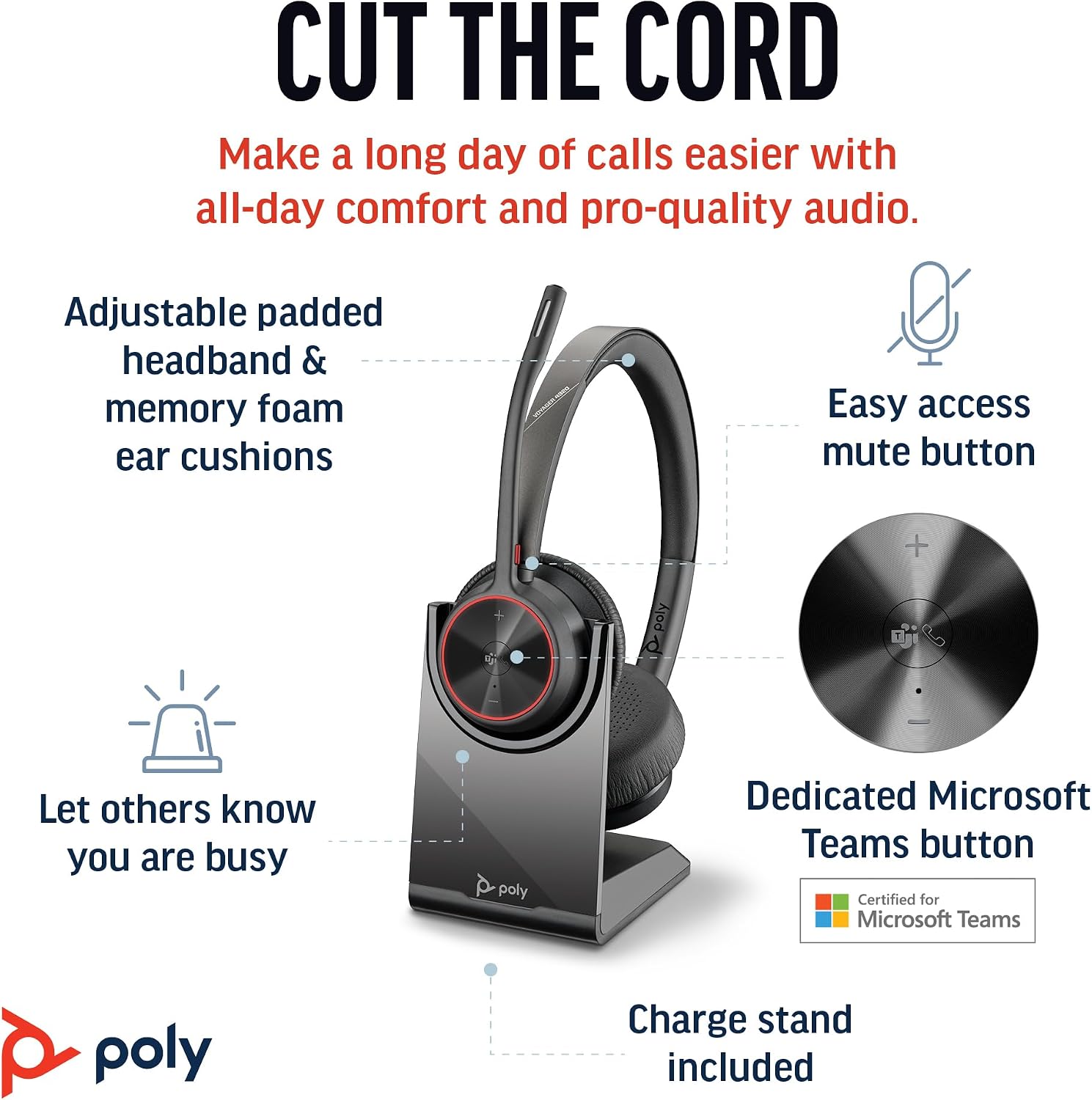
Image 2.1: The Poly Voyager 4320 UC Headset highlighting its adjustable padded headband, memory foam ear cushions, easy access mute button, dedicated Microsoft Teams button, and included charge stand.

Image 2.2: Illustration demonstrating the noise-canceling dual microphone with Acoustic Fence technology, which filters out background noise for clear communication.
3. סעטאַפּ גייד
3.1 פּעקל אינהאַלט
באַשטעטיקן אַז אַלע זאכן זענען פאַראַן אין דיין פּעקל:
- פּאָלי וואָיאַדזשער 4320 UC וויירלעס כעדסעט
- דעסקטאָפּ טשאַרדזשינג שטיין
- BT700 USB-C Bluetooth Adapter
- וסב-C צו וסב-א אַדאַפּטער
- וסב טשאַרדזשינג קאַבלע
- Travel Pouch (may be included with some versions)
3.2 אויפלאָדן דעם כעדסעט
Before first use, fully charge your headset. The headset can be charged using the included desktop charging stand or directly via the USB charging cable.
- ניצן די טשאַרדזשינג שטיין: Connect the USB charging cable to the charging stand and then to a powered USB port (e.g., computer, wall adapter). Place the headset onto the charging stand. The headset's LED indicator will show charging status.
- דירעקטע USB טשאַרדזשינג: Connect the USB charging cable directly to the headset's USB-C port and then to a powered USB port.
A full charge takes approximately 1.5 hours. The headset provides up to 24 hours of talk time and 47 hours of listening time.
3.3 קאַנעקטינג צו דעוויסעס
The Voyager 4320 UC headset offers multiple connection options:
3.3.1 Connecting to PC/Mac (via USB Adapter)
- Insert the BT700 USB-C Bluetooth adapter into an available USB-C port on your computer. If your computer only has USB-A ports, use the included USB-C to USB-A adapter.
- The adapter's LED will flash blue, indicating it is searching for the headset.
- Power on your headset. The headset and adapter are pre-paired and should connect automatically. The adapter's LED will turn solid blue when connected.
- אויסקלייבן דעם פּאָלי וואָיאַדזשער 4320 UC ווי אייער אַודיאָ אַרייַנגאַנג און אַרויסגאַנג מיטל אין אייער קאָמפּיוטער'ס געזונט סעטטינגס און קאָמוניקאַציע אַפּלאַקיישאַנז (למשל, מייקראָסאָפֿט טימז, זום).
3.3.2 Connecting to Mobile Phone (via Bluetooth)
- With the headset powered on, press and hold the Bluetooth pairing button on the headset until the headset's LED flashes red and blue, indicating pairing mode.
- On your mobile phone, go to Bluetooth settings and enable Bluetooth.
- Select "Poly Voyager 4320 UC" from the list of available devices.
- Once paired, the headset's LED will stop flashing and remain solid blue.

Image 3.1: Diagram illustrating the multiple connection options for the Poly Voyager 4320 UC headset, including connection to a PC/Mac via the USB-C BT700 Bluetooth adapter (with USB-A adapter option) and direct Bluetooth connection to a mobile device.
4. אַפּערייטינג ינסטרוקטיאָנס
4.1 טראָגן די כעדסעט
The headset can be worn with the microphone boom on either the right or left side. Rotate the boom up and over to align with the desired side. For optimal microphone performance, position the boom approximately two finger-widths from the corner of your mouth.
4.2 כעדסעט קאָנטראָלס
- באַנד אַרויף / אַראָפּ (+/-): Adjusts listening volume.
- רופן קנעפּל: דרוק צו ענטפֿערן אָדער פאַרענדיקן אַ רוף.
- שטיל קנעפּל: Located on the microphone boom. Press to mute/unmute your microphone. A dynamic mute alert will notify you if you speak while muted.
- מייקראָסאָפֿט טימז קנעפּל: Dedicated button for instant access to the Microsoft Teams application.
- מאַכט קנעפּל: Slide to power on/off.
4.3 געפירט ינדיקאַטאָרס
The headset and USB adapter feature LED indicators to provide status information:
- Headset LED:
- Solid Blue: Connected/In call
- Flashing Red/Blue: Pairing mode
- האַרט רויט: מיוטיד
- האַרט בורשטין: טשאַרדזשינג
- פלאַשינג רויט: נידעריק באַטאַרייע
- USB Adapter LED (BT700):
- Solid Blue: Connected/In call
- Flashing Blue: Searching for headset
- האַרט רויט: מיוטיד
5. וישאַלט
5.1 רייניקונג
To maintain the headset's performance and hygiene:
- ווישט די אויער קישן און קאפבאנד מיט א ווייכן, טרוקענעם שטאָףamp שטאָף. ויסמיידן ניצן האַרב קעמיקאַלז אָדער אַברייסיוו מאַטעריאַלס.
- Do not immerse the headset in water or any liquids.
- Keep the charging contacts on the headset and stand clean and free of debris.
5.2 סטאָרידזש
When not in use, store the headset on its charging stand or in the included travel pouch to protect it from dust and damage. Avoid storing in extreme temperatures.
6. טראָובלעשאָאָטינג
6.1 קיין אַודיאָ אָדער שלעכטע אַודיאָ קוואַליטעט
- קוק די קשר: Ensure the headset is properly connected to your device (solid blue LED on headset and adapter).
- באַנד לעוועלס: Verify that headset, computer, and application volume levels are not muted or set too low.
- פעליקייַט מיטל: Confirm that the Poly Voyager 4320 UC is selected as the default playback and recording device in your computer's sound settings and communication software.
- קייט: Ensure you are within the wireless range (up to 50 meters) of your connected device.
- ינטערפיראַנס: גייט אַוועק פון אַנדערע וויירלעס דעוויסעס וואָס קענען פאַרשאַפן שטערונג.
6.2 מיקראָפאָן אַרבעט נישט
- קוק שטום: Ensure the microphone is not muted (headset LED should not be solid red).
- מיקראָפאָן שטעלע: Adjust the microphone boom to be two finger-widths from your mouth.
- פעליקייַט מיטל: Confirm the headset is selected as the default recording device in your computer's sound settings and communication software.
- ווייכווארג סעטטינגס: קאָנטראָלירט די מיקראָפאָן פּריוואַטקייט סעטטינגס אין אייער אָפּערייטינג סיסטעם.
6.3 Headset Not Pairing/Connecting
- מאַכט ציקל: קער די כעדסעט אַוועק און אויף ווידער.
- ריפּער: Follow the pairing instructions in Section 3.3 to re-pair the headset with your device or USB adapter.
- Adapter Reset: If using the USB adapter, try unplugging and re-inserting it.
- Clear Device List: On your mobile device, forget the headset from the Bluetooth device list and attempt to pair again.
7. ספּעסאַפאַקיישאַנז
| שטריך | באַשרייַבונג |
|---|---|
| מאָדעל נאָמען | Voyager 4320 Teams Version with Charge Stand, USB-C BT700 with USB-C to USB-A Adapter |
| קאַנעקטיוויטי טעכנאָלאָגיע | ווירעלעס (בלוטוט 5.2) |
| ווירעלעסס ראַנגע | אַרויף צו 50 מעטער (164 פֿיס) |
| רעדן צייט | אַרויף צו 24 שעה |
| צוגעהערט צייט | אַרויף צו 47 שעה |
| טשאַרדזשינג צייט | בעערעך. 1.5 שעה פֿאַר פול אָפּצאָל |
| מיקראָפאָן | ראַש-קאַנסאַלינג צווייענדיק מיקראָפאָן מיט אַקוסטיש פענס טעכנאָלאָגיע |
| קאַמפּאַטאַבאַל דעוויסעס | סעלפאָונז, דעסקטאָפּס, לאַפּטאָפּס, טאַבלעטן |
| קאָנטראָל טיפּ | מעדיע קאָנטראָל, ריר |
| פּונקט וואָג | 162 גראַמז (5.7 אונסעס) |
| פּראָדוקט דימענשאַנז | 3.94 X 0.79 X 1.06 אינטשעס |
| באַטערי טיפּ | 1 ליטהיום יאָן באַטאַרייע (אַרייַנגערעכנט) |
| UPC | 017229196667, 196548548736 |
8. וואָראַנטי און שטיצן
פֿאַר וואָראַנטי אינפֿאָרמאַציע און טעכנישע שטיצע, ביטע זען די באַאַמטער פּאָלי webזייטל אדער קאנטאקט זייער קאסטומער סערוויס. האלט אייער באווייז פון קויפן פאר גאראנטיע טענות.


