1. הקדמה
This instruction manual provides comprehensive guidance for setting up, operating, and maintaining your Yahboom Jetson Orin NX 16GB AI Development Kit. This powerful kit is designed for advanced artificial intelligence and robotics applications, leveraging NVIDIA's Ampere architecture GPU and Arm Cortex-A78AE CPU for high-performance computing at the edge.
2. Key Features and Core Parameters
- AI פאָרשטעלונג: Up to 157 TOPS (Dense) for advanced AI workloads.
- גפּו: 1024-האַרץ NVIDIA Ampere architecture GPU with 32 Tensor Cores.
- CPU: 8-core Arm Cortex-A78AE v8.2 64-bit CPU (2MB L2 + 4MB L3).
- זכּרון: 16GB 128-bit LPDDR5 with 102.4GB/s bandwidth.
- סטאָרידזש: Supports external NVMe SSD (256GB SSD included in this kit).
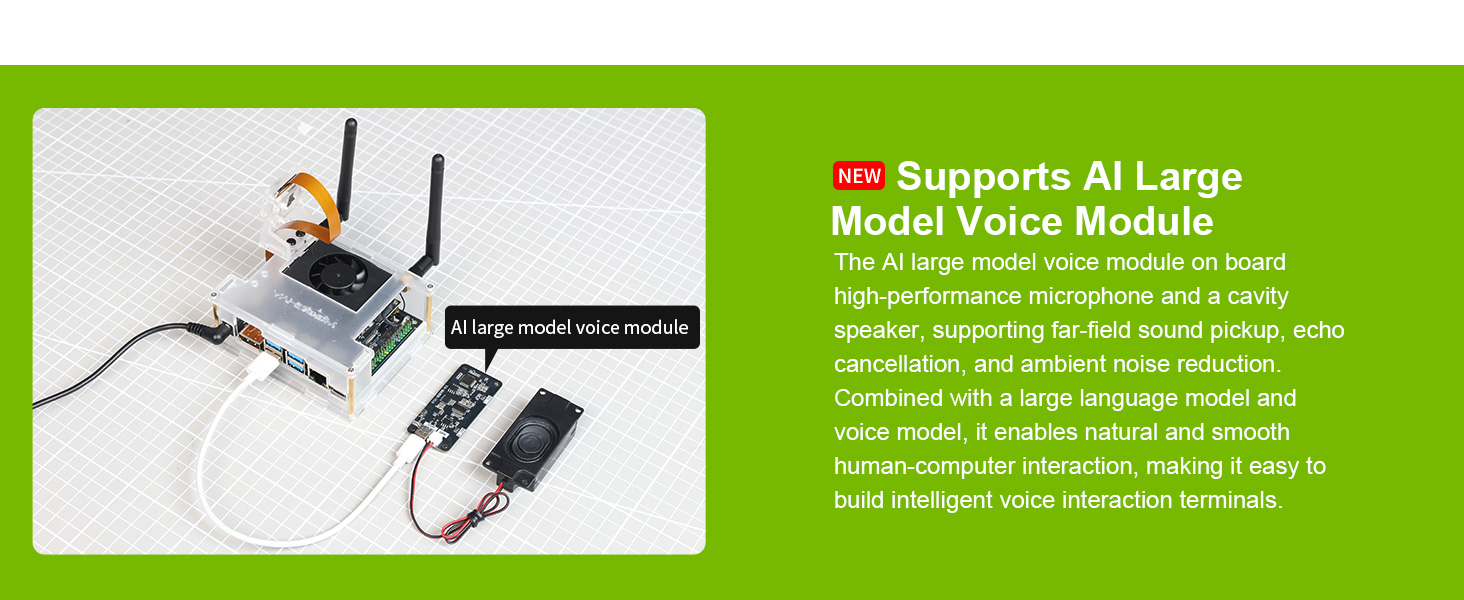
- Enhanced Human-Computer Interaction: Leverages three AI models and an AI voice interaction module for multimodal visual systems, environmental awareness, and AI visual gameplay.
- Industry Revolution: Ideal for small, low-power robotics and autonomous machines in manufacturing, logistics, retail, agriculture, medical, and life sciences.
- Tutorial Materials: Comprehensive tutorials based on Ubuntu 22.04, supporting NVIDIA CUDA 12.6, TensorRT 10.7.0, cuDNN 9.6.0, OpenCV 4.10.0, and more.
3. פּראָדוקט איבערview און קאַמפּאָונאַנץ
The Yahboom Jetson Orin NX 16GB AI Development Kit includes the core Jetson Orin NX module, a carrier board, and various accessories to facilitate immediate development.
3.1. קיט אינהאַלט
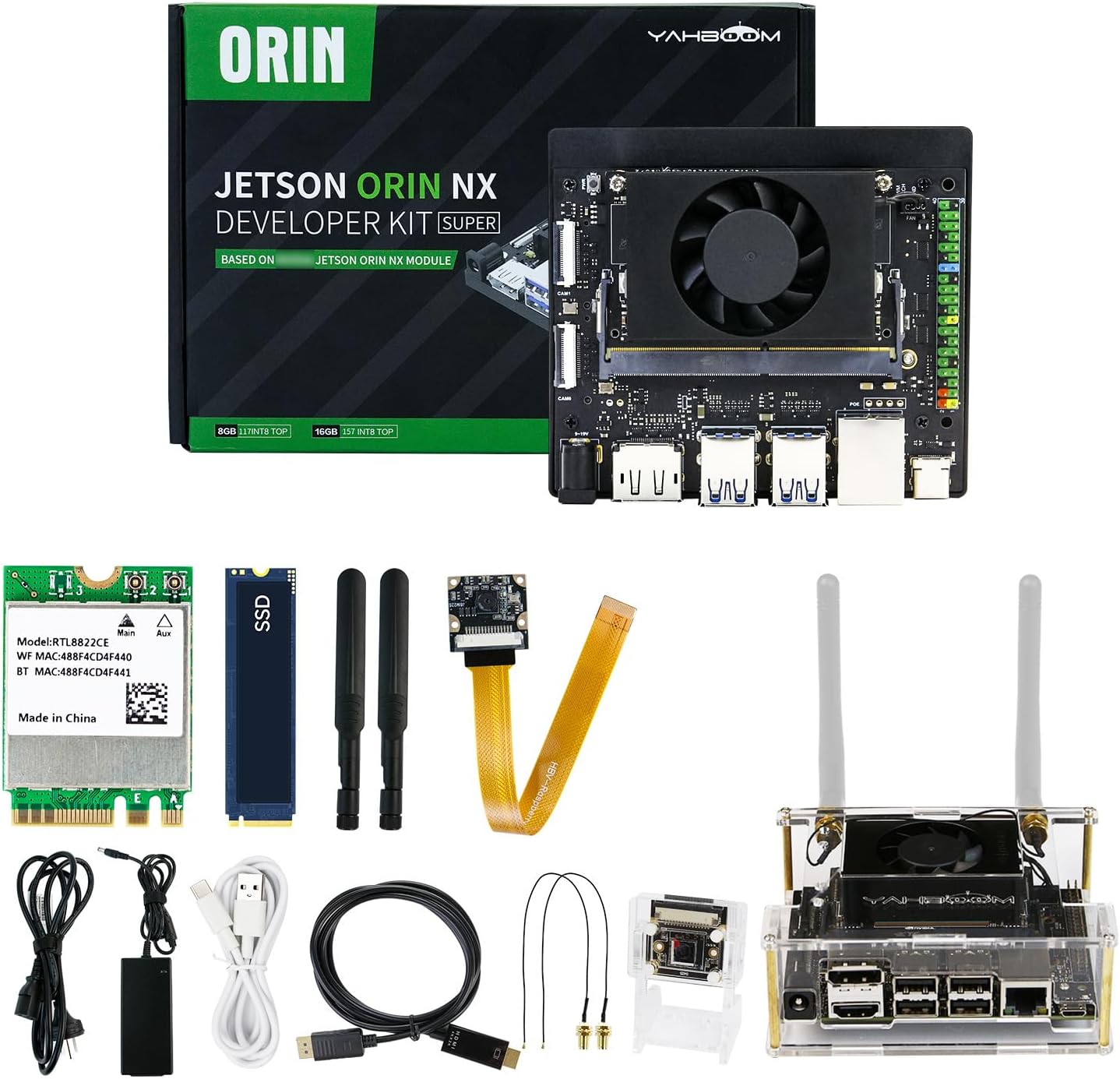
דער קיט טיפּיש כולל:
- Jetson Orin NX 16GB Core Module with Fan
- קאַריער באָרד
- 256GB NVMe M.2 SSD (pre-installed with system image)
- IMX219 CSI Camera
- Dual-band Wireless Network Card (8822CE NGW) with Antennas
- מאַכט אַדאַפּטער
- Various Cables (USB-C, USB-A, etc.)
- Acrylic Case (for protection and mounting)
3.2. Board Layout and Interfaces

The carrier board provides a rich set of interfaces for connectivity and expansion:
- מאַכט צובינד: DC5525 power jack (5.5mm x 2.5mm) for 19V/5A input.
- ווייַז רעזולטאַט: DisplayPort interface for monitor connection.
- וסב פּאָרץ: 4x USB 3.2 Gen 1 Type-A ports (rated at 10Gbps each), 1x USB Type-C port (data only).
- נעטוואָרקינג: Gigabit Ethernet port (RJ45).
- אַפּאַראַט ינטערפייסיז: 2x MIPI CSI camera interfaces (22Pin).
- יקספּאַנשאַן: 40-pin GPIO expansion header, CAN bus, PoE interface.
- סטאָרידזש יקספּאַנשאַן: M.2 Key M connectors for NVMe SSDs, M.2 Key E connector for wireless modules.
4. סעטאַפּ אינסטרוקציעס
Follow these steps to set up your Yahboom Jetson Orin NX 16GB AI Development Kit:
4.1. ייַזנוואַרג אַסעמבלי
- אינסטאַלירן SSD: Ensure the 256GB NVMe M.2 SSD is securely installed in the M.2 Key M slot on the carrier board. This kit comes with a pre-installed system image.
- Install Wireless Module: Ensure the dual-band wireless network card is installed in the M.2 Key E slot. Connect the antennas to the module and position them for optimal signal reception.
- Assemble Case: Carefully place the assembled board into the acrylic case, ensuring all ports align with the case openings. Secure the case components as per the provided instructions.
- פֿאַרבינדן קאַמעראַ: Connect the IMX219 CSI camera to one of the MIPI CSI camera interfaces.
4.2. ערשטע אײַנשטעלן און קאָנפיגוראַציע
- פאַרבינדן פּעריפעראַלס:
- Connect a monitor to the DisplayPort interface.
- Connect a USB keyboard and mouse to the USB 3.0 Type-A ports.
- (Optional) Connect an Ethernet cable to the RJ45 port for wired network access.
- פאַרבינדן מאַכט: Plug the power adapter into the DC5525 power jack. The device will power on automatically.
- First Boot Setup: On the first boot, you will be prompted to configure basic system settings, including:
- Creating a username and password.
- Setting up Wi-Fi network connection (if not using Ethernet).
- Other basic system configurations.
- סיסטעם גרייט: Once the setup is complete, the Ubuntu desktop environment will load, and your kit is ready for use.
5. אַפּערייטינג ינסטרוקטיאָנס
The Yahboom Jetson Orin NX 16GB AI Development Kit runs on Ubuntu 22.04 LTS, providing a full desktop Linux environment. It comes pre-configured with NVIDIA's Jetpack SDK, which includes CUDA, TensorRT, cuDNN, and OpenCV, essential for AI development.
5.1. Accessing Development Tools
The desktop environment provides shortcuts and access to various development tools and resources. You can open a terminal to execute commands, install additional software, and run your AI applications.
- טערמינאַל: Use the terminal for command-line operations, including installing packages (
sudo apt install), running scripts, and managing processes. - NVIDIA Jetpack SDK: The pre-installed Jetpack SDK provides a comprehensive suite of tools for AI development. Ensure your system is updated to the latest Jetpack version for optimal performance.
- טוטאָריאַלז: Access the provided tutorial materials for guidance on various AI and robotics projects.
5.2. מאַכט מאַנאַגעמענט
The Jetson Orin NX supports various power modes to optimize performance and energy consumption. You can select the appropriate power mode based on your application's requirements (e.g., 10W, 15W, 25W, 40W).

6. Advanced Development and Tutorials
The kit is accompanied by extensive tutorial materials designed to guide users through various AI and robotics development scenarios.
6.1. AI Large Model Development
Yahboom provides continuously updated materials for offline and online deployment of large AI models. These include applications for visual understanding, visual localization, text-to-picture generation, and video analysis.

6.2. ROS2 Programming Support
The kit offers robust support for ROS2 programming, enabling development of advanced robotics applications. Tutorials cover ROS1 basic course, ROS2 basic course, GPIO control, vision, and Docker basics.
7. Performance Benchmarks
The Jetson Orin NX SUPER offers significant performance improvements over previous generations, particularly in Large Language Models (LLMs), Visual Language Models (VLMs), and Visual Transformers.
The computing power of the Jetson Orin NX SUPER developer kit is 67% higher than the previous generation, and the GPU frequency is increased by 53%, enabling developers to meet the demands of large-scale AI projects.
8. וישאַלט
To ensure the longevity and optimal performance of your Yahboom Jetson Orin NX 16GB AI Development Kit, follow these maintenance guidelines:
- האַלטן ריין: Regularly clean the device and its fan to prevent dust accumulation, which can hinder cooling and performance. Use compressed air or a soft brush.
- ווענטילאַטיאָן: Ensure the device is placed in a well-ventilated area to prevent overheating. Avoid blocking the fan or vents.
- ווייכווארג דערהייַנטיקונגען: Periodically check for and install system and Jetpack SDK updates to benefit from performance improvements, bug fixes, and new features.
- מאַכט אַוועק רעכט: Always shut down the operating system gracefully before disconnecting power to prevent data corruption.
9. טראָובלעשאָאָטינג
די סעקציע גיט לייזונגען צו געוויינטלעכע פראבלעמען וואָס איר קענט באַגעגענען:
- קיין אַרויסווייַז רעזולטאַט:
- Ensure the monitor is correctly connected to the DisplayPort and powered on.
- Verify the power adapter is securely connected to the kit and a power outlet.
- מיטל נישט פּאַוערינג אויף:
- קאָנטראָלירט די פֿאַרבינדונג פֿון דער מאַכט אַדאַפּטער און זיכערט זיך אַז די מאַכט אַוטלעט פֿונקציאָנירט.
- Confirm the power adapter meets the 19V/5A specification.
- Wi-Fi/בלוטוט קאנעקטיוויטי פראבלעמען:
- Ensure the wireless network card is properly installed and its antennas are connected.
- Check network settings in Ubuntu to ensure correct configuration and drivers.
- Software/Application Errors:
- Refer to the specific tutorial materials or NVIDIA Jetson developer forums for detailed guidance.
- Ensure all necessary SDKs and libraries are installed and up-to-date.
10. טעכניש ספּעסאַפאַקיישאַנז
| שטריך | באַשרייַבונג |
|---|---|
| אַי פאָרשטעלונג | 117/157 TOPS |
| גפּו | 1024-האַרץ NVIDIA Ampעס איז אַ גפּו אַרקאַטעקטשער מיט 32 טענסאָר קאָרעס |
| קפּו | 8-האַרץ אָרעם Cortex-A78AE v8.2 64-ביסל קפּו 2MB L2 + 4MB L3 |
| באַראַן | 16GB 128-bit LPDDR5 | 102.4GB/s |
| סטאָרידזש | 256 GB SSD (Supports external NVMe) |
| אָפּערייטינג סיסטעם | Linux (Ubuntu 22.04 LTS with Jetpack SDK) |
| ווייַז רעזולטאַט | DisplayPort |
| וסב פּאָרץ | 3x USB 3.0, 1x USB 2.0, 1x USB Type-C (data only) |
| נעטוואָרקינג | Gigabit Ethernet, Bluetooth, Wi-Fi (8822CE NGW) |
| קאַמעראַ ינטערפייסיז | 2x MIPI CSI (22Pin) |
| מאַכט אַרייַנשרייַב | DC5525 (19V/5A) |
| דימענשאַנז | 9.88 X 7.95 X 2.83 אינטשעס |
| פּונקט וואָג | 2.12 פונט |
11. וואָראַנטי און שטיצן
For technical support, troubleshooting assistance, or warranty inquiries regarding your Yahboom Jetson Orin NX 16GB AI Development Kit, please contact Yahboom customer support directly. Refer to the official Yahboom webוועבזייטל אדער אייער קויפן דאקומענטאציע פאר קאנטאקט דעטאלן.
While this product may be eligible for third-party protection plans, any product-specific warranty claims should be directed to the manufacturer, Yahboom.


