1. הקדמה
Thank you for choosing the Hoco ES64 Easy Sound Sports Wireless Bluetooth Headset. This manual provides detailed instructions on how to set up, operate, and maintain your new headset. Please read this manual carefully before use to ensure optimal performance and longevity of your device.
2. פּראָדוקט איבערview
The Hoco ES64 headset is designed for sports and everyday use, offering a comfortable in-ear fit and wireless convenience. It features a neckband design with integrated controls.

פיגורע 2.1: פראָנט view of the Hoco ES64 Wireless Bluetooth Headset, showing the neckband, control panel, and in-ear earbuds.

פיגורע 2.2: נאָענט-אַרויף view of the Hoco ES64 earbuds, highlighting their magnetic absorption design for convenient storage when not in use.
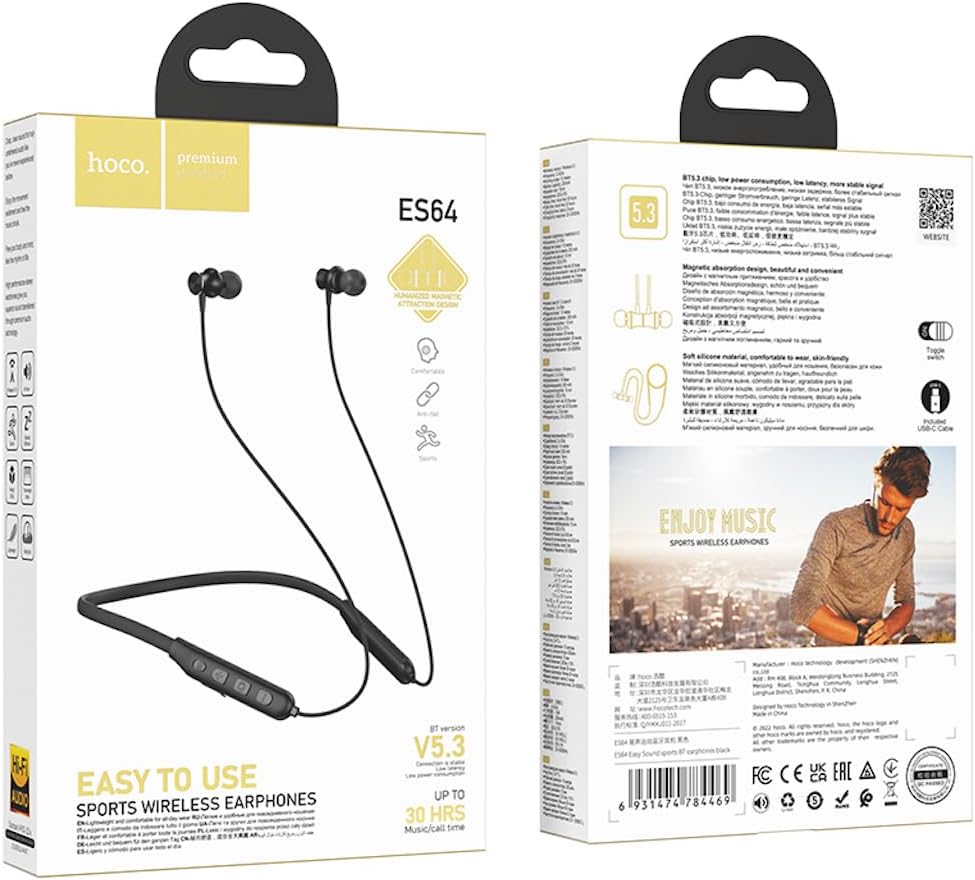
פיגורע 2.3: Packaging of the Hoco ES64 headset, displaying key features and specifications.
3. ספּעסאַפאַקיישאַנז
| שטריך | באַשרייַבונג |
|---|---|
| בלועטאָאָטה ווערסיע | 5.3 (JL AC7003 chip) |
| באַטאַרייע קאַפּאַציטעט | 200 מאַה |
| טשאַרדזשינג צייט | בעערעך 2 שעה |
| ניצן צייט | אַרויף צו 30 שעה |
| סטאַנדביי צייט | אַרויף צו 350 שעה |
| Total Earphone Length | 85 סענטימעטער |
| וואָג | 26.5ג |
| קאָנטראָל טיפּ | Toggle switch button |
| פּינטלעך טאָנעס | Chinese and English support |
| אויער פּלייסמאַנט | אין אויער |
| ראַש קאָנטראָל | קיינער |
4. סעטאַפּ
4.1 אויפלאָדן דעם כעדסעט
Before first use, fully charge the headset. Connect the charging cable (USB-C) to the charging port on the headset and the other end to a USB power source (e.g., computer USB port, wall adapter). The charging indicator light will show the charging status. Charging typically takes about 2 hours.
4.2 פּאַוערינג אויף / אַוועק
- מאַכט אויף: Locate the toggle switch button on the control panel. Slide the switch to the 'ON' position. You will hear a power-on prompt.
- מאַכט אַוועק: Slide the toggle switch to the 'OFF' position. You will hear a power-off prompt.
4.3 בלועטאָאָטה פּערינג
To connect your Hoco ES64 headset to a Bluetooth-enabled device (e.g., smartphone, tablet):
- פאַרזיכערן די כעדסעט איז Powered אַוועק.
- Slide the toggle switch to the 'ON' position. The headset will automatically enter pairing mode, indicated by a flashing LED light.
- אויף אייער דעווייס, גייט צו בלועטוט סעטינגס און צינדט אן בלועטוט.
- זוכן פֿאַר available devices. You should see "Hoco ES64" or a similar name appear in the list.
- Select "Hoco ES64" to connect. Once connected, the LED light will stop flashing and you will hear a confirmation prompt.
- אויב געבעטן פֿאַר אַ פּאַראָל, אַרייַן "0000" (פיר נולן).
דער כעדסעט וועט אויטאָמאַטיש פּרובירן זיך ווידער צו פֿאַרבינדן מיטן לעצטן פֿאַרבונדענעם דעווייס ווען עס ווערט אָנגעצונדן.
5. אַפּערייטינג ינסטרוקטיאָנס
The Hoco ES64 features an intuitive control panel for managing audio and calls.
5.1 מוזיק פּלייבאַק
- שפּיל / פּויזע: Press the Multifunction Button (usually the center button) once.
- ווייַטער שפּור: Press and hold the '+' (Volume Up) button.
- פֿריִערדיקע שפּור: Press and hold the '-' (Volume Down) button.
- באַנד אַרויף: דריק קורץ דעם '+' קנעפל.
- באַנד אַראָפּ: דריק קורץ דעם '-' קנעפל.
5.2 רוף פאַרוואַלטונג
- ענטפֿערן / סוף רופן: Press the Multifunction Button once during an incoming call.
- אָפּוואַרפן רופן: Press and hold the Multifunction Button for 2 seconds during an incoming call.
- ריאַל די לעצטע נומער: Double-press the Multifunction Button when not on a call.
5.3 Switching Prompt Tone Language
The headset supports prompt tones in Chinese and English. To switch the language, double-click the Multifunction Button when the headset is not paired with any device.
6. וישאַלט
To ensure the longevity and optimal performance of your Hoco ES64 headset, follow these maintenance guidelines:
- רייניקונג: Use a soft, dry cloth to wipe the headset. Do not use abrasive cleaners or solvents.
- סטאָרידזש: When not in use, store the headset in a cool, dry place, away from direct sunlight and extreme temperatures. The magnetic earbuds can help keep them tidy.
- ויסמיידן וואַסער: The headset is not waterproof. Avoid exposure to water, rain, or excessive moisture.
- טשאַרדזשינג: Charge the headset regularly, even if not in frequent use, to maintain battery health. Avoid overcharging.
7. טראָובלעשאָאָטינג
If you encounter issues with your Hoco ES64 headset, refer to the following common solutions:
- כעדסעט גייט נישט אן: זיכער מאַכן אַז די באַטאַרייע איז אויפגעלאָדן. פֿאַרבינדט עס צו אַ מאַכט מקור און פּרוּווט ווידער.
- קען נישט צוזאמענשטעלן מיטן אפאראט:
- זיכער מאַכן אַז די כעדסעט איז אין פּערינג מאָדע (בלינקען LED).
- אויסלעשן און אנשטעלן בלועטוט אויף אייער דעווייס.
- מאַך די כעדסעט נעענטער צו דיין מיטל.
- ויסמעקן פריערדיקע בלועטוט קאַנעקשאַנז אויף דיין מיטל און פּרוּווט ווידער צו פאַרבינדן.
- קיין קול:
- קאָנטראָלירט דעם וואָלומען לעוועל אויף ביידע די כעדסעט און אייער פֿאַרבונדענע מיטל.
- זיכער מאַכן אַז די כעדסעט איז ריכטיק פארבונדן צו דיין מיטל.
- פרובירט צו שפּילן פֿאַרשידענע אַודיאָ קוועלער.
- נעבעך געזונט קוואַליטעט:
- זיכער מאַכן אַז עס זענען נישטאָ קיין שטערונגען צווישן דעם כעדסעט און דיין דעווייס.
- גייט אַוועק פון קוועלער פון שטאַרקע עלעקטראָמאַגנעטישע שטערונג.
- Check if the earbuds are clean and properly seated in your ears.
8. וואָראַנטי און שטיצן
The Hoco ES64 headset comes with a standard manufacturer's warranty. Please refer to the warranty card included in your product packaging for specific terms and conditions, including the warranty period and coverage details.
For technical support, troubleshooting assistance beyond this manual, or warranty claims, please contact the retailer where you purchased the product or the official Hoco customer service. Contact information can typically be found on the product packaging or the manufacturer's official webפּלאַץ.


