הקדמה
Thank you for choosing the Hoco S19 Small Heartful ENC Noise Reduction Wireless Headphones. This manual provides detailed instructions on how to set up, operate, and maintain your new wireless headphones. Please read this manual carefully before use to ensure optimal performance and longevity of your device.
זיכערקייַט אינפֿאָרמאַציע
- Do not expose the device to extreme temperatures, humidity, or corrosive substances.
- Keep the device away from water and liquids. It is not water resistant.
- פרובירט נישט צו צענעמען אדער מאדיפיצירן דעם אפאראט. דאס וועט בטל מאכן די גאראנטיע.
- ניצט נאָר די צוגעשטעלטע אָדער סערטיפיצירטע טשאַרדזשינג קייבלס.
- ויסמיידן צוגעהערט אין הויך באַנד לעוועלס פֿאַר עקסטענדעד פּיריאַדז צו פאַרמייַדן געהער שעדיקן.
פּעקל אינהאַלט
ביטע טשעק די פּאַקעט פֿאַר די פאלגענדע זאכן:
- Hoco S19 Wireless Headphone
- אויער קושאַנז
- טשאַרדזשינג קאַבל (USB)
- באַניצער מאַנואַל

בילד: פראָנט view of the Hoco S19 retail packaging, showing the headphone and key features.
פּראָדוקט איבערview
Familiarize yourself with the components of your Hoco S19 headphone.

בילד: רעכטע זייט view of the Hoco S19 wireless headphone, highlighting the ear hook design and control buttons.
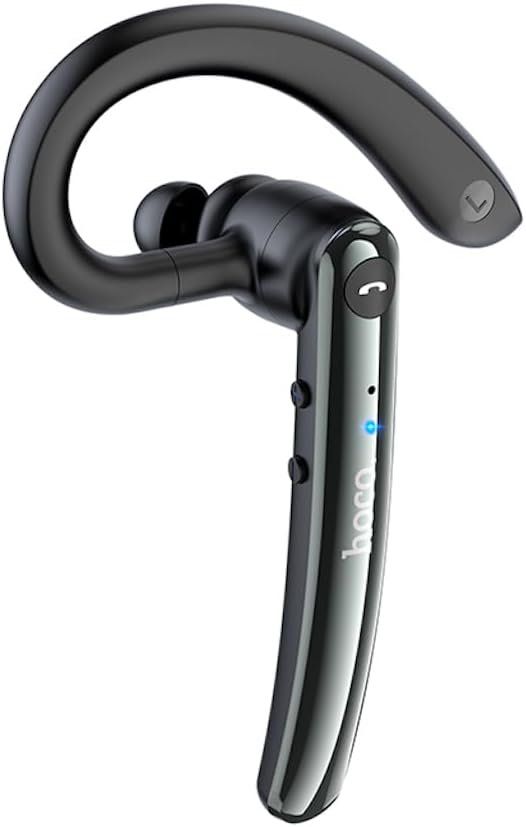
בילד: לינקע זייט view of the Hoco S19 wireless headphone, showing the ergonomic ear hook and main body.

בילד: צוריק view of the Hoco S19 wireless headphone, displaying the charging port, model number (S19), input voltage, and various certification marks.
שליסל קאַמפּאָונאַנץ:
- אויער קרוק: Designed for secure and comfortable fit.
- הויפּט גוף: Houses the battery, chip, and controls.
- מולטי-פונקציע קנעפּל: For power, pairing, call management, and music control.
- באַנד קנעפּלעך: For adjusting audio volume.
- מיקראָפאָן: Dual microphones for ENC noise reduction.
- טשאַרדזשינג פּאָרט: פֿאַר פֿאַרבינדן דעם טשאַרדזשינג קאַבל.
- LED ינדיקאַטאָר: ווײַזט מאַכט, פּערינג, און טשאַרדזשינג סטאַטוס.

Image: Inside of the Hoco S19 packaging, illustrating the location of the main and auxiliary microphones for enhanced call clarity.
סעטאַפּ
1. אויפלאָדן די כעדפאָון
Before first use, fully charge the headphone. The battery capacity is 90mAh.
- Connect the charging cable to the headphone's charging port and the other end to a USB power source (e.g., computer, wall adapter).
- The LED indicator will show charging status (e.g., red light).
- Charging takes approximately 1 hour. The LED indicator will change or turn off once fully charged.
2. Pairing with a Device (Bluetooth)
The Hoco S19 uses Bluetooth 5.0 for stable connectivity.
- מאַכט אויף: Press and hold the Multi-function Button until the LED indicator flashes blue and red alternately, indicating pairing mode.
- אַקטאַווייט בלועטאָאָטה: אויף אייער סמאַרטפאָון, טאַבלעט, אָדער אַנדער בלוטוט-ענייבאַלד מיטל, גייט צו די בלוטוט סעטטינגס און אַקטיווירט בלוטוט.
- זוכן פֿאַר מכשירים: Your device will automatically search for nearby Bluetooth devices.
- Select "Hoco S19": From the list of available devices, select "Hoco S19".
- באַשטעטיקן פּערינג: Once connected, the LED indicator on the headphone will flash blue slowly or turn off, and you will hear a voice prompt confirming the connection.
If pairing fails, turn off the headphone and your device's Bluetooth, then repeat the steps.
אַפּערייטינג ינסטראַקשאַנז
מאַכט אויף / אַוועק
- מאַכט אויף: Press and hold the Multi-function Button for approximately 3 seconds until the LED indicator flashes blue and you hear a voice prompt.
- מאַכט אַוועק: Press and hold the Multi-function Button for approximately 5 seconds until the LED indicator turns red and you hear a voice prompt.
רופן פאַנגקשאַנז
- ענטפֿערן / סוף רופן: Press the Multi-function Button once during an incoming call to answer. Press it again during a call to end.
- אָפּוואַרפן רופן: Press and hold the Multi-function Button for approximately 2 seconds during an incoming call to reject.
- ריאַל די לעצטע נומער: דריקט צוויי מאָל דעם מולטי-פונקציע קנעפּל ווען איר זענט נישט אויף אַ רוף.
מוזיק פּלייַבאַקק
- שפּיל / פּויזע: Press the Multi-function Button once during music playback.
- ווייַטער שפּור: דריק און האַלט די באַנד אַרויף קנעפּל.
- פֿריִערדיקע שפּור: דריקן און האַלטן די Volume Down קנעפּל.
באַנד קאָנטראָל
- באַנד אַרויף: דריק קורץ דעם "Volume Up" קנעפל.
- באַנד אַראָפּ: דריק קורץ דעם באַנד אַראָפּ קנעפּל.
ENC Noise Reduction
The Hoco S19 features double-mark ENC (Environmental Noise Cancellation) for clearer calls. This feature is active during calls to reduce background noise.
Language Prompts
The headphone supports Chinese and English voice prompts. To switch languages, triple-click the Multi-function Button when the headphone is not connected to any device.
וישאַלט
- רייניקונג: Use a soft, dry cloth to clean the headphone. Do not use harsh chemicals or abrasive materials.
- סטאָרידזש: Store the headphone in a cool, dry place away from direct sunlight and extreme temperatures.
- באַטערי זאָרגן: To prolong battery life, avoid fully discharging the battery frequently. Charge the headphone regularly, even if not in use for extended periods.
טראָובלעשאָאָטינג
| פּראָבלעם | מעגלעך סיבה | לייזונג |
|---|---|---|
| Headphone does not power on. | נידעריק באַטאַרייע. | Charge the headphone for at least 1 hour. |
| קען נישט צופּאַסן מיטן דעווייס. | Bluetooth not enabled on device; headphone not in pairing mode; too far from device. | Ensure Bluetooth is on. Put headphone in pairing mode (flashing blue/red). Keep devices within 10 meters. |
| קיין קלאַנג אדער שלעכטע קלאַנג קוואַליטעט. | Volume too low; headphone not connected; interference. | Increase volume. Reconnect headphone. Move away from sources of interference. |
| די קוואַליטעט פון די רופן איז שלעכט. | Environmental noise; microphone obstructed. | Ensure microphone is clear. ENC noise reduction should help in noisy environments. |
ספּעסאַפאַקיישאַנז
| שטריך | דעטאַל |
|---|---|
| מאָדעל נאָמען | S19 |
| קאַנעקטיוויטי טעכנאָלאָגיע | ווירעלעסס (בלועטאָאָטה) |
| בלועטאָאָטה ווערסיע | 5.0 (Chip: Realtek RTL8763BMF) |
| באַטאַרייע קאַפּאַציטעט | 90 מאַה |
| טשאַרדזשינג צייט | בעערעך 1 שעה |
| רעדן / מוזיק צייט | אַרויף צו 9 שעה |
| סטאַנדביי צייט | אַרויף צו 200 שעה |
| ראַש רעדוקציע | Double-mark ENC (Environmental Noise Cancellation) |
| Supported Prompts | כינעזיש און ענגליש |
| מאַטעריאַל | אַקרילאָניטרילע בוטאַדיענע סטירענע (אַבס) |
| פּונקט וואָג | 12 גראַמז |
| קאָליר | מעטאַל גריי |
| וואַסער קעגנשטעל מדרגה | ניט וואַסער קעגנשטעליק |
וואָראַנטי און שטיצן
HOCO products are designed and manufactured to the highest quality standards. For information regarding warranty coverage, please refer to the warranty card included with your purchase or visit the official HOCO webפּלאַץ.
For technical support, troubleshooting assistance, or service inquiries, please contact your local HOCO distributor or the customer service department through the contact information provided on the HOCO official webוועבזייטל אדער אייער קויף קוויטל.
אָנליין רעסורסן: For additional information, FAQs, and product updates, please visit the official HOCO webפּלאַץ.