1. הקדמה
This manual provides detailed instructions for the setup, operation, maintenance, and troubleshooting of your Steelplay Adventure Controller for Nintendo Switch. Please read this manual thoroughly before using the product to ensure optimal performance and longevity.
2. פּעקל אינהאַלט
- Steelplay Adventure Controller
- וסב טשאַרדזשינג קאַבלע
- באַניצער מאַנואַל (דעם דאָקומענט)
3. קאָנטראָללער אויסלייג
Familiarize yourself with the buttons and features of your Steelplay Adventure Controller.

פיגורע 1: פראָנט view of the Steelplay Adventure Controller. This image displays the controller's ergonomic design, featuring a teal main body, brown grips, and yellow accents on the analog sticks, D-pad, and face buttons. The layout includes two clickable analog sticks, a directional pad, A/B/X/Y action buttons, Home, Capture, Plus, Minus, and Turbo buttons.
- לינקער אנאלאג שטעקן: פֿאַר באַוועגונג און קאַמעראַ קאָנטראָל.
- רעכטער אנאלאג שטעקן: For camera control or specific in-game actions.
- ד-פּאַד: ריכטונגס-איינגאב.
- A/B/X/Y קנעפּלעך: אַקציע קנעפּלעך.
- לינקס/רעכטס קנעפּלעך: אַקסל קנעפּלעך.
- ZL/ZR קנעפּלעך: טריגער קנעפּלעך.
- HOME קנעפּל: Returns to the Nintendo Switch HOME Menu.
- CAPTURE Button: Takes screenshots or video clips.
- + (Plus) Button: אָנהייב / פּויזע קנעפּל.
- - (Minus) Button: אויסקלייַבן קנעפּל.
- TURBO קנעפּל: For setting rapid-fire functionality (refer to operating section).
- LED ינדיקאַטאָרס: Display connection status, player number, and charging status.
4. סעטאַפּ און קאַנעקשאַן
4.1 ערשט טשאַרדזשינג
Before first use, fully charge the controller. Connect the USB charging cable to the controller's charging port and the other end to a USB power source (e.g., Nintendo Switch dock, USB wall adapter, computer USB port). The LED indicators will show charging status and turn off or change color when fully charged.
4.2 Pairing with Nintendo Switch
- On your Nintendo Switch HOME Menu, select "Controllers".
- אויסקלייבן "טוישן גריפ/סדר".
- On the Steelplay Adventure Controller, press and hold the HOME קנעפּל און די Y קנעפּל simultaneously for a few seconds until the LED indicators start flashing rapidly. This indicates the controller is in pairing mode.
- The Nintendo Switch will detect the controller. Once detected, the LED indicators on the controller will stop flashing and remain solid, indicating a successful connection.
- Press the L+R buttons on the controller as prompted by the Switch screen to finalize the connection.
Once paired, the controller will automatically connect to your Nintendo Switch when powered on and within range.
5. אפערירן דעם קאנטראלער
5.1 יקערדיק קאָנטראָלס
The Steelplay Adventure Controller functions similarly to official Nintendo Switch Pro Controllers. Use the analog sticks for movement, D-pad for directional input, and A/B/X/Y buttons for in-game actions. The L/R and ZL/ZR buttons provide additional input options.
5.2 באַוועגונג קאָנטראָל
The controller supports motion control functionality, allowing for immersive gameplay in compatible titles. Ensure your Nintendo Switch system software is up to date for optimal motion control performance.
5.3 טורבאָ פֿונקציע
The TURBO function allows a button to be pressed repeatedly as long as it is held down, providing a rapid-fire effect.
- צו אַקטיווירן טורבאָ: דריקן און האַלטן די TURBO קנעפּל, then press the desired action button (e.g., A, B, X, Y, L, R, ZL, ZR). The button will now have TURBO functionality.
- צו דעאקטיוויזירן טורבא: דריקן און האַלטן די TURBO קנעפּל again, then press the same action button. The TURBO function for that button will be turned off.
6. וישאַלט
6.1 רייניקונג
צו רייניקן אייער קאנטראלער, ניצט א ווייכע, טרוקענע טוך. פאר שווערע שמוץ, אביסל ווייכער מאכןampen the cloth with water and gently wipe the surface. Do not use harsh chemicals, solvents, or abrasive cleaners, as these can damage the controller's finish and internal components.
6.2 סטאָרידזש
Store the controller in a cool, dry place away from direct sunlight, extreme temperatures, and high humidity. Avoid placing heavy objects on the controller to prevent damage to the buttons or casing.
6.3 באַטערי קער
The controller contains a built-in Lithium-ion battery. To prolong battery life, avoid fully discharging the battery frequently. If storing the controller for an extended period, charge it to approximately 50% capacity every few months.
7. טראָובלעשאָאָטינג
| פּראָבלעם | מעגלעך סיבה | לייזונג |
|---|---|---|
| Controller does not connect to Switch. |
|
|
| Input lag or unresponsive buttons. |
|
|
| Controller does not charge. |
|
|
8. ספּעסאַפאַקיישאַנז
| שטריך | דעטאַל |
|---|---|
| סאָרט | סטילפּלייַ |
| מאָדעל נומער | 3760352735322 |
| קאַנעקטיוויטי | בלועטאָאָטה (וויירלעסס) |
| קאַמפּאַטאַבאַל דעוויסעס | נינטענדאָו סוויטש |
| קאָליר | Multicolore (Teal, Brown, Yellow) |
| ספּעציעלע פֿעיִקייטן | Wireless, Motion Control, TURBO Function |
| וואָג | 185 גראַמז |
| דימענסיעס (L X W X H) | 16 X 11.5 X 6.3 סענטימעטער |
| באַטערי טיפּ | 1 Lithium-ion (built-in) |
9. וואָראַנטי און שטיצן
The product packaging indicates a 5-year warranty. For specific warranty terms, conditions, and support inquiries, please refer to the official Steelplay webזייטל אדער קאנטאקט זייער קאסטומער סערוויס גלייך. האלט אייער באווייז פון קויפן פאר גאראנטיע פארלאנגען.
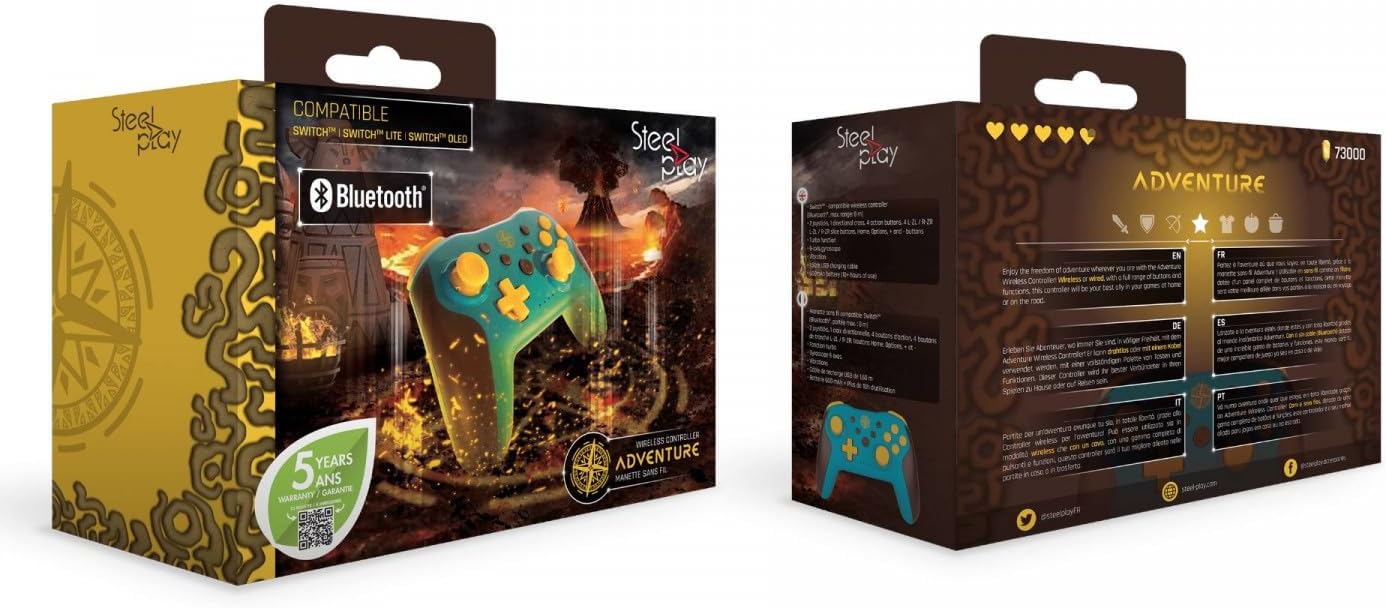
פיגורע 2: Packaging of the Steelplay Adventure Controller. The box prominently features the controller's design, compatibility with various Nintendo Switch models, Bluetooth logo, and a "5 years warranty" seal. The reverse side provides product information in multiple languages.