1. הקדמה
This instruction manual provides comprehensive guidance for the safe and effective use of the Focket 0.5M-470MHz Signal Generator. This device is designed for generating radio frequency signals across a broad spectrum, supporting various modulation types. Please read this manual thoroughly before operating the device and retain it for future reference.
2. זיכערקייַט אינפֿאָרמאַציע
- Always use the specified 12VDC power supply. Using an incorrect power source may damage the device and pose a safety risk.
- שטעלט נישט אויס דעם אפאראט צו פייכטקייט, רעגן, אדער עקסטרעמע טעמפעראטורן.
- פֿאַרמײַדט צו עפֿענען דעם אַפּאַראַט casinז. סערוויסינג זאָל נאָר דורכגעפירט ווערן דורך קוואַליפֿיצירטע פּערסאָנעל.
- זיכער מאַכן אַז די ווענטילאַציע אַרום דעם אַפּאַראַט איז ריכטיק בעתן אָפּעראַציע.
- Disconnect power before cleaning or when the device is not in use.
3. פּראָדוקט איבערview
The Focket 0.5M-470MHz Signal Generator is a versatile instrument capable of producing signals with adjustable frequency and power, along with various modulation options. Its robust ABS construction ensures durability for long-term use.
3.1 שליסל פֿעיִקייטן
- אָפטקייַט קייט: 0.5 מהז צו 470 מהז
- Signal Power: -70 דבם צו 132 דבם
- טייפּס פון מאָדולאַטיאָן: Amplitude Modulation (AM), Frequency Modulation (FM), Phase Modulation (PM), Pulse Modulation
- Built-in Tone Modulation: 800 הז
- מאַכט צושטעלן: 12VDC
- מאַטעריאַל: שטאַרקע ABS casing
3.2 קאַמפּאָונאַנץ
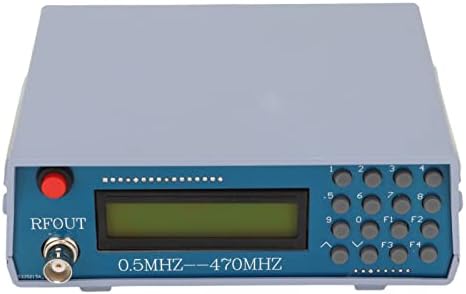


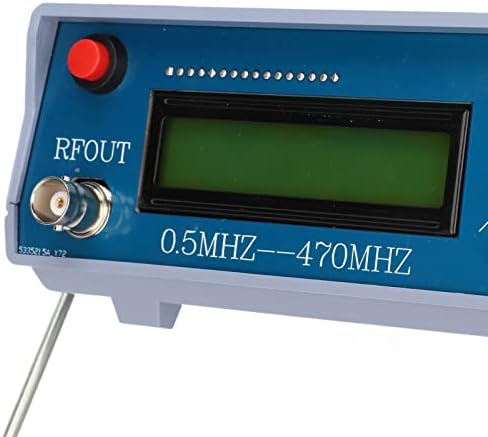

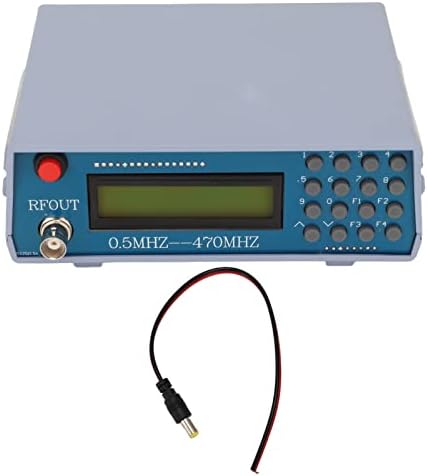
4. ספּעסאַפאַקיישאַנז
| פּאַראַמעטער | ווערט |
|---|---|
| נומער טיפּ | סיגנאַל גענעראַטאָר |
| סאָרט | Focket |
| מאָדעל נומער | Focketfm1yxt7hb2 |
| אָפטקייַט ראַנגע | 0.5 מהז צו 470 מהז |
| סיגנאַל מאַכט | -70 דבם צו 132 דבם |
| Built-in Tone Modulation | 800 הז |
| מאַכט צושטעלן | 12VDC |
| מאַטעריאַל | ABS |
| פּעקל דימענשאַנז | 20 X 15 X 10 סענטימעטער |
5. סעטאַפּ
- אויספּאַקן: Carefully remove the signal generator and its accessories from the packaging. Verify that all components listed in the package list are present: 1x Signal Generator, 1x Power Cord.
- מאַכט קשר: Connect the provided 12VDC power cord to the DC input port on the signal generator. Plug the other end of the power cord into a suitable 12VDC power outlet.
- RF Output Connection: Connect your test equipment (e.g., spectrum analyzer, oscilloscope, antenna) to the RFOUT BNC connector on the front panel using an appropriate coaxial cable.
- פּאַזישאַנינג: Place the signal generator on a stable, flat surface. The integrated stand can be used to angle the device for better visibility.
6. אַפּערייטינג ינסטרוקטיאָנס
The signal generator is controlled via its front panel display and keypad.
6.1 מאַכט אויף / אַוועק
- To power on, ensure the 12VDC power supply is connected. The device should automatically power on and display the default frequency.
- To power off, disconnect the 12VDC power supply.
6.2 באַשטעטיקן אָפטקייַט
- Use the numerical keypad (0-9) to enter the desired frequency.
- The decimal point button can be used for precise frequency entry.
- The device supports 7-digit frequency input. For example, to set 439.0125 MHz, you would enter '4390125' (representing 439012.5 KHz). The display will show the entered value.
- Press an appropriate function key (e.g., F1, F2, F3, F4) or an 'Enter' equivalent (if available, not explicitly detailed in provided data) to confirm the frequency.
6.3 Adjusting Signal Power
The signal power can be adjusted within the range of -70 dBm to 132 dBm. Specific controls for power adjustment are typically accessed via function keys or dedicated buttons. Refer to the on-screen menu or specific button labels for power level control.
6.4 Selecting Modulation Type
The device supports AM, FM, PM, and Pulse modulation. Use the function keys (F1-F4) or menu options to cycle through or select the desired modulation type. The 800 Hz tone modulation is built-in and can be activated as needed.
7. וישאַלט
- רייניקונג: ניצט אַ ווייכע, טרוקענע שטאָף צו רייניקן די אויסערלעכע זייט פון דעם אַפּאַראַט. ניצט נישט קיין פליסיקע רייניגער אָדער סאָלווענטן.
- סטאָרידזש: When not in use, store the signal generator in a cool, dry place, away from direct sunlight and extreme temperatures.
- דורכקוק: Periodically inspect the power cord and connectors for any signs of damage.
8. טראָובלעשאָאָטינג
| פּראָבלעם | מעגלעך סיבה | לייזונג |
|---|---|---|
| די מיטל טוט נישט מאַכט אויף | No power supply, incorrect power supply, faulty power cord | Ensure 12VDC power supply is correctly connected and functional. Check power cord for damage. |
| No RF output signal | Incorrect frequency/power settings, faulty output cable, device malfunction | Verify frequency and power settings. Check the coaxial cable connection. If problem persists, contact support. |
| דיספּליי איז ליידיק אָדער נישט ליינעוודיק | Power issue, display malfunction | Check power connection. If power is present and display remains blank, contact support. |
9. וואָראַנטי און שטיצן
פֿאַר וואָראַנטי אינפֿאָרמאַציע אָדער טעכנישע שטיצע, ביטע זען די דאָקומענטאַציע וואָס איז צוגעשטעלט געוואָרן ביים קויפן אָדער קאָנטאַקט דיין הענדלער. האַלט דיין קויף קוויטל ווי אַ באַווייַז פון קויפן.