1. הקדמה
The EPOS Impact 1060T is a professional double-sided wireless headset designed for PC use, optimized for high-performance communication environments. It features advanced AI Noise Cancellation and Super Wideband Audio to ensure exceptional clarity during calls, even in noisy surroundings. The headset is Microsoft Teams Certified, providing seamless integration and optimal performance for virtual meetings.
Engineered for all-day comfort, the Impact 1060T includes soft memory foam earpads and a lightweight frame. Smart features such as a 360° busylight, mic-tip LED mute alerts, and intuitive boom-arm call control enhance efficiency and focus. This manual provides detailed instructions for setting up, operating, and maintaining your headset to ensure optimal performance and longevity.

Figure 1: EPOS Impact 1060T highlighting key features.
2. פּעקל אינהאַלט
באַשטעטיקן אַז אַלע זאכן זענען פאַראַן אין דיין פּעקל:
- EPOS Impact 1060T Wireless Headset
- וסב-C צו וסב-C קאַבלע
- וסב-C צו וסב-א אַדאַפּטער
- ווייכע טראָג־פּאַקעט
- זיכערקייַט גייד
- קאָמפּליאַנסע בלאַט
- שנעל גייד
- BTD 800a Dongle (for models with dongle)

Figure 2: EPOS Impact 1060T package contents.
3. סעטאַפּ
3.1 ערשט טשאַרדזשינג
Before first use, fully charge your headset. Connect the provided USB-C to USB-C cable to the headset and a power source. Use the USB-C to USB-A adapter if your power source only has USB-A ports. The headset can also be charged wirelessly if a compatible charging stand is available (charging stand sold separately for some models).
3.2 פּאַוערינג אויף / אַוועק
- צו אנצינדן: דריק און האלט דעם פּאַוער קנעפּל ביז די אינדיקאַטאָר ליכט צינדט זיך אָן.
- אויסצולאָשן: דריק און האַלט דעם פּאַוער קנעפּל ביז די אינדיקאַטאָר ליכט גייט אויס.
3.3 קאַנעקטינג צו דעוויסעס
The EPOS Impact 1060T offers versatile connectivity options:
- Bluetooth Pairing:
- פאַרזיכערן די כעדסעט איז Powered אַוועק.
- דריק און האלט דעם פּאַוער קנעפּל פֿאַר אַרום 4 סעקונדעס ביז דער LED אינדיקאַטאָר בלינקט בלוי און רויט, וואָס ווײַזט אויף פּערינג מאָדע.
- On your device (PC, smartphone), go to Bluetooth settings and select "EPOS Impact 1060T" from the list of available devices.
- אַמאָל פארבונדן, וועט דער LED אינדיקאַטאָר ווײַזן אַ האַרט בלוי ליכט.
- USB-C ווייערד קאַנעקשאַן: Connect the headset directly to your device using the provided USB-C to USB-C cable. The headset will be recognized automatically.
- USB-A Wired Connection: Use the USB-C to USB-A adapter with the USB-C cable to connect to devices with USB-A ports.
- Using the BTD 800a Dongle: For optimal wireless performance and extended range, plug the BTD 800a USB dongle into your PC. The headset will automatically connect to the dongle.
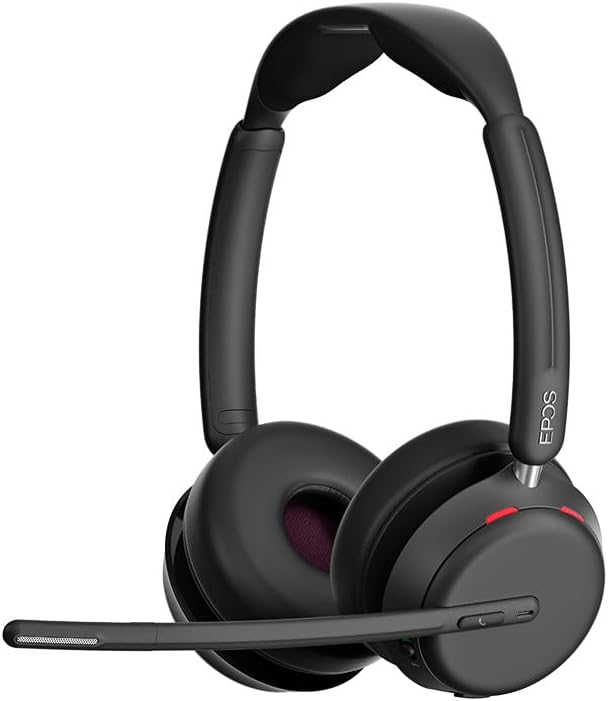
פיגורע 3: פראָנט view of the EPOS Impact 1060T Headset.
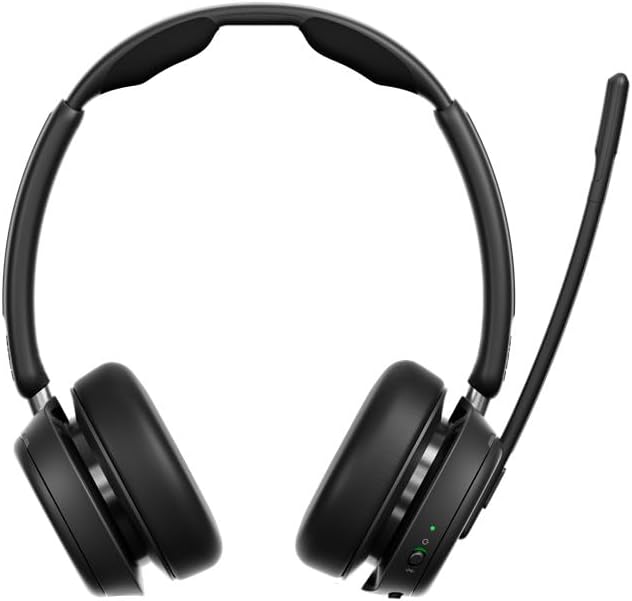
פיגורע 4: צוריק view of the EPOS Impact 1060T Headset.
4. אַפּערייטינג ינסטרוקטיאָנס
4.1 טראָגן די כעדסעט
Adjust the headband for a comfortable and secure fit. The memory foam earpads are designed for extended wear. The microphone boom arm can be rotated to either side for optimal voice pickup.
4.2 רוף פאַרוואַלטונג
- ענטפֿערן / סוף רופן: Use the intuitive inline controller or the dedicated call button on the earcup.
- שטום / ונמוט מיקראָפאָן:
- Lower the microphone boom arm to unmute and raise it to mute.
- A mic-tip LED will alert you if the microphone is muted.
- Alternatively, use the mute button on the inline controller.
- באַנד קאָנטראָל: Adjust the volume using the dedicated buttons on the inline controller or earcup.
4.3 Noise Cancellation and Audio Features
- קינסטלעכע אינטעליגענץ ראַש קאַנסאַליישאַן: Three digital beamforming microphones powered by EPOS AI™ actively block out background noise, ensuring your voice is heard clearly.
- סופּער ברייטבאַנד אַודיאָ: Provides rich, natural sound for both calls and media.
- BrainAdapt™ Technology: Designed to reduce brain fatigue and enhance focus during long calls.
4.4 סמאַרט פֿעיִקייטן
- פאַרנומען ליכט: A 360° busylight on the headset signals your availability to colleagues, preventing interruptions during calls.
- Microsoft Teams Certified: Optimized for Microsoft Teams, offering dedicated controls and seamless integration for calls and meetings.

Figure 5: Headset optimized for Unified Communications.
Video 1: "Powerful Sound and Comfort for Your Workday" - An official EPOS video showcasing the features and comfort of the Impact series headsets, including the 1060T.
Video 2: "EPOS IMPACT 860T Microsoft Teams Headset" - An official EPOS video demonstrating features of the similar Impact 860T model, highlighting Microsoft Teams integration and sound quality.
Video 3: "EPOS Impact 860T ANC Headset" - An official EPOS video showcasing the Active Noise Cancellation and design of the similar Impact 860T model.
5. וישאַלט
- רייניקונג: Use a soft, dry cloth to clean the headset. Avoid using liquids or abrasive cleaners.
- סטאָרידזש: When not in use, store the headset in the provided soft carry pouch to protect it from dust and damage.
- באַטערי זאָרגן: כדי צו פארלענגערן די לעבן פון די באַטעריע, זאָלט איר נישט אָפט אויסלאָדן די באַטעריע. זאָלט איר עס אָפט אויפלאָדן.
- ווייכווארג דערהייַנטיקונגען: Integrate with EPOS Manager for device updates and analytics to ensure optimal performance and access to the latest features.
6. טראָובלעשאָאָטינג
If you experience issues with your EPOS Impact 1060T, refer to the following common solutions:
| פּראָבלעם | מעגלעך סיבה | לייזונג |
|---|---|---|
| No audio/microphone not working | Headset not paired/connected, incorrect audio device selected, microphone muted. | Ensure headset is paired/connected. Check device audio settings to select "EPOS Impact 1060T" as input/output. Unmute microphone. |
| Poor audio quality/background noise | Weak Bluetooth signal, environmental interference, microphone not positioned correctly. | Move closer to the connected device. Ensure no obstructions. Adjust microphone boom arm for optimal voice pickup. |
| כעדסעט איז נישט טשאַרדזשינג | Cable not connected properly, faulty cable/charger, wireless charging misalignment. | Verify cable connections. Try a different USB port or charger. Ensure headset is correctly placed on the wireless charging pad. |
| Headset randomly restarts/disconnects | Firmware issue, device compatibility, low battery. | Ensure headset firmware is up to date via EPOS Manager. Fully charge the headset. Try connecting to a different device to isolate the issue. |
7. ספּעסאַפאַקיישאַנז
- מאָדעל נאָמען: IMPACT 1060T
- קאַנעקטיוויטי טעכנאָלאָגיע: ווירעלעסס (בלועטאָאָטה)
- בלועטאָאָטה ווערסיע: 5.0
- ראַש קאָנטראָל: אַדאַפּטיוו ראַש קאַנסאַליישאַן
- מיקראָפאָן: AI Noise Cancellation with three digital beamforming microphones
- אַודיאָ: Super Wideband Audio
- עאַרפּיעסע פאָרעם: אויף אויער
- מאַטעריאַל: Fabric/Silicone
- נומער וואָג: 3.68 אונס (0.23 פונט)
- פּראָדוקט דימענשאַנז: 19.69 X 19.69 X 11.02 אינטשעס
- באַטעריז: 1 ליטהיום יאָן באַטאַרייע (אַרייַנגערעכנט)
- ספּעציעלע פֿעיִקייטן: Adjustable Headband, Lightweight, Noise Cancellation, Volume Control, Wireless Charging
- פאַבריקאַנט: Demant Sound Epos Audio A/S
8. וואָראַנטי & שטיצן
The EPOS Impact 1060T is built for durability and comes with a 3 יאָר וואָראַנטי. For technical support, warranty claims, or further assistance, please visit the official EPOS webזייטל אדער קאנטאקט זייער קאסטומער סערוויס. האלט אייער באווייז פון קויפן פאר גאראנטיע וואַלידאציע.
For additional resources and software updates, visit the EPOS קראָם אויף אַמאַזאָן.


