הקדמה
The bopmen Star10 Wireless Bluetooth Karaoke Microphone is a versatile 4-in-1 device designed for singing, acting as a portable handheld microphone, speaker, and featuring an integrated disco light. It offers high-resolution audio quality and extensive compatibility, making it suitable for various entertainment settings including car travel, home parties, and general use for adults and children.

Image: The Star10 Wireless Bluetooth Karaoke Microphone in Rose Gold, showcasing its sleek design and integrated disco ball.
זיכערקייַט אינפֿאָרמאַציע
- דו זאלסט נישט ויסשטעלן די מיטל צו עקסטרעם טעמפּעראַטורעס אָדער הומידיטי.
- ויסמיידן דראַפּינג אָדער אונטערטעניק די מיטל צו שטאַרק ימפּאַקץ.
- האַלטן אויסער דערגרייכן פון קליינע קינדער צו פאַרמייַדן דערשטיקונג געפאַרן פון קליינע טיילן.
- Use only the provided USB C-A cable for charging.
- דו זאלסט נישט פּרווון צו דיסאַסעמבאַל אָדער מאָדיפיצירן די מיטל.
- רייניקט דעם אפאראט מיט א ווייכן, טרוקענעם טוך. פארמיידט ניצן שטרענגע כעמיקאלן אדער שרײַבנדיקע רייניגער.
פּעקל אינהאַלט
ביטע אָפּהאַקן דאָס קעסטל פֿאַר די פֿאָלגנדיקע זאַכן:
- 1 x Karaoke microphone (Star10)
- 1 x USB C-A charging cable
- 1 x באַניצער מאַנואַל
פּראָדוקט איבערview
Familiarize yourself with the main controls and ports of your Star10 microphone.

Image: Detailed diagram illustrating the main control panel and bottom ports of the Star10 microphone, including Microphone Volume, On/Off/Play/Pause, Reverb On/Off, Volume Up/Down, Next/Previous Song, Tone Mode, Disco Light Control, USB Port, 3.5mm Earphone Jack, and TF Card slot.
הויפּט קאָנטראָלס:
- Microphone Volume / Accompaniment Mode On/Off: Adjusts microphone volume or toggles accompaniment.
- On/Off, Play/Pause: Powers the device on/off and controls music playback.
- Reverb On/Off / Bluetooth & TF Card Mode: Toggles reverb effect and switches between input modes.
- באַנד אַרויף / אַראָפּ: אַדזשאַסטירט די אַלגעמיינע רעדנער באַנד.
- פֿריִער / נעקסטער ליד: Navigates through tracks.
- טון מאָדע: Cycles through different voice effects.
- Disco Light Control / Twins Pairing: Controls the disco light and initiates Twins Mode pairing.
Bottom Ports:
- ינדיקאַטאָר ליכט: Shows device status (e.g., charging, connected).
- 3.5 mm Earphone Jack / Re-Set button inside: For private listening or resetting the device.
- וסב פּאָרט: פֿאַר אויפֿלאָדן דעם מיקראָפֿאָן.
- טף קאַרד שפּעלטל: For playing music directly from a micro TF card (up to 32GB, not included).
סעטאַפּ
טשאַרדזשינג די מיקראָפאָן:
- Connect the provided USB C-A cable to the USB port on the bottom of the microphone.
- Connect the other end of the cable to a compatible USB power adapter (not included) or a computer USB port.
- The indicator light will show charging status. A full charge provides up to 10 hours of use (minimum 5 hours).
מאַכט אויף / אַוועק:
- דריקן און האַלטן די אויף / אַוועק / שפּיל / פּויז button for a few seconds to power on the microphone. You will hear an audible prompt.
- To power off, press and hold the same button until you hear the power-off prompt.
אַפּערייטינג ינסטראַקשאַנז
בלועטאָאָטה קאַנעקשאַן:
The Star10 microphone uses Bluetooth 5.2 for seamless connection to your devices.
- Power on the microphone. It will automatically enter Bluetooth pairing mode.
- On your smartphone, tablet, or other Bluetooth-enabled device, open the Bluetooth settings.
- זוכן פֿאַר "STAR 10" in the list of available devices and select it to pair.
- Once connected, you will hear a confirmation prompt. You can now play music from your device through the microphone's speaker and sing along.

Image: The Star10 microphone demonstrating its wide compatibility, connecting wirelessly to smartphones, tablets, and laptops via Bluetooth.
TF קאַרד מאָדע:
Play music directly from a micro TF card.
- Insert a micro TF card (up to 32GB, not included) with your music files into the TF Card slot on the bottom of the microphone.
- The microphone will automatically switch to TF Card mode. If not, press the Reverb On/Off / Bluetooth & TF Card Mode button to cycle modes.
- ניצן די פֿריִערדיקע / ווייַטער ליד קנעפּלעך צו נאַוויגירן טראַקס און שפּיל / פּויזע פֿאַר פּלייבאַק קאָנטראָל.
Disco Light Control:
Enhance your karaoke experience with the built-in disco light.
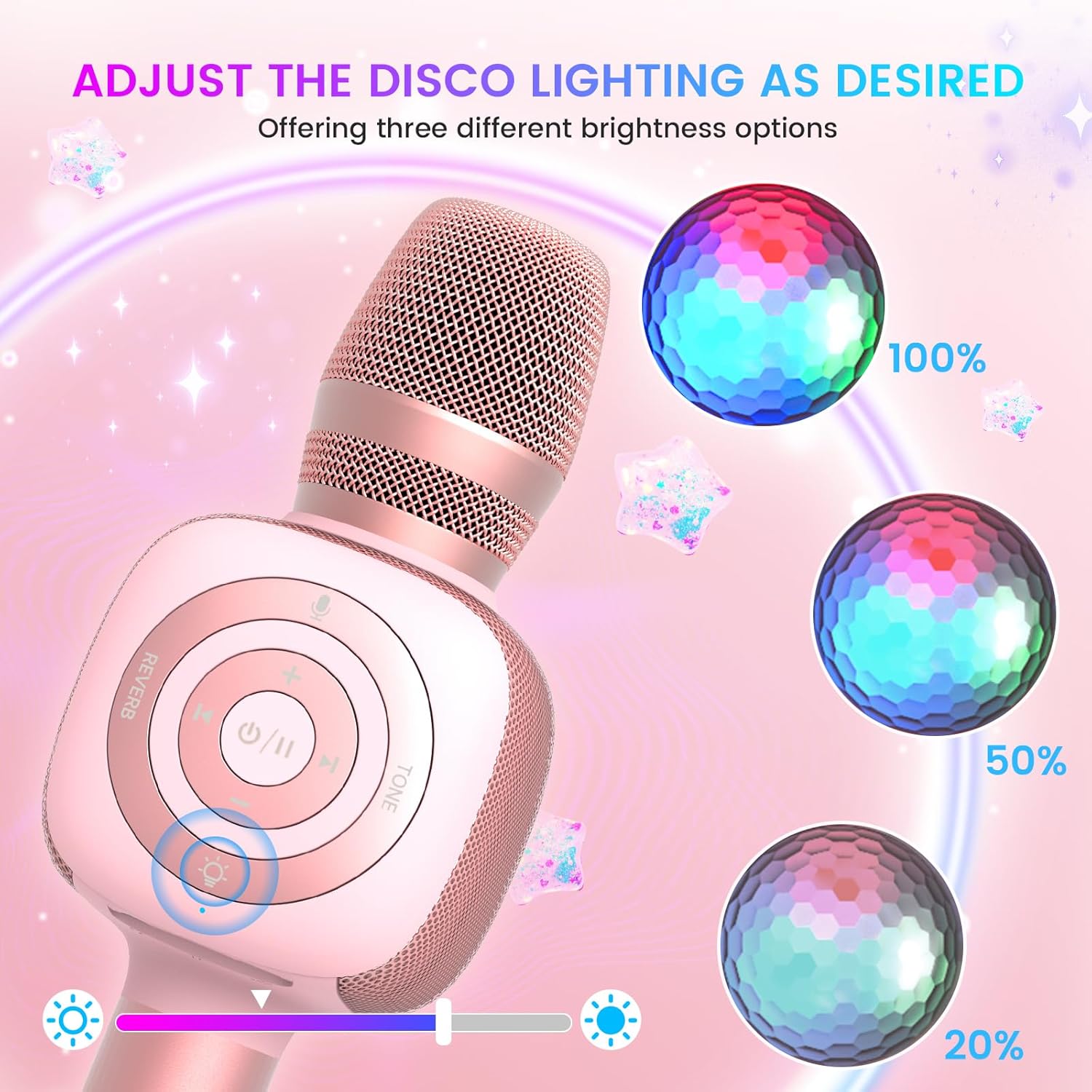
Image: The Star10 microphone's disco light feature, illustrating three adjustable brightness levels (100%, 50%, 20%) to suit different ambiance needs.
- דרוק די דיסקאָ ליכט קאָנטראָל button (light bulb icon) to cycle through three RGB color modes and brightness levels.
- Press again to turn the disco light off.
Tone Modes (Magic Mode):
Experiment with different voice effects for added fun.

Image: The Star10 microphone's "Magic Mode" feature, depicting icons for Male Voice, Female Voice, Cartoon Voice, and Monster Sound effects.
- דרוק די טאָן מאָדע button to cycle through various voice effects such as Male Voice, Female Voice, Cartoon Voice, and Monster Sound.
- Continue pressing to return to the original tone.
Twins Mode (Duet Mode):
Pair two Star10 microphones for a duet experience.

Image: Two individuals enjoying a duet, each holding a Star10 microphone, illustrating the "Twins Mode" functionality for shared singing experiences.
- Ensure both Star10 microphones are powered on.
- On one microphone, press and hold the דיסקאָ ליכט קאָנטראָל button for 2 seconds until a prompt tone "LINK CONNECTED" is heard. This microphone is now in Twins Mode pairing.
- On your cellphone/device, perform Bluetooth pairing selection and choose either of the two microphones. Both microphones will now be connected and output audio.
- To exit Twins Mode, press and hold the דיסקאָ ליכט קאָנטראָל button on the paired microphone for 2 seconds.
וישאַלט
- רייניקונג: Wipe the microphone with a soft, dry cloth. Do not use liquid cleaners or aerosols.
- סטאָרידזש: האַלט דעם מיקראָפאָן אין אַ קיל, טרוקן אָרט אַוועק פון דירעקט זונשייַן און עקסטרעמע טעמפּעראַטורן.
- באַטערי זאָרגן: For optimal battery life, charge the microphone regularly, even if not in frequent use. Avoid fully discharging the battery for extended periods.
טראָובלעשאָאָטינג
| פּראָבלעם | מעגלעך סיבה | לייזונג |
|---|---|---|
| דער מיקראָפאָן גייט נישט אָן. | נידעריגע באַטעריע; דער מאַכט קנעפּל נישט געהאַלטן לאַנג גענוג. | Charge the microphone fully; Press and hold the power button for 3-5 seconds. |
| קען נישט פאַרבינדן דורך בלוטוט. | Microphone not in pairing mode; Device Bluetooth off; Interference. | Ensure microphone is on and in pairing mode; Enable Bluetooth on your device; Move closer to the microphone; Restart both devices. |
| קיין קלאַנג פֿון רעדנער. | Volume too low; Device volume too low; Incorrect mode. | Increase microphone volume; Increase device volume; Ensure correct mode (Bluetooth/TF Card). |
| Voice effects not working. | אומרעכטע קנעפּל דריקונג. | Press the 'Tone Mode' button repeatedly to cycle through effects. |
| די דיסקאָ ליכט אַרבעט נישט. | Light turned off. | Press the 'Disco Light Control' button to turn on/cycle modes. |
ספּעסאַפאַקיישאַנז
- מאָדעל: שטערן 10
- סאָרט: באָפּמען
- מיקראָפאָן פאָרם פאַקטאָר: כאַנדכעלד
- קאַנעקטיוויטי טעכנאָלאָגיע: בלועטאָאָטה 5.2
- מאַכט מקור: באַטעריע געטריבן (2 ליטהיום יאָן באַטעריעס אַרייַנגערעכנט)
- באַטאַרייע לעבן: Up to 10 hours (minimum 5 hours)
- פּראָדוקט דימענשאַנז: 18.7 X 16.54 X 12.2 אינטשעס
- נומער וואָג: 1.19 פונט (540 גראַמז)
- סיגנאַל-צו-ראַש פאַרהעלטעניש: 52 דב
- אָפטקייַט ענטפער: 10 KHz
- קאַמפּאַטאַבאַל דעוויסעס: Personal Computer, Smartphone, Karaoke Machine
- ספּעציעלע שטריך: Mute Function, Disco Light, Voice Changer, Twins Mode
- קאָליר: רויז גאָלד
- רעקאַמענדיד ניצט: דרינענדיק / דרויסנדיק
וואָראַנטי און שטיצן
Your bopmen Star10 Karaoke Microphone comes with a standard manufacturer's warranty. For detailed warranty information, please refer to the warranty card included in your package or visit the official bopmen webפּלאַץ.
If you encounter any issues or have questions regarding your product, please do not hesitate to contact our professional customer service team. We are committed to providing support and assistance within 24 hours to ensure your satisfaction.
קאָנטאַקט אינפֿאָרמאַציע: Please refer to the contact details provided in your product packaging or on the official bopmen support page for the most up-to-date information.


