הקדמה
א דאנק פארן קויפןasing the Hoco HC5 Cool Enjoy Sports Wireless Speaker. This manual provides important information regarding the setup, operation, and maintenance of your new speaker. Please read this manual thoroughly before using the product to ensure proper function and to extend its lifespan.
זיכערקייַט אינפֿאָרמאַציע
- שטעלט נישט אויס דעם רעדנער צו עקסטרעמע טעמפּעראַטורן, דירעקטע זונשייַן, אדער הויכע פֿײַכטקייט.
- ויסמיידן דראַפּינג אָדער ונטערטעניק די רעדנער צו שטאַרק ימפּאַקץ.
- Do not disassemble, repair, or modify the speaker yourself. Refer to qualified service personnel.
- האַלטן די רעדנער אַוועק פון וואַסער און אנדערע ליקווידס.
- ניצט נאָר דעם ספּעציפֿישן טשאַרדזשינג קאַבל און אַדאַפּטער.
- Clean the speaker with a soft, dry cloth. Do not use harsh chemicals or abrasive cleaners.
פּעקל אינהאַלט

Image: Hoco HC5 speaker in its retail packaging, showing the speaker and its accessories.
ביטע קאָנטראָלירט דעם אינהאַלט פֿון דער פּאַקעט קערפֿול. אויב עס פֿעלן אָדער זענען געשעדיגט, קאָנטאַקטירט אייער הענדלער.
- Hoco HC5 Wireless Speaker
- וסב טשאַרדזשינג קאַבלע
- AUX קאַבלע
- אַקסל רימען
- באַניצער מאַנואַל (דעם דאָקומענט)
פּראָדוקט איבערview
Familiarize yourself with the various parts and controls of your Hoco HC5 speaker.

בילד: פראָנט view of the Hoco HC5 speaker, showcasing its cylindrical design, speaker grilles, and attached shoulder strap.

בילד: נאָענט-אַרויף view of one end of the Hoco HC5 speaker, highlighting the speaker driver and the robust casing.
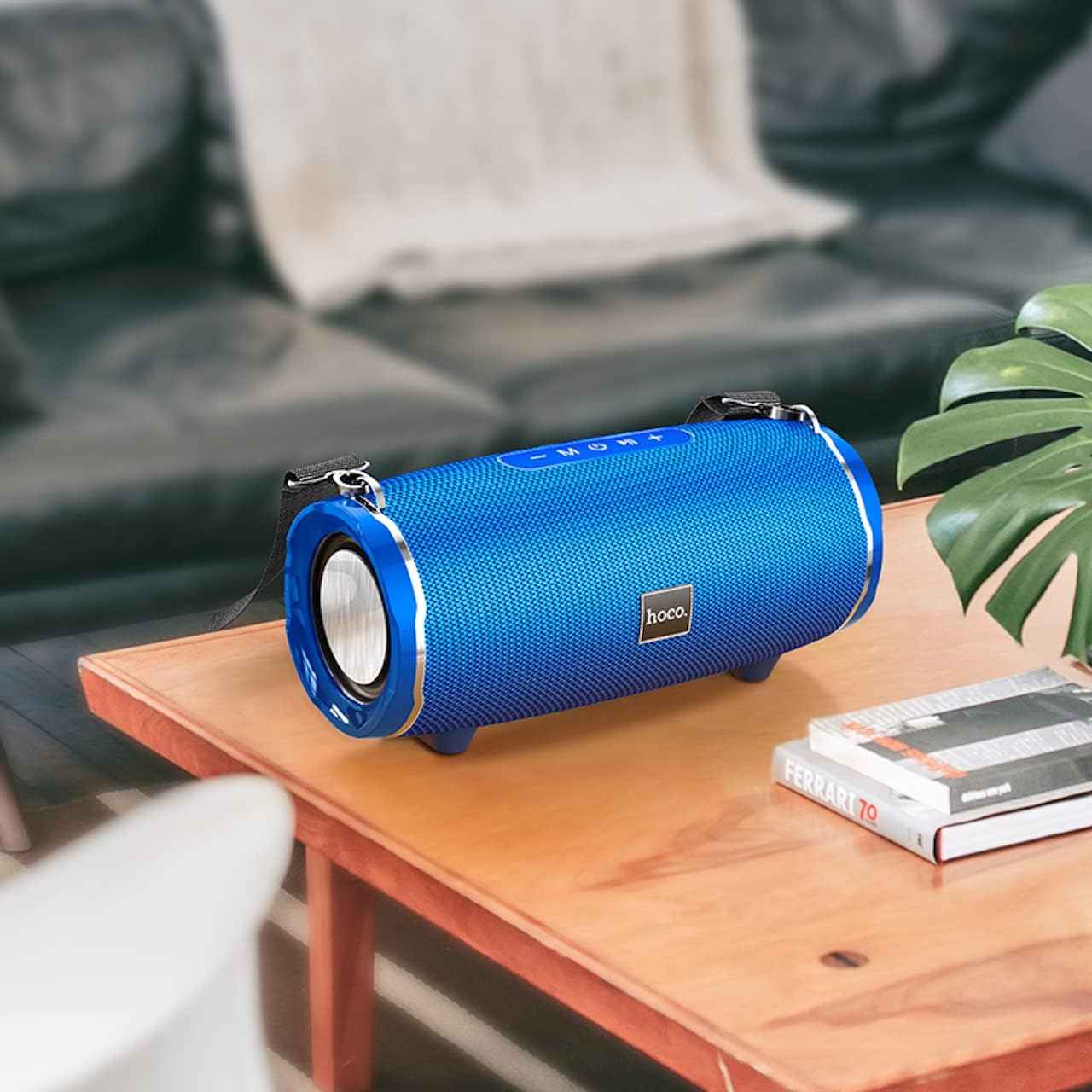
Image: The Hoco HC5 speaker placed on a wooden table, demonstrating its size and how it might appear in a home setting.
Control Panel (Top/Rear)
- מאַכט קנעפּל: דריקן און האַלטן צו קער אויף / אַוועק.
- מאָדע קנעפּל (M): Short press to switch between Bluetooth, TF Card, USB, AUX, and FM modes.
- Play/Pause Button (▶⏸): Short press to play or pause music. In FM mode, short press to auto-scan and save stations.
- באַנד אַראָפּ / פריערדיקע ליד (-): קורץ דריקן פֿאַר פֿריִערדיקן ליד. לאַנג דריקן צו פֿאַרמינערן די קול.
- קול העכער / נעקסטע ליד (+): קורץ דריקן פֿאַר דער ווייַטער ליד. לאַנג דריקן צו פאַרגרעסערן די באַנד.
פּאָרטן (הינטן/זײַט)
- וסב פּאָרט: פֿאַר USB פלאַש דרייוו ווידערשפּיל.
- טף קאַרד שפּעלטל: פֿאַר TF (MicroSD) קאַרטל ווידערשפּיל.
- AUX פּאָרט: For connecting external audio devices via 3.5mm audio cable.
- טשאַרדזשינג פּאָרט: פֿאַר אָפּלאָדן די רעדנער'ס אינערלעכע באַטאַרייע.
סעטאַפּ
טשאַרדזשינג די רעדנער
- פֿאַרבינדט דעם USB טשאַרדזשינג קאַבל צום רעדנער'ס טשאַרדזשינג פּאָרט.
- פֿאַרבינדט דעם אַנדערן עק פֿונעם USB קאַבל צו אַ USB מאַכט אַדאַפּטער (5V/1A רעקאָמענדירט) אָדער אַ קאָמפּיוטער'ס USB פּאָרט.
- די טשאַרדזשינג אינדיקאַטאָר ליכט וועט זיך אָנצינדן בעת טשאַרדזשינג און זיך אויסלעשן ווען עס איז גאָר אויפגעלאָדן.
- א פול אָפּצאָל נעמט בעערעך 3.5 שעה.
מאַכט אויף / אַוועק
- צו מאַכט אויף: Press and hold the Power button for a few seconds until you hear a power-on prompt.
- צו מאַכט אַוועק: Press and hold the Power button again for a few seconds until you hear a power-off prompt.
אַפּערייטינג ינסטראַקשאַנז
בלועטאָאָטה מאָדע
- צינדט אן דעם רעדנער. עס וועט אויטאמאטיש אריינגיין אין בלוטוט פארבינדונג מאָדוס, אנגעצייכנט דורך א בלינקנדיקע LED ליכט.
- אַקטיווירן בלועטוט אויף אייער מיטל (סמאַרטפאָון, טאַבלעט, אאז"וו).
- זוכן פֿאַר "HC5" in the list of available Bluetooth devices and select it to connect.
- Once connected, the LED indicator will stop flashing, and you will hear a connection tone.
- איר קענט איצט שפּילן אַודיאָ פֿון אייער דעווייס דורך דעם רעדנער.
- Use the Play/Pause, Volume Up/Down, and Previous/Next Track buttons on the speaker or your device to control playback.
TF Card / USB Mode
- Insert a TF (MicroSD) card or USB flash drive into the corresponding slot on the speaker.
- The speaker will automatically switch to TF Card or USB mode and begin playing audio files. If not, short press the "M" (Mode) button to switch.
- פאַרזיכערן דיין אַודיאָ files זײַנען אין אַ קאָמפּאַטיבלן פֿאָרמאַט (למשל, MP3).
- Use the Play/Pause, Volume Up/Down, and Previous/Next Track buttons to control playback.
AUX מאָדע
- פֿאַרבינדט איין עק פֿון דעם 3.5 מ״מ AUX קאַבל צום רעדנער'ס AUX פּאָרט.
- פֿאַרבינדט דעם אַנדערן עק צום אַודיאָ־אַרויסגאַנג פֿון אייער עקסטערנעם מיטל (למשל, MP3 שפּילער, קאָמפּיוטער).
- The speaker will automatically switch to AUX mode. If not, short press the "M" (Mode) button to switch.
- Audio will now play through the speaker. Control playback from your external device.
עפעם ראַדיאָ מאָדע
- Short press the "M" (Mode) button until you enter FM radio mode.
- To auto-scan and save available FM stations, short press the Play/Pause button. The speaker will scan and store stations automatically.
- ניצט די "פֿריִערדיקע/נעקסטע טרעק" קנעפּלעך צו נאַוויגירן צווישן געראַטעוועטע סטאַנציעס.
TWS (True Wireless Stereo) Function (If Supported)
The Hoco HC5 speaker supports TWS function, allowing you to pair two HC5 speakers together for a true stereo sound experience.
- Ensure both HC5 speakers are powered on and not connected to any Bluetooth device.
- On one of the speakers (this will be the primary speaker), long press the Play/Pause button until you hear a prompt indicating TWS pairing mode.
- די צוויי רעדנערס וועלן זיך אויטאמאטיש זוכן און זיך פארבינדן איינער מיטן צווייטן. אזוי שנעל ווי זיי זענען פארבונדן, וועט איר הערן א באשטעטיגונגס טאן.
- Now, connect your device to the primary speaker via Bluetooth as described in the "Bluetooth Mode" section.
- אַודיאָ וועט איצט שפּילן אין סטעריאָו דורך ביידע רעדנערס.
וישאַלט
- רייניקונג: Use a soft, dry, lint-free cloth to wipe the surface of the speaker. Do not use liquid cleaners, aerosols, or solvents.
- סטאָרידזש: ווען נישט אין באַנוץ פֿאַר לענגערע פּעריאָדן, זאָל מען דעם רעדנער האַלטן אין אַ קיל, טרוקן אָרט, אַוועק פֿון דירעקטער זון און עקסטרעמע טעמפּעראַטורן.
- באַטערי זאָרגן: כדי צו פארלענגערן די לעבן פון די באַטעריע, זאָלט איר נישט אָפט אויסלאָדן די באַטעריע. לאָדט דעם רעדנער רעגולער אויף, אפילו אויב ער איז נישט אין באַנוץ.
טראָובלעשאָאָטינג
| פּראָבלעם | מעגלעך סיבה | לייזונג |
|---|---|---|
| דער רעדנער לאָזט זיך נישט אָנ. | די באַטעריע איז נידעריק אָדער אויסגעשעפּט. | לאָדט דעם רעדנער גאָר אויף. |
| קענען ניט פאַרבינדן מיט בלועטאָאָטה מיטל. | רעדנער איז נישט אין פּערינג מאָדע; מיטל בלועטוט איז אויסגעלאָשן; רעדנער איז שוין פארבונדן צו אן אנדער מיטל. | Ensure speaker is in pairing mode (flashing LED). Turn off and on Bluetooth on your device. Disconnect from other devices. |
| קיין קלאַנג פֿון רעדנער. | די וואליום איז צו נידעריג; אומרעכטע מאָדע אויסגעקליבן; פּראָבלעם מיטן אַודיאָ מקור. | Increase speaker and device volume. Press "M" button to select correct mode. Check audio source. |
| די FM ראַדיאָ אָפּנאַם איז שוואַך. | שוואַך סיגנאַל; סביבה־אינטערפערענץ. | Relocate the speaker. Re-scan for stations. |
ספּעסאַפאַקיישאַנז
| שטריך | דעטאַל |
|---|---|
| מאָדעל | HC5 |
| בלועטאָאָטה ווערסיע | 5.0 (JL chip) |
| רעדנער גרייס | 76מם * 2 |
| רעדנער מאַכט רעזולטאַט | 15W * 2 (Total 30W) |
| באַטאַרייע קאַפּאַציטעט | 3600 מאַה |
| טשאַרדזשינג צייט | בעערעך 3.5 שעה |
| מוזיק / טאַלק צייט | אַרויף צו 4 שעה |
| קאַנעקטיוויטי אָפּציעס | Bluetooth, TF card, USB, AUX, FM, TWS |
| פּראָדוקט דימענשאַנז | 292 X 139 X 132 מם |
| פּראָדוקט וואָג | 1.5 קג |
| אַודיאָ רעזולטאַט מאָדע | אַרומרינגלען |
| מאַונטינג טיפּ | טאַבלעטאָפּ |
וואָראַנטי און שטיצן
The Hoco HC5 speaker comes with a standard manufacturer's warranty. Please refer to the warranty card included in your package for specific terms and conditions. For technical support, troubleshooting assistance, or warranty claims, please contact the retailer where you purchased the product or visit the official HOCO webפּלאַץ פֿאַר קאָנטאַקט אינפֿאָרמאַציע.
פאַבריקאַנט: Hoco
לאַנד פון אָריגין: כינע


