1. הקדמה
Thank you for choosing the GenMachine Mini PC. This compact yet powerful computer is designed to deliver exceptional performance for a variety of tasks, including gaming, office productivity, and creative design. Equipped with an AMD Ryzen 7 3750H processor, ample memory, and fast storage, it offers a seamless computing experience. This manual provides essential information for setting up, operating, maintaining, and troubleshooting your new Mini PC.
2. וואָס איז אין דער קעסטל
Please verify that all items are present and in good condition upon unboxing.
- 1 x GenMachine Mini PC
- 1 x HDMI קאַבלע
- 1 x מאַכט אַדאַפּטער
- 1 x באַניצער מאַנואַל (דאָס דאָקומענט)
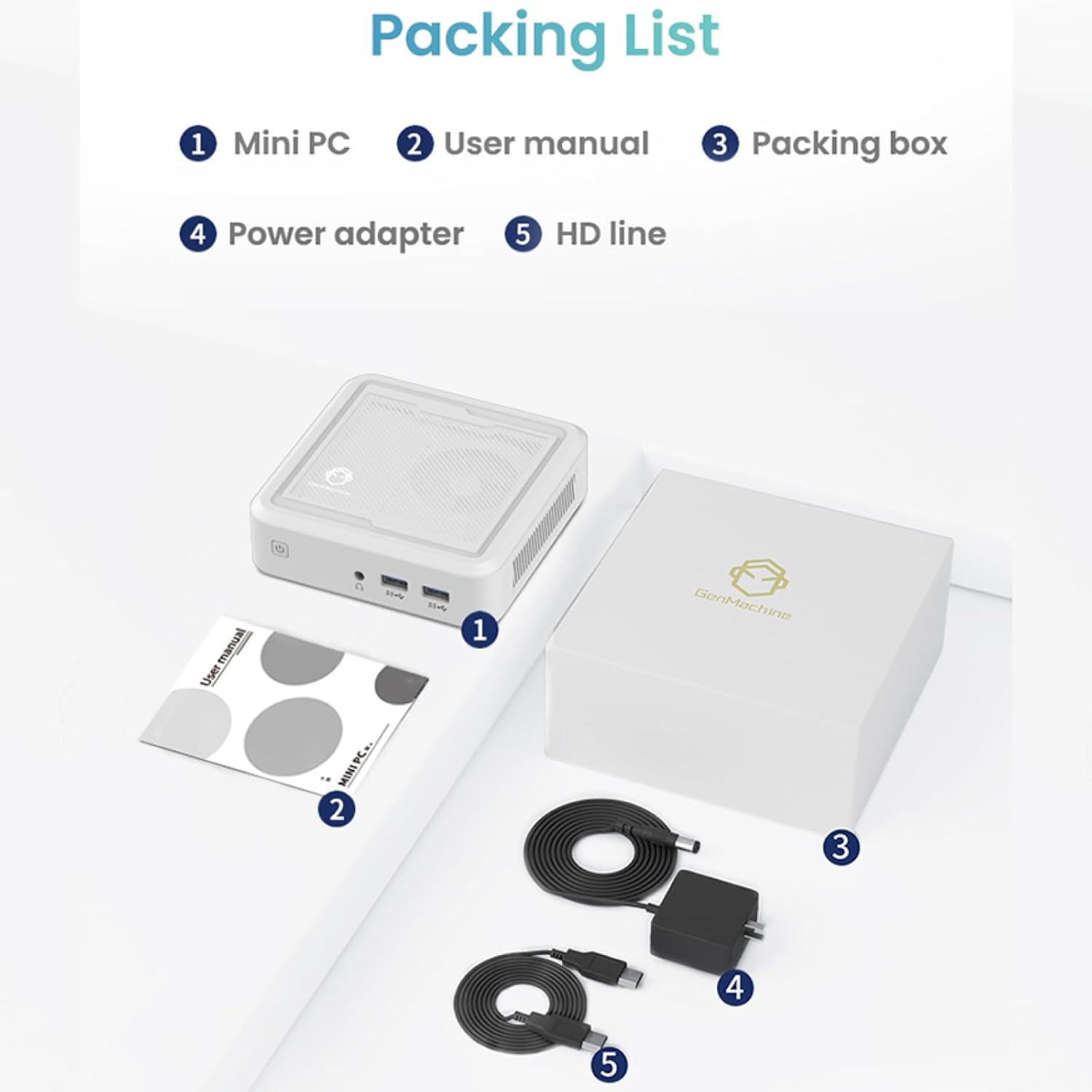
Figure 2.1: Packaging contents of the GenMachine Mini PC.
3. פּראָדוקט פֿעיִקייטן
The GenMachine Mini PC is engineered with features to enhance your computing experience:
- שטאַרק פאָרשטעלונג: Equipped with an AMD Ryzen 7 3750H processor, delivering speeds up to 4.0GHz with 4 cores and 8 threads for demanding tasks.
- Ampזכּרון און סטאָרידזש: Features 8GB of DDR4 RAM and a 256GB SSD with M.2 NVMe support for seamless multitasking and quick file צוטריט.
- ווערסאַטאַל קאַנעקטיוויטי: Advanced WiFi 6 and Bluetooth 5.2 capabilities ensure high-speed internet and smooth device pairing.
- סאָליד פּלאַן: A sleek, small form factor that fits easily into any workspace or gaming setup.
- קייפל ווייַז אָפּציעס: HDMI and DisplayPort outputs support dual 4K displays for expanded productivity and immersive visuals.

פיגורע 3.1: פראָנט view of the GenMachine Mini PC.
3.1 Rich Interface for Easy Connection
The Mini PC offers a comprehensive set of ports to meet various connectivity needs:
- וסב 3.0 רענטגענ 4
- הדמי רענטגענ 1
- DisplayPort (DP) x 1
- LAN (Ethernet) x 1
- 3.5mm Audio Jack x 1
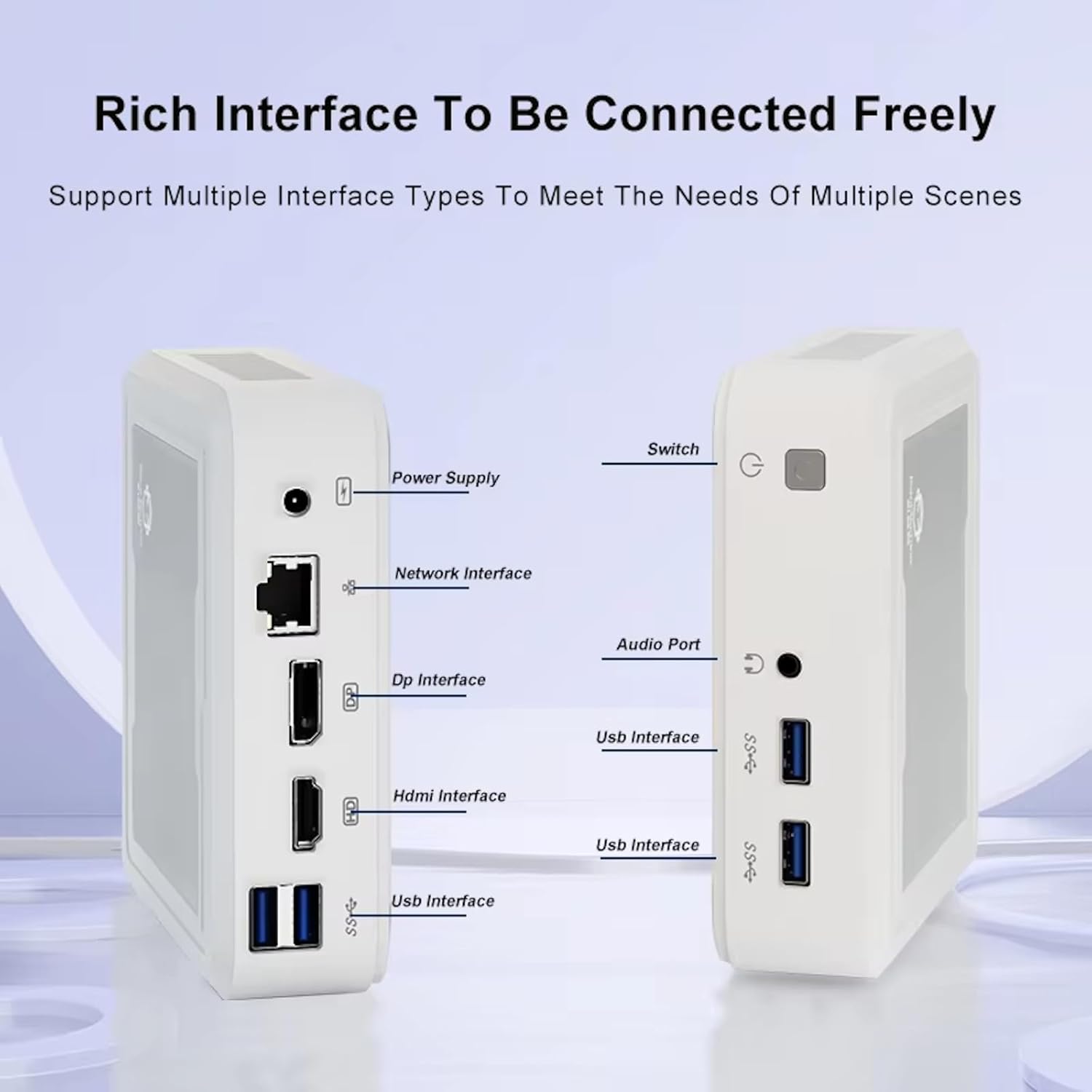
Figure 3.2: Available ports on the GenMachine Mini PC.
3.2 שטיצע פֿאַר צוויי מאָניטאָרן
Enhance your productivity or gaming experience by connecting up to two 4K displays simultaneously using the HDMI and DisplayPort outputs.

Figure 3.3: Dual 4K display setup with the GenMachine Mini PC.
Video 3.1: Demonstration of the GenMachine Mini PC supporting two monitors simultaneously.
3.3 ענערגיע עפעקטיווקייט און שטילע אפעראציע
Designed for low noise operation, the Mini PC maintains a quiet environment, making it suitable for various settings.

Figure 3.4: Noise level comparison of the GenMachine Mini PC.
3.4 Compact and Durable Design
The Mini PC features an ultra-durable, lightweight metal casing, making it space-saving and robust for any work environment.
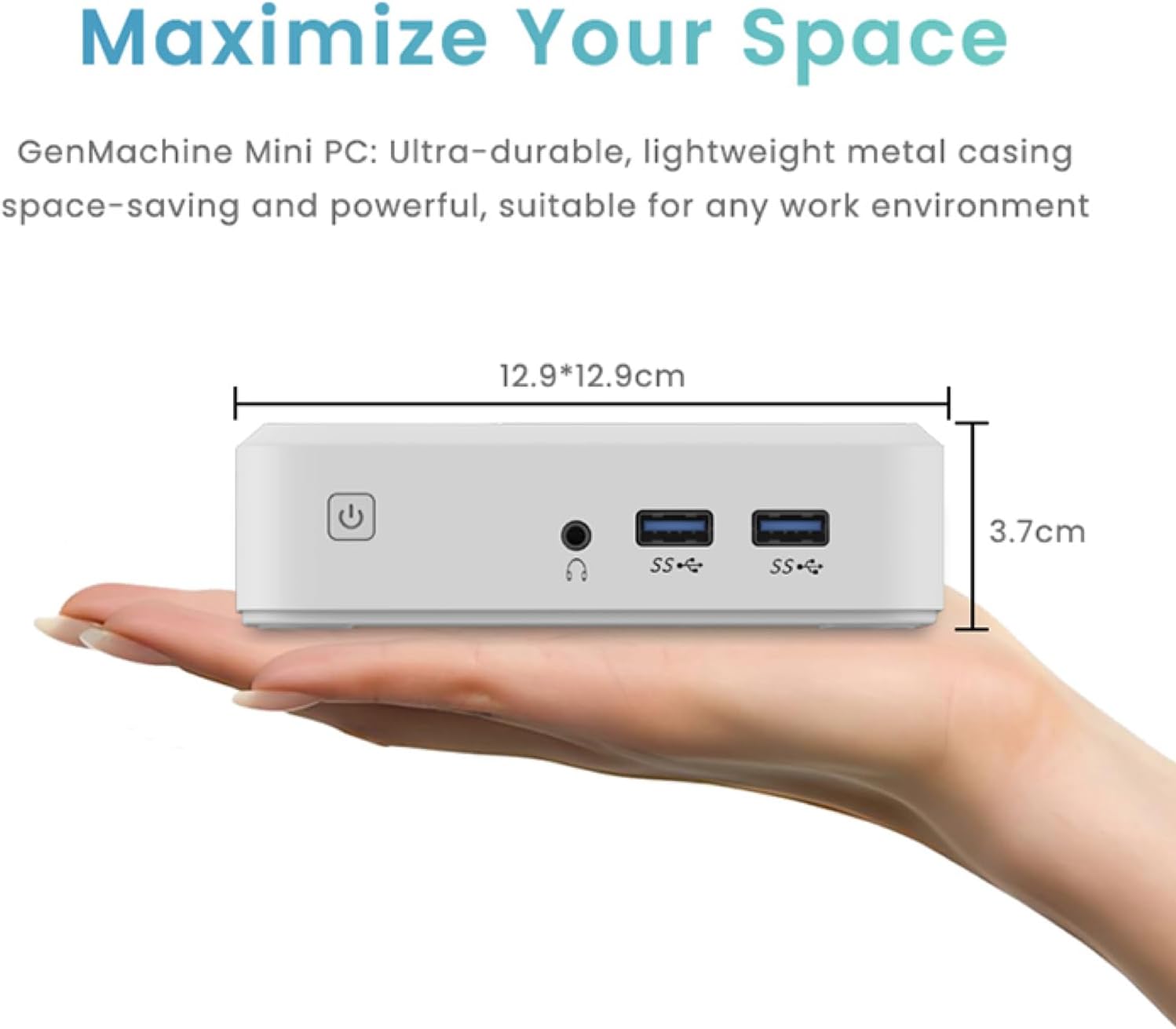
Figure 3.5: Compact size of the GenMachine Mini PC.
ווידעא 3.2: איבערview of the GenMachine Mini PC's features and compact design.
4. סעטאַפּ גייד
Follow these steps to set up your GenMachine Mini PC:
- Unpack the Mini PC: קערפאַלי באַזייַטיקן אַלע קאַמפּאָונאַנץ פון די פּאַקקאַגינג.
- פאַרבינדן צו אַ דיספּליי: Use the provided HDMI cable to connect the Mini PC to your monitor or TV. If using a DisplayPort monitor, use a compatible DP cable (not included).
- פאַרבינדן פּעריפעראַלס: Plug in your keyboard, mouse, and any other USB devices into the available USB 3.0 ports.
- פאַרבינדן צו נעץ (אפציאָנעל): For a wired internet connection, connect an Ethernet cable to the LAN port. For wireless, ensure your WiFi network is available during initial setup.
- פאַרבינדן מאַכט: Plug the power adapter into the DC-in port on the Mini PC, then plug the adapter into a power outlet.
- מאַכט אויף: Press the power button on the front of the Mini PC. The system should boot up.
5. אַפּערייטינג ינסטרוקטיאָנס
5.1 ערשטע בוט און אָפּערייטינג סיסטעם סעטאַפּ
Upon first power-on, the Mini PC will guide you through the operating system setup process. Follow the on-screen prompts to configure language, region, user accounts, and network settings.
5.2 מאַכט מאַנאַגעמענט
- מאַכט אויף: דרוק די מאַכט קנעפּל אַמאָל.
- שאַט אַראָפּ: Access the power options through the operating system's start menu and select 'Shut down'.
- ריסטאַרט: Access the power options through the operating system's start menu and select 'Restart'.
- שלאָפן מאָדע: Access the power options through the operating system's start menu and select 'Sleep'.
5.3 פֿאַרבינדן זיך צו Wi-Fi און בלועטוט
To connect to a wireless network or Bluetooth device, use the respective settings within your operating system. The Mini PC supports WiFi 6 and Bluetooth 5.2 for fast and reliable connections.
6. וישאַלט
Regular maintenance helps ensure the longevity and optimal performance of your Mini PC:
- רייניקונג: Use a soft, dry cloth to clean the exterior. For dust in vents, use compressed air. Ensure the device is powered off and unplugged before cleaning.
- ווענטילאַטיאָן: Ensure the Mini PC is placed in a well-ventilated area. Do not block the air vents.
- ווייכווארג דערהייַנטיקונגען: Regularly update your operating system, drivers, and applications to ensure security and performance.
- דאַטאַ באַקקופּ: מאַכט פּעריִאָדיש באַקאַפּן פון וויכטיקע דאַטן צו אַן עקסטערנאַלן דרייוו אָדער וואָלקן סטאָרידזש.
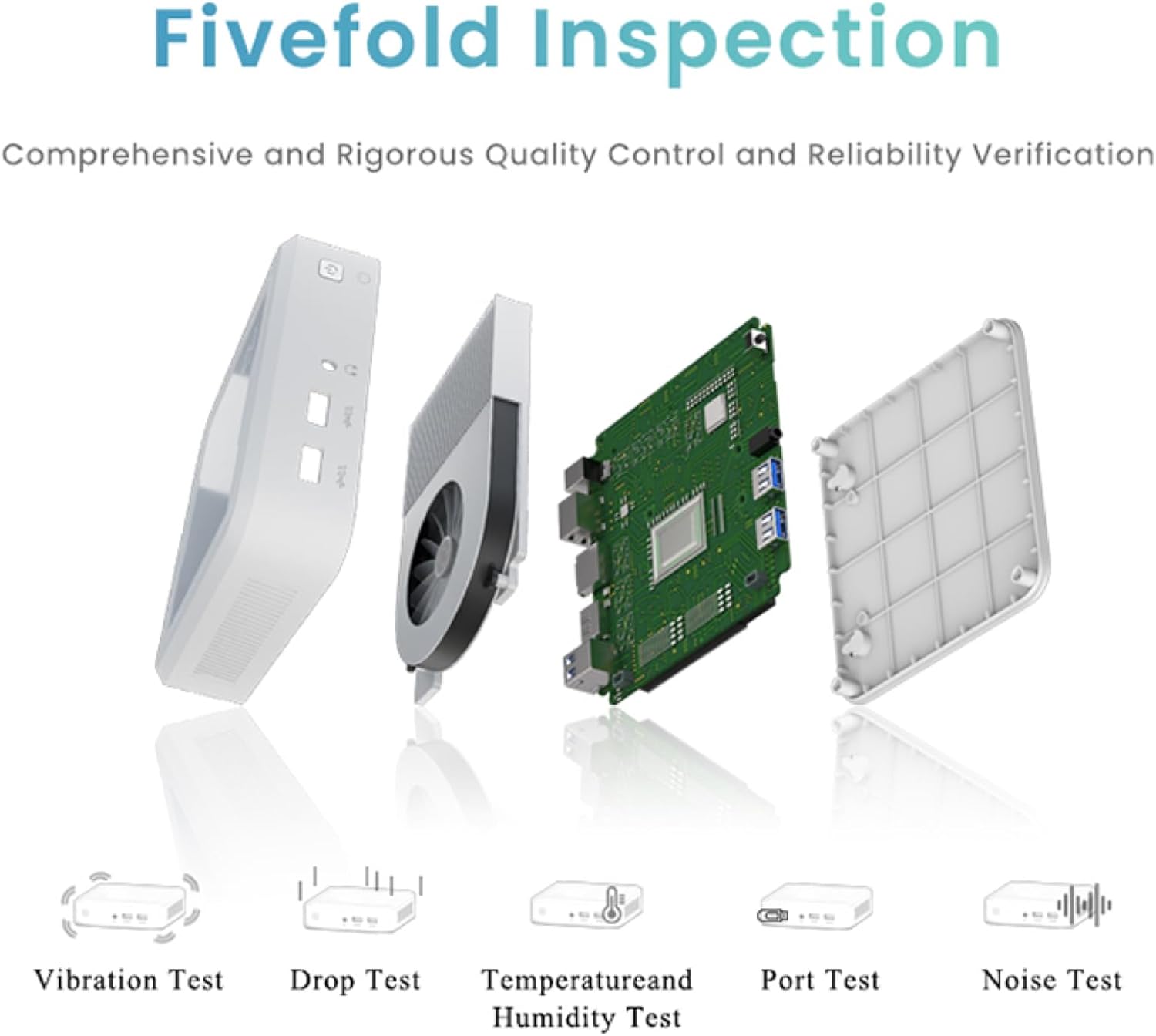
Figure 6.1: GenMachine's Fivefold Inspection process for quality control.
7. טראָובלעשאָאָטינג
אויב איר טרעפט פּראָבלעמען מיט אייער מיני פּיסי, זעט די פאלגענדע געוויינטלעכע פּראָבלעמען און לייזונגען:
- קיין מאַכט:
- זיכער מאַכן אַז דער מאַכט אַדאַפּטער איז זיכער פארבונדן צו ביידע די מיני פּיסי און אַ אַרבעטנדיק מאַכט ווענטיל.
- פּרוּווט אַ אַנדערש מאַכט ווענטיל.
- קיין ווייַז:
- Verify that the HDMI or DisplayPort cable is securely connected to both the Mini PC and the monitor.
- זייט זיכער אז דער מאָניטאָר איז אנגעצונדן און איינגעשטעלט צו דער ריכטיקער אינפוט מקור.
- פרובירט אן אנדערן דיספּלעי קאַבל אדער מאָניטאָר אויב מעגלעך.
- System Freezes or Unresponsive:
- Perform a hard reset by holding the power button for 5-10 seconds until the device powers off, then restart.
- Ensure the operating system and drivers are up to date.
- Check for overheating; ensure proper ventilation.
- Run a system diagnostic or memory test if the issue persists.
- קיין אינטערנעט פֿאַרבינדונג:
- פֿאַר דראָטיקע פֿאַרבינדונגען, קאָנטראָלירט דעם עטהערנעט קאַבל און ראַוטער סטאַטוס.
- For Wi-Fi, ensure Wi-Fi is enabled in the operating system and you are connected to the correct network with the correct password.
- ריסטאַרט דיין ראַוטער/מאָדעם.
8. ספּעסאַפאַקיישאַנז
| שטריך | באַשרייַבונג |
|---|---|
| פּראַסעסער | AMD Ryzen 7 3750H (4 cores, 8 threads, up to 4.0GHz) |
| באַראַן | 8GB DDR4 |
| סטאָרידזש | 256GB SSD (with M.2 NVMe support) |
| גראַפיקס קאָופּראַסעסער | אַמד ראַדעאָן וועגאַ 10 גראַפיקס |
| מאַקסימום סקרין האַכלאָטע | 3840 X 2160 בילדצעלן (4K) |
| ווירעלעסס טיפּ | 802.11ac (WiFi 6), Bluetooth 5.2 |
| וסב פּאָרץ | 4 רענטגענ וסב 3.0 |
| ווידעא אַוטפּוץ | הדמי, DisplayPort |
| אָפּערייטינג סיסטעם | OS (Pre-installed) |
| פּונקט וואָג | 2.1 פונט |
| פּראָדוקט דימענשאַנז | 4.9 X 4.9 X 1.4 אינטשעס |
| קאָליר | שוואַרץ |
9. וואָראַנטי און שטיצן
For warranty information and technical support, please refer to the warranty card included with your product or visit the official GenMachine webזייטל. האַלט אייער קויף קוויטל ווי אַ באַווייַז פון קויפן פֿאַר וואָראַנטי קליימז.
If you require further assistance, please contact GenMachine customer support through the channels provided on their official webפּלאַץ.


