1. הקדמה
This user manual provides essential information for the safe and efficient operation of your HYCHIKA 3.6V Cordless Electric Rechargeable Screwdriver Drill Set. Please read this manual thoroughly before first use and keep it for future reference.
The HYCHIKA 3.6V Cordless Electric Screwdriver is designed for various screwing and light drilling tasks around the home. It features a maximum torque of 6 N-m, a 6.35 mm quick-change chuck, and a versatile design that allows for both pistol and straight grip configurations.
2. זיכערקייַט אינסטרוקציעס
שטענדיק אָבסערווירן גרונטלעכע זיכערהייט מיטלען ווען איר ניצט עלעקטרישע מכשירים צו רעדוצירן דעם ריזיקאָ פון פייער, עלעקטרישן קלאַפּ און פערזענלעכע שאָדן.
- אַרבעט שטח זיכערקייַט: האַלט אייער אַרבעטס־געגנט ריין און גוט באַלויכטן. פֿאַרפּאַקטע אָדער טונקעלע געביטן לאַדן איין צו אומגליקן. ניצט נישט עלעקטרישע מכשירים אין עקספּלאָזיווע אַטמאָספֿערעס, ווי למשל אין דער אנוועזנהייט פֿון ברענענדיקע פֿליסיקייטן, גאַזן אָדער שטויב.
- עלעקטריקאַל זיכערקייַט: פֿאַרמײַדט קערפּער קאָנטאַקט מיט געערדטע אָדער פֿאַרבונדענע פֿלעכן ווי רערן, ראַדיאַטאָרן, אויוון און רעפֿרידזשעראַטאָרן. שטעלט נישט אויס עלעקטרישע מכשירים צו רעגן אָדער נאַסע באַדינגונגען.
- פערזענליכע זיכערקייט: Always wear eye protection. Use safety glasses, goggles, or a face shield. Wear hearing protection when operating noisy tools. Dress properly; avoid loose clothing or jewelry.
- מכשירים נוצן און זאָרגן: צווינגט נישט דעם עלעקטרישן געצייג. ניצט דעם ריכטיקן עלעקטרישן געצייג פאר אייער אנווענדונג. ציט ארויס דעם שטעקער פון דער שטראָם-מקור און/אדער נעמט ארויס די באַטעריע איידער איר מאַכט קיין אַדזשאַסטמאַנץ, טוישט אַקסעסאָריעס, אדער לייגט אַוועק עלעקטרישע געצייג.
- באַטערי פּאַק נוצן און זאָרגן: לאָדט נאָר אויף מיטן טשאַרדזשער וואָס ווערט ספּעציפֿיצירט דורך דעם פאַבריקאַנט. ניצט נישט קיין באַטעריע פּאַקס מיט קיין אַנדערע עלעקטרישע מכשירים. ווען די באַטעריע פּאַק איז נישט אין באַנוץ, האַלט עס אַוועק פֿון אַנדערע מעטאַלענע אָביעקטן.
3. פּעקל אינהאַלט
באַשטעטיקט אַז אַלע זאכן וואָס זענען אויסגערעכנט אונטן זענען אַרייַנגערעכנט אין אייער פּעקל. אויב עפּעס פעלנדיק אָדער צעבראָכן, ביטע קאָנטאַקטירט קונה שטיצע.
- 1 x HYCHIKA 3.6V Cordless Screwdriver
- 19 קס שרויפנ - ציער ביץ
- 1 x עקסטענסיאָן בר
- 1 x טשאַרדזשינג אַדאַפּטער
- 1 x באַניצער מאַנואַל

Figure 3.1: Contents of the HYCHIKA 3.6V Cordless Screwdriver package, including the screwdriver, various bits, and charging adapter.
4. פּראָדוקט פֿעיִקייטן און קאָמפּאָנענטן
Familiarize yourself with the different parts of your cordless screwdriver.

Figure 4.1: Key components of the screwdriver, including the magnetic chuck, PUSH button, front LED light, On/Off switch, LED charger indicator, 3.5mm charger port, and forward & reverse button.
- Magnetic Chuck: 1/4 inch (6.35mm) quick-change chuck for easy bit installation and removal.
- פראָנט געפירט ליכט: Illuminates the work area for improved visibility in dark environments.
- אָנ / אַוועק באַשטימען: Activates and deactivates the screwdriver.
- Forward & Reverse Button: Controls the rotation direction for screwing and unscrewing.
- LED Charger Indicator: Provides status of battery charging.
- 3.5mm Charger Port: Connection point for the charging adapter.
- PUSH קנעפּל: Used to adjust the grip configuration from pistol to straight.
5. סעטאַפּ
5.1 טשאַרדזשינג די באַטאַרייע
The screwdriver is powered by a 3.6V 2000 mAh Lithium-Ion battery. Before first use, fully charge the battery.
- Connect the charging adapter to the 3.5mm charger port on the screwdriver.
- שטעקט אריין דעם טשאַרדזשינג אַדאַפּטער אין אַ נאָרמאַלן עלעקטרישן ווענטיל.
- The LED charger indicator will illuminate during charging. Once fully charged, the indicator may change color or turn off depending on the model.
- אַרויסנעמען דעם טשאַרדזשער אַמאָל די טשאַרדזשינג איז פֿאַרטיק.

Figure 5.1: The screwdriver connected to its charging adapter, indicating a full charge.
The screwdriver is designed to maintain full power output even when the battery is low, ensuring consistent performance until the battery is depleted.
5.2 אינסטאַלירן שרויפנציהער ביטס
The screwdriver features a 1/4 inch (6.35mm) magnetic quick-change chuck for easy bit installation.
- אויסקלייַבן די צונעמען שרויפנ - ציער ביסל פֿאַר דיין אַרבעט.
- Insert the bit into the magnetic chuck until it is securely seated. The magnetic chuck will hold the bit firmly in place.
- To remove a bit, simply pull it out of the chuck. Bits with grooves are designed for easier removal.

Figure 5.2: Visual guide for inserting a bit into the magnetic chuck and removing it.
6. אַפּערייטינג ינסטרוקטיאָנס
6.1 Adjusting Grip Configuration
The screwdriver can be used in two grip configurations: pistol grip or straight grip, for enhanced versatility and comfort.
- To change the grip, press and hold the "PUSH" button located at the top of the screwdriver.
- While holding the button, rotate the handle ninety degrees to switch between pistol and straight configurations.
- Release the "PUSH" button once the desired configuration is achieved. The handle will lock into place.
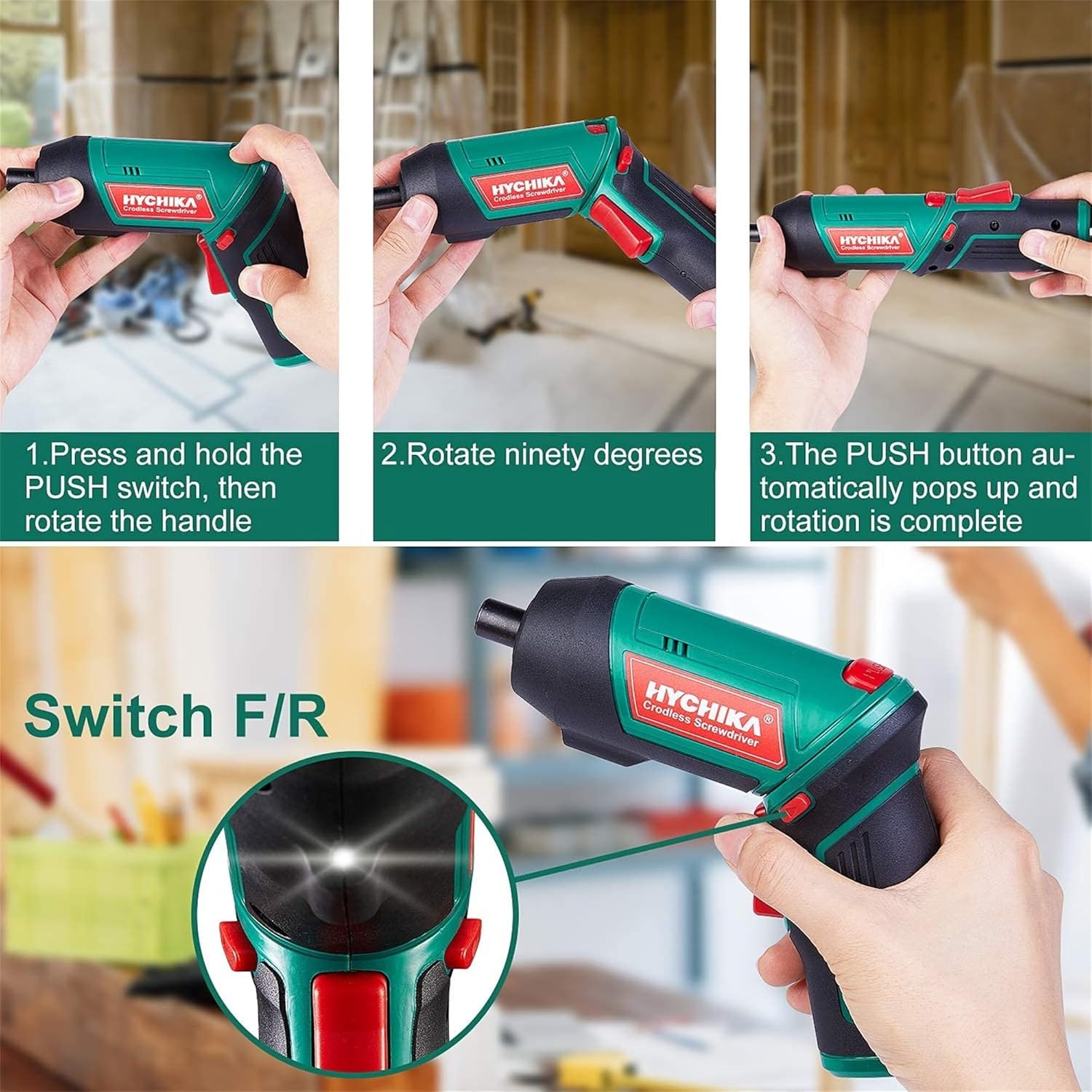
Figure 6.1: Demonstrates the process of transforming the screwdriver's grip by pressing the PUSH button and rotating the handle.
6.2 פאָרווערטס און צוריקווערטס אָפּעראַציע
The forward/reverse button controls the direction of rotation for screwing and unscrewing.
- To drive screws (forward rotation), push the forward/reverse button to the left (when viewפון די הינטן פון די געצייַג).
- To remove screws (reverse rotation), push the forward/reverse button to the right.
- When the button is in the center position, the tool is locked, preventing accidental activation.
6.3 ניצן די LED ארבעט ליכט
The built-in LED light automatically illuminates when the screwdriver is in operation, providing visibility in dimly lit areas.

Figure 6.2: The integrated LED light provides clear illumination for working in dark environments.
7. וישאַלט
Regular maintenance ensures the longevity and optimal performance of your screwdriver.
- רייניקונג: Keep the ventilation openings clean and free from dust. Use a soft, damp שטאָף צו רייניקן דעם געצייַג casinז. ניצט נישט קיין שטרענגע כעמיקאלן אדער אברייסיוו רייניגער.
- ביט קער: Clean screwdriver bits after use. Store them in the provided case to prevent loss and damage.
- באַטאַרייע סטאָרידזש: If storing the tool for an extended period, ensure the battery is partially charged (around 50%) and store it in a cool, dry place. Recharge the battery every 3-6 months to maintain its health.
- אַלגעמיינע דורכקוק: Periodically check for any loose screws, damaged cords, or worn parts. Do not use the tool if any damage is observed.
8. טראָובלעשאָאָטינג
This section addresses common issues you might encounter with your screwdriver.
| פּראָבלעם | מעגלעך סיבה | לייזונג |
|---|---|---|
| שרויפנציהער טוט זיך נישט אן. | באַטערי איז דיפּליטיד. Forward/Reverse switch is in the center (locked) position. | באַשולדיקן די באַטאַרייע גאָר. פּוש די פאָרויס / פאַרקערט באַשטימען צו די לינקס אָדער רעכט. |
| Screwdriver loses power quickly. | באַטערי נישט גאָר באפוילן. Battery life degraded. | זיכער מאַכן אַז די באַטאַרייע איז גאָר אויפגעלאָדן איידער נוצן. If battery life is significantly reduced, contact customer support for replacement options. |
| Bits are not held securely in the chuck. | Bit is not fully inserted. Chuck is dirty or damaged. | Push the bit firmly into the chuck until it clicks into place. Clean the chuck area. If damage is visible, contact customer support. |
אויב די פראבלעם בלייבט נאך פרובירן די לייזונגען, ביטע קאנטאקטירט קאסטומער סופארט.
9. ספּעסאַפאַקיישאַנז
| שטריך | באַשרייַבונג |
|---|---|
| סאָרט | Overstock (HYCHIKA) |
| מאָדעל נומער | c131a012-0da9-4306-aeab-b1d9ff5cd4b7 |
| Voltage | 3.6 וואלטס |
| מאַכט מקור | באַטאַרייע פּאַוערד |
| ספּיד | 180 רפּם |
| פּונקט טאָרק | 6 Newton Meters (6 N-m) |
| באַטערי טיפּ | ליטהיום יאָן |
| באַטאַרייע קאַפּאַציטעט | 2000 מאַה |
| טשאַק גרייס | 1 מם |
| מאַטעריאַל | פּלאַסטיק, גומע |
| קאָליר | גרין |
| UPC | 616859793583 |
10. וואָראַנטי און שטיצן
Overstock offers lifetime after-sales service for this product. For any questions, concerns, or technical assistance, please contact our customer support team.
Please have your model number (c131a012-0da9-4306-aeab-b1d9ff5cd4b7) and purchase information ready when contacting support.


