1. הקדמה און איבערview
די שווארצעview BV5200Pro is a rugged smartphone designed for durability and performance in challenging environments. It features advanced protection against water, dust, and drops, combined with a powerful processor and versatile camera system. This manual provides essential information for setting up, operating, and maintaining your device.

Image: The Blackview BV5200Pro is built to withstand harsh conditions, meeting MIL-STD-810H military standards for drop resistance, IP68 for water immersion up to 1.5 meters for 30 minutes, and IP69K for protection against high-pressure, high-temperature water jets and 360° dust ingress.
2. מיטל סעטאַפּ
2.1 סים קאַרטל און סטאָרידזש ינסטאַלירונג
The BV5200Pro supports dual 4G LTE SIM cards and a TF (microSD) card for expanded storage. It features three dedicated card slots.
- געפינט די סים קארטל טאַץ אויף דער זייט פון דעם טעלעפאָן.
- ניצט דעם צוגעשטעלטן סים ארויסווארפער געצייג צו עפענען דעם טאץ.
- Carefully place your Nano-SIM cards and/or TF card into the designated slots. Ensure the gold contacts face downwards.
- שטופּ אָפּ דעם טאַץ צוריק אין טעלעפאָן ביז עס איז גלייך מיטן אַפּאַראַט'ס קערפּער.

Image: The phone features three card slots, allowing for two 4G LTE SIM cards and one TF card for memory expansion up to 1TB simultaneously.
2.2 ערשטע איינשטראָם און גרונטלעכע סעטטינגס
To power on your device, press and hold the power button located on the side until the Blackview logo appears. Follow the on-screen prompts to complete the initial setup, including selecting your language, connecting to a Wi-Fi network, and setting up your Google account.
3. אַפּערייטינג דיין מיטל
3.1 אַרויסווייַז און באַניצער צובינד
The BV5200Pro features a 6.1-inch HD+ display with a resolution of 720x1560 pixels and 500 nits brightness, ensuring clear visuals even in bright conditions. It runs on Android 12 with Doke OS 3.0, offering an intuitive and customizable user experience.

Image: The 6.1-inch HD+ display provides a wide view and immersive experience with 720x1560 resolution, 83% screen-to-body ratio, and 500 cd/m² brightness.
3.2 פאָרשטעלונג און סטאָרידזש
Powered by the MediaTek Helio G35 Octa-Core processor, the phone offers smooth performance for daily tasks and entertainment. It comes with 4GB of RAM, expandable to 7GB (with 3GB virtual RAM), and 64GB of internal storage, which can be further expanded up to 1TB using a TF card.

Image: Visual representation of the MediaTek Helio G35 processor, 7GB RAM (4GB physical + 3GB virtual), and 64GB ROM, with 1TB TF card expandability.
3.3 באַטאַרייע און טשאַרדזשינג
The device is equipped with a 5180mAh battery, providing extended usage times: up to 642 hours standby, 26.5 hours calling, 20 hours music playback, and 8.8 hours video playback. It supports 10W fast charging and OTG reverse charging, allowing you to use your phone as a power bank for other devices.

בילד: איבערview of the 5180mAh battery, showing usage durations for various activities and the OTG reverse charging capability.
3.4 אַפּאַראַט פֿעיִקייטן
The BV5200Pro features a 13MP Sony IMX258 rear camera and an 8MP Samsung5K4H7 front camera. It utilizes ArcSoft technology for enhanced photography, offering various modes:
- 360° Panorama Capture: פֿאַר ברייטע סצענישע בילדער.
- נאַכט מאָדע: פֿאַרבעסערט נידעריק-ליכט פאָטאָגראַפֿיע.
- Improved HDR: Balances exposure in high-contrast scenes.
- פּאָרטרעט מאָדע: Creates a bokeh effect for professional-looking portraits.
- פנים פיל ליכט: Enhances selfies in dim lighting.
- שיינקייט מאָדע: Optimizes facial features for flattering photos.
The camera also boasts a 0.1s ultra-fast PDAF for quick and accurate focusing.

Image: Details of the 8MP front camera and 13MP+2MP+2MP rear camera with ArcSoft technology for enhanced photo quality.

בילד: עקסamples of various camera modes available on the BV5200Pro, including Beauty Mode, Night Mode, Portrait Mode, and Pro Mode.
3.5 Security and Convenience Features
The phone includes several features for security and user convenience:
- NFC: פֿאַר קאָנטאַקטלאָזע צאָלונגען און שנעלע דאַטן אַריבערפירן.
- Face ID: Secure and convenient facial recognition for unlocking.
- הענטשקע מאָדע: Allows touchscreen operation while wearing gloves.
- Customized Function Button: A programmable button for quick access to 5 essential functions or your favorite apps.
3.6 Navigation and Toolkit
Integrated GPS, GLONASS, Beidou, and Galileo systems provide accurate positioning. The device also comes with a useful toolkit of professional apps, including Compass, Gradienter, Barometer, Protractor, SoundMeter, and FM radio.

בילד: א פולשטענדיקע view of the phone's utility features, including the customizable shortcut button, Face Unlock, 3 card slots, Glove Mode, NFC, advanced GPS, and a suite of toolkit applications.
4. וישאַלט און האַלטבארקייט
די שווארצעview BV5200Pro is engineered for extreme durability, making it suitable for rugged use. To ensure its longevity, follow these guidelines:
- וואַסערפּרוף (IP68): The phone can withstand immersion in water up to 1.5 meters deep for 30 minutes. Ensure all port covers are securely closed before exposure to water.
- Dustproof (IP69K): It offers 360° protection against dust and can resist high-pressure, high-temperature water jets.
- Dropproof (MIL-STD-810H): Certified to military standard MIL-STD-810H, the phone is drop-resistant from heights up to 1.5 meters.
- רייניקונג: ניצן אַ ווייך, דamp א טוך צו רייניקן דעם אפאראט. פארמיידט שטרענגע כעמיקאלן אדער שברייענדע מאטעריאלן.
- טעמפּעראַטור: Operate the phone within its specified temperature range to prevent damage to the battery and internal components.
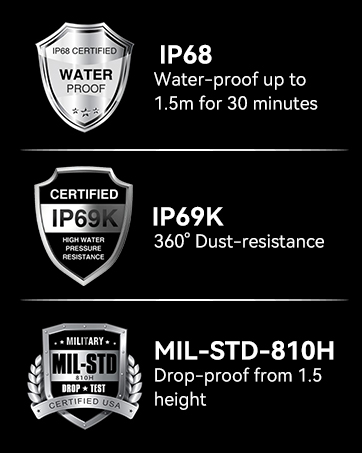
Image: The Blackview BV5200Pro submerged in water, illustrating its IP68 waterproof rating.
5. טראָובלעשאָאָטינג
5.1 נעץ קאָמפּאַטאַביליטי
די שווארצעview BV5200Pro is compatible with GSM network carriers such as T-Mobile, BTC, MetroPCS, H2O, Movistar, Telcel, Tigo, Claro, Vivacom, Ultra Mobile, Lycamobile, Tello Mobile, Bell Wireless, Rogers Wireless, Chatr, Luck Mobile, Virgin Mobile, Telus, Fido, FIZZ, and Shaw Mobile.
וויכטיק: This phone is נישט compatible with AT&T and Cricket Wireless SIM cards.

Image: A visual guide to the supported 2G, 3G, and 4G network bands and compatible US carriers for the Blackview BV5200Pro.
5.2 פּראָסט ישוז
- די מיטל איז נישט פּאַוערינג: זיכער מאַכן אַז די באַטאַרייע איז אויפגעלאָדן. פֿאַרבינדט דעם טעלעפאָן צום טשאַרדזשער און וואַרט אַ פּאָר מינוט איידער איר פּרוּווט עס ווידער אָנצוצינדן.
- נעבעך סיגנאַל אָפּטראָג: Check your SIM card installation. If the issue persists, contact your network provider.
- אַפּפּס קראַשן: Clear the cache of the problematic app or reinstall it. Ensure your system software is up to date.
- Touchscreen unresponsiveness: Restart the device. If using Glove Mode, ensure it is enabled correctly.
6. ספּעסאַפאַקיישאַנז
| שטריך | באַשרייַבונג |
|---|---|
| מאָדעל נאָמען | BV5200Pro |
| אָפּערייטינג סיסטעם | אַנדרויד 12.0 |
| פּראַסעסער | מעדיאַטעק העליאָ G35 אָקטאַ-קאָר |
| באַראַן | 4 גיגאבייט (אויסברייטבאר ביז 7 גיגאבייט) |
| אינערלעכער סטאָרידזש | 64 גיגאבייט |
| יקספּאַנדאַבאַל סטאָרידזש | ביז 1TB דורך TF קאַרטל |
| פאַרשטעלן גרייס | 6.1 אינטשעס HD+ |
| האַכלאָטע | 720 X 1560 |
| דערציען אַפּאַראַט | 13 מפּ Sony IMX258 |
| פראָנט אַפּאַראַט | 8MP Samsung5K4H7 |
| באַטאַרייע קאַפּאַציטעט | 5180 מאַה |
| טשאַרדזשינג | 10 וואט שנעלע טשאַרדזשינג, OTG פאַרקערטע טשאַרדזשינג |
| האַלטבארקייט רייטינגז | IP68 Waterproof, IP69K Dustproof, MIL-STD-810H Dropproof |
| קאַנעקטיוויטי | Dual 4G LTE, Wi-Fi (802.11 a/b/g/n/ac), Bluetooth 5.0, NFC |
| נאַוויגאַציע | דזשי־פי־עס, גלאָנאַס, ביידו, גאַלילעאָ |
| דימענשאַנז | 161.8 X 77.86 X 13.65 מם |
| וואָג | 268ג |
7. וואָראַנטי און שטיצן
שוואַרץview offers a 2-year warranty on all Blackview cell phones purchased from authorized retailers. This includes a 24-month free repair warranty and lifetime technician support. For any issues or inquiries, please contact Blackview קונה דינסט.

Image: Information regarding Blackview's two-year warranty support, emphasizing strict quality control and dedicated customer service.
8. פּראָדוקט ווידעאָ איבערview
ווידעא: אן אפיציעלע איבערview of the Blackview BV5200Pro Rugged Cell Phone, highlighting its key features and durability.


