הקדמה
Thank you for choosing the Joysico Stereo-to-Mono Single Earbud Headset. This wired earphone is designed for comfort and convenience, allowing you to enjoy audio while maintaining awareness of your surroundings. It features an in-line microphone for clear calls and integrated controls for media management. This manual provides detailed instructions for setup, operation, maintenance, and troubleshooting to ensure optimal performance of your device.
וואָס איז אין די קעסטל
- 1 x Joysico Stereo-to-Mono Single Earbud (Right Ear Only)
- 1 x Memory Foam Ear Cushion
- 3 x Silicone Ear Cushions (S, M, L)
- 1 x פּראַטעקטיוו קעריינג קאַסע
- 1 x Shirt Clip
- 1 x באַניצער מאַנואַל (דאָס דאָקומענט)

Image: The Joysico Stereo-to-Mono Single Earbud, showcasing the earbud, in-line controls, 3.5mm jack, and the included protective carrying case.
פּראָדוקט איבערview ווידעא
ווידעא: אן איבערview of the Joysico YS3 Single Earbud Headphone, highlighting its key features and design.
סעטאַפּ גייד
Follow these steps to set up your Joysico earbud for comfortable and effective use.
1. אויסקלויבן די רעכטע אויער שפּיץ
The earbud comes with three sizes of silicone ear tips (Small, Medium, Large) and one memory foam ear cushion. Select the tip that provides the most comfortable and secure fit for your ear canal. A good seal is essential for optimal sound quality.

Image: Illustration showing the three sizes of silicone ear tips (S, M, L) and a memory foam ear cushion included with the earbud, designed for long-term comfort.
2. Wearing the Earbud
This earbud is designed for the right ear only and features an over-ear hook design for a secure fit. Gently place the earbud into your right ear canal and loop the ear hook over the top of your ear. Adjust until it feels snug and comfortable. The wrap-around design helps the earbud stay in place during movement, making it suitable for sports or active use.

Image: A person wearing the Joysico earbud, demonstrating how the earhook design keeps the earbud securely in place during activities like running or workouts.
אַפּערייטינג ינסטראַקשאַנז
Learn how to connect your earbud and utilize its in-line controls.
1. קאַנעקטינג צו דיין מיטל
The Joysico earbud connects via a standard 3.5mm audio jack. Simply insert the 3.5mm plug into the audio port of your compatible device. This earbud converts stereo audio into a single mono output, allowing you to hear both left and right channels in one ear.

Image: A visual representation of the earbud's stereo-to-mono conversion feature, enabling full audio experience in a single earpiece, beneficial for individuals with single-sided hearing.
2. Using In-Line Controls
The earbud features an in-line remote with a microphone and control buttons for easy access to various functions without needing to reach for your device.
- באַנד אַרויף: דריק דעם '+' קנעפל.
- באַנד אַראָפּ: דריק דעם '-' קנעפּל.
- שפּיל / פּויזע: דריקט דעם צענטער קנעפּל אַמאָל.
- האָפּקען צו ווייַטער שפּור: Click the center button twice.
- גיי צו פריערדיקן ליד: Click the center button three times.
- ענטפֿערן / סוף רופן: Click the center button once during a call.
- אַקטאַווייט קול אַססיסטאַנט: Long press the center button.
- מיקראָפאָן: The built-in microphone allows for clear hands-free calls, blocking out background noise.

Image: Detailed diagram illustrating the functions of the in-line remote control buttons, including volume adjustment, track control, call management, and voice assistant activation.
וישאַלט און זאָרג
Proper care will extend the lifespan of your Joysico earbud.
- רייניקונג: Gently wipe the earbud and ear tips with a soft, dry cloth. For ear tips, you may use a slightly damp cloth with mild soap, then dry thoroughly before reattaching. Do not submerge the earbud in water.
- סטאָרידזש: When not in use, store the earbud in the provided protective carrying case to prevent tangling and damage.
- קאַבלע זאָרגן: The earbud features a tangle-free cord. Avoid excessive pulling or sharp bends to prevent internal wire damage. Use the included shirt clip to secure the cable and reduce strain.
- שווייספּראָאָף: The earbud is designed with sweatproof construction, making it suitable for workouts. However, it is נישט וואַסער-קעגנשטעליק; avoid exposure to heavy rain or submersion.
טראָובלעשאָאָטינג
If you encounter issues with your earbud, refer to the following common problems and solutions.
| פּראָבלעם | מעגלעך סיבה | לייזונג |
|---|---|---|
| ניט געזונט אָדער נידעריק באַנד |
|
|
| מיקראָפאָן טוט נישט אַרבעטן |
|
|
| קאָנטראָלס ניט ריספּאַנדינג |
|
|
פּראָדוקט ספּעסאַפאַקיישאַנז
| שטריך | דעטאַל |
|---|---|
| סאָרט | Joysico |
| מאָדעל נאָמען | YS2 BLUE |
| קאַנעקטיוויטי טעכנאָלאָגיע | ווייערד |
| כעדפאָונז דזשאַק | 3.5 מם דזשאַק |
| אויער פּלייסמאַנט | In Ear (Right Ear Only) |
| פאָרם פאַקטאָר | אין אויער מיט איבער אויער קרוק |
| קאָנטראָל טיפּ | קנעפּל קאָנטראָל |
| קאַבלע שטריך | טאַנגלע פֿרייַ |
| פּונקט וואָג | 40 גראַמז (1.41 אונסעס) |
| פּראָדוקט דימענשאַנז | 3.74 X 3.74 X 1.97 אינטשעס |
| וואַסער קעגנשטעל מדרגה | Not Water Resistant (Sweatproof) |
| אָפטקייַט ראַנגע | 20 הערץ - 20,000 הערץ |
| מאַטעריאַל | פּלאַסטיק |
| קאָליר | בלוי |
קאַמפּאַטאַבילאַטי
The Joysico Stereo-to-Mono Single Earbud is widely compatible with devices featuring a 3.5mm audio jack.
- סמאַרטפאָנעס: Compatible with iPhone (6s & previous versions), Android phones (e.g., Samsung), and other cell phones with a 3.5mm audio jack. (Note: iPhone 7 and above require a Lightning adapter, not included).
- Tablets & Laptops: Works with iPad, tablets, Macbook, and other laptops/PCs.
- Media Players: Compatible with iPod, MP3, and MP4 players.
- גיימינג קאַנסאָול: Connects to PS4, PS5, and Nintendo Switch.
- אנדערע מכשירים: Also compatible with Kindle, radio, and other devices with a 3.5mm audio output.

Image: A diagram illustrating the universal compatibility of the earbud with various devices that have a 3.5mm audio jack, including smartphones, tablets, laptops, and gaming consoles.
זיכערקייַט און באַניץ גיידליינז
The single-ear design of this earbud offers a safety advantage in certain environments.
- ענוויראָנמענטאַל וויסיקייַט: By keeping one ear free, you can remain aware of your surroundings, which is crucial for activities such as driving, cycling, running near traffic, or walking in busy areas.
- דרייווינג: This earbud is a safer option for phone calls while driving, as it allows you to hear ambient sounds and traffic.
- באַנד לעוועלס: To prevent hearing damage, avoid listening at excessively high volumes for prolonged periods.
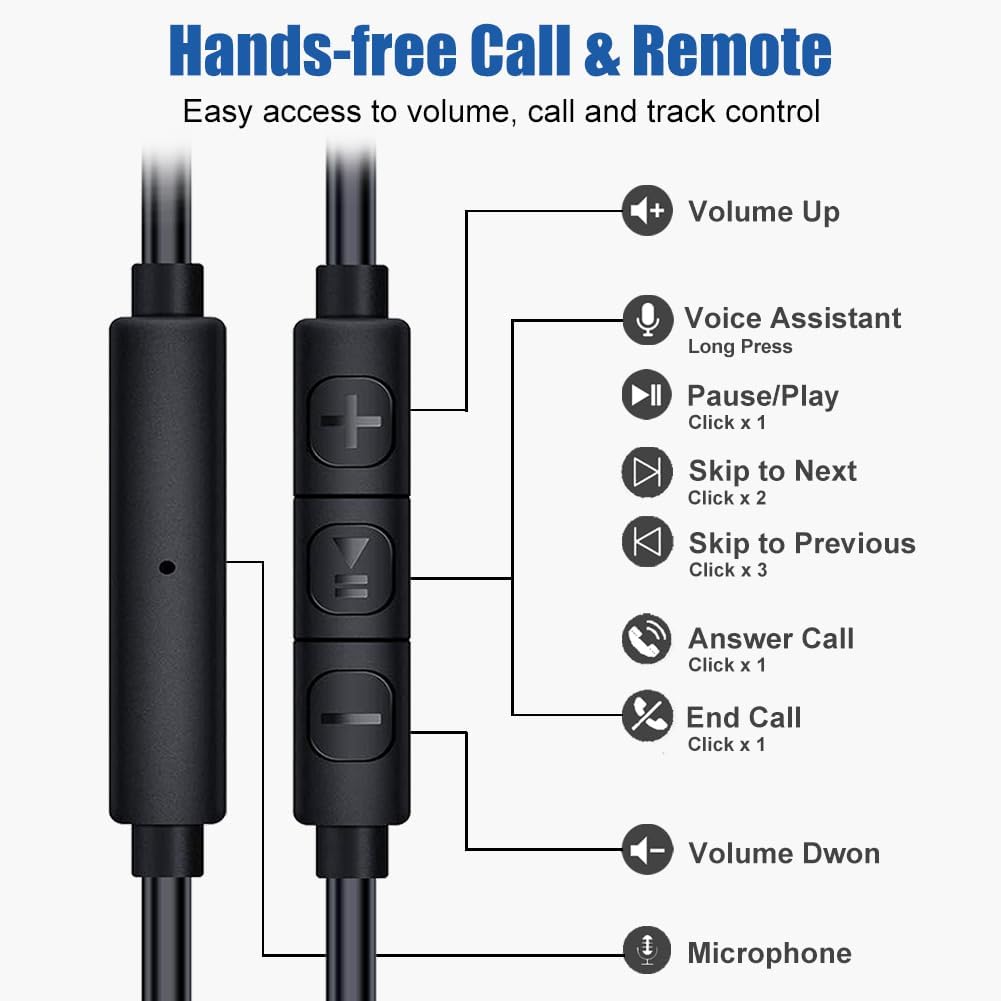
Image: A man cycling while wearing the single earbud, highlighting the benefit of having one ear open for increased safety and awareness of surroundings during outdoor activities or driving.
וואָראַנטי און שטיצן
Joysico stands behind the quality of its products.
- וואָראַנטי: דער פּראָדוקט קומט מיט אַ 1-יאָר וואָראַנטי פֿון דעם קויף־דאַטום. ביטע באַהאַלטן אייער קויף־באַווייַז פֿאַר גאַראַנטיע־קליימז.
- שטיצן: For any questions, technical assistance, or warranty claims, please contact Joysico customer support through the retailer's platform or the official Joysico webפּלאַץ.

Image: A visual representation of the 1-Year Warranty badge, alongside the earbud, cord, and various ear tips, indicating product quality and support.


