1. הקדמה און איבערview
The ESR Geo Magnetic Wallet is designed to enhance your iPhone experience by combining secure card storage with advanced tracking capabilities and versatile stand functionality. This manual provides essential information for setting up, operating, and maintaining your Geo Wallet.

Image: The ESR Geo Magnetic Wallet in Dark Black, attached to an iPhone, demonstrating its various features including the Find My app interface and its use as a phone stand.
2. וואָס איז אַרייַנגערעכנט
- ESR Geo Magnetic Wallet
- טשאַרדזשינג קאַבלע
- באַניצער מאַנואַל
3. סעטאַפּ און פּערינג
3.1 ערשט טשאַרדזשינג
Before first use, fully charge your ESR Geo Magnetic Wallet using the provided charging cable. The wallet features a small LED indicator that will show charging status.

Image: The ESR Geo Magnetic Wallet connected to its charging cable, illustrating the charging process. Ensure the stand is closed before charging.
3.2 Pairing with Apple Find My
The ESR Geo Magnetic Wallet integrates with Apple's Find My network for location tracking. Follow these steps to pair your wallet:
- Ensure Two-Factor Authentication is enabled on your iPhone.
- Turn on Bluetooth and Location Services on your iPhone.
- Press the power button on your Geo Wallet once (a beep indicates it's on).
- Open the 'Find My' app on your iPhone.
- Navigate to 'Items' > 'Add Item' > 'Other Supported Item'.
- Tap 'Connect' when 'ESR HaloLock Geo Wallet Stand' is detected and follow the on-screen instructions to name and register it to your Apple ID.

Image: A visual representation of the four-step pairing process for the ESR Geo Magnetic Wallet with the Apple Find My app, including charging, enabling Bluetooth/Location, pressing the power button, and connecting via the app.
3.3 קאַמפּאַטאַבילאַטי
The ESR Geo Magnetic Wallet is compatible with:
- iPhones with MagSafe (iPhone 12 series and later, except SE models).
- ESR HaloLock cases and official MagSafe cases.
- ESR HaloLock Universal Rings.
It is NOT compatible with iPhone 13/12 mini or non-magnetic cases.

Image: A clear diagram illustrating the compatibility of the ESR Geo Magnetic Wallet with various iPhone models and case types, indicating both compatible and incompatible scenarios.
4. אַפּערייטינג ינסטרוקטיאָנס
4.1 Attaching to iPhone
Align the ESR Geo Magnetic Wallet with the MagSafe area on the back of your compatible iPhone or MagSafe-compatible case. The strong magnets will securely attach the wallet.
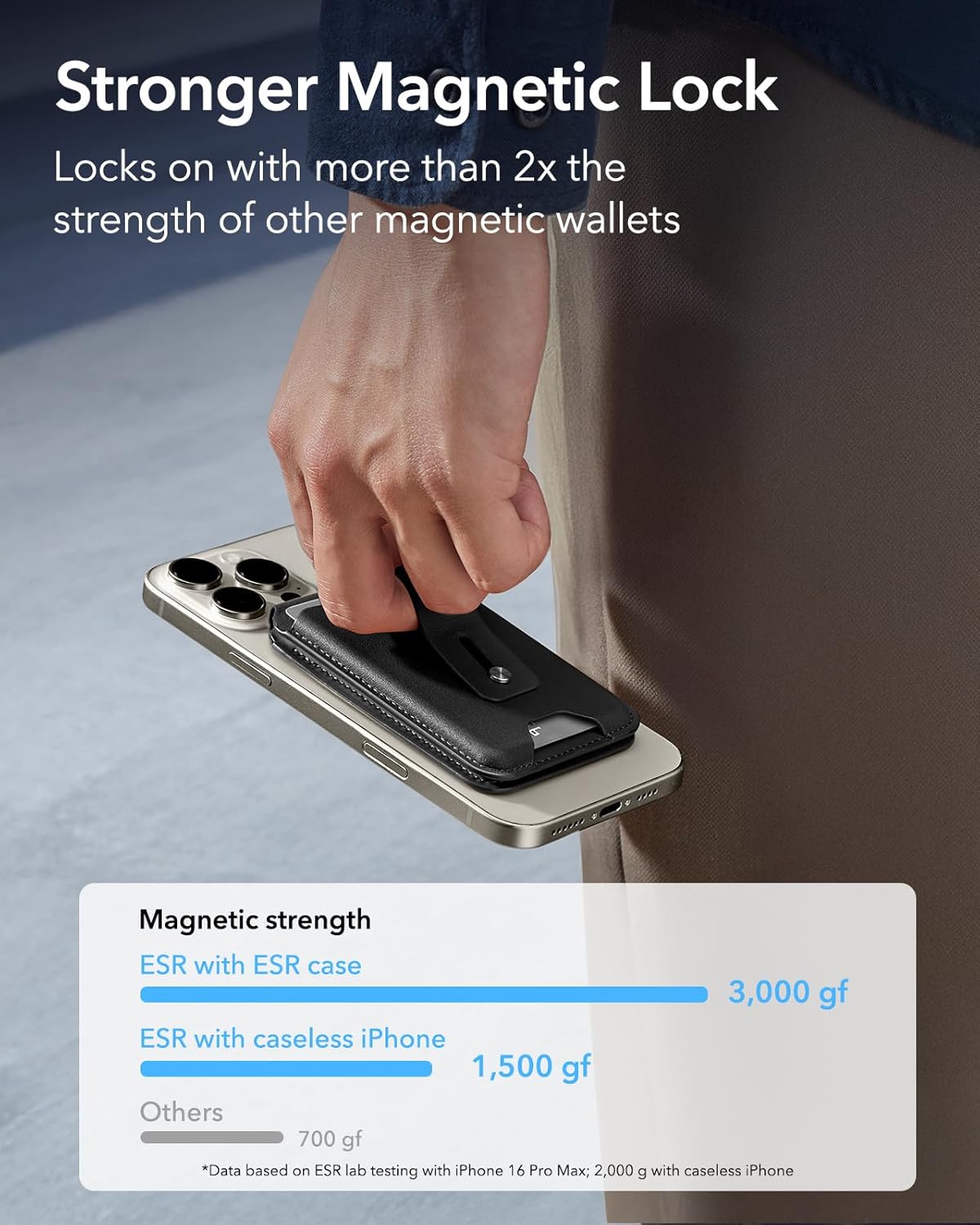
Image: The ESR Geo Magnetic Wallet magnetically attached to an iPhone, demonstrating the strong magnetic lock. A bar graph illustrates the magnetic strength compared to other wallets.
4.2 Card Storage
The wallet is designed to securely hold 1-3 cards. Insert cards into the designated slot. To easily retrieve cards, use the push-out slot at the bottom.

Image: A user inserting a card into the ESR Geo Magnetic Wallet, showcasing its smart card storage design that holds 1-3 cards securely.
4.3 Adjustable Stand Function
The integrated hinge allows the wallet to fold out, creating a stable stand for your iPhone. Adjust the angle between 15° and 170° for optimal viewing in both portrait and landscape orientations.

Image: The ESR Geo Magnetic Wallet functioning as a multi-view stand, supporting an iPhone in both portrait and landscape orientations with adjustable angles.
4.4 Secure Finger Loop
Utilize the durable finger loop on the back of the wallet for a more secure grip on your phone, reducing the risk of accidental drops.

Image: A close-up of a hand holding an iPhone with the ESR Geo Magnetic Wallet attached, demonstrating the use of the adjustable finger loop for enhanced grip.
5. פֿעיִקייטן
5.1 Full Apple Find My Functionality
The ESR Geo Magnetic Wallet is Apple-Certified for full Find My functionality. This allows you to:
- See its real-time location on a map.
- Play a sound to help locate it when nearby.
- Receive 'Left Behind' notifications if you accidentally leave it behind.
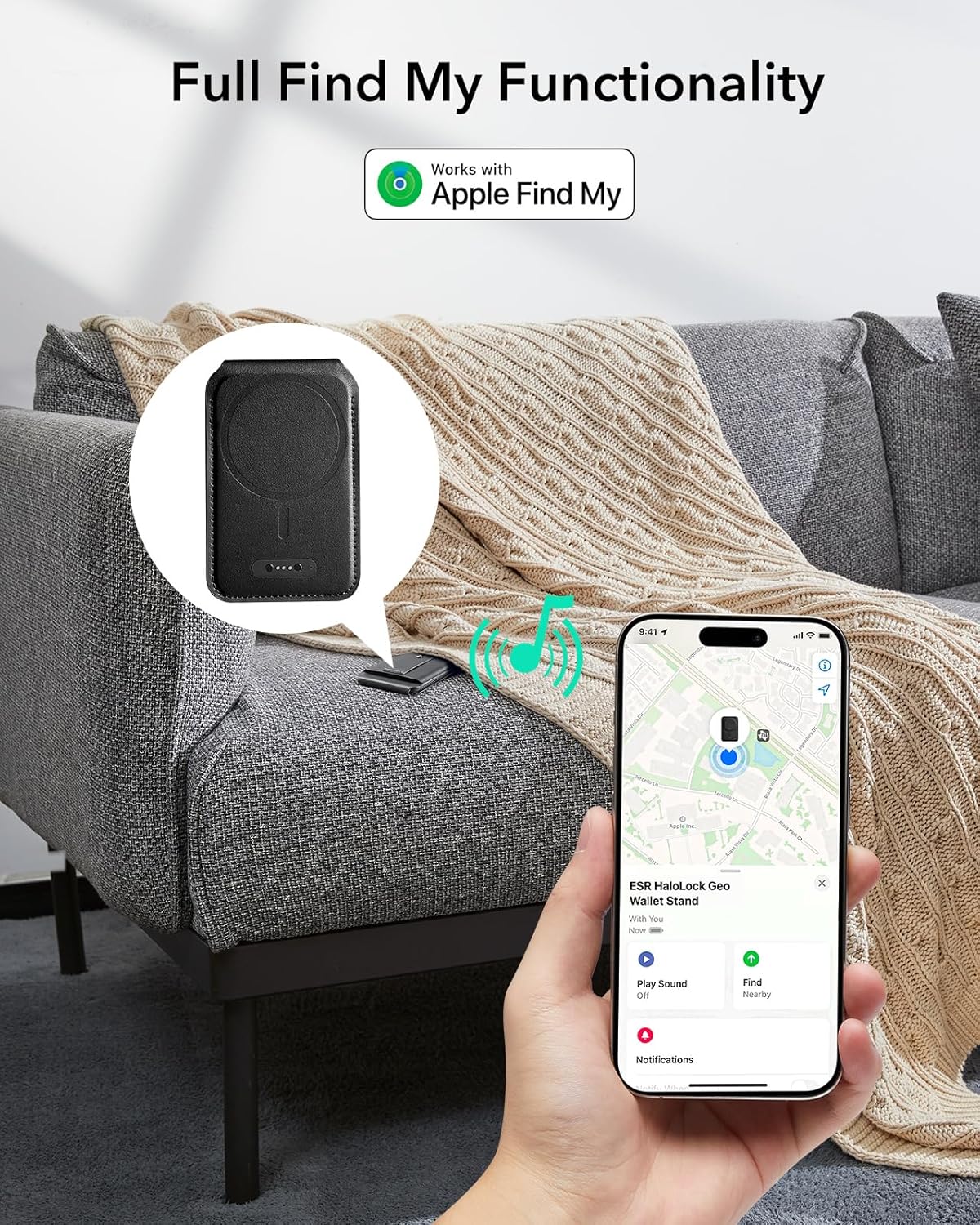
Image: An iPhone screen displaying the Apple Find My app, showing the location of the ESR Geo Magnetic Wallet and the option to play a sound to locate it.
5.2 Enhanced Magnetic Lock
Experience a powerful magnetic lock with up to 3,200-g strength, more than double that of official magnetic wallets, ensuring your important items remain secure.
5.3 RFID Blocking Technology
The wallet features built-in RFID-blocking technology to protect your credit cards, IDs, and personal data from unauthorized scans and digital theft.
6. וישאַלט
6.1 באַטעריע לעבן און טשאַרדזשינג
The integrated battery provides approximately 3 months of use from a 1.5-hour full charge. Recharge using the provided magnetic charging cable when the battery is low to maintain Find My functionality.

בילד: א דעטאַלירטע view of the ESR Geo Magnetic Wallet's charging port, showing the magnetic charging cable connected. The text indicates 3 months of battery life from a 1.5-hour charge.
7. טראָובלעשאָאָטינג
7.1 Find My Not Working
- Ensure the wallet is charged.
- Verify Bluetooth and Location Services are enabled on your iPhone.
- Confirm the wallet is powered on (press the button once for a beep).
- Check your iPhone's Find My app settings for the wallet.
7.2 Cards Difficult to Insert/Remove
The dynamic tension spring is designed to hold cards securely. If cards are too tight, ensure you are not exceeding the 3-card capacity. Use the bottom push-out slot for easier removal.
8. ספּעסאַפאַקיישאַנז
| פּראָדוקט דימענשאַנז | 11 X 3.1 X 11 אינטשעס |
| פּונקט וואָג | 2.93 אונסעס (83 גראַם) |
| נומער מאָדעל נומער | 2K6090101 |
| מאַטעריאַל | לעדער |
| קאָליר | טונקל שווארצע |
| ספּעציעלע פֿעיִקייטן | Geo Magnetic Wallet with Full Find My Functionality, Wallet Tracker with Adjustable Stand, RFID Blocking |
9. וואָראַנטי און שטיצן
Your ESR Geo Magnetic Wallet comes with a standard warranty. Please refer to the included User Manual for detailed warranty information and registration instructions. For further assistance, visit the official ESR support webפּלאַץ אָדער קאָנטאַקט קונה דינסט.
10. אפיציעלע פּראָדוקט ווידעאָס
ESR Magnetic Geo Wallet Stand Review
ווידעא: א דעטאלירטע רעקארדירונגview of the ESR Magnetic Geo Wallet Stand, covering its features, functionality, and overall value. This video helps users understand the product's capabilities and benefits.
ESR Magnetic Wallet with Find My Capabilities - Worth IT?
Video: An in-depth look at the ESR Magnetic Wallet, focusing on its Find My capabilities and assessing its overall worth. The video demonstrates how the tracking feature works and its practical applications.
Super slim and versatile, Great kick stand & find my feature
Video: This video highlights the slim design, versatility, and key features of the ESR Geo Magnetic Wallet, including its kickstand functionality and Find My integration.


