הקדמה
The Turtle Beach Stealth Pro Multiplatform Wireless Gaming Headset delivers premium audio features across various gaming platforms. This headset is designed for Xbox Series X|S, Xbox One, PS5, PS4, Windows PCs, Mac, Steam Deck, and Bluetooth-equipped mobile devices. It features optimized 50mm Nanoclear drivers, versatile active noise cancellation, and advanced microphone technology for clear communication. This manual provides essential information for setting up, operating, maintaining, and troubleshooting your Stealth Pro headset.
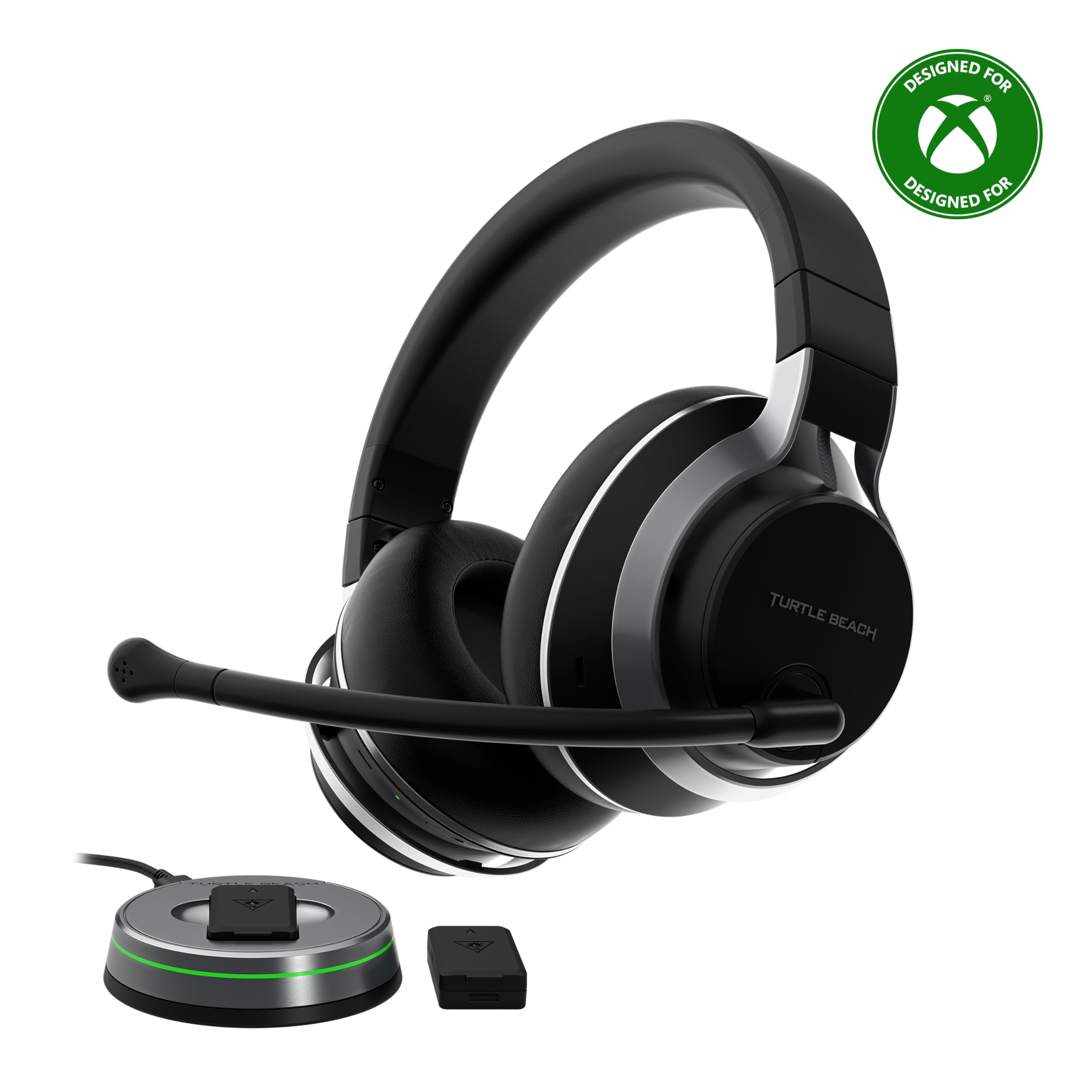
Image: The Turtle Beach Stealth Pro Wireless Gaming Headset, showcasing its sleek black design with silver accents.
וואָס איז אין די קעסטל
- Stealth Pro Gaming Headset
- Removable TruSpeak Boom Microphone
- 2x Rechargeable Battery Packs
- Transmitter & Charging Station
- 3ft USB-C Cable
- 6.5ft USB-C Transmitter Cable
- קעריינג טאַש
- שנעל אָנהייב גייד
- טשערעפּאַכע ביטש סטיקער

Image: All components included in the Stealth Pro package, neatly arranged.
סעטאַפּ
טשאַרדזשינג די באַטעריז
The Stealth Pro comes with two swappable 12+ hour battery packs. Insert one battery into the headset and the other into the charging slot on the wireless transmitter. Connect the transmitter to a USB power source using the provided USB-C cable. A quick 15-minute charge provides three hours of battery life.
קאַנעקטינג צו דיין מיטל
For Xbox/PlayStation/PC/Mac: Plug the wireless transmitter into an available USB port on your console or PC. The headset will automatically connect within seconds. Ensure the switch on the transmitter is set to the correct platform (Xbox/PC).
For Mobile Devices (Bluetooth): The headset supports Bluetooth 5.1 dual connectivity. Press and hold the Bluetooth pairing button on the headset to enter pairing mode. Select 'Stealth Pro' from your mobile device's Bluetooth settings. You can simultaneously listen to mobile audio while gaming on your console or PC.

Image: The Stealth Pro headset demonstrating its multiplatform compatibility with consoles, PC, and mobile devices.
אַפּערייטינג ינסטראַקשאַנז
קאָנטראָלס איבערview
- מאַכט קנעפּל: דריקן און האַלטן צו מאַכט אויף / אַוועק.
- בלועטאָאָטה קנעפּל: דריקן און האַלטן צו אַרייַן פּערינג מאָדע.
- Superhuman Hearing Button: Activates/deactivates Superhuman Hearing mode.
- באַנד ראָד: Adjusts master volume. Can be remapped via the Audio Hub app.
- מאָדע קנעפּל: Default functions include EQ preset selection. Can be remapped via the Audio Hub app.
מיקראָפאָן באַניץ
The headset includes a removable TruSpeak Boom Microphone and dual concealed microphones. The boom mic utilizes S.M.A.R.T. noise-cancelling technology for clear chat. To mute the boom mic, simply flip it up. The concealed mics are ideal for on-the-go use or a more discrete look.
אַפּ-באזירט אַודיאָ קוסטאָמיזאַטיאָן
Use the Turtle Beach Audio Hub app (for iOS/Android) or Audio Hub V2 app (for Windows PCs/Mac) to customize your audio experience. This includes:
- Adjusting 10-band EQ settings for game audio, Bluetooth audio, and chat.
- Fine-tuning active noise cancellation levels.
- Programming the mappable wheel and mode button for distinct functions (e.g., Game/Chat Mix, Variable Mic Monitoring, Superhuman Hearing volume, Bass & Treble Boost).
- Adjusting microphone sensitivity, noise gate, and monitoring levels.

Image: The Turtle Beach Audio Hub app displaying advanced 10-band EQ and microphone enhancement options.
פֿעיִקייטן
יקסעפּשאַנאַל אַודיאָ פידעליטי
Equipped with hand-selected 50mm Nanoclear drivers and a powerful onboard DAC, the Stealth Pro delivers a highly detailed soundstage. It supports Windows Sonic, Sony 3D Audio for PS5, Dolby Atmos, and DTS Headphone:X for immersive audio.

בילד: אן אינערליכע view of the 50mm Nanoclear driver, highlighting the headset's audio capabilities.
Unrivaled Active Noise Cancellation
Experience up to 25dB of noise reduction with variable active noise cancellation. Four internal microphones reduce ambient noise, allowing you to focus on your game or fine-tune for noise transparency. Levels can be adjusted via the Audio Hub app or the headset's volume wheel.

Image: Visual representation of the headset's active noise cancellation technology.
Swappable Dual Battery System
Two swappable 12+ hour battery packs ensure continuous power. Charge one pack in the transmitter while using the other in the headset. The headset automatically reconnects when swapping packs, minimizing downtime.
Maximum Wireless Compatibility
Officially licensed for Xbox Series X|S and Xbox One, the Stealth Pro is also fully compatible with PS5, PS4, Windows PCs, Mac, and mobile devices via Bluetooth 5.1. The lag-free 2.4 GHz wireless connection provides up to 50 ft / 15m range.
Advanced Superhuman Hearing
Designed specifically for the Stealth Pro, Advanced Superhuman Hearing provides a battlefield advantage by enhancing critical in-game sounds like footsteps and weapon reloads. Adjust intensity and choose from three preset levels via the Audio Hub app.
ווידעא: אפיציעלע פּראָדוקט ווידעא ווייַזונגasing the Turtle Beach Stealth Pro Xbox Headset's features and design.
וישאַלט
רייניקונג
Wipe the headset and ear cushions with a soft, dry cloth. Avoid using harsh chemicals or abrasive materials. For deeper cleaning of ear cushions, gently wipe with a damp cloth and mild soap, then air dry completely.
סטאָרידזש
When not in use, store the headset in the included velvet cloth carrying pouch to protect it from dust and scratches. The lay-flat design makes it easy to store.
באַטערי קער
To prolong battery life, avoid fully discharging the batteries frequently. Charge them regularly. Store batteries in a cool, dry place away from direct sunlight.
טראָובלעשאָאָטינג
No Audio/Mic Issues
- זיכער מאַכן אַז די כעדסעט איז אנגעצונדן און גאָר אויפגעלאָדן.
- Verify the wireless transmitter is correctly plugged into your device and the platform switch is set correctly.
- Check device audio settings to ensure the Stealth Pro is selected as the input/output device.
- For boom mic issues, ensure it is securely inserted and not muted (flipped up).
- Update headset firmware via the Turtle Beach Audio Hub V2 app on PC/Mac.
קאַנעקטיוויטי פּראָבלעמס
- If experiencing intermittent connection, try moving closer to the wireless transmitter.
- Re-pair the headset with your device. For Bluetooth, forget the device and re-pair.
- זיכער מאַכן אַז קיין אַנדערע וויירלעס דעוויסעס זאָלן נישט פאַרשאַפן שטערונג.
טעכניש ספּעסאַפאַקיישאַנז
| שטריך | באַשרייַבונג |
|---|---|
| כעדפאָונז דריווערס | 50mm Nanoclear Drivers with Neodymium magnets |
| ראַש קאַנסאַליישאַן | Variable Active Noise Cancellation >25dB Noise Reduction @ 100Hz |
| אָפטקייַט ענטפער | 10 הערץ - 22 קילאָהרץ |
| מיקראָפאָן טיפּ | Unidirectional Noise Cancelling >30dB Noise Reduction @ 3kHz |
| מיקראָפאָן אָפטקייַט ענטפער | 100 הז - 8 כז |
| Wireless Dual Connection | Simultaneous 2.4Ghz & Bluetooth |
| גיימינג ווירעלעסס | 2.4Ghz Lag-Free Wireless |
| ווירעלעסס ראַנגע | Up to 50’ / 15m |
| Earcup Design | Over-Ear (Closed) |
| Ear cushion Material | Leatherette wrapped Memory Foam |
| פּונקט וואָג | 413 גראַמז (14.6 אונסעס) |
| פּראָדוקט דימענשאַנז | 7.17 X 6.81 X 3.43 אינטשעס |
| באַטעריז | 1 ליטהיום פּאָלימער באַטעריז פארלאנגט (אַרייַנגערעכנט) |
וואָראַנטי און שטיצן
For warranty information and detailed support, please refer to the documentation included in your product packaging or visit the official Turtle Beach support website. Product registration may be required for warranty claims.


