1. הקדמה
This manual provides detailed instructions for the ENDORFY Thock Wireless Mechanical Keyboard, model EY5A078. It covers setup, operation, maintenance, and troubleshooting to ensure optimal performance and longevity of your device. Please read this manual thoroughly before using the keyboard.

Image 1.1: The ENDORFY Thock Wireless Mechanical Keyboard EY5A078. This image displays the full QWERTY layout with illuminated keys, showcasing the keyboard's design and RGB capabilities.
2. פּעקל אינהאַלט
באַשטעטיקן אַז אַלע זאכן זענען פאַראַן אין פּעקל:
- ENDORFY Thock Wireless Mechanical Keyboard EY5A078
- USB-C to USB-A Cable (detachable)
- 2.4 גהז וסב ופנעמער
- קייקאַפּ פּולער
- באַשטימען פּולער
- באַניצער מאַנואַל (דעם דאָקומענט)
3. סעטאַפּ און קאַנעקשאַן
The ENDORFY Thock Wireless Mechanical Keyboard offers three connection modes: wired, 2.4 GHz wireless, and Bluetooth.
3.1. ווייערד קאַנעקשאַן
- Locate the USB-C port on the keyboard (typically on the back or top edge).
- Connect the provided USB-C to USB-A cable to the keyboard.
- פֿאַרבינדט דעם USB-A עק פֿונעם קאַבל צו אַ פֿאַראַן USB פּאָרט אויף אייער קאָמפּיוטער.
- The keyboard will be automatically detected and ready for use.
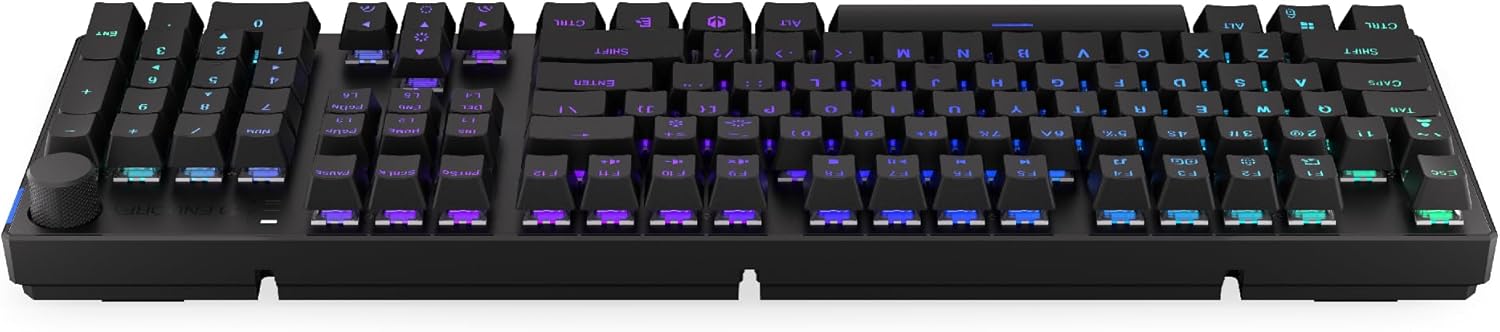
בילד 3.1: זייט view of the keyboard, highlighting the USB-C port for wired connection and charging.
3.2. 2.4 GHz דראָטלאָזע פֿאַרבינדונג
- Locate the 2.4 GHz USB receiver. It may be stored in a compartment on the underside of the keyboard.
- Plug the 2.4 GHz USB receiver into an available USB port on your computer.
- On the keyboard, locate the mode switch (usually on the back or side) and set it to the 2.4 GHz wireless mode (often indicated by a specific icon or "2.4G").
- The keyboard should automatically connect. An indicator light may confirm the connection.

Image 3.2: Underside of the keyboard, showing the compartment for storing the 2.4 GHz USB receiver and adjustable feet.
3.3. בלועטאָאָטה קאַנעקשאַן
- On the keyboard, set the mode switch to Bluetooth mode (often indicated by a Bluetooth icon or "BT").
- The keyboard may have multiple Bluetooth profiles (e.g., BT1, BT2, BT3). Select one by pressing Fn + 1, Fn + 2, or Fn + 3. The corresponding indicator light will flash.
- אויף אייער קאָמפּיוטער אָדער מיטל, עפֿנט די בלועטוט סעטטינגס און זוכט פֿאַר נײַע דעוויסעס.
- Select "ENDORFY Thock Wireless" (or similar name) from the list of available devices.
- גיי קיין פּראַמפּס אויף דעם עקראַן צו פאַרענדיקן דעם פּערינג פּראָצעס.
- אַמאָל פּערד, וועט די אינדיקאַטאָר ליכט אויף דער קלאַוויאַטור אויפהערן צו בלינקען און בלייבן אָן שטערונג.
4. אָפּעראַציע
4.1. Key Functions and Shortcuts
The keyboard features various function key combinations (Fn + Key) for multimedia control, lighting adjustments, and other settings.
- Fn + F1-F12: Multimedia and system functions (e.g., volume control, media playback, calculator). Refer to the keycap legends for specific functions.
- Fn + פײַל קנעפּלעך: Adjust RGB lighting effects (e.g., brightness, speed, direction).
- Fn + 1/2/3: Switch between Bluetooth profiles.
- Fn + 4: Switch to 2.4 GHz wireless mode.
- Fn + 5: טוישט צו ווייערד מאָדע.
4.2. RGB לייטינג קאָנטראָל
The ENDORFY Thock keyboard features programmable RGB backlighting. Use the following combinations to customize the lighting:
- Fn + רעכטע פײַל: Change lighting effect.
- Fn + לינקער פײַל: Change lighting effect direction.
- Fn + אַרויף פײַל: פאַרגרעסערן ברייטנאַס.
- Fn + אַראָפּ פײַל: פאַרמינערן ברייטנאַס.
- Fn + ינס: טוישן קאָלירן.
- Fn + Del: Adjust effect speed.
4.3. באנד קנופ
The dedicated volume knob located on the top right of the keyboard allows for quick audio adjustments.
- דרייען זייגערווייז: פאַרגרעסערן באַנד.
- דרייען קעגן זייגער: פאַרמינערן באַנד.
- דרוק אַראָפּ: Mute/Unmute audio.

Image 4.1: Detail of the volume knob and status indicator lights, located on the upper right side of the keyboard.
4.4. הייס-סוואַפּאַבל סוויטשיז
The ENDORFY Thock keyboard features hot-swappable switches, allowing you to change mechanical switches without soldering. This enables customization of typing feel.
- אַראָפּנעמען שליסל-קאַפּ: ניצט דעם צוגעשטעלטן קלאַוויאַטור-אויסציער צו פֿאָרזיכטיק אַראָפּנעמען דעם געוואונטשענעם קלאַוויאַטור.
- אַראָפּנעמען סוויטש: Use the provided switch puller to carefully grip the top and bottom clips of the switch and pull it straight up.
- אריינשטעלן נייעם סוויטש: גלייכט אויס די שטיפטלעך פון דעם נייעם סוויטש מיט די לעכער אויפן פּקב. דריקט פעסט דעם סוויטש ביז ער קליקט אריין אין פלאץ. זיכערט זיך אז די שטיפטלעך זענען נישט געבויגן.
- פאַרבייַטן קלאַוויאַטור: לייג צוריק דעם קלאַוויאַטור אויף דעם נייעם סוויטש סטעם.

בילד 4.2: א נאָענטע בילד view of the Kailh Box Brown mechanical switches, demonstrating the hot-swappable design.
5. וישאַלט
5.1. רייניקן די קלאַוויאַטור
רעגולערע רייניקונג העלפט אויפהאלטן די קלאַוויאַטור'ס פאָרשטעלונג און אויסזען.
- אָפּשטעקן די קלאַוויאַטור פֿון אייער קאָמפּיוטער איידער איר רייניקט.
- ניצט אַ קלאַוויאַטור-אויסציער צו אַראָפּנעמען די קלאַוויאַטור-קאַפּס פֿאַר אַ גרינטלעכע רייניקונג.
- ניצט קאמפרעסט לופט צו באזייטיגן שטויב און שמוץ פון צווישן די קנעפלעך.
- Wipe keycaps and the keyboard surface with a soft, damp שטאָף. ויסמייַדן האַרב קעמיקאַלז.
- Ensure the keyboard is completely dry before reconnecting.
5.2. קלאַוויאַטור און סוויטש פאַרבייַט
Refer to Section 4.4 for detailed instructions on replacing keycaps and switches. Use only compatible keycaps and switches to avoid damage.
6. טראָובלעשאָאָטינג
| פּראָבלעם | מעגלעך סיבה | לייזונג |
|---|---|---|
| קלאַוויאַטור רעאַגירט נישט (ווייערד) | לויזער קאַבל פֿאַרבינדונג, דעפֿעקטיווער USB פּאָרט. | זיכער מאַכן אַז דער USB-C קאַבל איז זיכער פֿאַרבונדן. פּרוּווט אַן אַנדער USB פּאָרט אָדער קאַבל. |
| קלאַוויאַטור רעאַגירט נישט (ווירעלעס) | Low battery, incorrect mode, receiver not plugged in, pairing issue. | Charge the keyboard. Ensure mode switch is set correctly (2.4G or BT). Re-pair Bluetooth or re-insert 2.4 GHz receiver. |
| RGB לייטינג טוט נישט אַרבעטן | Lighting turned off, low battery, software issue. | Check lighting controls (Fn + Arrow keys). Charge the keyboard. Restart computer. |
| Keys double-typing or not registering | Dust/debris under switch, faulty switch. | Clean under keycaps with compressed air. If issue persists, replace the switch (refer to Section 4.4). |
7. ספּעסאַפאַקיישאַנז
- מאָדעל: EY5A078
- סאָרט: ENDORFY
- קאַנעקטיוויטי: Wired (USB-C), 2.4 GHz Wireless, Bluetooth
- באַשטימען טיפּ: Kailh Box Brown (Hot-swappable)
- שליסל קאַפּס: פּבט טאָפּל שאָט
- אויסלייג: Full-size QWERTY
- באַקלייט: פּראָגראַממאַבלע RGB
- אַפּערייטינג סיסטעמס: Linux, Mac OS X 10.12 Sierra, Windows 10
- קאָליר: שוואַרץ
- מאַטעריאַל: פּאָליבוטילענע טערעפטהאַלאַטע (PBT)
- ספּעציעלע פֿעיִקייטן: Detachable cable, Volume knob with mute, Hot-swappable switches
- באַטערי: ליטיום-יאָן (אַרייַנגערעכנט)
8. וואָראַנטי און שטיצן
ENDORFY products are covered by a manufacturer's warranty. For detailed warranty information, please refer to the warranty card included with your product or visit the official ENDORFY website. For technical support, product inquiries, or service requests, please contact ENDORFY customer support through their official channels.
באַאַמטער Webפּלאַץ: www.endorfy.com
9. זיכערקייַט אינפֿאָרמאַציע
- האַלט די קלאַוויאַטור אַוועק פון פליסיקייטן און צו פיל נעץ.
- ויסמיידן יקספּאָוזינג די קלאַוויאַטור צו עקסטרעם טעמפּעראַטורעס.
- Do not attempt to disassemble or modify the keyboard beyond hot-swapping switches and keycaps, as this may void the warranty and cause damage.
- ניצט נאָר דעם צוגעשטעלטן אָדער רעקאָמענדירטן טשאַרדזשינג קאַבל.
- Dispose of the battery and electronic components responsibly according to local regulations.


