This manual provides comprehensive instructions for the installation, operation, and maintenance of the Axis F9114 Main Unit. Please read this manual carefully before using the product to ensure proper functionality and safety.
פּראָדוקט איבערview
The AXIS F9114 is a main unit designed for the F-Series surveillance system. It supports up to four F21 or F7 sensor units, providing a flexible and discreet surveillance solution. This unit acts as the central processing hub for connected camera sensors.
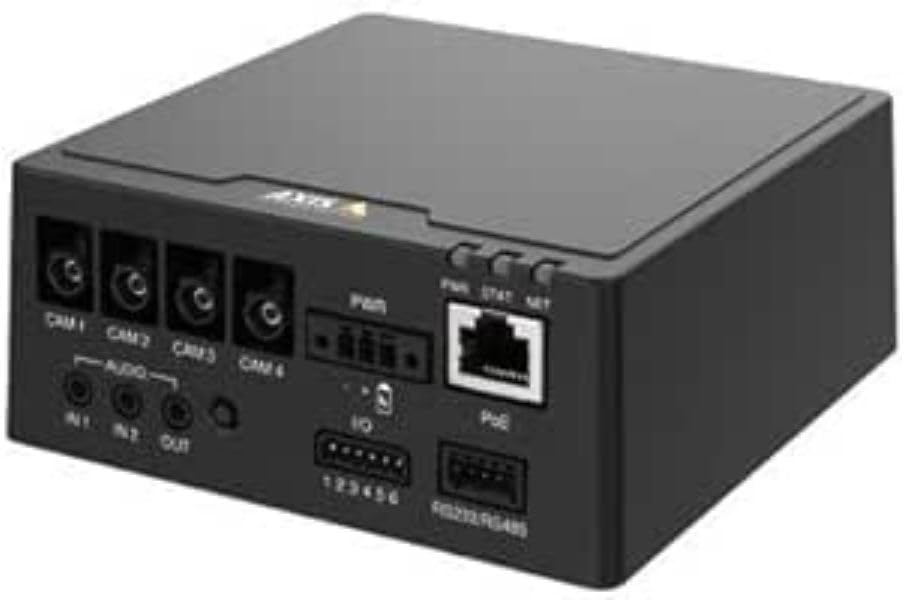
פיגורע 1: פראָנט view of the AXIS F9114 Main Unit, showing camera input ports (CAM 1-4), audio input/output, power input, I/O ports, and an Ethernet port with PoE support.
שליסל פֿעיִקייטן:
Supports up to 4 Axis F-Series sensor units (e.g., F21, F7).
Central processing unit for video and audio streams.
Compact design for flexible installation.
Integrated Power over Ethernet (PoE) for simplified power and data connectivity.
Multiple I/O ports for external device integration.
Audio input/output capabilities.
סעטאַפּ און ינסטאַלירונג
פּעקל אינהאַלט:
AXIS F9114 Main Unit
ינסטאַללאַטיאָן גייד
(Power supply and sensor units sold separately, unless specified)
Connecting Sensor Units:
Ensure the main unit is powered off before connecting any sensor units.
Connect the cables from your AXIS F-Series sensor units (e.g., F21, F7) to the designated "CAM 1", "CAM 2", "CAM 3", and "CAM 4" ports on the rear of the F9114 Main Unit. Ensure a secure connection.
Each sensor unit requires a dedicated port.
מאַכט די אַפּאַראַט:
מאַכט איבער עטהערנעט (פּאָע): Connect an Ethernet cable from a PoE-enabled switch or injector to the "PoE" port on the F9114. This will provide both power and network connectivity.
פונדרויסנדיק מאַכט צושטעלן: If PoE is not used, connect a compatible DC power adapter (not included) to the "PWR" input terminal. Refer to specifications for voltagE באדערפענישן.
נעץ קאַנעקשאַן:
Connect an Ethernet cable from your network to the "PoE" port on the F9114. This provides network access for configuration and video streaming.
אַודיאָ און י / אָ קאַנעקשאַנז:
אַודיאָ: Connect external microphones to "IN 1" or "IN 2" and speakers to "OUT" if audio functionality is required.
I/O: Use the "IO" terminal block for connecting external devices such as alarm sensors or relays. Refer to the detailed wiring diagram in the full technical documentation for specific connections.
אָפּעראַציע
ערשט מאַכט-אַרויף:
Once all connections are secure and power is supplied, the unit will begin its startup sequence. Observe the LED indicators for status.
LED ינדיקאַטאָרס:
PWR (מאַכט): Indicates power status. (e.g., Solid green for normal operation).
STAT (Status): Indicates operational status. (e.g., Flashing for network activity, solid for ready).
NET (Network): ווײַזט אויף נעץ פֿאַרבינדונג און טעטיקייט.
אַקסעס די מיטל:
Use the AXIS IP Utility or a network scanner to discover the IP address of the F9114 on your network.
עפענען א web browser and enter the IP address to access the device's web צובינד.
Log in using the default credentials (refer to the installation guide or Axis website for current defaults).
Follow the on-screen instructions to configure network settings, video streams, and other system parameters.
ווידעא פאַרוואַלטונג:
The F9114 integrates with various video management software (VMS) solutions. Refer to your VMS documentation for adding and managing the device.
וישאַלט
רייניקונג: ניצט אַ ווייכע, טרוקענע שטאָף צו רייניקן די אויסערלעכע זייט פון דעם אַפּאַראַט. ניצט נישט קיין שטרענגע כעמיקאַלן אָדער שרײַבנדיקע רייניגער.
Firmware דערהייַנטיקונגען: Regularly check the Axis Communications website for firmware updates. Keeping the firmware updated ensures optimal performance, security, and access to new features.
ינווייראַנמענאַל טנאָים: Ensure the unit is operated within its specified temperature and humidity ranges to prevent damage.
טראָובלעשאָאָטינג
פּראָסט ישוז און סאַלושאַנז:
קיין מאַכט:
Verify power cable connection (if using external power).
Ensure PoE switch/injector is active and providing power (if using PoE).
קוק די מאַכט מקור.
קיין נעץ פֿאַרבינדונג:
קאָנטראָלירט די עטהערנעט קאַבל פֿאַרבינדונג.
Verify network switch/router functionality.
Confirm IP address settings are correct or DHCP is functioning.
No Video from Sensor Unit:
Ensure sensor unit cables are securely connected to the F9114.
Verify the sensor unit is compatible with the F9114.
Check the sensor unit's status indicators (if available).
Access the F9114 web interface to confirm sensor unit detection and configuration.
פארגעסן שפּריכוואָרט:
Refer to the Axis Communications support documentation for password reset procedures, which typically involve a factory reset button or specific software tools.
For more detailed troubleshooting, refer to the comprehensive support resources available on the Axis Communications webפּלאַץ.
ספּעסאַפאַקיישאַנז
שטריך
דעטאַל
סאָרט
אַקס קאָמוניקאַציע
מאָדעל נומער
01991-001
פּונקט וואָג
1.87 פונט
פּראָדוקט דימענשאַנז (LxWxH)
19.69 X 19.69 X 11.02 אינטשעס
פאַבריקאַנט
AXIS - CAMERA
ASIN
B0BWNS49VS
ערשטער דאַטע בנימצא
23 פעברואר 2023
Note: Specifications are subject to change without notice. For the most current information, please refer to the official Axis Communications webפּלאַץ.
וואָראַנטי און שטיצן
וואָראַנטי אינפֿאָרמאַציע:
For detailed warranty information, please refer to the warranty statement provided with your product or visit the official Axis Communications webזייטל. האַלט דיין קויפן באַווייַז פֿאַר וואָראַנטי קליימז.
טעכניש שטיצן:
If you encounter issues that cannot be resolved using this manual or the troubleshooting section, please contact Axis Communications technical support. Support resources, including FAQs, documentation, and contact information, are available on their official webפּלאַץ.
AXIS Camera Station S20 Appliance Series Installation Guide This installation guide provides essential instructions for setting up and installing the AXIS Camera Station S20 Appliance Series, including models S2008, S2016, and S2024. It covers hardware overview, cable connections, software setup, and network configuration for professional video surveillance systems.