
1. הקדמה
Thank you for choosing the Outwell Arctic Chill 50L Portable Refrigerator. This manual provides essential information for the safe and efficient operation, maintenance, and troubleshooting of your new appliance. Please read it thoroughly before first use and keep it for future reference.
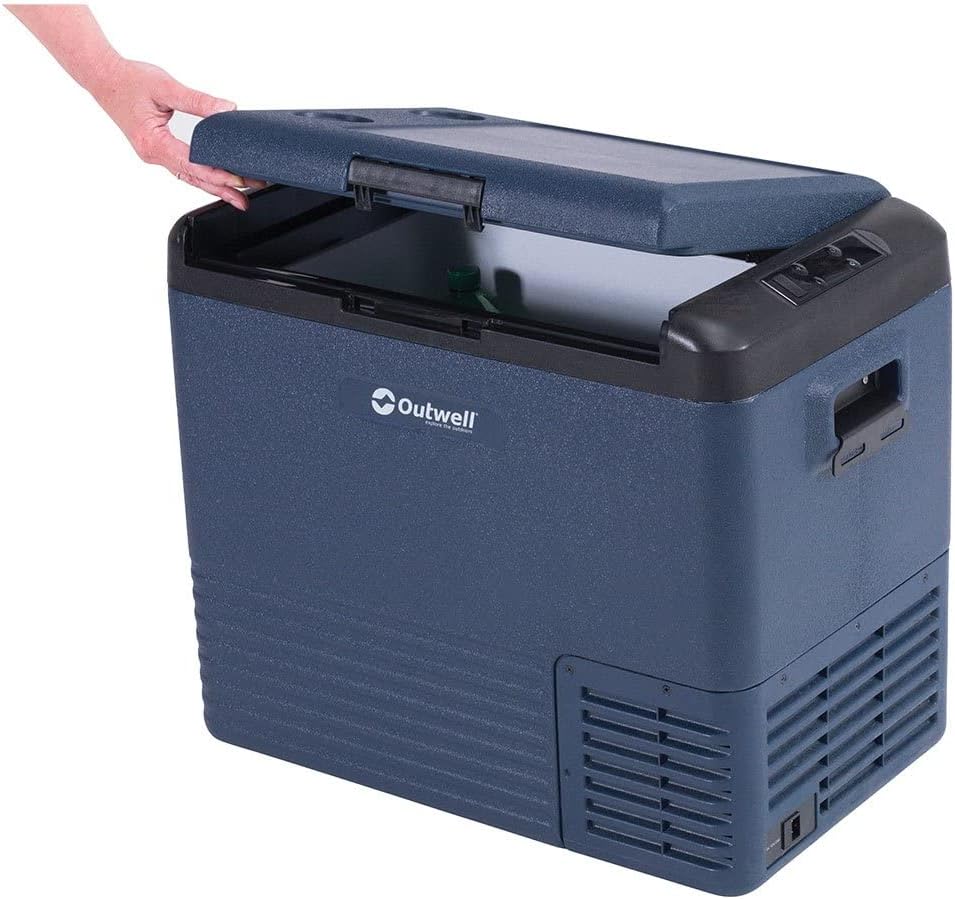
This image displays the Outwell Arctic Chill 50L portable refrigerator in a dark blue color, with its lid partially open, revealing the spacious interior suitable for storing food and beverages.
2. זיכערקייַט אינסטרוקציעס
- פאַרזיכערן די מאַכט צושטעלן וואָלtage שטימט איבער מיטן ראַנג־עטיקעט אויפן אַפּאַראַט.
- Do not operate the refrigerator if the power cord is damaged. Contact qualified service personnel.
- האַלטן ווענטאַליישאַן אָופּאַנינגז קלאָר פון אַבסטראַקשאַנז.
- דו זאלסט נישט נוצן עלעקטריקאַל אַפּפּליאַנסעס אין די עסנוואַרג סטאָרידזש קאַמפּאַרטמאַנץ, אויב זיי זענען פון די טיפּ רעקאַמענדיד דורך דער פאַבריקאַנט.
- פֿאַרמײַדט צו שטעלן דעם קילער אין דירעקטער זון אָדער לעבן היץ־קוואַלן.
- דער אַפּפּליאַנסע איז נישט בדעה פֿאַר נוצן דורך מענטשן (אַרייַנגערעכנט קינדער) מיט רידוסט גשמיות, סענסערי אָדער גייַסטיק קייפּאַבילאַטיז, אָדער פעלן פון דערפאַרונג און וויסן, סייַדן זיי האָבן באקומען השגחה אָדער לימעד וועגן די נוצן פון דעם אַפּפּליאַנסע דורך אַ מענטש פאַראַנטוואָרטלעך פֿאַר זייער זיכערקייַט.
- קינדער זאָל זיין סופּערווייזד צו ענשור אַז זיי טאָן ניט שפּילן מיט די אַפּפּליאַנסע.
3. פּעקל אינהאַלט
ביטע קאָנטראָלירט אַז אַלע זאכן זענען פאַראַן און אין גוטן צושטאַנד:
- Outwell Arctic Chill 50L Portable Refrigerator Unit
- AC מאַכט אַדאַפּטער (230V)
- DC Power Cable (12V)
- באַניצער מאַנואַל

This image illustrates the power accessories included with the refrigerator, featuring an AC adapter for household outlets and a 12V DC cable for vehicle power sources, ensuring versatile connectivity.
4. סעטאַפּ
4.1 אַנפּאַקינג
- Remove all packaging materials and inspect the refrigerator for any damage.
- ריין די ינלענדיש און יקסטיריער מיט אַדamp שטאָף איידער ערשטער נוצן.
- Place the refrigerator on a stable, level surface, ensuring adequate ventilation around all sides.
4.2 קאַנעקטינג צו מאַכט
The Arctic Chill 50L can be powered by either 12V DC (car/vehicle) or 230V AC (household mains).
- פֿאַר 12V DC: Connect the DC power cable to the refrigerator's DC input port and then to your vehicle's 12V socket.
- פֿאַר 230V AC: Connect the AC power adapter to the refrigerator's AC input port, then plug the adapter into a standard 230V wall outlet.
Ensure the power connection is secure before turning on the unit.
5. אַפּערייטינג ינסטרוקטיאָנס
5.1 קאָנטראָל פּאַנעל איבערview

This close-up image highlights the digital control panel of the refrigerator, showing temperature display, battery indicator, and buttons for adjusting settings like ECO mode.
The control panel features a digital display and several buttons for operation:
- מאַכט קנעפּל: טורנס די אַפּאַראַט אויף / אַוועק.
- טעמפּעראַטור אַדזשאַסטמענט קנעפּלעך (+/-): Increases or decreases the target temperature.
- מאָדע קנעפּל: Cycles through cooling modes (e.g., ECO, MAX).
- ווייַז: Shows current temperature, battery level, and selected mode.
5.2 באַשטעטיקן טעמפּעראַטור
- דריק דעם "Power" קנעפּל צו אנצינדן דעם פרידזשידער.
- Use the '+' or '-' buttons to set your desired temperature. The display will show the target temperature briefly, then revert to the current internal temperature.
5.3 קאָאָלינג מאָדעס
- מאַקס מאָדע: גיט מאַקסימום קיל-קראַפט פֿאַר שנעלע טעמפּעראַטור רעדוקציע.
- עקאָ מאָדע: Optimizes power consumption for energy efficiency, suitable for maintaining temperature over longer periods.
Press the Mode button to switch between available cooling modes.
5.4 Smartphone App Connectivity
The Outwell Arctic Chill 50L may feature Bluetooth connectivity, allowing you to control and monitor the refrigerator via a dedicated smartphone app.
- Download the 'Outwell Arctic Cooler' app from your device's app store.
- מאַכן זיכער אַז בלועטאָאָטה איז ענייבאַלד אויף דיין סמאַרטפאָנע.
- Follow the in-app instructions to pair your refrigerator.

This image shows a user interacting with the Outwell Arctic Cooler mobile application on a smartphone, which allows for remote control and monitoring of the refrigerator's temperature and settings.
6. וישאַלט
6.1 רייניקונג
- שטענדיק דיסקאַנעקט די מאַכט איידער רייניקונג.
- ריין די ינלענדיש און יקסטיריער סערפאַסיז מיט אַדamp שטאָף און מילד וואַשפּולווער.
- דו זאלסט נישט נוצן אַברייסיוו קלינערז אָדער האַרב קעמיקאַלז.
- זיכער מאַכן אַז די אַפּאַראַט איז גאָר טרוקן איידער איר צוריקשטעלט די עלעקטריע.
6.2 סטאָרידזש
When not in use for extended periods, ensure the refrigerator is clean, dry, and stored in a well-ventilated area. Leave the lid slightly ajar to prevent odors and mildew.
7. טראָובלעשאָאָטינג
| פּראָבלעם | מעגלעך סיבה | לייזונג |
|---|---|---|
| פרידזשידער טוט נישט קער אויף | No power supply; Damaged power cord; Blown fuse (vehicle) | Check power connection; Try a different outlet/socket; Inspect power cord; Check vehicle fuse. |
| ניט גענוגיק קאָאָלינג | Ventilation blocked; Door not sealed properly; Ambient temperature too high; Overloaded with warm items | Clear vents; Ensure lid is closed tightly; Move to a cooler location; Allow time for cooling. |
| ומגעוויינטלעך ראַש | איינהייט נישט גלייך; פען פארשטאפונג | Place on a level surface; Check for debris near the fan. |
8. ספּעסאַפאַקיישאַנז
| שטריך | דעטאַל |
|---|---|
| סאָרט | Outwell |
| מאָדעל נאָמען | Arctic Chill 50L |
| מאָדעל נומער | 590205 |
| קאַפּאַציטעט | 50 ליטער |
| מאַכט אַרייַנשרייַב | 12V DC / 230V AC |
| קאָליר | גרוי |
| מאַטעריאַל (עקסטעריאָר) | פּאָליעסטער |
| ינסאַליישאַן מאַטעריאַל | פּאָליוויניל קלאָרייד |
| פּראָדוקט וואָג | 2.7 קילאָגראַמס |
| ספּעציעלע שטריך | גרינג צו נוצן |
9. וואָראַנטי און שטיצן
For warranty information and technical support, please refer to the warranty card included with your product or visit the official Outwell webזייטל. האַלט דיין קויפן באַווייַז פֿאַר קיין וואָראַנטי קליימז.