הקדמה
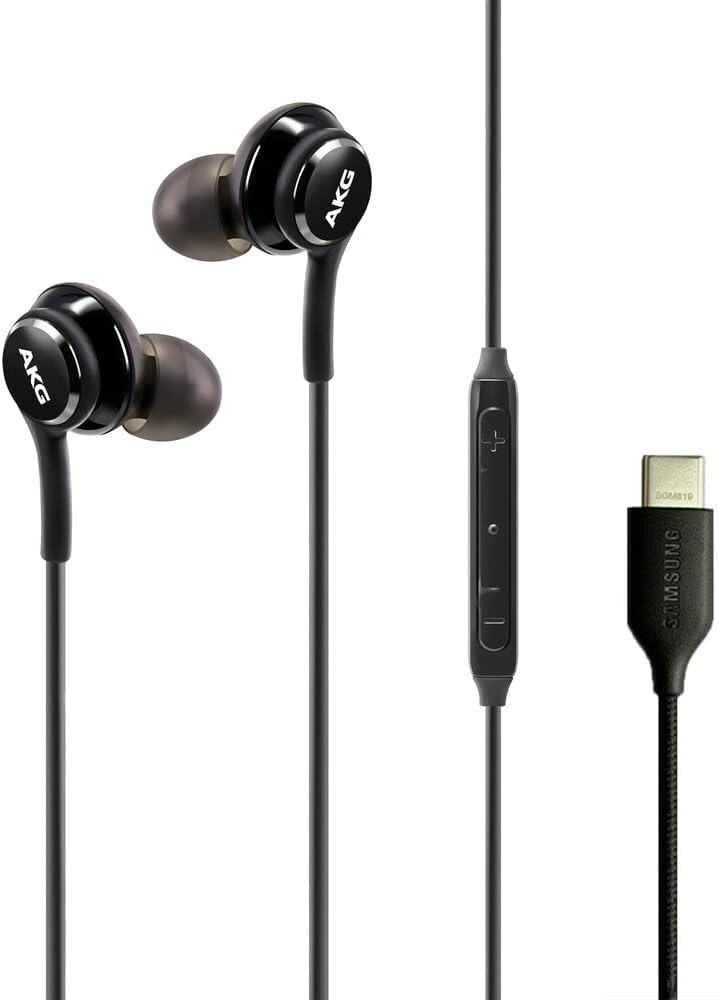
This manual provides essential information for the proper use and maintenance of your Samsung AKG USB-C Earbuds. These in-ear headphones are designed to deliver clear, balanced audio and feature an inline remote with a microphone for convenient control and communication.
The earbuds are compatible with a range of Samsung Galaxy devices, including the Galaxy S23 Ultra, A53, S21, S21 FE, S20, Note 10, Note 10+, S10, and S10 Plus. Please note that these earbuds utilize a USB Type-C connector and do not have a 3.5mm headphone jack.
פּראָדוקט פֿעיִקייטן
- AKG-Tuned Audio: Engineered by AKG for clear, authentic-sounding, and balanced output.
- Inline Remote & Microphone: Integrated controls for volume adjustment, music playback, and call management.
- וסב טיפּ-C קאַנעקטיוויטי: Direct digital audio connection for compatible devices.
- Braided Cable Design: Enhances durability and reduces tangling.
- Comfortable In-Ear Fit: Designed for secure and comfortable wear.
- לייטווייט פּלאַן: Weighing approximately 0.63 ounces for extended comfort.


פּעקל אינהאַלט
באַשטעטיקן אַז אַלע זאכן זענען פאַראַן אין פּעקל:
- Samsung AKG USB-C Earbuds
- אויער קישנס (פאַרשידענע גרייסן)
- Protective Velvet Pouch

סעטאַפּ
1. אויסקלייבן אויער עצות
Choose the ear tip size that provides the most comfortable and secure fit for your ears. A proper fit is crucial for optimal sound quality and noise isolation. Gently pull off the pre-installed ear tips and replace them with the desired size by pushing them onto the earbud nozzle until secure.

2. קאַנעקטינג צו דיין מיטל
Insert the USB Type-C connector of the earbuds into the USB Type-C port on your compatible Samsung Galaxy device. The earbuds are plug-and-play and should be recognized automatically by your device.

For a visual guide on the product and its features, please refer to the video below:
ווידעא 1: אן איבערview of the Samsung AKG USB-C Earbuds, highlighting key features and design elements.
אַפּערייטינג ינסטראַקשאַנז
The inline remote provides convenient control over your audio and calls:
| קנעפּל / קאַמף | פֿונקציע |
|---|---|
| באַנד אַרויף (+) | פאַרגרעסערן אַודיאָ באַנד. |
| באַנד אַראָפּ (-) | פֿאַרקלענערן די אַודיאָ באַנד. |
| Center Button (Single Press) | Play/Pause music; Answer/End call. |
| Center Button (Double Press) | האָפּקען צו דער ווייַטער שפּור. |
| Center Button (Triple Press) | גיין צו די פריערדיקע שפּור. |
| מיקראָפאָן | For hands-free calls and voice commands. |

וישאַלט
רייניקונג
- Gently wipe the earbuds and cable with a soft, dry cloth.
- פֿאַר אויער טיפּס, נעמט זיי אַראָפּ פֿון די אויערקנעפּלעך און רייניקט מיט אַ מילדער זייף לייזונג און וואַסער. מאַכט זיכער אַז זיי זענען גאָר טרוקן איידער איר זייט זיי צוריק אָנשטעקן.
- דו זאלסט נישט נוצן האַרב קעמיקאַלז אָדער אַברייסיוו מאַטעריאַלס פֿאַר רייניקונג.
סטאָרידזש
When not in use, store the earbuds in the provided velvet pouch to protect them from dust, dirt, and tangling. Avoid extreme temperatures and direct sunlight.
טראָובלעשאָאָטינג
| פּראָבלעם | מעגלעך לייזונג |
|---|---|
| ניט געזונט אָדער נידעריק באַנד |
|
| מיקראָפאָן טוט נישט אַרבעטן |
|
| נעבעך געזונט קוואַליטעט |
|
| Earbuds do not fit comfortably |
|
ספּעסאַפאַקיישאַנז
| שטריך | דעטאַל |
|---|---|
| סאָרט | סאַמסונג |
| מאָדעל נומער | AKG-TYPE-C-Wired-Velvet-S23 |
| קאָליר | שוואַרץ |
| אויער פּלייסמאַנט | אין אויער |
| פאָרם פאַקטאָר | אין אויער |
| ימפּידאַנס | 32 אָהמס |
| קאַנעקטיוויטי טעכנאָלאָגיע | ווייערד (וסב טיפּ-C) |
| אָפטקייַט ראַנגע | 20 הערץ - 20,000 הערץ |
| אַודיאָ דרייווער טיפּ | דינאַמיש דרייווער |
| נאָך פֿעיִקייטן | Microphone Included, Inline Remote Control |
| ראַש קאָנטראָל | קיינער |
| וואַסער קעגנשטעל מדרגה | ניט וואַסער קעגנשטעליק |
| טראָגן קעסטל מאַטעריאַל | Fabric (Velvet) |
| וואָג | 0.63 אונסעס (בעערעך) |
| קאַמפּאַטאַבאַל דעוויסעס | Samsung Galaxy devices (S23 Ultra, A53, S21, S21 FE, S20, Note 10, Note 10+, S10, S10 Plus) |
וואָראַנטי און שטיצן
These Samsung AKG USB-C Earbuds come with a manufacturer's warranty. For specific warranty terms and conditions, please refer to the documentation included with your purchase or visit the official Samsung support webפּלאַץ.
פֿאַר ווייטערדיקע הילף, טעכנישע שטיצע, אדער צו view additional product information, please visit the סאַמסונג קראָם אויף אַמאַזאָן אדער די אפיציעלע סאמסונג webפּלאַץ.


