1. הקדמה
This manual provides detailed instructions for the setup, operation, and maintenance of your VYSER F2 Projector. Please read this manual thoroughly before using the projector to ensure proper functionality and to maximize your viewing experience. The VYSER F2 Projector is a versatile device designed for various entertainment and presentation needs, offering high-definition projection with multiple connectivity options.
2. וואָס איז אין דער קעסטל
Upon unboxing your VYSER F2 Projector, please verify that all the following items are included:
- VYSER F2 Projector
- ווייַט קאָנטראָל
- באַניצער מאַנואַל (דעם דאָקומענט)
- HDMI קאַבלע
- מאַכט קאַבלע
3. פּראָדוקט איבערview
Familiarize yourself with the components and ports of your VYSER F2 Projector.

Figure 3.1: VYSER F2 Projector with key features highlighted.
3.1 פראָנט View
- פאָקוס לענס: אַדזשאַסטירט די קלאַרקייט פון די פּראַיעקטירטע בילד.
- IR ופנעמער: ריסיווז סיגנאַלז פון די ווייַט קאָנטראָל.
3.2 זייט און הינטן Views (Ports and Controls)
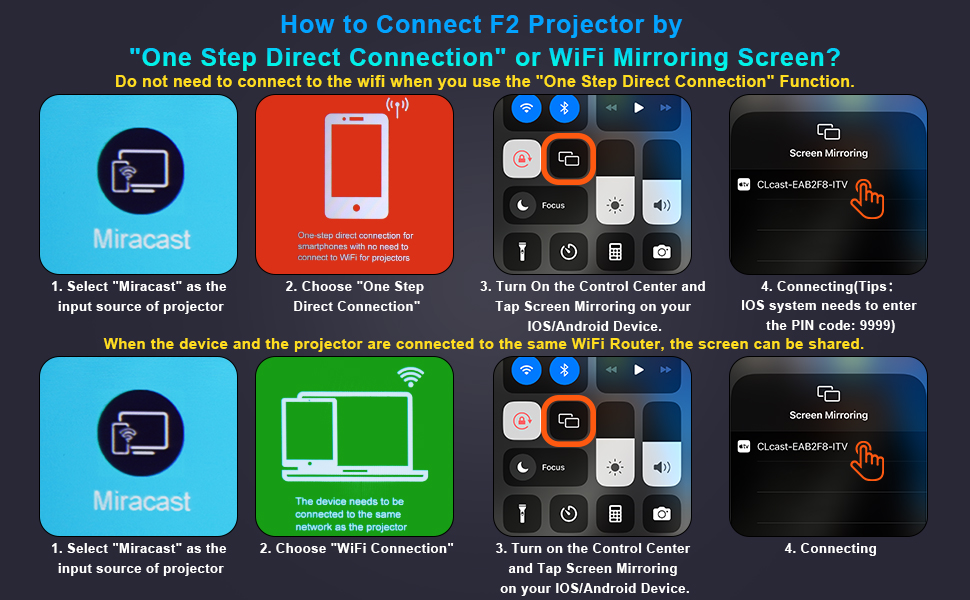
Figure 3.2: Multiple connection options on the VYSER F2 Projector.
- HDMI פּאָרטן (x2): Connect to devices like laptops, TV sticks, gaming consoles (e.g., PS5/Xbox).
- USB פּאָרטן (x2): פֿאַרבינדט USB דרייווז פֿאַר מעדיע ווידערשפּיל.
- AV פּאָרט: פֿאַרבינדט זיך צו עלטערע דעווייסעס מיט אַן AV קאַבל.
- 3.5 מם אַודיאָ רעזולטאַט: פֿאַרבינדט עקסטערנע רעדנערס אָדער כעדפאָונז.
- מאַכט אַרייַנשרייַב: פאַרבינדן די מאַכט קאַבלע.
- Cooling Windows: פאַרזיכערן געהעריק ווענאַליישאַן פֿאַר היץ דיסיפּיישאַן.
- אויף-ברעט קאָנטראָלס: Buttons for power, menu, input source, and navigation.
3.3 360 Degree View פון דעם פּראָיעקטאָר
Video 3.1: A comprehensive 360-degree view of the VYSER F2 Projector, showcasing its design and various ports from all angles.
4. סעטאַפּ
Follow these steps to set up your VYSER F2 Projector for the first time.
4.1 פּלייסמאַנט
Place the projector on a stable, flat surface. Ensure there is adequate ventilation around the projector to prevent overheating. The projection distance can range from 5-15 feet, allowing for an adjustable screen size of 50-300 inches.
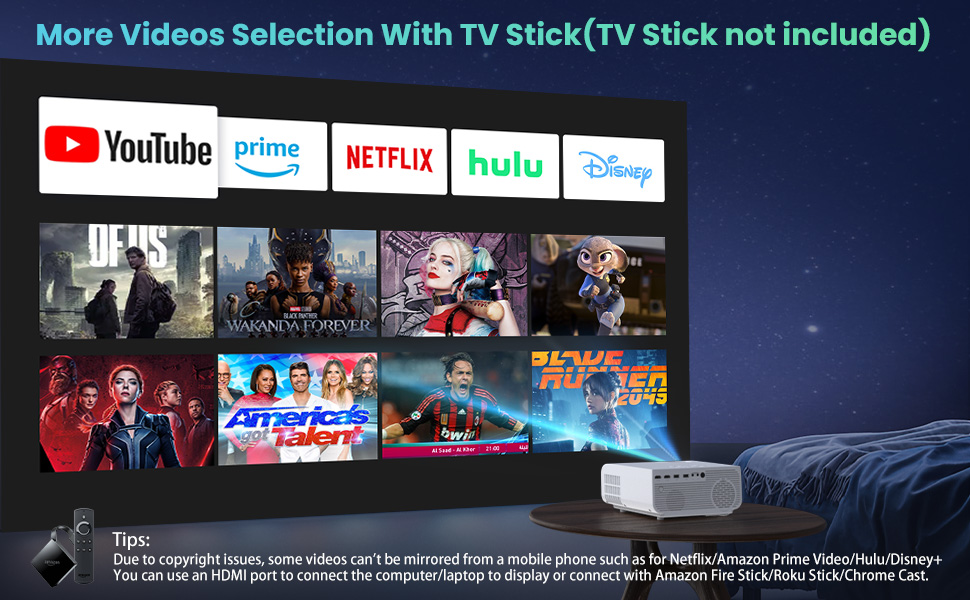
Figure 4.1: Adjustable display size from 50 to 300 inches.
The projector can be placed on a table, mounted on a tripod, or ceiling-mounted. Use the adjustable foot at the bottom of the projector to fine-tune the projection angle if needed.
4.2 מאַכט קאַנעקשאַן
- Connect the power cable to the Power Input port on the projector.
- צאַפּן די אנדערע סוף פון די מאַכט קאַבלע אין אַ מאַכט ווענטיל.
- Press the Power button on the projector or remote control to turn it on.
4.3 פאָקוס און קיסטאָון קאָרעקציע
- פאָקוס אַדזשאַסטמאַנט: Rotate the focus lens ring on the front of the projector until the image appears clear and sharp.
- Keystone Correction: Use the keystone correction dial (usually on top or side) to adjust the image shape if it appears trapezoidal. The projector supports ±15° keystone correction.
5. אַפּערייטינג ינסטרוקטיאָנס
Learn how to connect your devices and utilize the various features of your projector.
5.1 קאַנעקטינג דעוויסעס
The VYSER F2 Projector offers multiple ways to connect your devices:
- הדמי: For high-definition video and audio from laptops, gaming consoles, TV boxes, etc.
- וסב: פֿאַר פּלייינג מידיאַ files גלייַך פֿון אַ וסב בליץ פאָר.
- פון: For connecting older devices with AV output.
5.2 Wireless Connectivity (Screen Mirroring)
The projector supports 5G/2.4G WiFi for seamless screen mirroring from your smartphone or tablet.
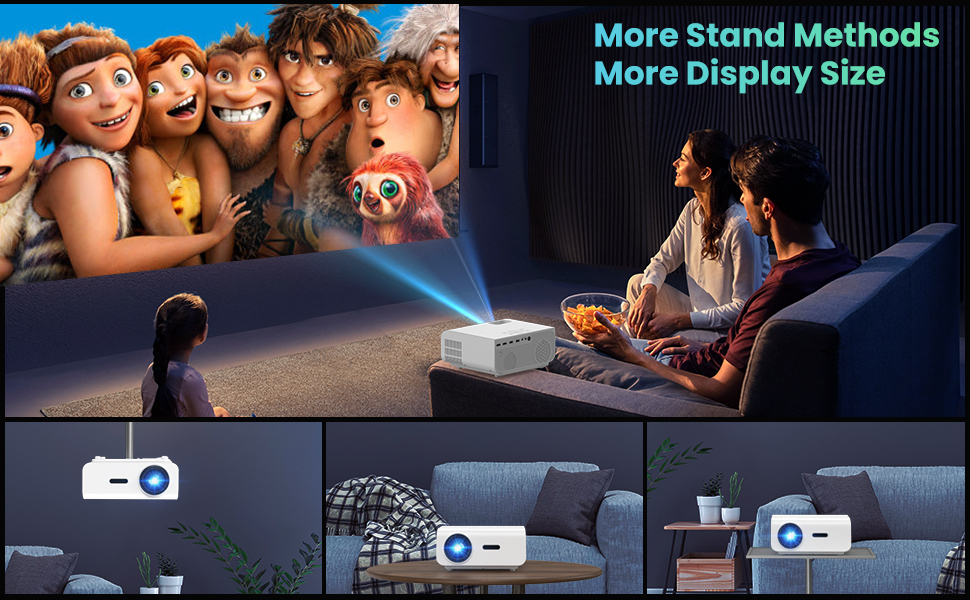
Figure 5.1: 5G/2.4G WiFi Screen Mirroring for various devices.
One-Step Direct Connection: This feature allows direct connection to your phone without needing a WiFi network. Ideal for outdoor use or when a router is unavailable.
Video 5.1: Demonstration of the F2 Projector's One-Step Direct Connection with WiFi and Bluetooth, showing quick setup for phone mirroring.
For detailed steps on screen mirroring, refer to the on-screen instructions by selecting "Miracast" from the input source menu.
Note: Due to copyright restrictions, some streaming services (e.g., Netflix, Amazon Prime Video, Hulu, Disney+) may block screen mirroring. For these services, it is recommended to use an HDMI connection with a compatible device like a Fire TV Stick, Roku Stick, or laptop.
5.3 בלועטאָאָטה קאַנעקשאַן
The projector features Bluetooth 5.1 for connecting to external Bluetooth speakers or headphones, enhancing your audio experience.

Figure 5.2: Bluetooth connection for external audio devices.
To connect: Navigate to the Bluetooth settings on the projector, enable Bluetooth, and select your desired audio device from the list of available devices. (Note: The projector connects to Bluetooth speakers, not directly to smartphones/tablets via Bluetooth for audio input).
5.4 מעניו נאַוויגאַציע
Use the remote control or the on-board buttons to navigate the projector's menu. Options typically include input source selection, picture settings (brightness, contrast, color), sound settings, and system settings.
6. וישאַלט
געהעריגע אויפהאלטונג גאראנטירט די לאנגעוויטי און אפטימאלע פערפארמאנס פון אייער פראיעקטאר.
- לענס רייניקונג: ניצט אַ ווייכע, לינט-פֿרייע שטאָף ספּעציעל דיזיינד פֿאַר אָפּטישע לענסעס צו זאַכט רייניקן די פּראָיעקטאָר לענס. פֿאַרמייַדט אַברייסיוו מאַטעריאַלן אָדער שטרענגע כעמיקאַלן.
- באַזייַטיקונג פון שטויב: Regularly clean the cooling vents to prevent dust buildup, which can affect performance and lifespan. Use a soft brush or compressed air.
- סטאָרידזש: ווען נישט אין באַנוץ פֿאַר לענגערע פּעריאָדן, זאָל מען האַלטן דעם פּראָיעקטאָר אין אַ קיל, טרוקן אָרט, בעסער אין זײַן אָריגינעלער פּאַקאַדזשינג אָדער אַ פּראַטעקטיוו קעסטל.
- מאַכט אַוועק רעכט: Always turn off the projector using the power button and allow it to cool down before unplugging or moving it.
7. טראָובלעשאָאָטינג
אויב איר טרעפט פּראָבלעמען מיט אייער פּראָיעקטאָר, זעט די פאלגענדע געוויינטלעכע טראָובלעשווטינג טריט:
| פּראָבלעם | מעגלעך סיבה / לייזונג |
|---|---|
| קיין בילד אדער "קיין סיגנאַל" מעסעדזש |
|
| בלערד בילד |
|
| Trapezoidal image |
|
| ניט געזונט אָדער נידעריק געזונט |
|
| Screen mirroring issues (e.g., Netflix not working) |
|
| Projector overheating or shutting down |
|
8. ספּעסאַפאַקיישאַנז
Key technical specifications for the VYSER F2 Projector:
| שטריך | דעטאַל |
|---|---|
| סאָרט | VYSER |
| מאָדעל | פ2 פּראַדזשעקטער |
| געבוירן האַכלאָטע | 1920 x 1080 (געבוירענער 1080P) |
| ברייטנאַס | 12000 Lux (350 ANSI Lumens) |
| קאַנטראַסט פאַרהעלטעניש | 10000:1 (implied from image comparison) |
| פּרויעקציע גרייס | 50-300 אינטשעס |
| פּרויעקציע דיסטאַנסע | 5-15 פֿיס |
| קאַנעקטיוויטי טעכנאָלאָגיע | Wireless (5G/2.4G WiFi), Bluetooth 5.1, HDMI (x2), USB (x2), AV, 3.5mm Audio Out |
| קייסטאָנע קערעקשאַן | ±15° מאַנואַל |
| פּונקט וואָג | 4.11 פונט |
| קאָליר | White-White |
9. וואָראַנטי און שטיצן
VYSER is committed to providing excellent customer service and technical support for your projector.
- לעבן קונה סערוויס: Enjoy lifetime customer service and technical support for your VYSER F2 Projector.
- For any inquiries, technical assistance, or warranty claims, please contact VYSER customer support through the platform where you purchased the product or refer to the official VYSER webפּלאַץ פֿאַר קאָנטאַקט אינפֿאָרמאַציע.


