1. הקדמה
Thank you for choosing the WOOX R4260 Smart Wireless Outdoor Camera. This manual provides comprehensive instructions for the installation, operation, and maintenance of your device. Please read this manual carefully before use to ensure proper functionality and safety. Keep this manual for future reference.
2. פּראָדוקט איבערview
2.1 פּעקל אינהאַלט
- WOOX R4260 Smart Wireless Outdoor Camera
- מאָונטינג קלאַמער
- מאָנטירונג שרויפן און וואַנט פּלאַגז
- וסב טשאַרדזשינג קאַבלע
- באַניצער מאַנואַל
2.2 קאַמעראַ קאָמפּאָנענטן
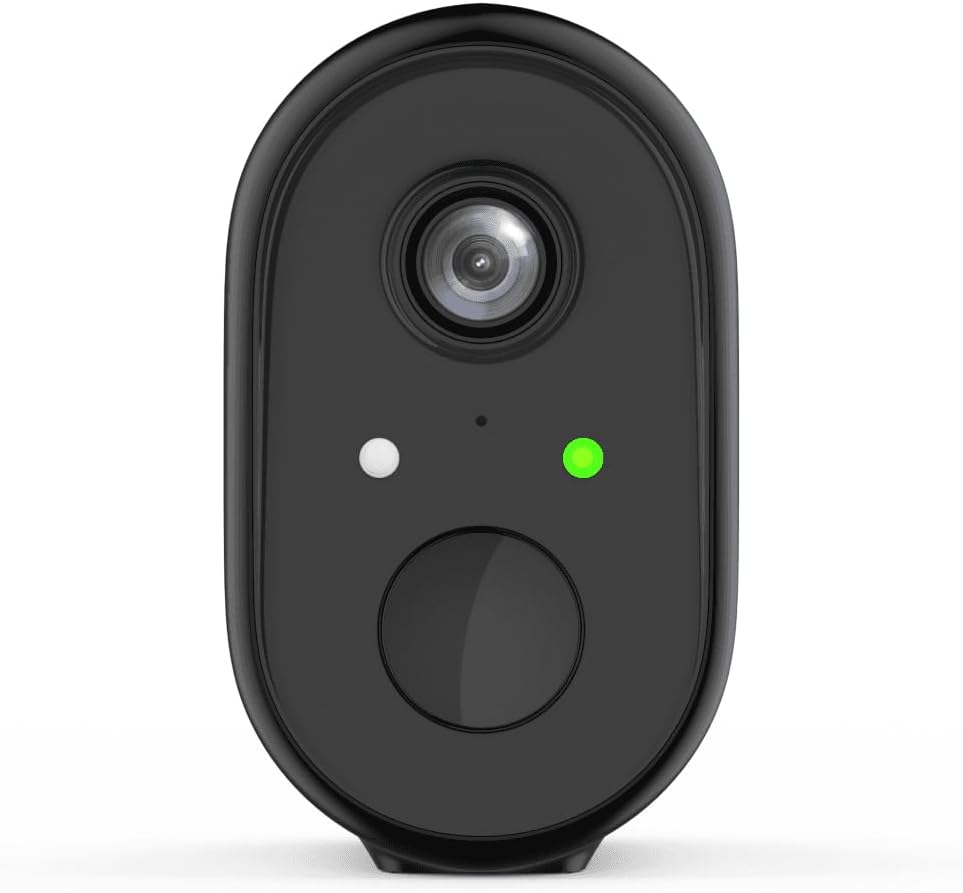
פיגורע 1: פראָנט view of the WOOX R4260 camera, highlighting the camera lens, status indicator LED, and the main button/microphone area.

פיגורע 2: The WOOX R4260 camera attached to its adjustable wall mounting bracket, showing the overall design and mounting mechanism.
- אַפּאַראַט לענס: קאַפּטשערז ווידעא פאָאָtage.
- סטאַטוס געפירט: Indicates camera status (e.g., pairing mode, connected, charging).
- מיקראָפאָן / רעדנער: פֿאַר צוויי-וועג אַודיאָ קאָמוניקאַציע.
- מאַונטינג פונט: Connects to the mounting bracket.
- וסב טשאַרדזשינג פּאָרט: For battery charging (usually located on the back or bottom, covered by a rubber flap).
- באַשטעטיק קנעפּל: Used to reset the camera to factory settings (often near the charging port or under a cover).
3. סעטאַפּ און ייַנמאָנטירונג
3.1 טשאַרדזשינג די באַטאַרייע
Before initial use, fully charge the camera's built-in lithium-ion battery. Connect the provided USB charging cable to the camera's charging port and a standard 5V USB power adapter (not included). The status LED will indicate charging status (e.g., red for charging, green for fully charged).
3.2 אַפּ דאַונלאָודינג און אַקאַונט שאַפונג
Download the "WOOX Home" app from the Apple App Store or Google Play Store. Register for a new account or log in with an existing one.
3.3 Pairing the Camera with the App
- Ensure your smartphone is connected to a 2.4GHz Wi-Fi network. The WOOX R4260 camera supports 2.4GHz Wi-Fi only.
- Open the WOOX Home app and tap the "+" icon to add a new device.
- Select "Security Camera" or the specific camera model (R4260) from the device list.
- Follow the on-screen instructions in the app. This typically involves powering on the camera, pressing the reset button until the status LED blinks rapidly (indicating pairing mode), and scanning a QR code generated by the app with the camera's lens.
- Once connected, the status LED will turn solid green, and the camera will appear in your app.
Note: If pairing fails, ensure your Wi-Fi password is correct and does not exceed 20 characters, as some users have reported issues with longer passwords. Ensure the camera is within range of your Wi-Fi router.
3.4 גשמיות ינסטאַלירונג
The WOOX R4260 can be mounted on a wall, ceiling, or tree. Choose a location that provides the desired viewing angle and is within Wi-Fi range.
- מאַרקירט די בויער פונקטן פֿאַר די מאַונטינג קלאַמער.
- באָערט לעכער און אַרײַנשטעקט וואַנט פּלאַגז אויב עס איז מאָנטירט אויף ציגל.
- באַפֿעסטיקן די מאַונטינג קלאַמער צו דער ייבערפלאַך מיט די צוגעשטעלטע שרויפֿן.
- באַפעסטיקט די קאַמעראַ צו דער מאָונטינג קלאַמער און אַדזשאַסטירט דעם ווינקל ווי נייטיק.
- Ensure the camera is securely fastened and has a clear line of sight.
4. אַפּערייטינג די קאַמעראַ
4.1 לעבן View
Open the WOOX Home app and tap on your R4260 camera to access the live video feed. From here, you can monitor your property in real-time.
4.2 צוויי-וועג אַודיאָ
The camera features two-way audio. In the live view, tap the microphone icon to speak through the camera's speaker, and listen to audio from the camera's microphone.
4.3 באַוועגונג דעטעקציע און וואָרענונגען
Configure motion detection settings within the WOOX Home app. You can adjust sensitivity, set detection zones, and schedule alert times. When motion is detected, the camera will record a clip and send a notification to your smartphone.
4.4 ווידעא רעקאָרדינג און סטאָרידזש
The camera supports local storage via a microSD card (not included) and cloud storage (subscription may be required). You can review רעקאָרדעד פוtagדורך די אַפּ'ס פּלייבאַק פֿונקציע.
5. וישאַלט
5.1 באַטערי מאַנאַגעמענט
The R4260 is powered by a rechargeable Lithium-ion battery. Monitor the battery level in the WOOX Home app and recharge the camera when the battery is low. Battery life can vary based on usage, temperature, and Wi-Fi signal strength.
5.2 רייניקונג
Periodically clean the camera lens with a soft, dry cloth to ensure clear image quality. Do not use harsh chemicals or abrasive materials.
5.3 פירמוואַרע דערהייַנטיקונגען
The WOOX Home app will notify you of available firmware updates. It is recommended to keep your camera's firmware updated to ensure optimal performance and security.
6. טראָובלעשאָאָטינג
| פּראָבלעם | מעגלעך לייזונג |
|---|---|
| די קאַמעראַ קען זיך נישט פֿאַרבינדן צו Wi-Fi. |
|
| נעבעך ווידעא קוואַליטעט. |
|
| באַטאַרייע דריינז געשווינד. |
|
| No motion detection alerts. |
|
7. ספּעסאַפאַקיישאַנז
- מאָדעל: ר4260
- האַכלאָטע ווידעא רעקאָרדינג: 1080 פּ
- עפעקטיווע ווידעא רעזאלוציע: 1080
- עפעקטיוו נאָך האַכלאָטע: 2 מעגאַפּיקסעלס
- קאַנעקטיוויטי טעכנאָלאָגיע: IEEE 802.11b/g/n, 2.4GHz Wi-Fi / WLAN
- ווירעלעסס קאָמוניקאַציע טעכנאָלאָגיע: WLAN
- ספּעציעלע פֿעיִקייטן: Two-way audio, Motion detector
- באַניץ: דרויסנדיק
- מאַכט מקור: Battery powered (2 Lithium-ion batteries included)
- Voltage: 5 וואלטס
- מאַכט: 5 וואטס
- Viewאין ווינקל: 110 דיגריז
- מאַטעריאַל: פּלאַסטיק
- קאָליר: שוואַרץ
- דימענשאַנז (L x W x H): 11.5 X 6 X 9.5 סענטימעטער
- מאַונטינג טיפּ: Wall mount, Ceiling mount, Tree mount
- ינסטאַלירונג טיפּ: שרויף-אין
- קאַמפּאַטאַבאַל דעוויסעס: סמאַרטפאָנע
- קאָנטראָללער טיפּ: Amazon Alexa (via WOOX Home app integration)
8. וואָראַנטי און שטיצן
WOOX products are designed and manufactured to the highest quality standards. For detailed warranty information and technical support, please refer to the official WOOX webזייטל אדער קאנטאקט זייער קאסטומער סערוויס גלייך. האלט אייער קויף קוויטל אלס באווייז פון קויפן.
פאַבריקאַנט: וואָאָקס


