1. הקדמה
This manual provides essential instructions for the installation, operation, and maintenance of the DEYE SUN-12K-SG04LP3-EU Three-Phase Hybrid Inverter. Please read this manual thoroughly before installation and operation to ensure proper use and to prevent damage to the device or injury to personnel. Keep this manual for future reference.

פיגורע 1: DEYE SUN-12K-SG04LP3-EU Hybrid Inverter and included accessories. This image displays the main inverter unit along with various cables, connectors, and current transformers that are part of the product package.
2. זיכערקייַט אינסטרוקציעס
שטענדיק אָבסערווירן די פאלגענדע זיכערהייט מיטלען צו רעדוצירן דעם ריזיקע פון עלעקטרישן קלאַפּ, פייַער אָדער שאָדן:
- אינסטאַלאַציע און וישאַלט מוז נאָר דורכגעפירט ווערן דורך קוואַליפֿיצירטע פּערסאָנעל.
- Ensure the inverter is disconnected from all power sources (PV array, battery, grid) before performing any service or maintenance.
- ניצט נישט דעם ינווערטער אויב ער איז געשעדיגט אדער עס שיינט צו ארבעטן נישט גוט.
- Do not attempt to repair the inverter yourself. Contact authorized service personnel.
- האַלטן קינדער אַוועק פון די ינווערטער.
- The inverter can reach high temperatures during operation. Avoid touching it directly.
- פאַרזיכערן געהעריק ווענאַליישאַן אַרום די ינווערטער צו פאַרמייַדן אָוווערכיטינג.
3. פּראָדוקט איבערview
The DEYE SUN-12K-SG04LP3-EU is a three-phase hybrid inverter designed for solar energy systems. It features two Maximum Power Point Trackers (MPPTs), a WLAN module for monitoring, and an IP65 rating for outdoor installation. It supports low-voltage 48V batteries and offers flexible DC/AC coupling options.
3.1 שליסל פֿעיִקייטן
- 12 kW Three-Phase Hybrid Inverter
- 48 V נידעריק וואָלומעןtage Battery Compatibility (Lead-Acid or Lithium-Ion)
- Two MPPTs for optimized solar energy harvesting
- Integrated WLAN module for remote monitoring
- IP65 protection rating for outdoor use
- Supports three-phase unbalanced output
- Equipped with CAN (x2) and RS485 (x1) ports for BMS and parallel communication
- Smart Load application and Grid-Peak-Shave function
3.2 פאַרנעם פון עקספּרעס

פיגורע 2: Components included in the DEYE SUN-12K-SG04LP3-EU package. This image shows the various accessories such as communication cables, DC connectors, current transformers, and the user manual that come with the inverter.
Verify that all components listed below are present in the package:
- DEYE SUN-12K-SG04LP3-EU Hybrid Inverter Unit
- WLAN מאָדולע
- באַניצער מאַנואַל
- מאָונטינג קלאַמער
- Communication Cables (e.g., Ethernet, RS485)
- דק קאַנעקטערז
- קראַנט טראַנספאָרמערס (קטס)
- טעמפּעראַטור סענסאָר
4. סעטאַפּ און ייַנמאָנטירונג
Proper installation is crucial for the safe and efficient operation of the inverter. Follow these steps carefully.
4.1 פּלאַץ סעלעקציע
- Install the inverter in a well-ventilated area, away from direct sunlight, rain, and dust.
- Ensure the ambient temperature is within the operating range (-40 °C to 60 °C).
- Maintain adequate clearance around the inverter for heat dissipation.
- The inverter is IP65 rated, allowing for outdoor installation, but protection from extreme weather is recommended.
4.2 מאַונטינג די ינווערטער
The inverter is designed for wall mounting.
- Use the provided mounting bracket as a template to mark drilling points on the wall.
- באָרט לעכער און אַרײַנשטעקן פּאַסיקע וואַנט פּלאַגז.
- פאַרריכטן די מאַונטינג קלאַמער צו די וואַנט.
- Carefully lift the inverter and hang it onto the mounting bracket.
- Secure the inverter to the bracket using the provided screws.

פיגורע 3: Top view of the inverter showing mounting points for wall installation. This image highlights the design features that facilitate easy and flexible installation of the unit on a wall.
4.3 עלעקטריקאַל קאַנעקשאַנז
All electrical connections must comply with local electrical codes and standards.

פיגורע 4: דנאָ view of the DEYE inverter, illustrating all connection ports. This includes battery connections, communication ports (CAN, RS485), PV input, grid connection, load connection, and generator/smart load ports.
- PV אַרייַנגאַנג קאַנעקשאַן: Connect the DC cables from the solar array to the PV input terminals (DC1, DC2). Ensure correct polarity. The inverter has 2 MPPTs.
- באַטערי קשר: Connect the battery cables to the BATTERY terminals. The inverter supports 48V low-voltage batteries (Lead-Acid or Lithium-Ion). Ensure correct polarity.
- AC גריד קאַנעקשאַן: Connect the AC grid cables to the GRID terminals. This is a three-phase inverter.
- לאָדן קשר: Connect the load cables to the LOAD terminals.
- Generator/Smart Load Connection: If applicable, connect the generator or smart load to the GEN terminals.
- קאָמוניקאַציע פּאָרץ: Connect BMS (Battery Management System) via CAN (COM1, COM2) or RS485 (COM3) ports. An RS232 port is also available for remote control.
- WLAN מאָדולע: Insert the WLAN module into its designated port for remote monitoring capabilities.
- טעמפּעראַטור סענסאָר: Connect the external temperature sensor.
באַמערקונג: The inverter supports parallel connection of up to 10 units for increased capacity.
5. אַפּערייטינג ינסטרוקטיאָנס
This section details the startup procedure and basic operation of the DEYE Hybrid Inverter.
5.1 ערשט סטאַרטאַפּ
- After all electrical connections are securely made, switch on the DC switch located on the side of the inverter.
- Switch on the AC breaker from the grid side.
- The inverter will perform a self-test and then begin operation.
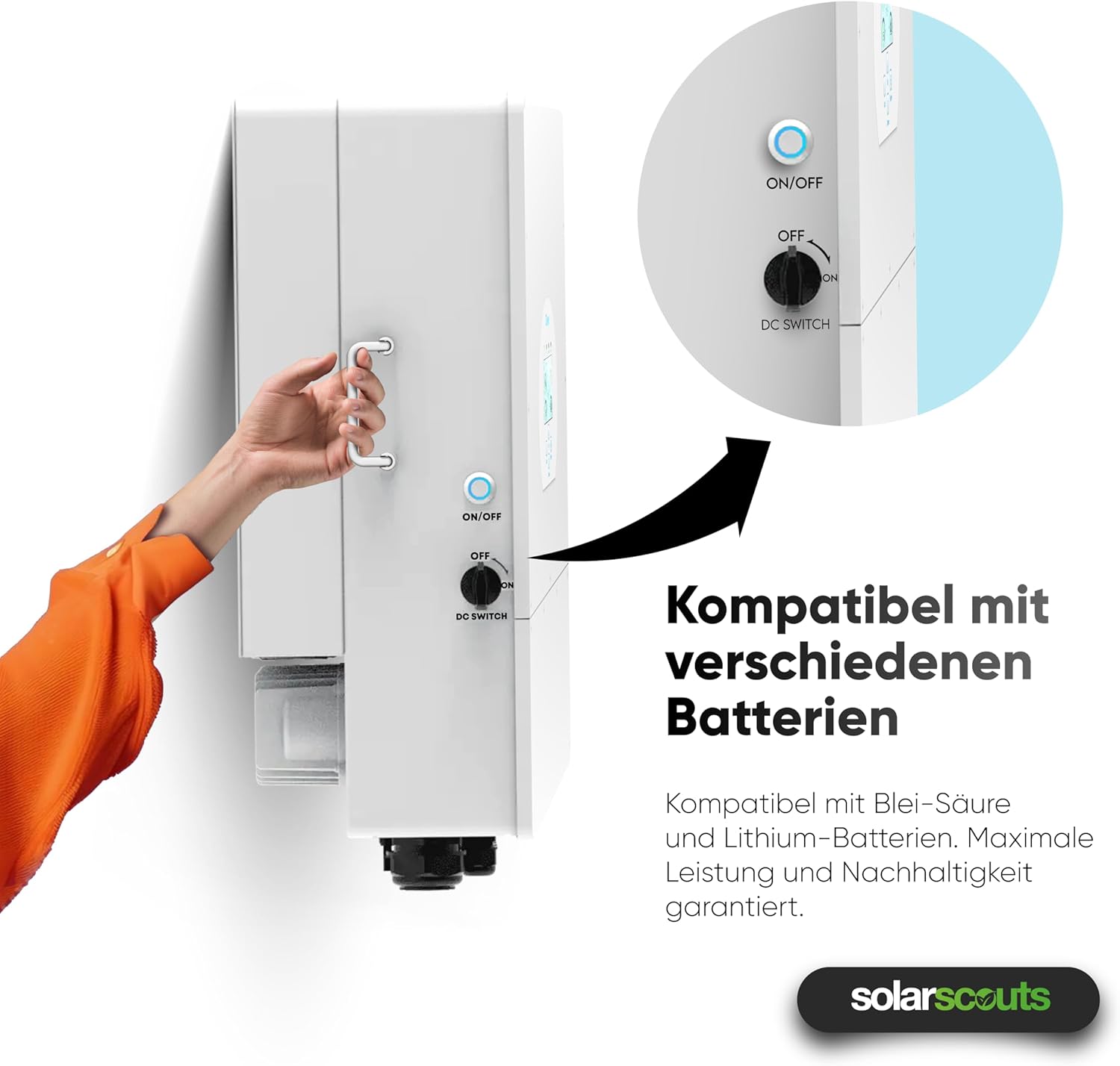
פיגורע 5: A hand operating the ON/OFF and DC switch on the side of the inverter. This switch controls the power flow and is essential for safe startup and shutdown procedures.
5.2 אַרויסווייַז און צובינד
The inverter features an intuitive touchscreen interface for monitoring and configuration.

פיגורע 6: נאָענט-אַרויף view of the inverter's touchscreen display. This interface provides real-time operational data, status indicators (AC, DC, Normal, Alarm), and navigation buttons (Up, Down, Esc, Enter) for system control and monitoring.
- סטאַטוס ינדיקאַטאָרס: AC, DC, Normal, Alarm LEDs indicate the current operational status.
- נאַוויגאַציע קנעפּלעך: Use "Up", "Down", "Esc", and "Enter" buttons to navigate through menus and adjust settings.
- פאַקטיש-צייט דאַטן: The display shows real-time power flow, battery status, and grid interaction.
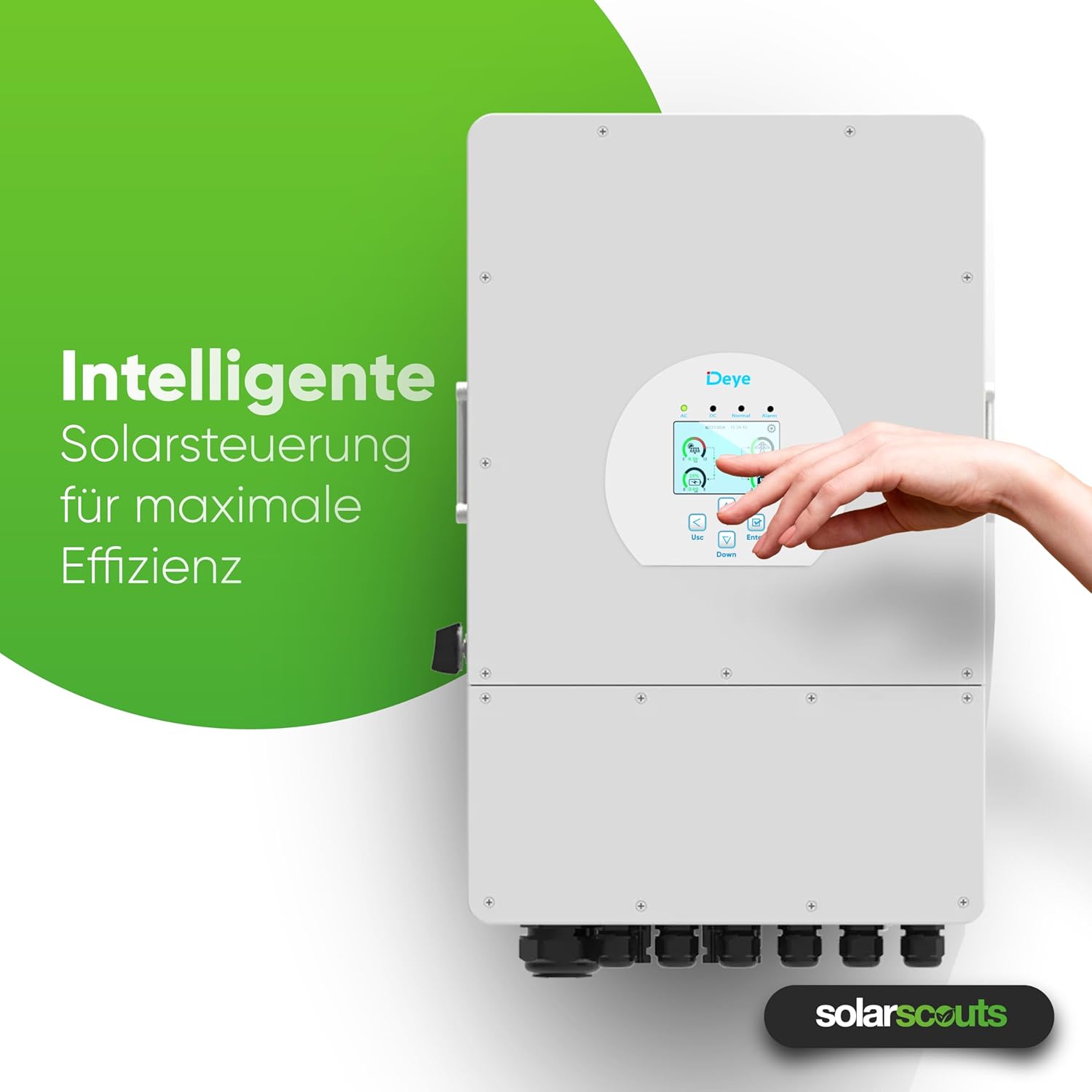
פיגורע 7: A hand interacting with the inverter's intelligent solar control display. This demonstrates the user-friendly interface for managing solar power and maximizing system efficiency.
5.3 אפערירן מאָדעס און סעטטינגס
The inverter offers various operating modes and configurable settings, including:
- Battery Charge/Discharge: Configure up to 6 periods for charging and discharging the battery.
- Grid-Tie Mode: Injects excess solar power into the grid.
- אַוועק-גריד מאָדע: Provides power to loads from PV and battery during grid outages.
- Smart Load Function: Manages connected loads intelligently.
- Grid-Peak-Shave Function: Optimizes energy usage to reduce peak demand from the grid.
Refer to the detailed sections in the full user manual for specific parameter settings and advanced configurations.
5.4 קלוגע מאָניטאָרינג פּלאַטפאָרמע
The integrated WLAN module allows connection to the Deye intelligent monitoring platform. This platform enables:
- Remote shutdown in case of emergencies.
- Remote parameter adjustment.
- Remote firmware updates.
- Real-time performance monitoring of the PV system.
6. וישאַלט
רעגולערע אויפהאלטונג גאראנטירט די לאנגעוויטי און אפטימאלע פאָרשטעלונג פון אייער ינווערטער.
- רייניקונג: Periodically clean the inverter's exterior to remove dust and debris. Ensure ventilation openings are clear. Use a soft, dry cloth. Do not use liquid cleaners.
- דורכקוקן: Regularly check all electrical connections for tightness and signs of corrosion or damage. Inspect cables for wear and tear.
- ווענטילאַטיאָן: Ensure that the area around the inverter remains clear to allow for proper airflow and cooling.
- Firmware דערהייַנטיקונגען: Keep the inverter's firmware updated through the smart monitoring platform to benefit from performance improvements and new features.
ווארענונג: Disconnect all power sources before performing any maintenance or cleaning.
7. טראָובלעשאָאָטינג
This section provides solutions for common issues you might encounter. For more complex problems, contact technical support.
| פּראָבלעם | מעגלעך סיבה | לייזונג |
|---|---|---|
| אינווערטער גייט נישט אן | DC switch off, AC breaker off, no PV input, battery disconnected/low voltage | Check DC switch, AC breaker, PV connections, and battery voltage. |
| קיין מאַכט רעזולטאַט | Grid disconnected, overload, inverter fault | Check grid connection, reduce load, check display for error codes. |
| WLAN connection issues | Incorrect network settings, weak signal, module not inserted correctly | Verify WLAN settings, ensure strong signal, reinsert WLAN module. |
| באַטעריע לאָדט זיך נישט אויף/אַנטלאָדט זיך נישט | Incorrect battery settings, BMS communication error, battery fault | Check battery type and settings, verify BMS connection, inspect battery. |
8. טעכניש ספּעסאַפאַקיישאַנז
The following table provides detailed technical specifications for the DEYE SUN-12K-SG04LP3-EU Hybrid Inverter.

פיגורע 8: A detailed table outlining the technical specifications of the DEYE Hybrid Inverter. This includes data on battery input, PV input, AC output, efficiency, protection, and general characteristics.
| פּאַראַמעטער | ווערט |
|---|---|
| מאָדעל | SUN-12K-SG04LP3-EU |
| פאַסעס | דריי-פאַסע |
| External AC Output Power | 12000 וו |
| דק אַרייַנשרייַב מאַכט (מאַקסימום) | 15600 וו |
| MPPTs | 2 |
| באַטערי וואָלtage | 40 V - 60 V (48 V nominal) |
| באַטערי טיפּ | Lead-Acid or Lithium-Ion |
| מאַקס. אָפּצאָל / אָפּזאָגן קראַנט | 240 א |
| שוץ קלאַס | IP65 |
| אַפּערייטינג טעמפּעראַטור | -40 °C צו 60 °C |
| דימענסיעס (L X W X H) | 42.2 סענטימעטער X 69.9 סענטימעטער X 27.9 סענטימעטער |
| וואָג | 33.6 קג |
| פּאַראַלעל קאַנעקשאַן | מאַקס. 10 וניץ |
9. וואָראַנטי און שטיצן
DEYE provides a comprehensive warranty for its products.

פיגורע 9: The DEYE Hybrid Inverter displayed with a badge indicating a 10-year warranty, signifying product quality and reliability.
- וואָראַנטי פּעריאָד: The DEYE SUN-12K-SG04LP3-EU Hybrid Inverter comes with a 10-year warranty. Please refer to the official warranty document for detailed terms and conditions.
- טעכניש שטיצן: For technical assistance, troubleshooting beyond this manual, or warranty claims, please contact your local DEYE distributor or visit the official DEYE webפּלאַץ פֿאַר שטיצן קאָנטאַקט אינפֿאָרמאַציע.
- ווייכווארג דערהייַנטיקונגען: Guaranteed software updates are available for the product.


