1. הקדמה
Welcome to the Kinstone 10.1" 4G LTE Android Tablet user manual. This guide provides comprehensive instructions for setting up, operating, and maintaining your new tablet. Designed for both work and play, this tablet features an octa-core processor, 8GB RAM, 128GB internal storage (expandable up to 1TB), an 8000mAh battery, and dual SIM slots for enhanced connectivity.

פיגור 1.1: פאָרנט און הינטן view of the Kinstone 10.1" Android Tablet, showcasinג זײַן גלאַטן דיזײַן און קאַמעראַ מאָדול.
2. פּראָדוקט איבערview
2.1 קאַמפּאָונאַנץ און פֿעיִקייטן
Your Kinstone tablet is equipped with advanced features for a superior user experience. Key components include:
- ווייַז: 10.1-inch Full HD IPS screen with 1920x1200 resolution, 178° wide viewing angle, and low blue light technology for eye comfort.
- פּראַסעסער: High-performance octa-core processor (hexa-core @2.0 GHz Cortex-A55 and dual-core @1.8 GHz Cortex-A75) with 2025 AI Chip.
- זכּרון און סטאָרידזש: 8GB RAM and 128GB internal storage, expandable up to 1TB via microSD card.
- קאַמעראַס: 13MP הינטערשטע קאַמעראַ און 5MP פראָנט קאַמעראַ.
- באַטערי: 8000mAh battery for extended usage.
- קאַנעקטיוויטי: 4G VoLTE dual SIM support, Bluetooth 5.0, 2.4/5G dual-band Wi-Fi.
- אַודיאָ: Dual speakers for stereo effect.
- פּאָרץ: Type-C charging port, 3.5mm earphone jack.

פיגורע 2.1: איבערview of the Android 12 OS features, highlighting efficiency, safety, entertainment, and display enhancements.

Figure 2.2: Visual summary of the Kinstone Android tablet's core features and specifications.
3. סעטאַפּ
3.1 ערשט טשאַרדזשינג
Before first use, fully charge your tablet. Connect the provided Type-C charging cable to the tablet's charging port and the other end to the charger. Plug the charger into a power outlet. The charging indicator will show the charging status. A full charge typically takes approximately 2 hours.

Figure 3.1: Illustration of the tablet's long-lasting 8000mAh battery life, supporting various activities.
3.2 פּאַוערינג אויף / אַוועק
- צו מאַכט אויף: Press and hold the Power button until the Kinstone logo appears on the screen.
- צו מאַכט אַוועק: דריק און האלט דעם פּאַוער קנעפּל ביז דער פּאַוער אָפּציעס מעניו דערשיינט. סעלעקטיר "אויסלאָשן" און באַשטעטיק.
- צו ריסטאַרט: פֿון די מאַכט אָפּציעס מעניו, סעלעקטירן "ריסטאַרט".
3.3 ערשטע סעטאַפּ וויזאַרד
ביים ערשטן מאָל אנצינדן, וועט די טאַבלעט אייך פירן דורך אַן ערשטן סעטאַפּ וויזאַרד. פֿאָלגט די אינסטרוקציעס אויף דעם עקראַן צו:
- אויסקלייַבן דיין שפּראַך.
- פאַרבינדן צו אַ Wi-Fi נעץ.
- Sign in with your Google account (or create one).
- שטעלט אויף דעם עקראַן שלאָס (PIN, מוסטער, פּאַראָל, אָדער פּנים ID).
- Review און אָננעמען די תּנאים און באַדינגונגען.
4. אַפּערייטינג ינסטרוקטיאָנס
4.1 נאַוויגירן דעם אַנדרויד צובינד
Your tablet runs on Android 12, offering an intuitive user interface. Common gestures include:
- צאַפּן: צו אויסקלײַבן אַן אייטעם אָדער עפֿענען אַן אַפּ.
- לאַקכענען: צו סקראָלן דורך סקרינז אדער ליסטעס.
- קניפּן-צו-זומען: צו פארגרעסערן אדער פארקלענערן בילדער און web בלעטער.
- לאנג דרוק: צו צוקומען צו קאנטעקסטועלע מעניוס אדער באוועגן אפליקאציע אייקאנען.
4.2 ינסטאָלינג אַפּפּליקאַטיאָנס
Applications can be downloaded and installed from the Google Play Store. Ensure you are connected to the internet before downloading.
- עפענען די שפּיל סטאָר אַפּ.
- זוכן פֿאַר the desired application.
- צאַפּן ינסטאַלירן און נאָכגיין די ינסטראַקשאַנז אויף דעם עקראַן.
4.3 ניצן Face ID
The tablet supports Face Recognition for unlocking. To set up Face ID:
- גיין צו סעטטינגס > זיכערהייט און פּריוואַטקייט > פּנים ופשליסן.
- גיי די פּראַמפּס צו רעגיסטרירן דיין פּנים.

Figure 4.1: Display features, including Face Recognition for secure and fast unlocking.
5. קאַנעקטיוויטי
5.1 ווי-פי קאַנעקשאַן
Connect to Wi-Fi for internet access:
- גיין צו סעטטינגס > נעץ און אינטערנעט > אינטערנעט.
- קער אויף ווי-פי.
- אויסקלייַבן דיין געוואלט נעץ און אַרייַן די פּאַראָל אויב פארלאנגט.

Figure 5.1: Connectivity options, including dual-band Wi-Fi for fast and stable connections.
5.2 בלועטאָאָטה פּערינג
Pair your tablet with Bluetooth devices like headphones or speakers:
- גיין צו סעטטינגס > קאָננעקטעד דעוויסעס > קאַנעקשאַן פּרעפֿערענצן > בלועטאָאָטה.
- קער אויף בלועטאָאָטה.
- אויסקלייבן דעם דעווייס וואָס איר ווילט צו פאַרבינדן פֿון דער רשימה פֿון פֿאַראַן דעווייסעס.
5.3 4G LTE and Dual SIM
The tablet supports 4G VoLTE with dual SIM slots, allowing for simultaneous calls and browsing. You can use two SIM cards or one SIM card and one microSD card.
- געפינט די סים קארטל טאַץ אויף דער זייט פון דער טאַבלעט.
- ניצט דעם צוגעשטעלטן סים ארויסווארפער געצייג צו עפענען דעם טאץ.
- Insert your Nano-SIM cards and/or microSD card into the designated slots.
- Gently push the tray back into the tablet.

Figure 5.2: Dual card slot functionality for SIM cards and expandable storage.
6. קאַמעראַ יוז
Your tablet is equipped with a 13MP rear camera and a 5MP front camera for capturing photos and videos, and for video calls.
- עפענען די אַפּאַראַט app from the home screen or app drawer.
- טוישט צווישן פראָנט און הינטערשטע קאַמעראַס ניצנדיק די קאַמעראַ ייקאַן.
- צאַפּן דעם שאַטער קנעפּל צו נעמען אַ פאָטאָ אָדער דעם רעקאָרד קנעפּל צו אָנהייבן/אָפּשטעלן ווידעאָ רעקאָרדינג.
- Access various camera modes and settings within the app.
7. באַטערי מאַנאַגעמענט
די 8000mAh באַטאַרייע גיט ample power for daily use. To optimize battery life:
- רעדוצירן פאַרשטעלן ברייטנאַס.
- Turn off Wi-Fi, Bluetooth, and 4G when not in use.
- שליסן הינטערגרונט אַפּליקאַציעס.
- אַקטיווירן באַטאַרייע שפּאָרער מאָדע אין סעטטינגס > באַטערי.
The tablet supports fast charging via its Type-C port.
8. סטאָרידזש מאַנאַגעמענט
Your tablet comes with 128GB of internal storage, which can be expanded up to 1TB using a microSD card.
- To check storage usage: Go to סעטטינגס > סטאָרידזש.
- צו באַפֿרײַען פּלאַץ: אויסמעקן נישט-נייטיקע fileס, אַראָפּנעמען נישט גענוצטע אַפּפּס, אָדער אַריבערפֿירן גרויסע fileס צו אַ מיקראָסד קאָרט.

Figure 8.1: Visual representation of the tablet's generous storage capabilities.
9. וישאַלט
To ensure the longevity and optimal performance of your Kinstone tablet:
- Keep the tablet clean using a soft, lint-free cloth. Avoid harsh chemicals.
- Protect the screen with a screen protector (one is included).
- Avoid exposing the tablet to extreme temperatures, direct sunlight, or moisture.
- Regularly update the operating system and applications to the latest versions.
- Perform periodic backups of important data.
10. טראָובלעשאָאָטינג
אויב איר טרעפט פּראָבלעמען מיט אייער טאַבלעט, זעט די פאלגענדע געוויינטלעכע לייזונגען:
| פּראָבלעם | מעגלעך לייזונג |
|---|---|
| טאַבלעט איז נישט אויסגעדרייט | זיכער מאַכן אַז די באַטאַרייע איז אָנגעלאָדן. דריק און האַלט די מאַכט קנעפּל פֿאַר לפּחות 10-15 סעקונדעס צו צווינגען אַ ריסטאַרט. |
| ווי-פי קשר ישוז | Restart your Wi-Fi router. Go to Settings > Network & internet > Internet, forget the network, and reconnect. Ensure the tablet is within range. |
| אַפּפּס פרירן אָדער קראַשן | Close the app and reopen it. Clear the app's cache (Settings > Apps > [App Name] > Storage & cache > Clear cache). Ensure the app is updated. |
| פּאַמעלעך פאָרשטעלונג | שליסט נישט גענוצטע אַפּפּס. רייניקט קאַש און צייטווייליגע files. Check storage space and free up if necessary. Restart the tablet. |
| באַטאַרייע דריינינג געשווינד | Reduce screen brightness. Disable unnecessary features like GPS, Bluetooth, or Wi-Fi when not in use. Check battery usage in settings to identify power-hungry apps. |
If problems persist, contact Kinstone customer support for further assistance.
11. ספּעסאַפאַקיישאַנז
Detailed technical specifications for your Kinstone tablet:
| שטריך | באַשרייַבונג |
|---|---|
| מאָדעל נומער | KST102SA_ROW |
| אָפּערייטינג סיסטעם | אַנדרויד 12 |
| פאַרשטעלן גרייס | 10.1 אינטשעס |
| פאַרשטעלן האַכלאָטע | 1920x1200 פּיקסעלס |
| פּראַסעסער | 2 GHz Octa-Core (Unisoc) |
| באַראַן | 8 גיגאבייט DDR4 SDRAM |
| אינערלעכער סטאָרידזש | 128 GB (Flash Memory) |
| יקספּאַנדאַבאַל סטאָרידזש | ביז 1 טב דורך מיקראָסד |
| גראַפיקס קאָופּראַסעסער | Mali-G57 MP1 |
| ווירעלעסס טיפּ | 802.11a, 802.11ac (2.4G/5G Dual-band Wi-Fi) |
| בלועטאָאָטה | 5.0 |
| דערציען אַפּאַראַט | 13 מפּ |
| פראָנט אַפּאַראַט | 5 מפּ |
| באַטאַרייע קאַפּאַציטעט | 8000 mAh (ליטיום פּאָלימער) |
| דורכשניטלעך באַטאַרייע לעבן | 8 שעה |
| פּונקט וואָג | 2 פונט |
| פּראָדוקט דימענשאַנז | 15.8 X 24.1 X 0.8 אינטשעס |
| קאָליר | גרוי |
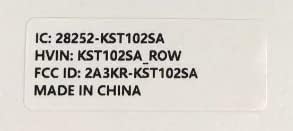
Figure 11.1: Product label with model number and regulatory information.
12. וואָראַנטי און שטיצן
12.1 וואָראַנטי סערוויס
Kinstone provides a warranty service for your tablet. Within three months from the date of purchase, Kinstone offers replacement services for eligible issues, not repair. Please retain your proof of purchase.
12.2 קונה שטיצן
For any questions, technical assistance, or warranty claims, please contact Kinstone customer support. You may also be eligible to receive a compatible leather case by contacting the seller after receiving your tablet.
Visit the official Kinstone store for more information and support: Kinstone Store on Amazon


