1. הקדמה
This manual provides detailed instructions for the proper use and maintenance of your New Bee BH58 Wireless Headset. Please read this manual thoroughly before using the product to ensure optimal performance and longevity. The BH58 headset features Bluetooth V5.0 connectivity, a noise-canceling microphone, and multiple connection options for various devices.

Figure 1: New Bee BH58 Wireless Headset with included USB dongle.
2. פּעקל אינהאַלט
זיכער מאַכן אַז אַלע זאכן זענען פאַראַן אין פּעקל:
- New Bee BH58 Wireless Headset
- וסב דאָנגלע
- וסב-C טשאַרדזשינג קאַבלע
- 3.5 מם אַודיאָ קאַבלע
- באַניצער מאַנואַל (דעם דאָקומענט)
3. פּראָדוקט איבערview
מאַכט זיך באַקאַנט מיט די כעדסעט'ס קאָמפּאָנענטן און קאָנטראָלס.

Figure 2: Headset controls layout.
- Mic Mute קנעפּל: שטום / ונמוט די מיקראָפאָן בעשאַס קאַללס.
- באַנד + / -: אַדזשאַסטירן אַודיאָ באַנד.
- Power On/Off / Multifunctional Button: Power on/off, play/pause music, answer/end calls.
- 3.5 מ״מ אַודיאָ צובינד: פֿאַר דראָטיקער פֿאַרבינדונג.
- טשאַרדזשינג פּאָרט (וסב-C): פֿאַר טשאַרדזשינג די כעדסעט.
- מיקראָפאָן: Rotatable for optimal positioning.

Figure 3: The microphone can rotate 270 degrees for use on either ear.
4. סעטאַפּ
4.1 אויפלאָדן דעם כעדסעט
Before first use, fully charge the headset. Connect the USB-C charging cable to the headset's charging port and the other end to a USB power source. The LED indicator will show charging status. A full charge takes approximately 1.5 hours.
4.2 מאַכט אויף / אַוועק
- מאַכט אויף: Push the power button to the middle position and hold for 3 seconds until the LED indicator flashes red and green alternately (for computer pairing mode) or red and blue alternately (for cellphone pairing mode).
- מאַכט אַוועק: Push the power button to the bottom position to turn off the headset.
4.3 פּאָרן מיט דעוויסעס
The BH58 headset supports three connection methods: Bluetooth, USB Dongle, and Wired.
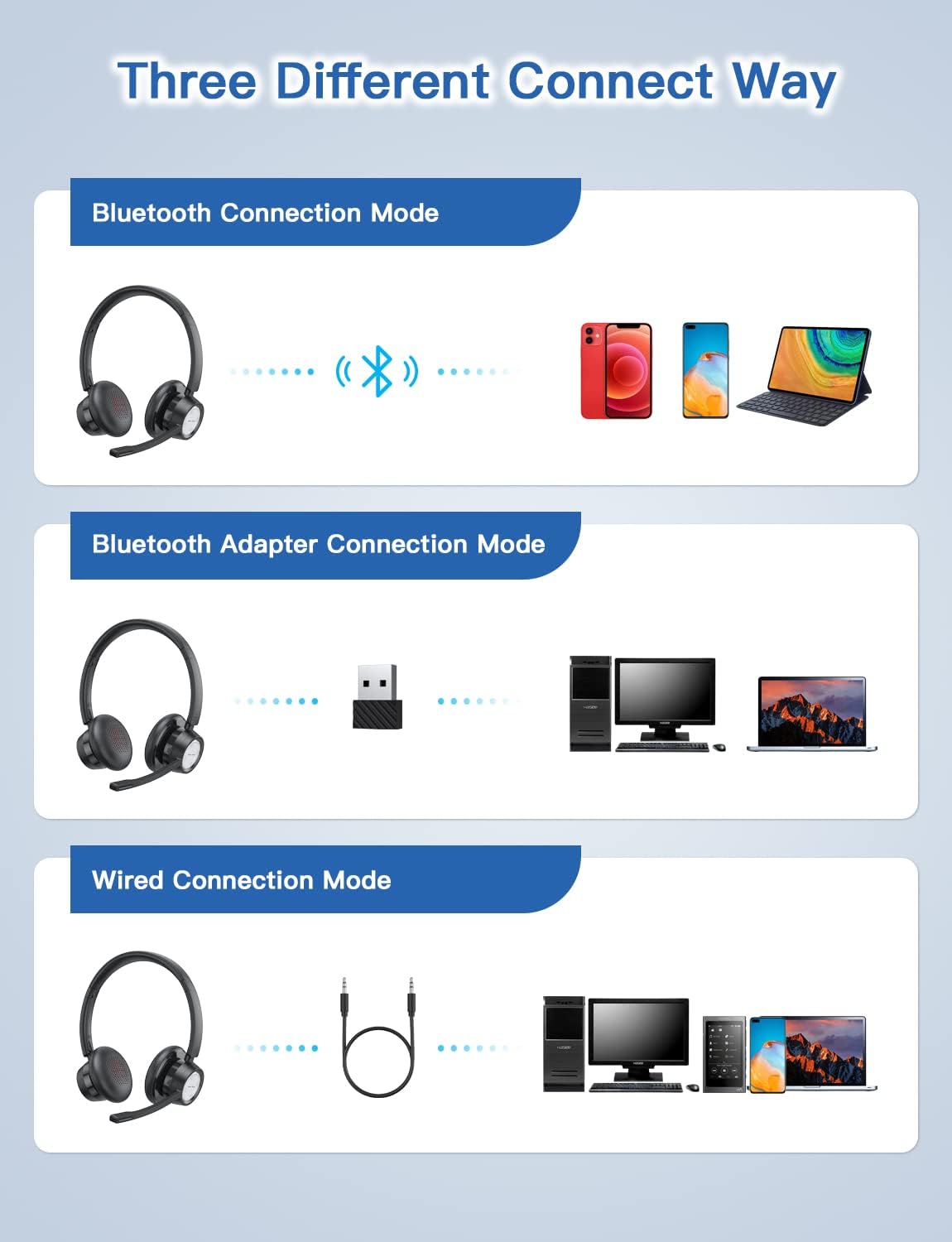
Figure 4: Multiple connection options for the BH58 headset.
4.3.1 Bluetooth Connection (for Cellphones/Tablets)
- Push the power button to the top and hold for 10 seconds until the headset LED indicator keeps flashing red and blue alternately. This indicates cellphone pairing mode.
- On your cellphone or tablet, go to 'Settings' > 'Bluetooth' and turn on Bluetooth.
- זוכן פֿאַר new devices and select 'BH58' from the list to connect.
- Once connected, you will hear a 'connected' voice prompt, and the LED indicator will flash blue every 30 seconds.
Video 1: Demonstrates the process of connecting the BH58 headset to a cellphone via Bluetooth.
4.3.2 USB Dongle Connection (for Computers without Bluetooth)
- Push the power button to the middle position to turn on the headset. The headset LED indicator keeps flashing red and green alternately, indicating computer pairing mode.
- Plug the Bluetooth transmitter (USB dongle) into your computer's USB port. It will automatically enter pairing mode. The Bluetooth transmitter LED indicator keeps flashing blue for about 3 seconds, then turns into red and blue flashing alternately.
- When hearing the 'connected' voice prompt, the connection is successful. The headset LED indicator flashes blue every 30 seconds, and the Bluetooth transmitter LED indicator is solid blue.
- On your computer, navigate to Sound Settings. Choose 'BH58' (or 'BTD-Q2' if listed) as the audio input and output device. Adjust sound settings as preferred.
Video 2: Illustrates how to connect the BH58 headset to a computer using the USB dongle and configure sound settings.
4.3.3 ווייערד קאַנעקשאַן
Connect the 3.5mm audio cable to the headset's 3.5mm audio interface and the other end to your device's audio jack. In wired mode, only the speaker has sound; the buttons and microphone on the headset do not function.
5. אָפּעראַציע
5.1 רוף פאַרוואַלטונג
- ענטפֿערן / סוף רופן: Press the Multifunctional Button once.
- אָפּוואַרפן רופן: Press and hold the Multifunctional Button for 2 seconds.
- שטום / ונמוט מיקראָפאָן: Press the Mic Mute Button during an active call.
5.2 אַודיאָ קאָנטראָל
- באַנד אַרויף: דרוק דעם באנד + קנעפּל.
- באַנד אַראָפּ: דריק דעם "Volume -" קנעפל.
- שפּיל / פּויזע מוזיק: Press the Multifunctional Button once.
5.3 טראָגן די כעדסעט
Adjust the headband for a comfortable fit. The microphone boom can be rotated 270 degrees to be worn on either the left or right ear. Position the microphone approximately 1-2 inches from your mouth for optimal voice clarity.

Figure 5: The headset can be adjusted for left or right ear wearing.
6. באַטאַרייע לעבן
The BH58 wireless headset offers extended battery performance:
- רעדן צייט: אַרויף צו 20 שעה
- מוזיק שפּיל צייט: אַרויף צו 28 שעה
- סטאַנדביי צייט: איבער 400 שעה
- טשאַרדזשינג צייט: בעערעך 1.5 שעה

פיגורע 6: איבערview of BH58 headset battery performance.
7. וישאַלט
- רייניקט דעם כעדסעט רעגולער מיט אַ ווייכן, טרוקענעם שטאָף.
- Avoid exposing the headset to extreme temperatures, moisture, or corrosive substances.
- סטאָר די כעדסעט אין אַ קיל, טרוקן אָרט ווען ניט אין נוצן.
- פּרוּווט נישט צו צענעמען אָדער פאַרריכטן דעם כעדסעט אַליין, ווײַל דאָס וועט בטל מאַכן די וואָראַנטי.
8. טראָובלעשאָאָטינג
| פּראָבלעם | לייזונג |
|---|---|
| כעדסעט גייט נישט אן. | מאַכן זיכער אַז די כעדסעט איז גאָר באפוילן. |
| קען נישט פארבינדן דורך בלוטוט. | Ensure the headset is in pairing mode (LED flashing red/blue or red/green). Turn off and on Bluetooth on your device. Clear previous Bluetooth connections. |
| קיין קלאַנג אדער שלעכטע קלאַנג קוואַליטעט. | Check volume levels on both the headset and your device. Ensure 'BH58' is selected as the audio output device in your system settings. For wired mode, ensure the cable is fully inserted. |
| מיקראָפאָן טוט נישט אַרבעטן. | Ensure the microphone is not muted. Check that 'BH58' is selected as the audio input device in your system settings. Microphone does not work in wired mode. |
| כעדסעט דיסקאָנעקט זיך אָפט. | Ensure the headset is within the effective Bluetooth range (10-45 meters depending on mode and environment). Avoid obstacles that may interfere with the signal. |
9. ספּעסאַפאַקיישאַנז
| שטריך | דעטאַל |
|---|---|
| מאָדעל נאָמען | BH58 |
| קאַנעקטיוויטי טעכנאָלאָגיע | ווירעלעס (בלוטוט), ווייערד (3.5 מ"מ) |
| ווירעלעסס קאָמוניקאַציע טעכנאָלאָגיע | בלועטאָאָטה וו5.0 |
| ראַש קאָנטראָל | Adaptive Noise Cancellation (ENC) |
| מיקראָפאָן | Omnidirectional, 270° Rotatable |
| רעדן צייט | אַרויף צו 20 שעה |
| מוזיק פּלייַבאַקק צייט | אַרויף צו 28 שעה |
| סטאַנדביי צייט | איבער 400 שעה |
| טשאַרדזשינג צייט | 1.5 שעה |
| טשאַרדזשינג פּאָרט | וסב-C |
| בלועטאָאָטה קייט | 10-45 meters (depending on mode/environment) |
| מאַטעריאַל | Fabric, Memory Foam |
| פּונקט וואָג | 230 גראַמז (8.1 אונסעס) |
| קאַמפּאַטאַבאַל דעוויסעס | Computers, Laptops, Smartphones, Tablets, VoIP systems, Webinar systems, Skype, Zoom, Avaya, Call Centers, Online meeting systems, Home devices, Office devices |
10. וואָראַנטי און שטיצן
New Bee provides excellent after-sales service, including a 12-month warranty from the date of purchase. A professional technical team and customer service center are available to assist you with any inquiries or issues.
For support, please refer to the contact information provided on the product packaging or the official New Bee webפּלאַץ.


