1. הקדמה
Thank you for choosing the typecase Touch iPad Keyboard Case. This manual provides detailed instructions for setting up, operating, and maintaining your keyboard case to ensure optimal performance and longevity. Please read this manual thoroughly before use.
2. קאַמפּאַטאַבילאַטי
This keyboard case is designed for specific iPad models. Please verify your iPad model number to ensure compatibility.
- iPad 10th Generation (10.9-inch, 2022): Models A2696, A2757, A2777
- iPad A16 (11th Generation, 2025): Models A3354, A3355, A3356
To verify your iPad model:
- אופֿן 1: Check the back of your iPad for the model number (e.g., A2696).
- אופֿן 2: Go to iPad Settings > General > About > Model Number. Tap the model number to display the A-number.
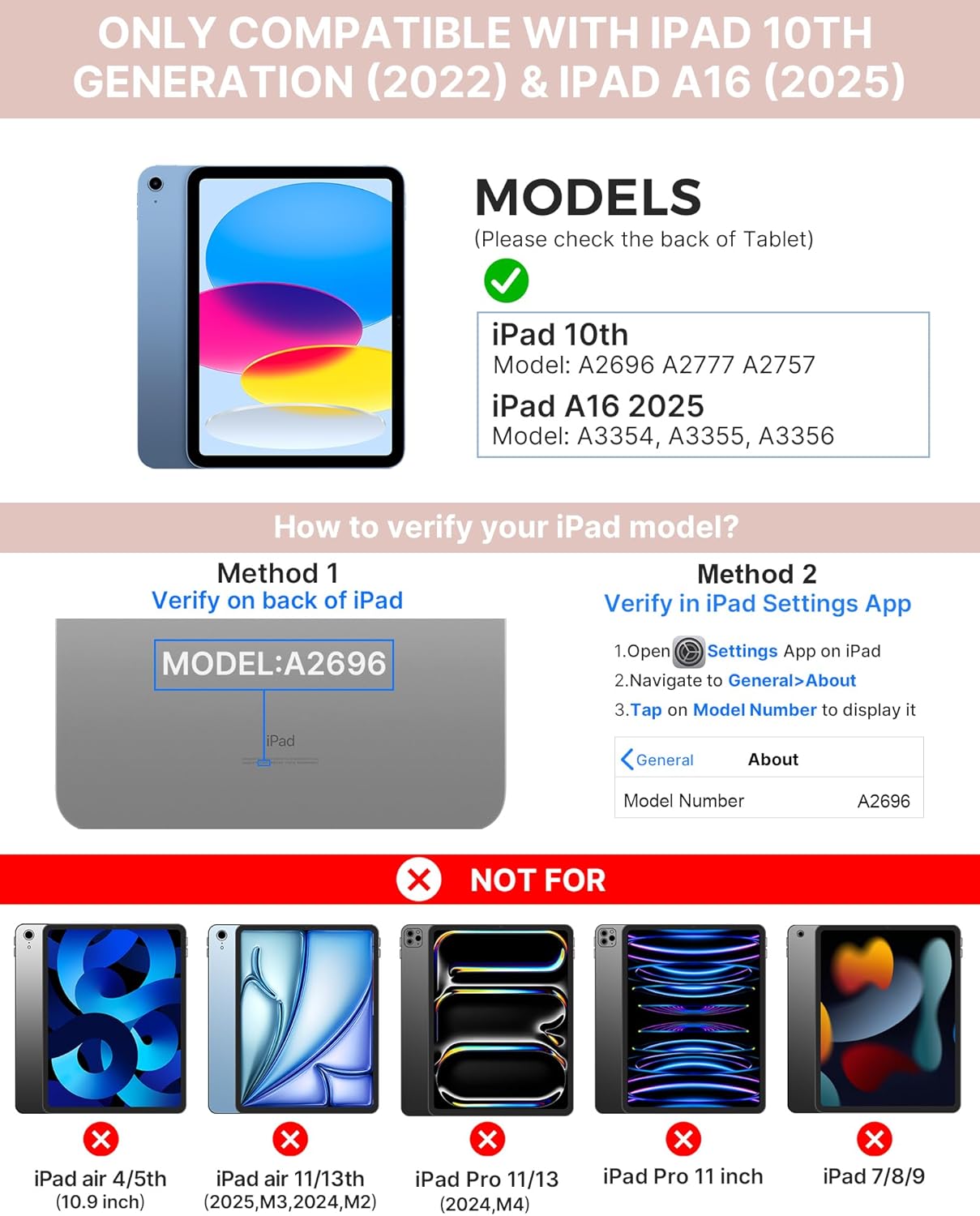
Image: Visual guide for identifying compatible iPad models and verifying the model number on the device or through settings.
3. פּעקל אינהאַלט
דער פּעקל כולל:
- 1 x typecase Touch iPad Keyboard Case
- 1 רענטגענ וסב- C טשאַרדזשינג קאַבלע
- 1 x באַניצער מאַנואַל
4. סעטאַפּ אינסטרוקציעס
4.1 אויפלאָדן די קלאַוויאַטור
Before initial use, fully charge the keyboard. Connect the provided USB-C charging cable to the keyboard's charging port and a power source. The charging indicator light will show the charging status.
- סטאַנדביי: אַרויף צו 1 יאָר
- Daytime use (2 hours/day with backlight off): אַרויף צו 3 חדשים
- Nighttime use (2 hours/day with backlight on): אַרויף צו 2 וואָכן

Image: Close-up of the keyboard's USB-C charging port and battery life specifications.
4.2 פּאָרן מיט אייפּאַד
- זייט זיכער אַז די קלאַוויאַטור איז אויפגעלאָדן.
- Turn on the keyboard by pressing the power button. The Bluetooth indicator light will flash.
- אויף אייער אייפּאַד, גייט צו סעטטינגס> בלועטאָאָטה.
- צינד אן בלוטוט. אייער אייפּאַד וועט זוכן פֿאַר פֿאַראַן דעוויסעס.
- Select "typecase Keyboard" from the list of devices.
- Follow any on-screen prompts to complete the pairing process. The Bluetooth indicator light on the keyboard will turn solid when successfully paired.
5. אַפּערייטינג ינסטרוקטיאָנס
5.1 אינסטאַלירן דיין iPad
Gently insert your iPad into the case, ensuring all edges are securely seated. The case provides full protection for your device.
5.2 קלאַוויאַטור פאַנגקשאַנז
The keyboard features a standard 78-key layout with a dedicated row of iPadOS shortcut keys for enhanced productivity.

בילד: איבערן קאָפּ view of the keyboard layout, highlighting the 78-key design and iPadOS shortcuts.
באַקקליט קיז
The keyboard features 11-color RGB LED backlighting with adjustable brightness levels. This allows for comfortable typing in various lighting conditions.
- דרוק די light bulb key צו דורכגיין די פארבן פון די הינטערליכט
- דרוק Fn + light bulb key צו סטרויערן די ברייטנאַס פון באַקלייט.
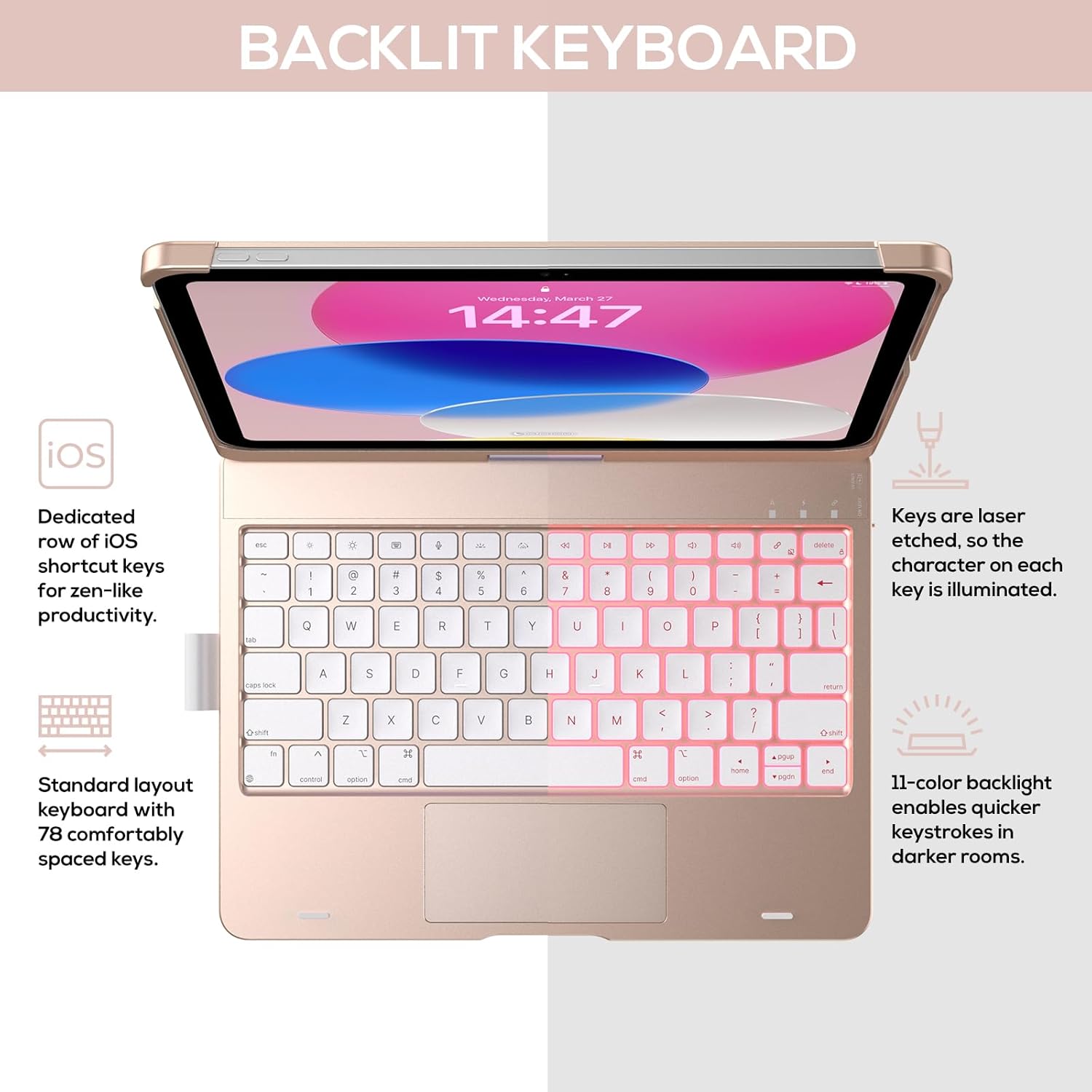
Image: The keyboard with illuminated keys, demonstrating the 11-color backlight and dedicated iOS shortcut keys.
5.3 Multi-Touch Trackpad
The integrated precision trackpad supports multi-gesture controls, enhancing productivity for tasks like document editing, web browsing, and presentation building.
- צאַפּן מיט איין פינגער: Click/Select
- צוויי פינגער מעגילע: Scroll up/down or left/right
- קניפּ צו פארגרעסער: פארגרעסער אין / אויס
- Three-finger swipe up: עפֿענען אַפּ סוויטשער
- Three-finger swipe down: צוריקקומען צו היים פאַרשטעלן

Image: Diagram showing common multi-touch gestures for the trackpad, including managing files, web browsing, and app switching.
5.4 360° Rotatable Hinge and Use Modes
The patented 360° hinge allows for versatile use of your iPad in 7 unique modes, adapting to various tasks from typing to viewing.
- לאַפּטאָפּ מאָדע: Traditional laptop setup for typing.
- שטאַנד מאָדע: ידעאַל פֿאַר viewאינהאַלט.
- געצעלט מאָדע: Stable for touch interaction or presentations.
- טאַבלעט מאָדע: Fold the keyboard behind the iPad for tablet use. Keys are protected in this mode.
- Corner Mode: Angled for comfortable drawing or writing.
- ייַנטיילן מאָדע: Rotate the screen to share content with others.
- Protect Mode: Close the case to fully protect the iPad.
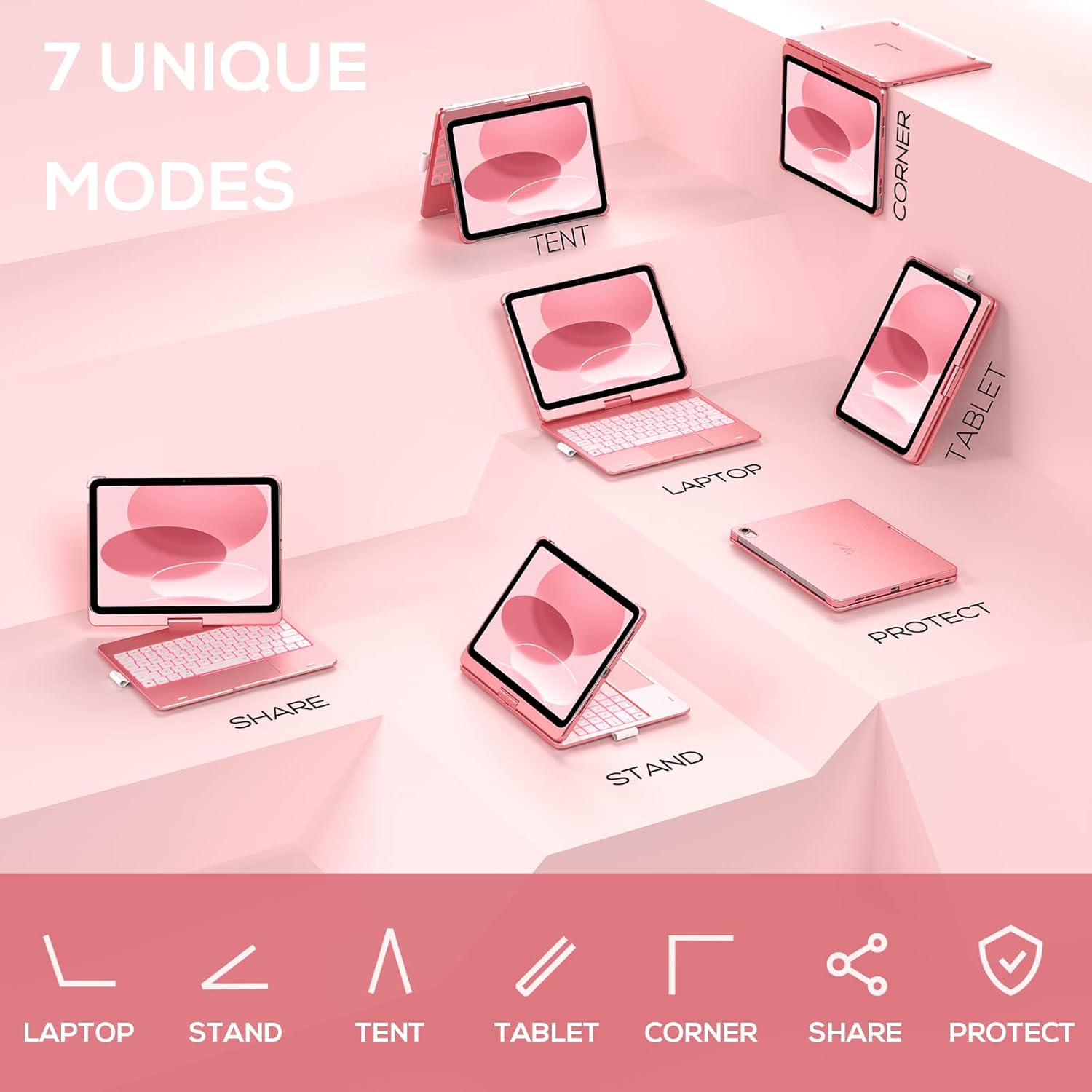
Image: A visual representation of the seven different configurations the keyboard case can be used in, including laptop, stand, and tablet modes.
5.5 Auto Sleep/Wake Function
The case features an auto sleep/wake function. Opening the case will wake your iPad, and closing it will put your iPad to sleep, helping to conserve battery life for both the iPad and the keyboard.

Image: A user's hand on the trackpad, illustrating the built-in trackpad and the auto sleep/wake feature that activates when the case is opened or closed.
5.6 עפּל פּענסיל האָלדער
An integrated holder is provided for your Apple Pencil, ensuring it is securely stored and easily accessible.
6. וישאַלט
6.1 רייניקונג
To clean the keyboard case, use a soft, damp cloth. Avoid using harsh chemicals or abrasive materials, as these may damage the surface. Ensure the charging port is dry before charging.
6.2 סטאָרידזש
When not in use for extended periods, store the keyboard case in a cool, dry place. It is recommended to fully charge the keyboard before long-term storage to maintain battery health.
7. טראָובלעשאָאָטינג
7.1 קלאַוויאַטור פֿאַרבינדט זיך נישט
- זייט זיכער אַז די קלאַוויאַטור איז אנגעצינדן און אויפגעלאָדן.
- קאָנטראָלירט אַז בלועטוט איז ענייבאַלד אויף אייער אייפּאַד.
- פארגעסט דעם דעווייס אין אייער אייפּאַד'ס בלועטוט סעטטינגס און פרובירט צו ווידער-פארן.
- ריסטאַרט ביידע דיין iPad און די קלאַוויאַטור.
7.2 קנעפּלעך רעאַגירן נישט
- זיכער מאַכן אַז די קלאַוויאַטור איז ריכטיק פארבונדן דורך בלועטוט.
- קאָנטראָלירט די קלאַוויאַטור'ס באַטאַרייע לעוועל.
- רייניקט יעדן שמוץ פון אַרום די קנעפּלעך.
7.3 Trackpad Not Working
- זיכער מאַכן אַז די קלאַוויאַטור איז פארבונדן.
- Check iPad settings for trackpad functionality (Settings > General > Trackpad).
- ריסטאַרט די קלאַוויאַטור און אייפּאַד.
7.4 באַקלייט אַרבעט נישט
- פאַרזיכערן די קלאַוויאַטור איז פּאַוערד אויף.
- Press the backlight control keys (light bulb key, Fn + light bulb key) to activate or adjust.
- Check battery level; low battery may disable backlighting.
8. ספּעסאַפאַקיישאַנז
| מאָדעל נומער | KB201T-100 |
| פּראָדוקט דימענשאַנז | 11 x 8.6 x 1.5 אינטשעס (11"ל x 8.6"ברייט x 1.5"ה) |
| פּונקט וואָג | 1.43 פונט |
| קאַנעקטיוויטי טעכנאָלאָגיע | בלועטאָאָטה |
| קלאַוויאַטור באַשרייַבונג | Flexible, 78-key layout with iPadOS shortcuts |
| ספּעציעלע פֿעיִקייטן | 360° Rotatable, 11-Color Backlit, Ergonomic, Lightweight, Multi-Touch Trackpad, Auto Sleep/Wake, Apple Pencil Holder |
| קלאַוויאַטור באַקלייט | RGB (11 פֿאַרבן) |
| באַטערי טיפּ | 1 ליטהיום פּאָלימער באַטאַרייע (אַרייַנגערעכנט) |
9. וואָראַנטי און שטיצן
typecase is committed to product quality and customer satisfaction. This product comes with the following support:
- פאַרבייַט סערוויס: Within 1 year of purchase.
- צוריקצאָל פּאָליטיק: אינערהאלב 30 טעג פון קויפן.
For any issues or inquiries, please contact typecase customer support for quick feedback and assistance.

Image: Information on typecase's after-sales service, including replacement, refund, and customer support.


