פּראָדוקט איבערview
The EPOS Adapt 361 is an over-ear Bluetooth headset designed for professional use. It features Active Noise Cancellation (ANC) to reduce background noise, optimizing focus in busy environments. The headset is optimized for Unified Communications (UC) and allows seamless switching between multiple devices. Its ergonomic design and comfortable ear pads provide noise dampening and comfort for extended wear. The headset is crafted from high-quality materials with a matt black finish.
Please note: During a brand transition period, products may feature either EPOS | SENNHEISER or EPOS branding.
וואָס איז אין די קעסטל
- EPOS Adapt 361 Headset
- BTD 800 USB-C דאָנגל
- USB-C Cable with USB-C Connector
- Audio Cable (2.5 mm Twist Lock and 3.5 mm Jack Plugs)
- סטאָרידזש טאַש
- קאָמפּליאַנסע בלאַט
- זיכערקייַט גייד
סעטאַפּ גייד
1. טשאַרדזשינג די העאַדסעט
Before first use, fully charge the headset using the provided USB-C cable. Connect the USB-C end to the headset and the other end to a compatible USB power source. The LED indicator on the headset will show charging status.
2. Connecting via Bluetooth (Wireless)
- מאַכט די כעדסעט.
- Activate Bluetooth pairing mode on the headset (refer to the headset controls for specific button presses, usually a long press on the power button or a dedicated Bluetooth button).
- On your device (PC, smartphone), enable Bluetooth and search for available devices.
- Select "EPOS Adapt 361" from the list to pair.
3. Connecting via USB-C Dongle (BTD 800)
For optimal performance with PC and Microsoft Teams, use the BTD 800 USB-C dongle.
- Plug the BTD 800 USB-C dongle into an available USB-C port on your computer.
- The dongle will automatically pair with your headset. The LED on the dongle will indicate connection status.
- Ensure the headset is selected as the audio input/output device in your computer's sound settings and communication applications (e.g., Microsoft Teams).
4. Connecting via Audio Cable (Wired)
For wired connection, use the provided audio cable.
- Connect the 2.5 mm twist-lock end of the audio cable to the headset.
- Connect the 3.5 mm jack end to the audio output of your device.
אַפּערייטינג ינסטראַקשאַנז
כעדסעט קאָנטראָלס
The EPOS Adapt 361 features intuitive controls for managing calls, media, and headset functions. These are typically touch-sensitive or button-based on the earcups.
- מאַכט אויף / אַוועק: דריקן און האַלטן די מאַכט קנעפּל.
- באַנד קאָנטראָל: Use the dedicated volume buttons or touch controls.
- אַקטיוו ראַש קאַנסאַליישאַן (ANC): Toggle ANC on/off to manage ambient noise.
- מייקראָסאָפֿט טימז קנעפּל: A dedicated button on the BTD 800 USB-C dongle allows for quick access to Microsoft Teams functions.
- רופן פאַרוואַלטונג: Answer/end calls, mute microphone using designated buttons.
- מעדיע קאָנטראָל: Play/pause, skip tracks.
- קול אָנזאָג: The headset provides voice prompts for status updates.
מיקראָפאָן באַניץ
The headset features two advanced microphones optimized for voice pickup, ensuring clear communication during calls.
מולטיפּאָינט קאַנעקטיוויטי
The headset supports multipoint connectivity, allowing it to be connected to two Bluetooth devices simultaneously, enabling seamless switching between them.
פאָלדאַבלע פּלאַן
The robust, foldable design allows for easy storage and portability in the included storage pouch.
וישאַלט
רייניקונג
Wipe the headset with a soft, dry cloth. Avoid using harsh chemicals or abrasive materials. Do not immerse the headset in water.
סטאָרידזש
When not in use, store the headset in the provided storage pouch to protect it from dust and damage. The foldable design facilitates compact storage.
טראָובלעשאָאָטינג
- קיין קלאַנג/שלעכטע אַודיאָ קוואַליטעט:
- זיכער מאַכן אַז די כעדסעט איז אויפגעלאָדן און אנגעצונדן.
- Verify Bluetooth connection or dongle connection.
- קאָנטראָלירט די אַפּאַראַט'ס אַודיאָ אַרויסגאַנג סעטטינגס.
- Ensure the audio cable is securely connected if using wired mode.
- מיקראָפאָן איז נישט ארבעטן:
- קוק אויב דער מיקראָפאָן איז מיוטיד.
- Verify headset is selected as the input device in your application settings.
- קאַנעקטיוויטי ישוז:
- ריסטאַרט די כעדסעט און די פֿאַרבונדענע מיטל.
- Re-pair the Bluetooth connection or re-insert the USB-C dongle.
- זיכער מאַכן אַז קיין אַנדערע דעוויסעס שטערן נישט דעם בלועטוט סיגנאַל.
- Active Noise Cancellation (ANC) Performance:
- זיכער מאַכן אַז די ANC איז אַקטיוויזירט.
- Check that the earcups are properly seated over your ears for optimal seal.
For advanced troubleshooting and firmware updates, utilize the EPOS Manager and EPOS Connect software.
ספּעסאַפאַקיישאַנז
| מאָדעל נאָמען | ADAPT 300 Series (Model 361) |
| קאַנעקטיוויטי טעכנאָלאָגיע | מיט אַ דראָט, אָן אַ דראָט (בלוטוט 5) |
| ווירעלעסס קאָמוניקאַציע טעכנאָלאָגיע | בלועטאָאָטה |
| אָפטקייַט ענטפער | 22000 הז |
| כעדפאָונז דזשאַק | 2.5 מם דזשאַק |
| אויער פּלייסמאַנט | איבער אויער |
| ראַש קאָנטראָל | אַקטיוו ראַש קאַנסאַליישאַן |
| קאַמפּאַטאַבאַל דעוויסעס | PC |
| קאָנטראָל טיפּ | מעדיע קאָנטראָל, ריר |
| ספּעציעלע פֿעיִקייטן | ActiveGard, Comfortable, Detachable Cable, Ergonomic Design, Foldable, Hands-free, Microphone Included, Microsoft Teams Button, Multipoint, Noise Cancellation, Rechargeable Battery, Sub Band Coding (SBC), Unified Communication, Voice Prompt, apt-X Technology |
| פּונקט וואָג | 8.5 אונסעס (241 גראַמז) |
| פּראָדוקט דימענשאַנז | 7.8 X 5.4 X 4.2 אינטשעס |
| באַטעריז | 1 ליטהיום יאָן באַטאַרייע (אַרייַנגערעכנט) |
פּראָדוקט בילדער
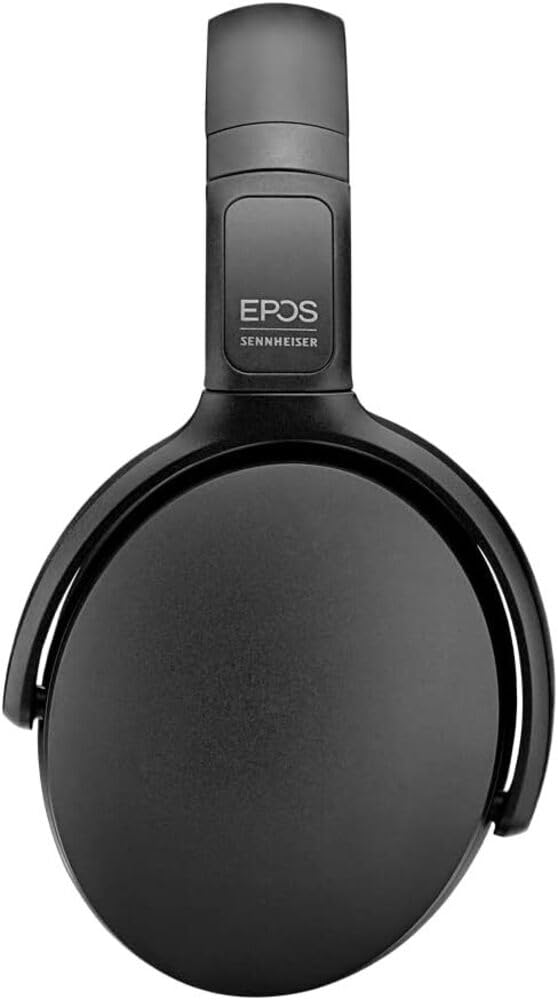
Image 1: The EPOS Adapt 361 Headset, showcasing its sleek black design and comfortable over-ear earcups. The adjustable headband is visible, designed for a secure and personalized fit.
וואָראַנטי און שטיצן
For warranty information and technical support, please refer to the official EPOS website or contact EPOS customer service. Details regarding specific warranty periods and service procedures can be found in the documentation included with your product or on the manufacturer's support pages.
The included Compliance Sheet and Safety Guide provide additional important information.


